Apply Conditional Access to agent identities and choose the right license
Accountability answers who's responsible for Relecloud's fraud-investigation agent. It doesn't answer when and how the agent can actually use its access. That's Conditional Access—the same enforcement layer Relecloud already applies to human sign-ins, now extended to a nonhuman identity type. Conditional Access policies evaluate agent context and risk, including agent identity risk surfaced by Microsoft Entra ID Protection, before they grant an agent access to anything.
Predict before you scope the policy
Suppose you configure a Conditional Access policy today and apply it to the fraud-investigation agent's identity. Relecloud's engineering team plans to spin up several more agents from the same blueprint soon. Does each new agent identity inherit that same protection automatically, or does it start unprotected?
It starts unprotected, unless you scope the policy correctly. Every agent identity in Microsoft Entra ID is derived from an agent identity blueprint—the definition that determines its configuration and governance model. A policy applied directly to one agent identity protects that identity and nothing else. A policy applied to the blueprint instead covers every agent identity derived from it, including any new ones the engineering team creates later. The blueprint is the point of leverage: target it once, and coverage extends forward automatically as Relecloud's agent fleet grows.
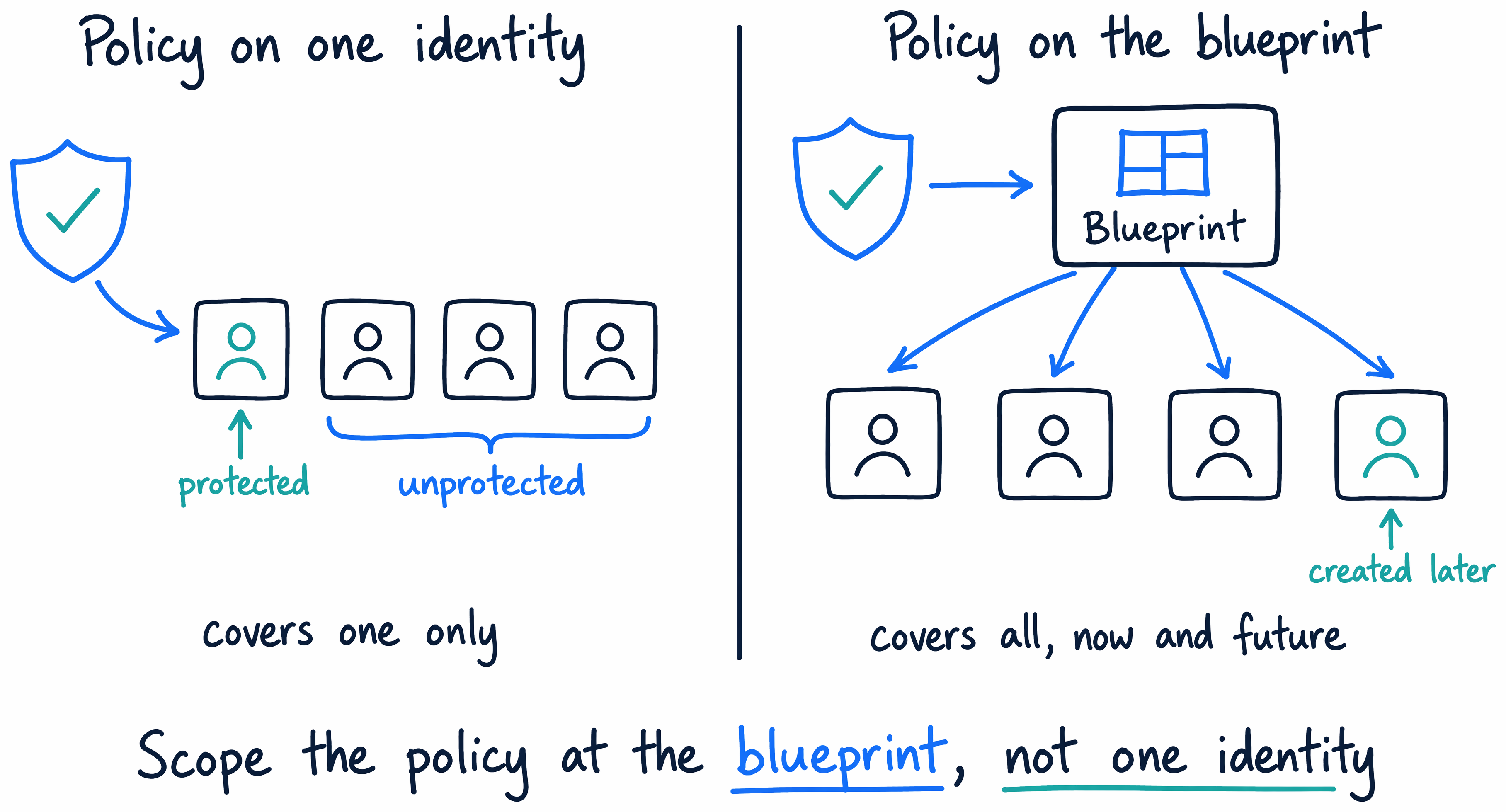
Guiding question: Relecloud's engineering team is about to create three more agents from the fraud-investigation agent's blueprint. Where do you scope the Conditional Access policy—the existing agent identity, or the blueprint—and what happens to the new agents six months from now if you choose wrong?
What the policy can target and enforce
Conditional Access for agent identities gives you several scoping and enforcement choices. You can scope a policy to All agent identities or All agent users and pair that scope with a Block grant control, which is useful when you need to prevent an entire class of agents from proceeding under specific conditions. You can target All resources to stop agent access org-wide rather than limiting the policy to a single application. And you can add agent risk conditions—high, medium, or low—so the policy blocks an agent based on risk signals that Microsoft Entra ID Protection surfaces for that agent identity, the same risk-based enforcement pattern Relecloud already uses for user sign-ins.
| Lever | Choices |
|---|---|
| Scope | All agent identities · All agent users · an agent identity blueprint · custom security attributes |
| Target resources | All resources, or specific apps |
| Grant control | Block access (agents can't satisfy interactive controls like MFA) |
| Condition | Agent risk—high, medium, or low—from Microsoft Entra ID Protection |
| Safe rollout | Report-only mode, to see what a policy would do before you enforce it |
Before you enforce anything broadly, Report-only mode lets you evaluate what a policy would do without actually blocking access. Turn it on, watch how the policy would have applied against real agent activity, and confirm it targets the right agents before you flip it to enforce. For a policy scoped at the blueprint level—where a mistake affects every agent the blueprint produces, not just one—that evaluation step is worth the extra pass.
The boundary Conditional Access doesn't cross
Here's a distinction worth holding onto precisely: targeting the agent identity blueprint does not cover the agent's user account. An agent identity and its user account are separate objects, and a Conditional Access policy that targets agent identities never automatically extends to the corresponding user account—whether you targeted the agent identity directly or reached it through the blueprint. If Relecloud's fraud-investigation agent needs both its identity and its user account protected, that requires deliberate policy targeting for each object. One doesn't imply the other.
It's also worth knowing where Conditional Access doesn't reach at all. Enforcement applies when an agent identity, or an agent's user account, requests a token for a resource. It does not apply when the blueprint itself acquires a token to create an agent identity or agent user account—blueprints don't act independently to access resources; they only create identities, so there's no resource-access moment for a policy to intercept. Conditional Access also doesn't apply if Security Defaults are enabled, and it can't reach an agent that accesses resources using an API key, since that path bypasses Microsoft Entra ID authentication entirely.
Scaling beyond one blueprint
Blueprint-level scoping solves the "several more agents soon" problem. But as Relecloud's agent fleet keeps growing across multiple blueprints, teams, and sensitivity levels, blueprint-level targeting alone becomes harder to manage one policy at a time. Custom security attributes address that scale: administrators categorize agent identities with business-specific labels—department, approval status, sensitivity tier—and target those attributes directly in Conditional Access policies. A policy scoped to an attribute automatically applies to every agent identity carrying that label, including agents created after the policy exists. Treat this as the scaling mechanism to reach for once blueprint-level policies start multiplying beyond what you can track individually.
Licensing this capability
None of this is available without the right license. Using Microsoft Entra ID Governance for agent identities requires one of two models: Microsoft 365 E7, which bundles Microsoft Agent 365 and Microsoft Entra Suite together, or Microsoft Agent 365 paired with at least Microsoft Entra ID P1 or Microsoft 365 E3. Confirm which model Relecloud's tenant already holds before you plan a Conditional Access rollout across every blueprint the engineering team owns.
Bringing the arc together
Look back at what governs Relecloud's fraud-investigation agent now. The object model gives it a distinct, governable identity instead of a shared credential. A sponsor and a least-privilege owner give it continuous human accountability. Lifecycle Workflows keep that accountability current automatically as people change roles or leave. And Conditional Access, scoped at the blueprint, controls exactly when and how the agent—and every agent that blueprint produces next—can use its access. That's the same governance discipline Relecloud already applies to its people, applied end to end to an agent.
The next unit puts this into practice: you apply a Conditional Access policy scoped to an agent identity blueprint and confirm the licensing it requires, hands-on.