Explain how Codename MDASH validates vulnerabilities
Caldova knows the simulated attack can expose an order and interrupt pharmacy operations. The team now uses MDASH to investigate the source code for its merchant portal and AI support agent and produce a smaller set of findings that people can review.
Follow the MDASH pipeline
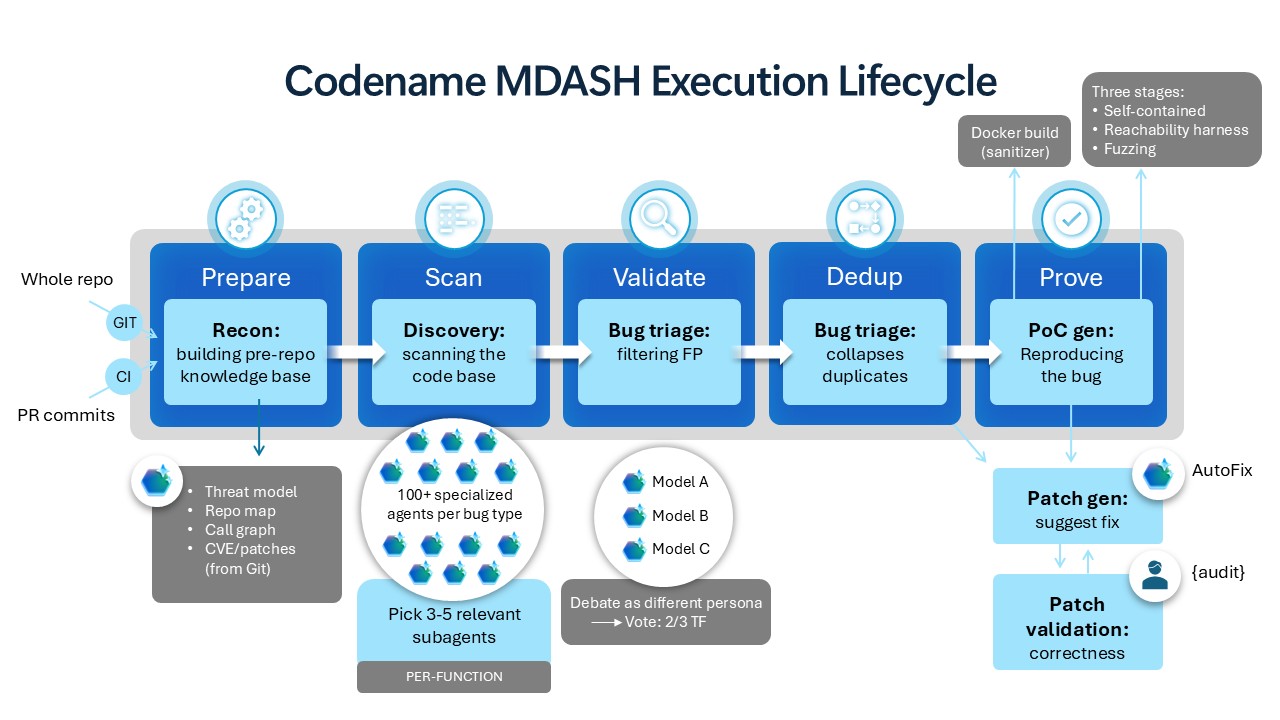
MDASH uses a sequence of analysis stages:
- Prepare: Identify and rank areas of code for analysis.
- Scan: Specialized agents look for possible vulnerabilities.
- Validate: Other agents challenge the findings and check whether the vulnerable path is reachable.
- Deduplicate: Combine reports that describe the same underlying issue.
- Prove: When practical, create a triggering input that provides stronger evidence.
The proof stage isn't available for every type of vulnerability. Evidence can therefore vary between findings.
The following official Microsoft Build demonstration shows MDASH scanning code, presenting findings, and supporting developer-reviewed remediation.
Understand how agents work together
MDASH gives agents focused security roles. For example, one agent might look for injection flaws while another checks whether Caldova validates identity, authorization, and order ownership before returning customer data or changing pharmacy operations.
A discovery agent proposes a possible vulnerability and provides evidence. Validation agents then challenge the proposal. They examine whether the code path is reachable and whether an attacker could exploit it.
This process is called agentic debate. It can reduce unsupported findings, but it doesn't make the results perfect. A person still reviews the evidence.
Review the results
MDASH findings include evidence, severity, and confidence. Results can appear in the Microsoft Defender portal or in compatible development tools through Static Analysis Results Interchange Format (SARIF).
Different teams use the results in different ways:
- Security teams review risks across repositories and assign priorities.
- Developers review the affected code and decide how to fix it.
Scanning is read-only and doesn't change the repository. A separate Defender CLI command can propose a local code fix. A developer reviews and tests that change before it is merged.
Choose a scan path
Organizations can start scans in two main ways:
| Scan path | Typical use |
|---|---|
| Remote scan | A security team starts a scan from the Defender portal. |
| Defender CLI | A developer or pipeline starts a scan from a local repository. |
Both paths can send results to the MDASH initiative in the Defender portal. Scans run in the background, and completion time depends on the size and complexity of the code.
For Caldova, the important point is simple: MDASH uses several stages and agents to test a finding before presenting it for human review. The security team can use that evidence to trace a suspected issue from an application request to the code that reads an order or controls a pharmacy operation.