Understand compliance standards and controls in Defender for Cloud
Before Contoso Healthcare's security team demonstrates compliance with ISO 27001 and National Institute of Standards and Technology (NIST) SP-800-53 to auditors, they need to understand how Defender for Cloud's compliance model works. The compliance dashboard provides a comprehensive view of an organization's security posture against industry standards, but interpreting that data requires knowledge of how standards, controls, and assessments function together. Here, you learn what compliance standards are, how Defender for Cloud evaluates them, and where to perform compliance management tasks.
Compliance standards in Defender for Cloud
Compliance standards in Defender for Cloud represent industry, regulatory, and organizational guidelines used to assess resource configurations across your cloud environment. Defender for Cloud supports three types of standards that organizations use to measure security posture.
Security benchmarks provide built-in baselines for cloud security best practices. The Microsoft Cloud Security Benchmark (MCSB) serves as the primary example—a comprehensive set of security recommendations based on common compliance frameworks including CIS and NIST. Organizations use these benchmarks as a foundation before layering on specific regulatory requirements.
Regulatory compliance standards reflect frameworks from industry programs and government regulations. Established examples include ISO 27001 for information security management, NIST SP 800-53 for federal systems, and PCI-DSS for payment card data. Emerging frameworks like DORA for financial resilience and the EU AI Act for artificial intelligence systems are also supported. For Contoso Healthcare, ISO 27001 and NIST SP 800-53 represent the two critical frameworks auditors evaluate during compliance reviews.
Custom standards allow organizations to define assessments aligned to internal policies. These organization-specific frameworks support vendor requirements, corporate security policies, or industry-specific controls beyond standard frameworks. Creating and managing custom standards requires Defender for Cloud CSPM (Cloud Security Posture Management) enabled on the subscription.
Standards are assigned to specific scopes—Azure subscriptions, management groups, AWS accounts, or GCP projects. Once assigned, Defender for Cloud continuously evaluates all in-scope resources against the controls defined in that standard, updating compliance scores as resources change.
The Microsoft Cloud Security Benchmark
MCSB is the default standard enabled automatically when you activate Defender for Cloud on a subscription. Microsoft authored this benchmark to provide security and compliance best practices based on common compliance frameworks. The benchmark applies across Azure, AWS, and GCP, giving multicloud organizations a consistent security baseline.
Note
MCSB v2 is available in preview. This version introduces expanded risk-based controls, broader Azure Policy mappings, and coverage for emerging workloads including AI. You can enable it from the Regulatory compliance dashboard alongside the current default MCSB.
Other default benchmarks apply for non-Azure clouds. When you connect AWS accounts to Defender for Cloud, both MCSB and the AWS Foundational Security Best Practices standard are enabled by default. For GCP projects, both MCSB and the GCP Default benchmark are enabled by default. These cloud-specific standards complement MCSB by providing native security guidance for each platform.
Compliance controls and assessment states
A compliance standard consists of multiple compliance controls—logical groups of related security recommendations. Each control represents a specific security requirement from the standard. Defender for Cloud continuously assesses in-scope resources against controls that support automated evaluation.
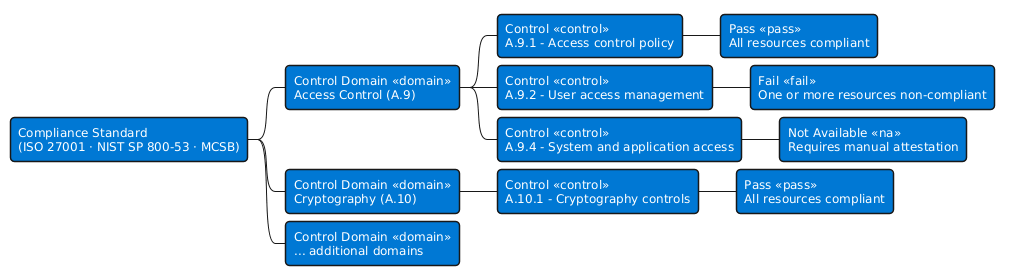
Three assessment states indicate compliance status for each control:
| Assessment State | Visual Indicator | Meaning |
|---|---|---|
| Passing | Green circle | All in-scope resources are compliant with the control |
| Failing | Red circle | One or more resources aren't compliant |
| Not available | Greyed out | The control can't be automatically assessed |
The following diagram shows how these states appear when you drill into a single control. ISO 27001 control A.9.1 breaks into two subcontrols, each with its own assessment state and the specific Defender for Cloud assessments that drive it.
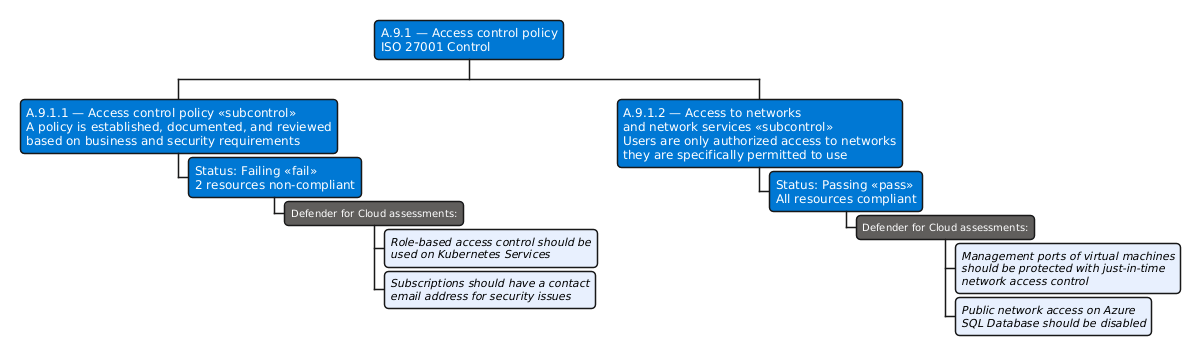
The third state—greyed out controls—often causes confusion during initial compliance reviews. These controls represent requirements Defender for Cloud can't automate, not missing security coverage. Grayed-out controls typically fall into three categories: procedural or process controls (like security awareness training requirements), platform responsibilities under the shared responsibility model (physical datacenter security), or controls with no implemented automated assessment yet. For Contoso Healthcare, ISO 27001 includes many process-oriented controls that require manual attestation rather than automated validation.
Manual attestation allows security teams to mark grayed-out controls as compliant after completing manual verification. This capability ensures compliance scores accurately reflect an organization's full security posture, combining automated assessments with manual evidence.
Working across the Azure and Defender portals
Compliance management spans two portals with distinct responsibilities. Understanding where to perform each task prevents confusion when configuring standards or reviewing compliance data.
The Azure portal at portal.azure.com serves as the configuration hub for compliance standards. You assign standards to subscriptions, configure scope, manage underlying Azure policies, and create custom standards in the Azure portal. To add a standard, you need Owner or Policy Contributor permissions on the subscription. To manage standards and access the full compliance dashboard, Resource Policy Contributor and Security Admin roles are required at minimum. Adding nondefault regulatory standards requires at least one paid Defender plan enabled—any Defender plan except Defender for Servers Plan 1 or Defender for API Plan 1.
The Defender portal at security.microsoft.com provides the monitoring interface for compliance status. You view compliance scores, examine control details, filter security recommendations by framework, and track remediation progress in the Defender portal. This portal offers read-only access to compliance data, making it ideal for security operations teams who monitor compliance without managing policy assignments. To view compliance data in the Defender portal, you need Reader role on the subscription—Security Reader role doesn't provide access to policy compliance data.
For Contoso Healthcare's security engineer, the typical workflow starts in the Azure portal to assign ISO 27001 and NIST SP 800-53 standards. From there, the engineer switches to the Defender portal to monitor compliance scores and identify failing controls that require remediation.
In the next unit, you navigate the Regulatory compliance dashboard to see these standards and controls in action, learning how to interpret compliance scores and identify security gaps that need attention.