Understand Azure Virtual Desktop architecture
When you deliver cloud-hosted desktops, design decisions such as pooling, identity integration, networking, and operations depend on how Azure Virtual Desktop (AVD) fits together. This unit maps the service boundary and core building blocks so you can reason about deployments before you touch configuration.
In this unit, you focus on concepts. You identify what Microsoft manages, what you manage, and how users reach desktops and apps.
Azure Virtual Desktop components at a glance
| Component | What it represents | What it does for you |
|---|---|---|
| Control plane (Microsoft-managed) | Service endpoints and brokering logic | Authenticates access, enumerates resources, brokers sessions, and provides a gateway path for RDP traffic. |
| Data plane (customer-managed) | Where user compute and data run | Hosts your session host VMs, applications, profiles, and networking. |
| Host pool | A logical grouping of session hosts | Defines how sessions distribute across VMs (pooled) or bind to users (personal). |
| Session host | A VM that runs Windows and your apps | Runs the desktop session or published applications for users. |
| Application group | A publish boundary for resources | Controls whether users see a full desktop or selected RemoteApps. |
| Workspace | A user-facing container | Presents one or more application groups to users in the client. |
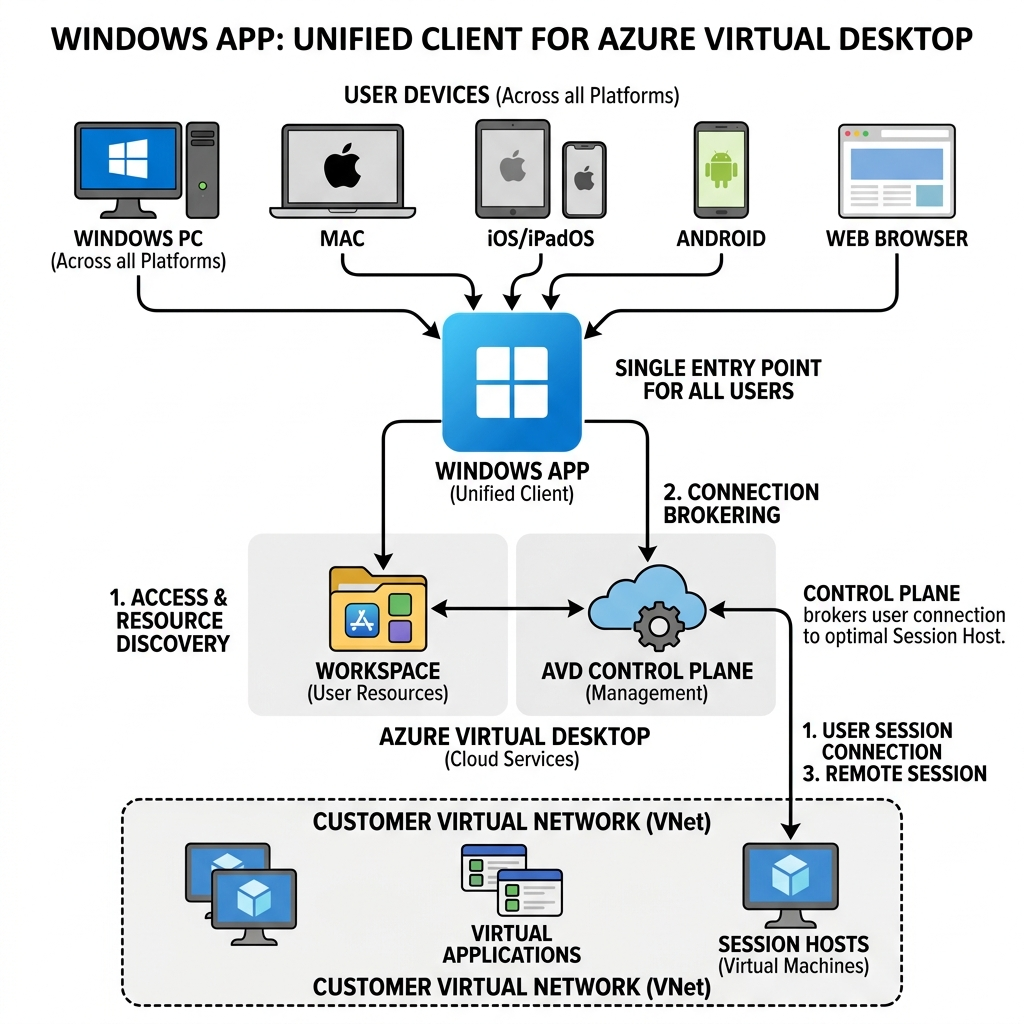
| Client (Windows App) | The user entry point | Provides a unified, cross-platform client that subscribes to workspaces and starts connections to desktops and apps. |
Note
Windows App replaces the earlier Remote Desktop client applications and is the recommended client for Azure Virtual Desktop across platforms.
Map the service boundary: control plane vs. data plane
AVD works as a managed service where Microsoft runs the brokering and connectivity services, while you run the compute that hosts user sessions. This separation lets you focus on images, applications, and governance without building and maintaining classic Remote Desktop Services (RDS) roles.
What Microsoft manages (control plane)
Microsoft-managed components handle discovery, brokering, and gateway connectivity:
- Web service that returns connection information to the Windows App
- Broker service that orchestrates incoming connections to a session host
- Gateway service that provides a secure path for Remote Desktop Protocol (RDP) traffic
- Resource directory and databases that store user resource metadata and connection files
What you manage (data plane)
You manage the components that determine user experience and performance:
- Session host virtual machines, images, and installed applications
- Virtual networks, routing, DNS, and name resolution
- Identity dependencies (Microsoft Entra ID and optionally Active Directory Domain Services or Microsoft Entra Domain Services)
- User profiles and data, commonly using FSLogix profile containers
- Monitoring signals from your resources, such as VM performance counters
Understand the core building blocks
The AVD resource model gives you a consistent way to publish desktops and applications, whether you run single-session or multi-session Windows.
Host pools and session hosts
A host pool is a collection of session host virtual machines registered to AVD. A session host is the VM that runs the user session.
Host pools come in two primary types:
- Pooled host pool: Users share a set of session hosts, and sessions load-balance across available VMs.
- Personal host pool: Each user maps to a dedicated session host.
| Design choice | Pooled | Personal |
|---|---|---|
| Primary goal | Cost efficiency and shared capacity | Dedicated performance and user-level separation |
| Session placement | Load balancing across hosts | User connects to an assigned host |
| Best for | Task workers, shift work, standardized app sets | Power users, developers, persistent app requirements |
| Operational focus | Capacity planning and scaling | Assignment tracking and per-user VM lifecycle |
Workspaces and application groups
Users don't connect directly to host pools. They connect to published resources.
- An application group defines what users can run.
- A desktop application group publishes a full desktop.
- A RemoteApp application group publishes selected applications.
- A workspace defines where users see those resources in the Windows App.
| Object | Relationship | Why it matters |
|---|---|---|
| Host pool | Contains session hosts | Defines where sessions run. |
| Application group | Attaches to one host pool | Defines which desktops or apps are available. |
| Workspace | Contains one or more application groups | Defines what a user subscribes to and sees in the client. |
Follow the connection flow: from discovery to an RDP session
A user connection has two distinct steps: feed discovery and session connection.
Feed discovery
When a user signs in to the Windows App, the client authenticates through Microsoft Entra ID and subscribes to a workspace. The service returns the list of desktops and RemoteApps the user can access.
Session connection
When the user selects a desktop or application, AVD brokers the session to a session host and establishes an RDP connection.
A core networking concept is reverse connect transport:
- The session host maintains outbound communication to the AVD service.
- No inbound RDP ports need to open to the internet.
In many environments, performance improves when RDP uses UDP-based transport. RDP Shortpath enables more direct UDP paths when available, while TCP-based reverse connect remains the fallback.
Place identity and networking dependencies in context
AVD depends on identity, name resolution, and network reachability inside your environment.
Identity considerations
AVD uses Microsoft Entra ID to authenticate user access to the service. Windows sign-in on the session host uses one of these models:
- Microsoft Entra joined session hosts for cloud-first identity
- Domain-joined session hosts using Active Directory Domain Services or Microsoft Entra Domain Services when classic domain features are required
Networking considerations
Keep these architectural rules in mind:
- Session hosts require outbound connectivity to AVD service endpoints.
- User traffic normally traverses the AVD gateway path.
- Private connectivity options such as ExpressRoute or site-to-site VPN support direct paths for specific scenarios.