Compare Azure Virtual Desktop with Windows 365
A cloud desktop decision starts with a simple question: do you need a platform that you shape for many users or a Cloud PC that you assign one-to-one like a physical device? This unit helps you compare Azure Virtual Desktop (AVD) and Windows 365 using workload signals you already know: user patterns, application needs, networking constraints and operational skills.
Quick comparison: AVD vs. Windows 365
| Decision area | Azure Virtual Desktop (AVD) | Windows 365 |
|---|---|---|
| Service model | Platform service where Microsoft manages the control plane and you manage session hosts, images and networking. | SaaS Cloud PC service where Microsoft hosts Cloud PCs and manages most platform infrastructure. |
| Session model | Pooled multi-session and personal desktops; supports RemoteApp publishing. | Dedicated Cloud PC per user (1:1) for Enterprise and Business. Windows 365 Frontline adds a concurrent-user option for shift-based access. |
| Workload density | High density through multi-session and shared hosts when apps and profiles support it. | Predictable per-user capacity; Frontline supports shared usage across shifts. |
| Scaling pattern | Scale host capacity up and down based on demand and schedules; you control VM sizing and placement. | Capacity aligns to license assignment rather than host scaling; Frontline optimizes cost through concurrent use. |
| Networking | You design the network (virtual networks, routing, hybrid connectivity) as part of the solution. | Microsoft-hosted network by default or bring-your-own network through Azure network connection when required. |
| Management center | Azure portal plus endpoint tools depending on join and management approach. | Intune-centric management and lifecycle tasks as device operations. |
| Typical best fit | Task workers, shared desktops, app-only publishing, bursty demand, specialized network integration. | Knowledge workers, steady usage, simplified operations. Frontline fits shift-based workers with shared schedules. |
Note
Windows 365 includes a Frontline edition that uses concurrent-user licensing. This option fits scenarios where more users exist than active Cloud PC sessions at any given time.
Match the service to the workload pattern
Workload pattern drives the biggest outcome differences between AVD and Windows 365. Start with how users consume compute and how variable that consumption is during the week.
Use AVD when many users share a similar desktop or app set
AVD fits pooled scenarios where multiple users share session hosts. This model reduces cost per user when concurrency stays below total user count and supports publishing full desktops or individual applications.
Use Windows 365 when users need a dedicated or shift-based Cloud PC experience
Windows 365 fits scenarios where users benefit from a device-like, persistent Cloud PC. Windows 365 Frontline extends this model to shift-based environments by allowing multiple users to share a smaller number of Cloud PCs across schedules.
Workload mapping matrix
| Workload scenario | Better fit | Why the fit is stronger |
|---|---|---|
| Task workers (shift-based, standardized apps) | AVD pooled or Windows 365 Frontline | AVD pooled maximizes density through multi-session. Windows 365 Frontline uses concurrent-user licensing for shift scenarios where not all users are active at the same time. |
| Knowledge workers (steady daily usage) | Windows 365 | Dedicated Cloud PC per user matches predictable compute needs. |
| Developers and power users (custom tools, higher CPU/RAM) | Windows 365 or AVD personal | Dedicated resources reduce noisy-neighbor effects; choose Windows 365 for device-like simplicity, AVD personal for deeper Azure control. |
| Contractors and temporary staff | Windows 365 or AVD pooled | Windows 365 aligns with quick assignment and lifecycle control; AVD pooled fits when apps are shared and networking already exists. |
| Application-only publishing (line-of-business app streaming) | AVD | RemoteApp publishing targets apps without delivering a full desktop. |
| Bursty or seasonal demand (month-end, call center peaks) | AVD pooled or Windows 365 Frontline | AVD scales host capacity elastically. Frontline reduces license footprint when demand varies by shift. |
| Strict hybrid integration (legacy apps, custom networking) | AVD or Windows 365 with bring-your-own network | AVD enables full network control; Windows 365 supports Azure network connection when required. |
Balance control and operations using a shared responsibility lens
A platform gives you knobs to turn and those knobs require ongoing operational ownership. A SaaS Cloud PC reduces knobs and shifts more responsibility to Microsoft.
Operational responsibility comparison
| Operational area | AVD: what you own | Windows 365: what you own |
|---|---|---|
| Compute fleet | Session host sizing, host counts, placement, availability design. | Cloud PC size selection per user; no host fleet management. |
| Image and app baseline | Golden image strategy, app packaging, update cadence, compatibility testing. | Image choice and app deployment through endpoint management. |
| Networking | Virtual network design, routing, DNS, security controls, hybrid connectivity. | Microsoft-hosted network or managed Azure network connection. |
| User profile and data | Profile solution and storage decisions. | Profile and data management align with a per-user device model. |
| Operations and troubleshooting | Host health, scaling behavior, performance tuning, capacity planning. | Device lifecycle actions and policy-driven management in Intune. |
Apply a simple decision flow for real projects
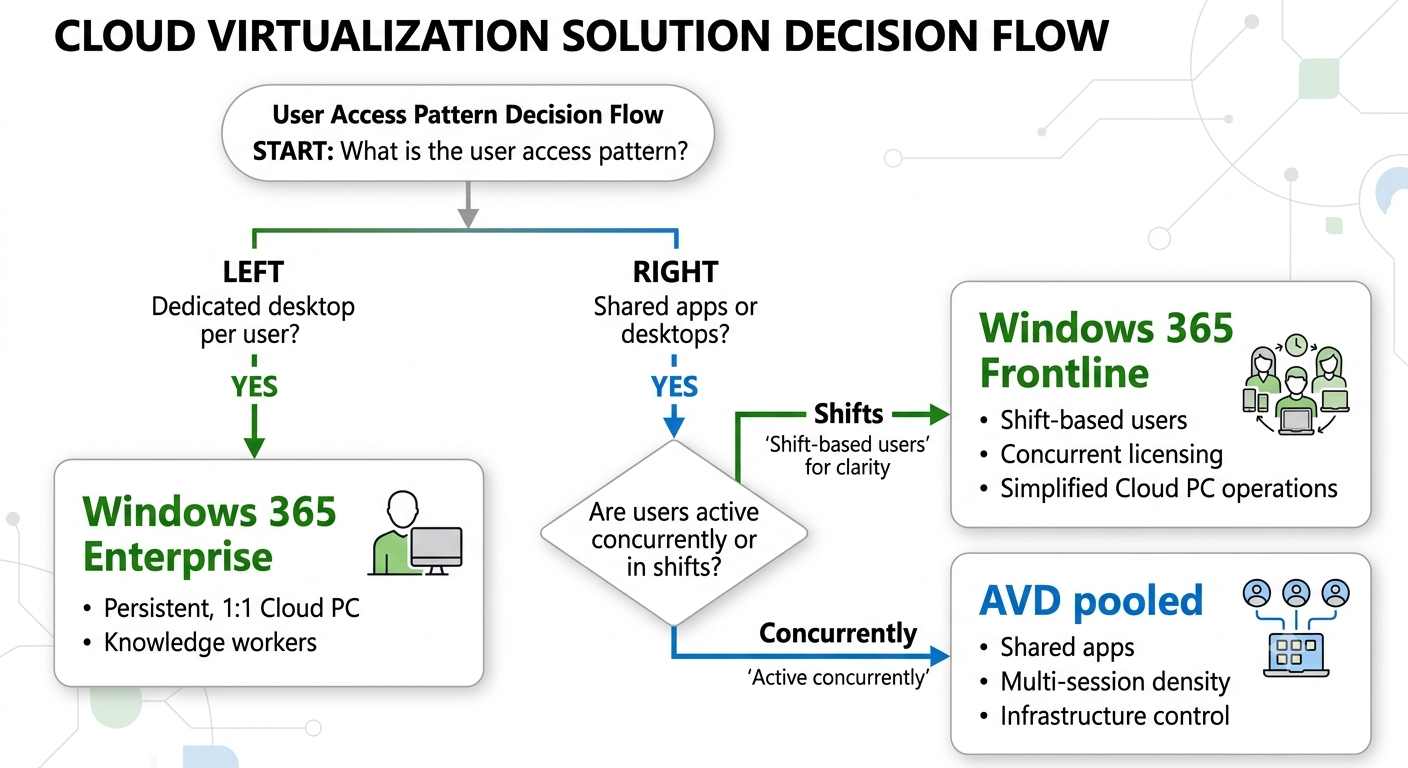
When deciding between pooled desktops and Cloud PCs, include Windows 365 Frontline as an option for shift-based workloads. Frontline offers concurrent-user licensing for environments where users rotate access across defined schedules, reducing operational and licensing complexity compared to managing pooled infrastructure.
When neither concurrency nor operational simplicity dominates the decision, use team skills as a practical tie-breaker:
- Prefer AVD when the workload needs multi-session density, RemoteApp publishing or deep Azure integration.
- Prefer Windows 365 when the workload values predictable per-user capacity, Intune-first operations or Frontline-based shift access.