Examine host pools, session hosts, and scaling
A virtual desktop design often fails for one of two reasons: too little capacity during peak hours or too much capacity during quiet hours. Host pools, session hosts and scaling features give you the controls to balance user experience and cost. This unit explains how the building blocks relate and how common scaling strategies behave in real environments.
| Decision you make | Options you evaluate | What the decision controls |
|---|---|---|
| Host pool type | Pooled or Personal | Whether users share session hosts or receive dedicated desktops |
| Session distribution | Breadth-first or Depth-first (pooled only) | How new sessions spread across available session hosts |
| Scaling approach | Autoscale scaling plans, Start VM on Connect or custom automation | How many session hosts run at different times of day |
Choose a host pool type that matches the user model
A host pool is a collection of Azure virtual machines registered as session hosts. The host pool type defines the user-to-VM relationship and drives decisions for profiles, scaling and cost.
Pooled host pools: shared capacity
A pooled host pool places many users on a shared set of session hosts. This model fits standardized application sets, task workers and high concurrency scenarios. Because users can land on different session hosts, this approach depends on a roaming profile solution.
Personal host pools: dedicated desktops
A personal host pool maps each user to a specific session host. This model fits users who need a persistent environment, predictable performance or applications that don't work in multi-session scenarios.
| Host pool type | Session mapping | Typical benefits | Typical trade-offs |
|---|---|---|---|
| Pooled | Users connect to any available session host | High density, shared capacity, flexible scaling | Requires strong profile strategy |
| Personal | Each user connects to one assigned session host | Predictable performance, persistent desktop | Higher per-user cost |
Understand session hosts and how you manage them
A session host is the compute layer that runs user sessions. How you manage session hosts determines how you patch, update and scale capacity.
Session hosts as a standardized fleet
A standardized session host fleet starts with a consistent image. When all session hosts share the same base configuration, scaling and troubleshooting become predictable.
Host pool management approaches
Azure Virtual Desktop supports different management approaches for session hosts.
- Standard management: You control VM creation, updates and scaling using your own tools.
- Session host configuration: The service stores a desired configuration and integrates creation, updates and scaling for pooled host pools.
| Management approach | Where configuration lives | How scaling and updates behave | Best fit |
|---|---|---|---|
| Standard | You manage VMs directly | Scaling and updates follow your operational model | Environments needing customization |
| Session host configuration | Azure Virtual Desktop service | Service-managed creation and updates with autoscale integration | Pooled host pools that benefit from standardization (pooled-only, preview) |
Control user experience with load balancing and session limits
Load balancing controls how new sessions land on session hosts in pooled host pools.
Breadth-first vs. depth-first
- Breadth-first spreads sessions across hosts to reduce contention.
- Depth-first fills one host to a maximum session limit before using the next.
| Algorithm | Session placement | Best use case | Trade-off |
|---|---|---|---|
| Breadth-first | Even distribution | Performance-sensitive workloads | Reduced scale-in efficiency |
| Depth-first | Concentrated sessions | Cost optimization | Requires accurate session limits |
Drain mode for maintenance
Drain mode prevents new sessions from landing on a session host while allowing existing sessions to finish. This approach supports patching, scale-in and host rotation.
Apply scaling options that match demand patterns
Scaling defines how many session hosts run at any time and how quickly capacity responds to demand.
The following diagram shows how these three design decisions—host pool type, load balancing, and scaling—build on each other.
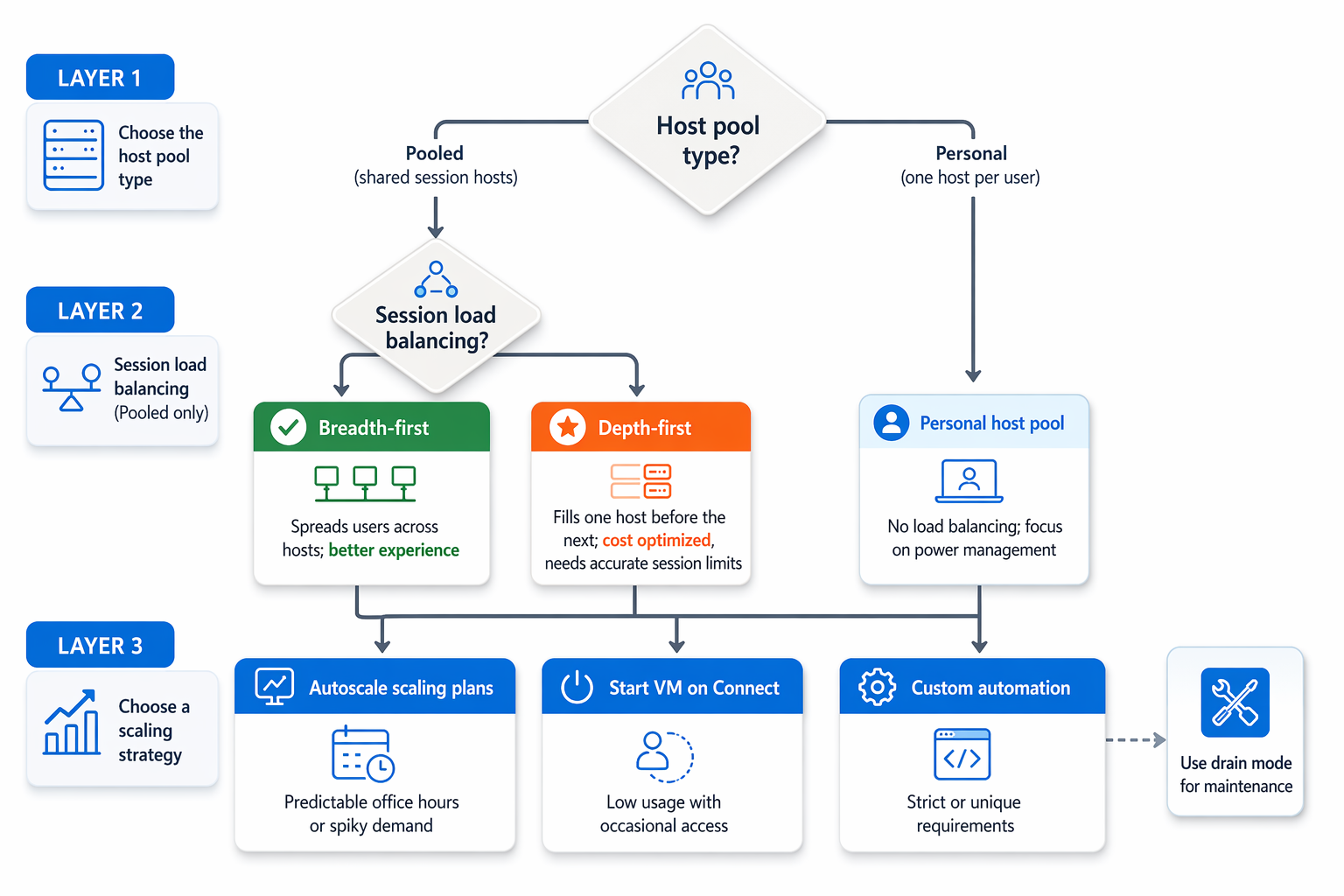
Autoscale scaling plans
Autoscale uses schedules to power session hosts on or off. One scaling plan can apply to multiple host pools, but each host pool uses only one plan.
Autoscale also supports personal host pools through power management. Idle personal session hosts can hibernate or deallocate based on schedules, reducing compute costs while preserving user state.
Start VM on Connect
Start VM on Connect powers on session hosts only when a user connects. This approach reduces idle cost but increases initial connection time.
| Demand pattern | Scaling option | Reason |
|---|---|---|
| Predictable office hours | Autoscale scaling plan | Schedule matches daily usage |
| Spiky sign-ins | Autoscale scaling plan with tuned limits | Handles rapid demand changes |
| Personal desktop cost optimization | Autoscale with personal pool power management | Reduces idle compute cost |
| Low usage with occasional access | Start VM on Connect | Hosts remain powered off until needed |
| Strict custom requirements | Custom automation | Enforces specialized rules |