Exercise - Create quantum entanglement with Q#
In the previous unit, you learned about the concept of quantum entanglement and Bell states.
In this unit, you use the Azure Quantum Development Kit (QDK) to write Q# code that creates entangled Bell states between two qubits. To create your first Bell state, you apply two quantum operations: the Hadamard operation and the Controlled-NOT (CNOT) operation.
First, let's understand how these operations work and why they create entangled states.
The Hadamard operation
Recall that the Hadamard, or H, operation, puts a qubit that's in a pure $\ket{0}$ state or $\ket{1}$ state into an equal superposition state.
$$ H \ket{0} = \frac1{\sqrt2} \ket{0} + \frac1{\sqrt2} \ket{1}$$ $$ H \ket{1} = \frac1{\sqrt2} \ket{0} - \frac1{\sqrt2} \ket{1}$$
The first step to create your Bell state is to perform a Hadamard operation on one of the qubits.
The Controlled-NOT (CNOT) operation
When two qubits are entangled, the state of one qubit is dependent on the state of the other qubit. Therefore, to entangle two qubits you need to apply a multi-qubit operation, which is an operation that acts on both qubits at the same time. The Controlled-NOT, or CNOT, operation is a multi-qubit operation that helps create entanglement.
The CNOT operation takes two qubits as input. One of the qubits is the control qubit and the other qubit is the target qubit. If the control qubit is in the $\ket{1}$ state, then the CNOT operation flips the state of the target qubit. Otherwise, CNOT does nothing.
For example, in the following two-qubit states, the control qubit is the leftmost qubit and the target qubit is the rightmost qubit.
Input to CNOT |
Output from CNOT |
|---|---|
| $\ket{00}$ | $\ket{00}$ |
| $\ket{01}$ | $\ket{01}$ |
| $\ket{10}$ | $\ket{11}$ |
| $\ket{11}$ | $\ket{10}$ |
In Q#, the CNOT operation acts on an array of two qubits, and it flips the second qubit only if the first qubit is One.
Entanglement with Hadamard and CNOT operations
Suppose that you have a two-qubit system in the state $\ket{00}$. In this state, the qubits aren't entangled. To put these qubits into the entangled Bell state $\ket{\phi^+}=\frac1{\sqrt2}(\ket{00}+\ket{11})$, apply the Hadamard and CNOT operations.
Here's how it works:
Choose one qubit in the c state to be the control qubit and the other qubit to be the target qubit. Here, we choose the leftmost qubit to be the control and the rightmost qubit to be the target.
Put only the control qubit into an equal superposition state. To do so, apply an H operation to only the control qubit:
$$H \ket{0_c} = \frac{1}{\sqrt{2}}(\ket{0_c} + \ket{1_c})$$
Note
The subscripts ${}_c$ and ${}_t$ specify the control and target qubits, respectively.
Apply a CNOT operation to the qubit pair. Recall that the control qubit is in a superposition state and the target qubit is in the $\ket{0_t}$ state.
$$ \begin{aligned} CNOT \frac{1}{\sqrt{2}}(\ket{0_c}+\ket{1_c})\ket{0_t} &= CNOT \frac{1}{\sqrt2}(\ket{0_c 0_t}+\ket{1_c 0_t})\\ &= \frac{1}{\sqrt2}(CNOT \ket{0_c 0_t} + CNOT \ket{1_c 0_t})\\ &= \frac{1}{\sqrt2}(\ket{0_c 0_t}+\ket{1_c 1_t}) \end{aligned} $$
The state $\frac{1}{\sqrt2}(\ket{0_c 0_t}+\ket{1_c 1_t})$ is entangled. This particular entangled state is one of the four Bell states, $\ket{\phi^{+}}$.
Note
In quantum computing, operations are often called gates. For example, the H gate and the CNOT gate.
Create quantum entanglement in Q#
To create a Bell state with Q# code, follow these steps in Visual Studio Code (VS Code):
- Open VS Code.
- Open the File menu, and then choose New Text File to create a new file.
- Save the file as Main.qs.
Create a Bell state
To create the Bell state $\ket{\phi^+}$ in Q#, follow these steps:
Import the
Std.Diagnosticsnamespace from the Q# standard library so that you can use theDumpMachinefunction. This function shows information about the qubit states when you call the function in your code. To import the namespace, copy the following Q# code into your Main.qs file:import Std.Diagnostics.*;Create the
Mainoperation that returns twoResulttype values, which are the measurement results of the qubits.import Std.Diagnostics.*; operation Main() : (Result, Result) { // Your code goes here }Inside the
Mainoperation, allocate two qubits to be entangled,q1andq2.import Std.Diagnostics.*; operation Main() : (Result, Result) { use (q1, q2) = (Qubit(), Qubit()); }Apply the Hadamard gate,
H, to the control qubit,q1. This puts only that qubit into a superposition state. Then apply the CNOT gate,CNOT, to both qubits to entangle the two qubits. The first argument toCNOTis the control qubit and the second argument is the target qubit.import Std.Diagnostics.*; operation Main() : (Result, Result) { use (q1, q2) = (Qubit(), Qubit()); H(q1); CNOT(q1, q2); }Use the
DumpMachinefunction to display the state of the qubits after you entangle them. Note thatDumpMachinedoesn't perform a measurement on the qubits, soDumpMachinedoesn't affect the qubit states.import Std.Diagnostics.*; operation Main() : (Result, Result) { use (q1, q2) = (Qubit(), Qubit()); H(q1); CNOT(q1, q2); DumpMachine(); }Use the
Moperation to measure the qubits, and store the results inm1andm2. Then use theResetoperation to reset the qubits.import Std.Diagnostics.*; operation Main() : (Result, Result) { use (q1, q2) = (Qubit(), Qubit()); H(q1); CNOT(q1, q2); DumpMachine(); let (m1, m2) = (M(q1), M(q2)); Reset(q1); Reset(q2); }Return the measurement results of the qubits with the
returnstatement. Here is final program in your Main.qs file:import Std.Diagnostics.*; operation Main() : (Result, Result) { use (q1, q2) = (Qubit(), Qubit()); H(q1); CNOT(q1, q2); DumpMachine(); let (m1, m2) = (M(q1), M(q2)); Reset(q1); Reset(q2); return (m1, m2); }To run your program on the built-in simulator, choose the Run code lens above the
Mainoperation, or press Ctrl + F5. Your output appears in the debug console.The measurement outcomes are correlated, so at the end of the program you get a result of
(Zero, Zero)or(One, One)with equal probability. Rerun the program multiple times and observe the output to convince yourself of the correlation.To visualize the circuit diagram, choose the Circuit code lens above the
Mainoperation. The circuit diagram shows the Hadamard gate applied to the first qubit and the CNOT gate applied to both qubits.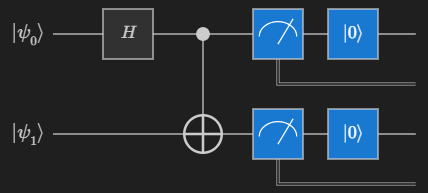
Create other Bell states
To create other Bell states, apply additional Pauli $X$ or $Z$ operations to the qubits.
For example, to create the Bell state $\ket{\phi^-}=\frac1{\sqrt2}(\ket{00}-\ket{11})$, apply the Pauli $Z$ operation to the control qubit after you apply the Hadamard gate, but before you apply CNOT. The $Z$ operation flips the state $\ket{+}$ to $\ket{-}$.
Note
The states $\frac{1}{\sqrt{2}}(\ket{0}+\ket{1})$ and $\frac{1}{\sqrt{2}}(\ket{0} - \ket{1})$ are also known as $\ket{+}$ and $\ket{-}$, respectively.
Here's how to create the $\ket{\phi^-}$ state:
Create two qubits in the state $\ket{00}$.
Put the control qubit into a superposition state with the $H$ operation:
$$H \ket{0_c} = \frac{1}{\sqrt{2}}(\ket{0_c} + \ket{1_c}) = \ket{+_c}$$
Apply the $Z$ operation to the control qubit.
$$Z \frac{1}{\sqrt{2}}(\ket{0_c} + \ket{1_c}) = \frac{1}{\sqrt{2}}(\ket{0_c} - \ket{1_c}) = \ket{-_c}$$
Apply the CNOT operation to the control qubit and the target qubit, which is in the $\ket{0_t}$ state.
$$ \begin{aligned} CNOT \frac{1}{\sqrt{2}}(\ket{0_c}-\ket{1_c})\ket{0_t} &= CNOT \frac{1}{\sqrt2}(\ket{0_c 0_t}-\ket{1_c 0_t})\\ &= \frac{1}{\sqrt2}(CNOT \ket{0_c 0_t} - CNOT \ket{1_c 0_t})\\ &= \frac{1}{\sqrt2}(\ket{0_c 0_t}-\ket{1_c 1_t}) \end{aligned} $$
To create the $\ket{\phi^-}$ Bell state in Q#, replace the code in the your Main.qs with the following code:
import Std.Diagnostics.*;

operation Main() : (Result, Result) {
    use (q1, q2) = (Qubit(), Qubit());

    H(q1);
    Z(q1); // Apply the Pauli Z operation to the control qubit
    CNOT(q1, q2);

    DumpMachine();

    let (m1, m2) = (M(q1), M(q2));
    Reset(q1);
    Reset(q2);

    return (m1, m2);
}
Similarly, you can create the Bell states $\ket{\psi^+}$ and $\ket{\psi^-}$ by applying the Pauli $X$ and $Z$ operations to the qubits.
- To create the Bell state $\ket{\psi^+}=\frac1{\sqrt2}(\ket{01}+\ket{10})$, apply the Pauli $X$ gate to the target qubit after you apply the Hadamard gate to the control qubit. Then apply the CNOT gate.
- To create the Bell state $\ket{\psi^-}=\frac1{\sqrt2}(\ket{01}-\ket{10})$, apply the Pauli $Z$ to the control qubit and the Pauli $X$ to the target qubit after you apply the Hadamard gate to the control qubit. Then apply the CNOT gate.
In the next unit, you learn how to use entanglement to send quantum information, a process known as quantum teleportation.