Identify key components of the Microsoft Intune Suite
The Microsoft Intune Suite includes eight distinct add-on capabilities. Each component addresses specific organizational needs and can be licensed individually or as part of the complete Intune Suite package. Understanding what each component offers helps you identify which capabilities align with your requirements.
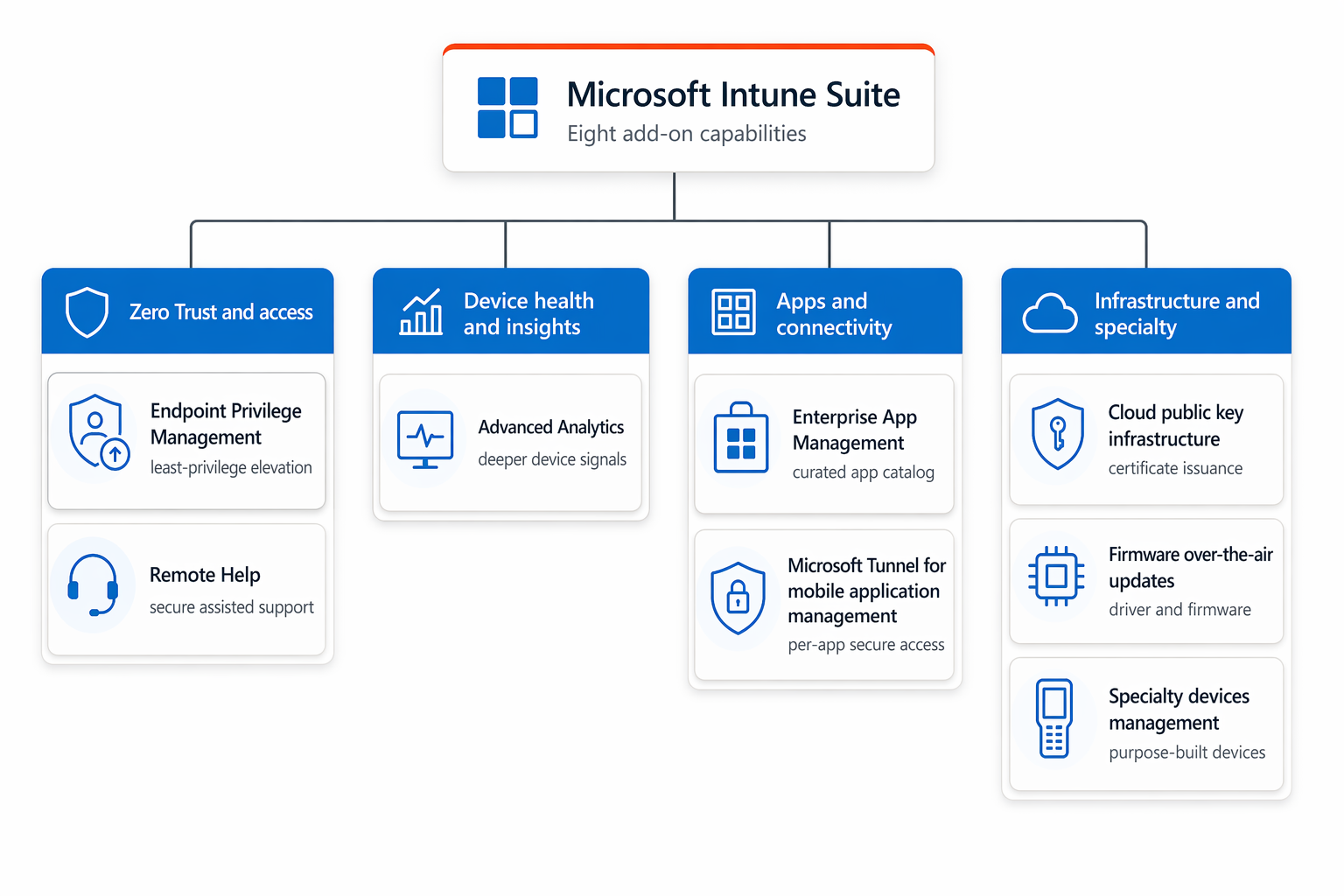
The following diagram groups the eight components into four purpose categories to help you find the right capability.
Endpoint Privilege Management
Endpoint Privilege Management (EPM) enables organizations to implement Zero Trust principles by running users with standard privileges while still allowing them to perform tasks that typically require administrator rights.
How it works
EPM uses elevation rules that define which applications, scripts, or installers users can run with elevated privileges. When a user attempts to run an application that requires elevation, EPM checks whether an elevation rule exists. If a matching rule is found, EPM elevates the application using a virtual account isolated from the user's profile.
Elevation types
EPM supports multiple elevation approaches:
- Automatic elevation: Applications elevate automatically without user interaction when they match defined rules
- User-confirmed elevation: Users right-click and select "Run with elevated access," optionally requiring business justification or authentication
- Support-approved elevation: Users submit elevation requests that administrators review and approve before use
- Elevate as current user: Applications elevate using the user's own account when compatibility requires access to user-specific resources
- Deny rules: Specific applications are blocked from running with elevated privileges
Rule capabilities
EPM elevation rules provide granular control based on multiple file attributes. You can create rules targeting file names, paths, file hashes, publisher certificates, and command-line arguments. Child process controls determine how EPM governs subprocesses created by elevated applications.
Reporting and auditing
EPM includes comprehensive reporting that distinguishes between managed elevations (handled by EPM) and unmanaged elevations (traditional "Run as administrator" by users with admin rights). This visibility helps you understand elevation patterns and identify applications that need elevation rules.
Remote Help
Remote Help is a cloud-based solution that provides secure, role-based remote assistance for Intune-managed devices. Unlike third-party tools, Remote Help integrates directly with Microsoft Intune and Microsoft Entra ID.
Key features
Both the helper (support personnel) and sharer (end user) must sign in with organizational Microsoft Entra accounts. This requirement ensures Remote Help only works within your organization's tenant. Administrators can't use Remote Help to assist users in different organizations.
Before helpers connect to devices, they see non-compliance warnings if the device doesn't meet assigned compliance policies. This visibility ensures support personnel understand the device's security posture before providing assistance.
Role-based access control
Administrators configure role-based access controls that determine:
- Which helpers can provide assistance and what actions they can perform
- Which helpers can view devices versus request full control
- Which helpers can provide elevated assistance by entering administrative credentials
These controls ensure appropriate access levels based on support team roles and responsibilities.
Platform-specific capabilities
Remote Help supports Windows, macOS, and Android devices with platform-specific features:
Windows capabilities:
- Elevation support allowing helpers to enter credentials for User Account Control prompts
- Remote launch feature letting helpers initiate sessions from the Intune admin center by sending notifications to sharers
- Optional support for unenrolled devices (disabled by default)
- Full chat functionality with continuous message threading
macOS and Android capabilities:
- Screen sharing and view-only remote assistance
- Web app option for sharers who can't install the native application
- Guided assistance without full device control
Session monitoring and auditing
The Microsoft Intune admin center provides reports showing active Remote Help sessions and historical session details. Reports include information about who helped whom, on which device, and for how long. Audit logs in Intune provide additional session tracking for compliance and security investigations.
Advanced Analytics
Advanced Analytics provides AI-driven insights that help IT administrators understand, anticipate, and improve the end-user experience. Rather than reacting to reported issues, Advanced Analytics enables proactive device management.
Analytics capabilities
Advanced Analytics identifies devices experiencing performance anomalies by analyzing device signals and comparing them to expected behavior patterns. The service generates alerts about devices showing signs of degraded performance or stability issues.
Predictive analytics capabilities identify devices at risk of experiencing problems based on historical patterns and device health signals. This allows you to address potential issues before they impact users.
The service provides actionable recommendations for improving device performance and end-user experience. These recommendations are based on analyzing device configurations, health signals, and usage patterns across your managed devices.
Device Query enables administrators to run real-time ad-hoc queries against individual managed devices using Kusto Query Language (KQL). Rather than waiting for scheduled policy sync cycles, you can retrieve current device property data on demand—useful for troubleshooting, inventory validation, and one-off investigations.
Battery Health insights monitor battery capacity across your managed device fleet, identifying devices with degraded battery health below configurable thresholds. This data supports proactive hardware refresh planning, helping you address battery issues before they result in unexpected device shutdowns or user productivity loss.
Integration with Intune
Advanced Analytics integrates directly with Intune reporting and monitoring capabilities. You can view analytics insights in the Microsoft Intune admin center alongside your existing device management data. This integration provides a unified view of device health and performance.
Enterprise App Management
Enterprise App Management provides access to the Enterprise App Catalog, a curated collection of popular Win32 applications that are pre-configured for deployment through Intune.
How it simplifies application deployment
Traditional Win32 application deployment requires creating installation packages, defining installation commands, configuring detection rules, and specifying system requirements. Each application requires administrative time to prepare for deployment.
With Enterprise App Management, you select applications from the Enterprise App Catalog and add them to your Intune tenant. Default installation settings, requirements, and detection rules are automatically provided. You can modify these settings if needed, or deploy with the default configuration.
Hosting and updates
Applications from the Enterprise App Catalog are hosted in Microsoft storage, eliminating the need to maintain your own hosting infrastructure. Microsoft manages application updates in the catalog, ensuring you have access to current versions of included applications.
The Enterprise App Catalog includes commonly used business applications, reducing deployment time for standard software used across organizations.
Microsoft Tunnel for Mobile Application Management
Microsoft Tunnel for Mobile Application Management extends the Microsoft Tunnel VPN gateway to support unenrolled Android and iOS devices. This capability addresses bring-your-own-device scenarios where users need secure access to corporate resources from personal devices.
Traditional VPN solutions require device enrollment, which users might resist on personal devices. Tunnel for MAM provides application-level VPN connectivity that doesn't require full device management. Users can access corporate resources through managed applications while keeping their personal device data separate.
This approach supports flexible work arrangements and bring-your-own-device programs while maintaining appropriate security controls.
Cloud PKI
Cloud PKI provides automated certificate lifecycle management for Intune-managed devices. Rather than maintaining on-premises certificate authority infrastructure, Cloud PKI delivers public key infrastructure capabilities as a cloud service.
Certificate management capabilities
Cloud PKI handles certificate issuance, renewal, and revocation automatically for devices across all Intune-supported platforms. The service integrates with device enrollment and configuration processes to provision certificates when devices are deployed.
Automated renewal ensures certificates remain valid without manual intervention. When devices are retired or wiped, Cloud PKI automatically revokes associated certificates.
Benefits over traditional PKI
Cloud PKI eliminates the operational overhead of maintaining on-premises certificate authorities. You don't need to manage certificate servers, handle certificate backup and recovery, or coordinate certificate-related tasks across infrastructure teams.
The cloud-based approach provides consistent certificate management across all managed devices regardless of location. Mobile workers and remote devices receive the same certificate management as devices in corporate facilities.
Firmware Over-the-Air (FOTA) update
Firmware Over-the-Air update capability enables remote firmware updates for supported specialty devices. This feature currently supports Zebra devices through LifeGuard Over-the-Air integration with Microsoft Intune.
Organizations using rugged mobile devices in field operations face challenges keeping firmware updated. Devices are dispersed across locations, making manual firmware updates impractical. FOTA capabilities allow you to deploy firmware updates remotely with granular control and monitoring.
You can schedule firmware deployments, target specific device groups, and monitor update progress from the Intune admin center. This ensures specialty devices receive critical security and functionality updates even when deployed in remote locations.
Specialty devices management
Specialty devices management provides targeted capabilities for managing purpose-built devices like AR/VR headsets, large smart-screen devices, and conference room meeting devices.
These devices have unique requirements that standard endpoint management doesn't fully address. AR/VR headsets need specific configuration and application management capabilities. Conference room devices require different security controls than user workstations. Large smart-screen devices have distinct management needs.
Specialty devices management provides device-specific policies, configurations, and protections tailored to these specialized endpoints. This ensures appropriate management for devices that serve specific business purposes beyond traditional computing.
Summary of Intune Suite components
The following table summarizes the eight Microsoft Intune Suite components:
| Component | Primary Use Case | Key Capability | Requires Enrolled Device |
|---|---|---|---|
| Endpoint Privilege Management | Zero Trust privilege elevation | Allow standard users to elevate specific applications through defined rules | Yes |
| Remote Help | Secure remote assistance | Enterprise-grade remote support integrated with Entra ID and Intune compliance | Yes (Windows unenrolled: optional) |
| Advanced Analytics | Proactive device management | AI-driven anomaly detection, predictive insights, device query, and battery health monitoring | Yes |
| Enterprise App Management | Simplified application deployment | Access to pre-configured Win32 applications from Enterprise App Catalog | Yes |
| Microsoft Tunnel for MAM | Mobile VPN for personal devices | Application-level VPN for unenrolled Android and iOS devices | No |
| Cloud PKI | Certificate lifecycle automation | Cloud-based certificate issuance, renewal, and revocation | Yes |
| Firmware Over-the-Air (FOTA) | Remote firmware management | Wireless firmware updates for specialty devices (Zebra) | Yes |
| Specialty devices management | Purpose-built device management | Specialized capabilities for AR/VR, smart screens, and meeting devices | Yes |