Describe event management
Events exist because they create high-intent engagement. Registration, attendance, and check-in all signal relevance. However, events are complex. They require planning, promotion, registration experiences, and measurable follow-up.
Customer Insights - Journeys includes event management features that help business users manage events end to end, from planning to analytics and ROI evaluation.
Event management capabilities
Dynamics 365 Customer Insights - Journeys event management lets you:
- Design the right event: The event designer lets you create the right event based on your organizational goals and factors like the intended audience, type of event, and desired business outcomes. You track and measure event logistics such as location details, fees, and other logistical data as you build the event.
- Create the right agenda: Define every session offered throughout the event. You track important details like session location, session type, target audience, and who delivers the session. You can add sessions to event tracks to help attendees locate the most relevant sessions.
- Manage speakers and sponsors: Keep track of the individuals and organizations that help make your event happen. Track important details like speaker sessions and individual or organization bios. You can also manage costs and expenses related to them.
- Manage registrations: Manage who plans to attend your event. Create event passes and packages to provide the best experience for attendees. Through attendance history, you evaluate session popularity and use that information to help determine future offerings.
- Improve event experience: During the event, manage and publish important changes to sessions, tracks, and speakers directly to the event website.
- Drive sales activities: Use attendance information from participants in marketing campaigns to generate leads and help drive future revenue.
Event registration experiences
You can deliver event registration as:
- A single registration page (standalone or embedded)
- An event portal (Power Pages template or web app portal)
These options exist because organizations vary: some want a full event site experience, while others only need a registration form and follow-up emails.
Event registration forms also include event-specific features like dynamic components that show sessions, speakers, and event details. Attendees often need this context before registering.
How business users use events
Business users typically decide:
- Is this event generating new leads or nurturing existing ones?
- What data do you need at registration to support follow-up?
- How should follow-up differ for registrants, attendees, and no-shows?
Example: Virtual webinar
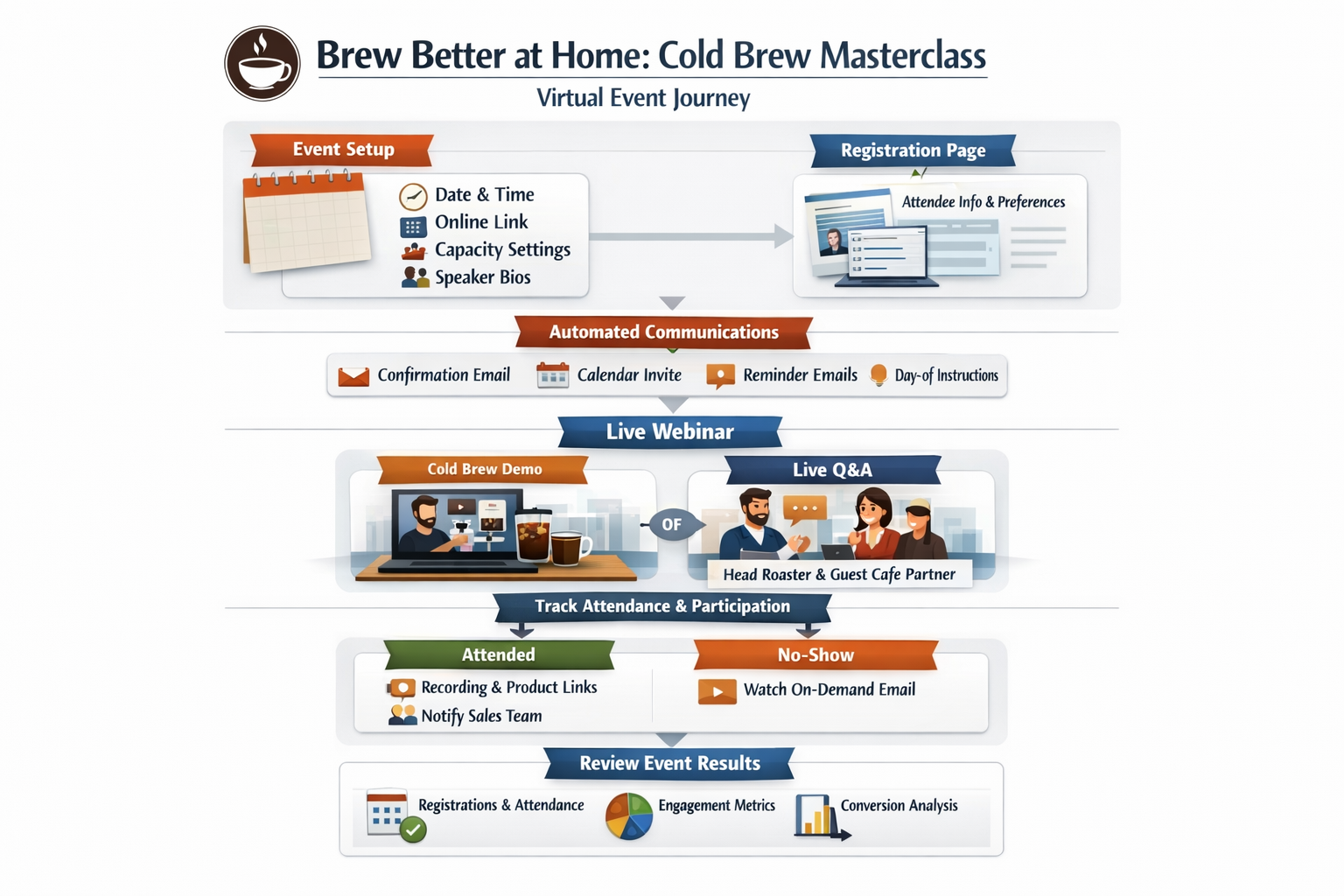
Contoso Coffee creates a 60-minute virtual webinar called "Brew Better at Home: Cold Brew Masterclass." In Customer Insights - Journeys, the team sets up the event details (date, time, time zone, online location link, capacity, and registration settings), defines an agenda with two sessions (a main demo plus live Q&A), and adds speakers (the head roaster and a guest café partner) with bios.
They publish a registration page that collects attendee info and optional preferences, for example, "I'm most interested in: cold brew concentrate, grinders, or subscriptions." The team then configures automated communications: confirmation, calendar invite, reminders, and day-of instructions. During the event, they track check-ins, attendance, and session participation.
Afterward, they use attendance status (attended versus no-show) and session interest to drive follow-up: send attendees a recording and product links, send no-shows a "watch on demand" email, and notify sales of highly engaged attendees. Finally, the team reviews event reporting (registrations, attendance rate, engagement, and downstream conversions) to measure ROI and improve the next event.