Describe forms
Forms exist because lead generation depends on a reliable way to convert engagement into known records and actionable intent. A known record is a contact or lead you can follow up with. Actionable intent is a clear signal of what the person wants.
A good form does more than collect an email address. It helps with identity and duplicate handling, captures the minimum details sales or marketing needs to respond appropriately, and (when applicable) records consent and communication preferences.
In Customer Insights - Journeys, a form submission can immediately trigger a real-time journey and personalize follow-up. For example, the system might send "Thanks for requesting the Buyer's Guide for Product A." The journey can also branch the experience based on what the person selected, such as routing "Request a demo" submissions to sales and sending "Newsletter signup" submissions into a nurture track.
Form types
Customer Insights - Journeys supports multiple types of forms, including marketing forms and event registration forms. These forms help marketing teams:
- Capture new leads or update known contacts
- Collect preferences and intent signals that indicate what the person wants
- Trigger immediate follow-up journeys
- Standardize data collection so sales can act with confidence
Customer Insights - Journeys includes multiple form types because capture scenarios vary:
- Marketing forms: Capture leads or contacts for newsletter signup, quote requests, and content downloads.
- Event registration forms: Enable event registration and create event registration records. They also support event-specific components like sessions and speakers.
- Preference center: Manage consent preferences, which is important for compliance and customer trust.
Form fields and controls
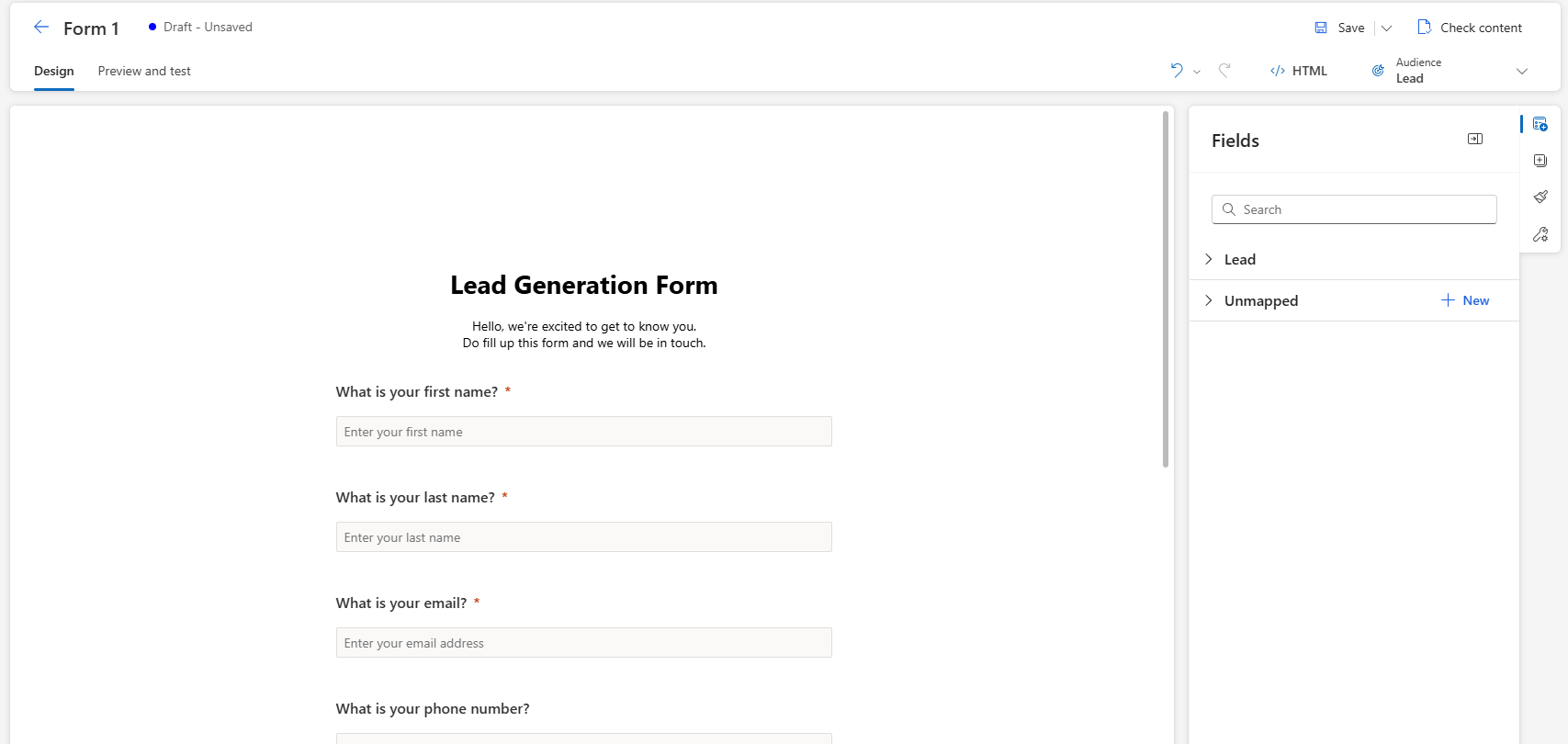
Forms contain fields, controls, and settings that improve data quality and usefulness:
- Target audience choice (Lead, Contact, or Lead & Contact): Select the record type the submission creates or updates, based on how your organization manages prospects and duplicates.
- Field properties (required, validation, hidden, and read-only): Control what users must enter and improve data quality with validation, hidden values, and prefilled or read-only fields.
- Submitted values for personalization and branching: Use what someone selects or enters to personalize follow-up and route them into the right journey path.
How business users use forms
In practice, business users approach forms by balancing two competing needs: keeping submission friction low so more people complete the form, while still collecting enough signal to drive the right follow-up. That usually means deciding what the minimum required fields are, whether the form targets high volume or high qualification, and whether specific answers should route someone into a different journey path.
The following examples show what this looks like in real organizations.
Content download (high volume)
A short form with email, first name, last name, and optional company fields gates a Buyer's Guide. The submission creates or updates a lead or contact and immediately triggers a real-time journey that delivers the asset. The journey follows up with two or three educational emails and branches based on whether the person selects a "pricing" link (send a stronger CTA) or doesn't engage (stay in nurture).
Request a demo (high intent)
A longer form captures company, role, phone, product of interest, and timeline. The submission triggers a journey that sends an instant confirmation, routes the lead to the right sales team (often based on territory or industry fields), and uses the selected "product of interest" to personalize the follow-up email and the next recommended content.
Event registration
A registration form captures attendee details and, optionally, session selections. Organizations use the submission to start an event journey: confirmation email, calendar details, reminders, and day-of instructions. After the event, they branch follow-up based on attendance or no-show status and session interest. For example, the system sends a session-specific recap to attendees.
Newsletter signup and preferences
A short signup form captures email plus one or two preference fields like industry, topics, or frequency. The values become the segmentation and personalization backbone: the welcome journey confirms the subscription, then future newsletters use the preferences to include only relevant content blocks and suppress topics the person opted out of.
Partner referral or co-sell intake
A partner-facing form captures partner name, customer company, deal size, and use case. The organization uses it to trigger internal notifications and create consistent lead records. It then starts a nurture path that includes partner-branded messaging and a clear handoff to the partner manager.
Customer success upsell or cross-sell
For existing customers, a form on a help center or in-product message captures interest in an add-on like "Tell me about Premium Support." The submission triggers a journey that sends a targeted explainer and offers a consultation. If the form connects to CRM, the journey can create or update an opportunity-related process while suppressing generic acquisition messaging.