Describe journeys
Journeys exist because marketing and sales outcomes depend on more than a single message. Journeys provide a structured way to deliver the right sequence of touchpoints, with timing and logic.
In Customer Insights - Journeys, a customer journey is the automated, rules-based experience an organization designs to guide a contact or lead through a series of interactions over time. A journey defines who enters (a segment or trigger), what they receive (emails and other touchpoints), when they receive it (timing), and how the experience adapts based on actions like opens, link selections, form submissions, or business events. Journeys also include controls like frequency caps, exclusions, and lifecycle states (draft or live) so teams run consistent engagement at scale without overwhelming customers.
Journey types
Customer Insights - Journeys supports two types of journeys:
- Trigger-based journeys react to customer actions like submitting a form or registering for an event. These journeys support "moments that matter" where timing is critical.
- Segment-based journeys target customers who share attributes like loyalty members in a region. These journeys support planned outreach and scheduled campaigns to defined audiences.
Trigger-based journey example
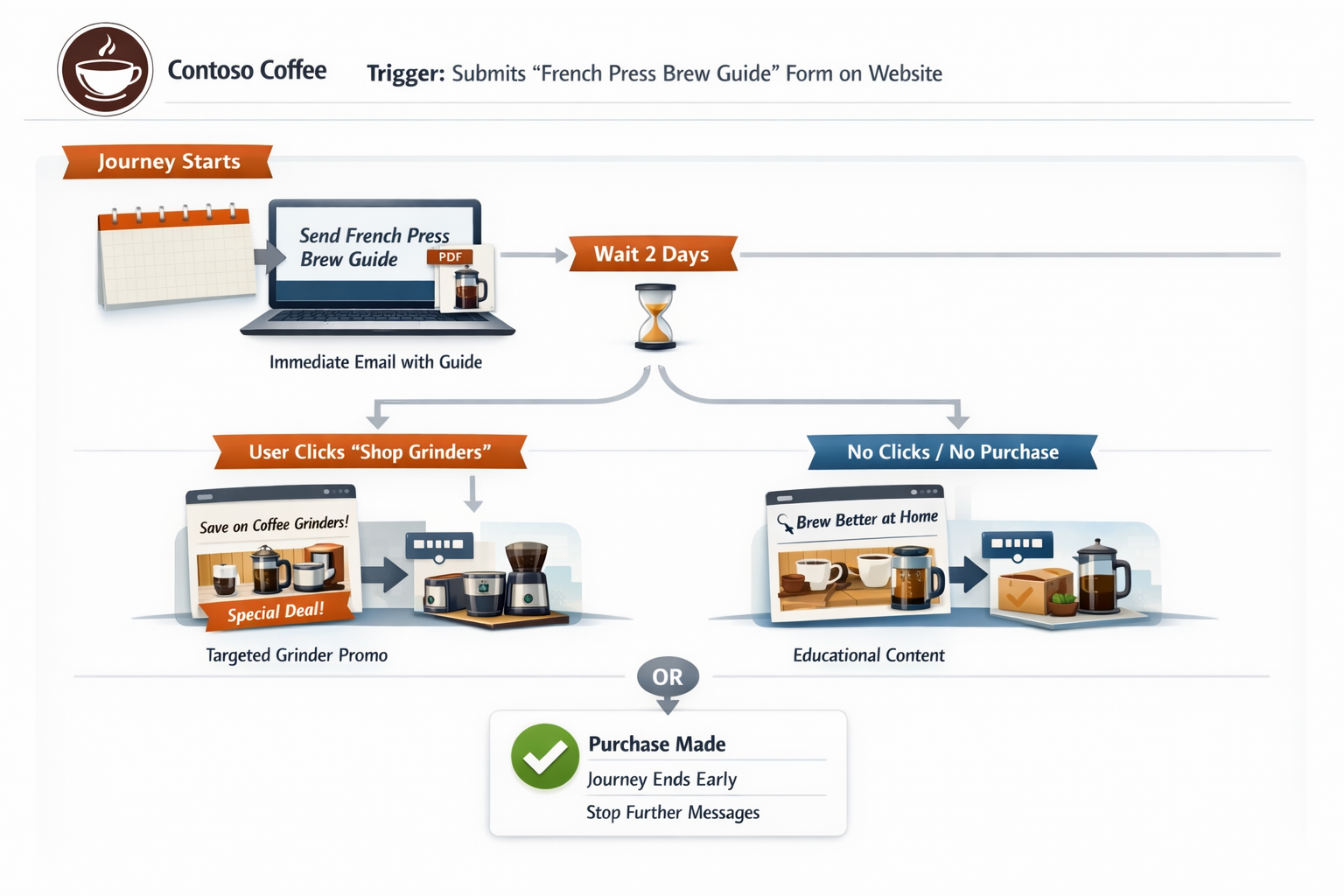
Contoso Coffee runs a "Brew Better at Home" campaign. When someone submits the French Press Brew Guide form on the website, that submission trigger starts a real-time journey. The journey immediately emails the guide, then waits two days and branches. If the person selects "Shop Grinders," they receive a targeted offer on grinders. If they don't engage, they receive a short educational email with brew tips and a softer CTA. The journey can also stop early if the person makes a purchase so they don't keep receiving acquisition messages.
Segment-based journey example
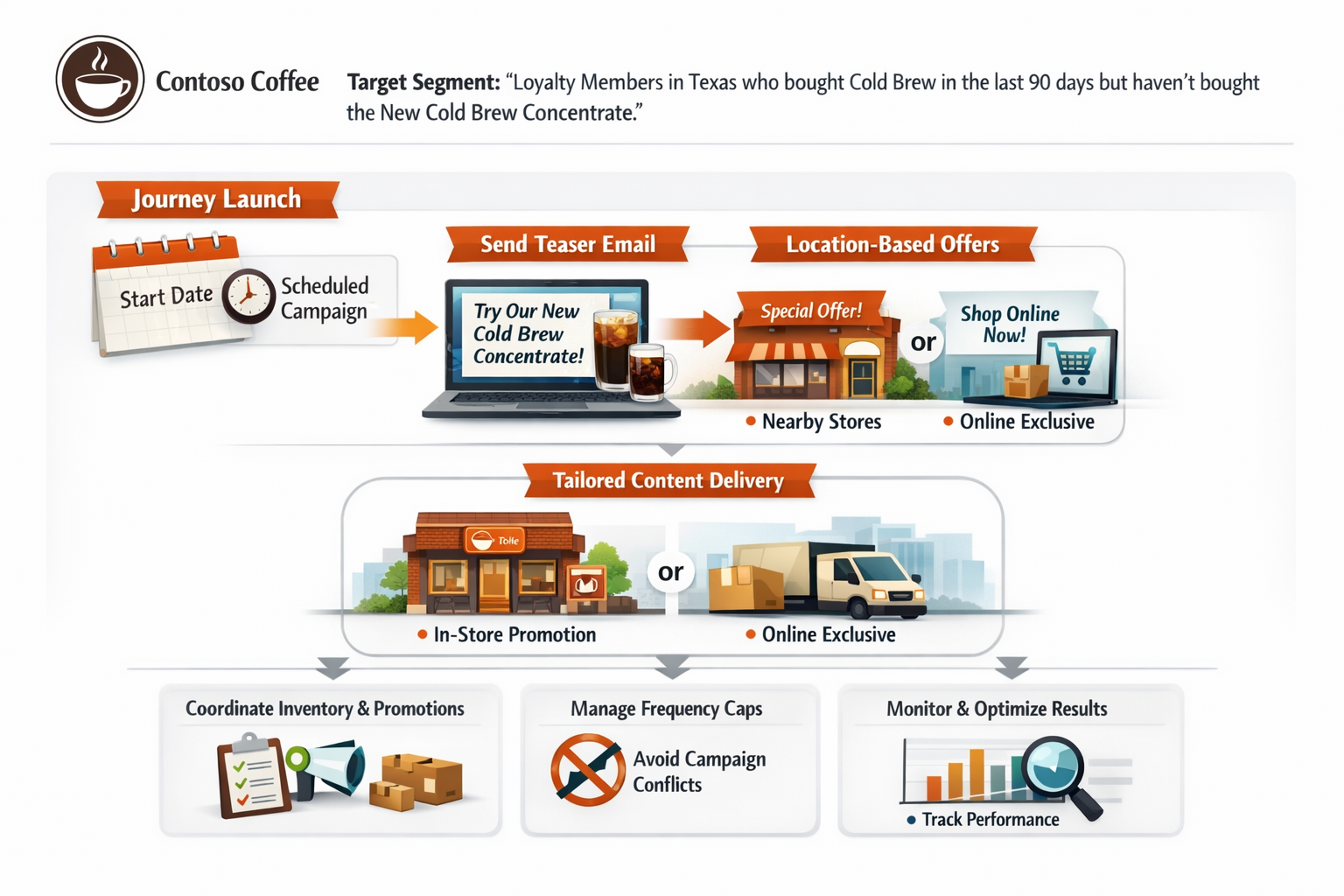
Contoso Coffee has a loyalty program and wants to promote a seasonal product line, for example, a new cold brew concentrate. They create a segment like "Loyalty members in Texas who purchased cold brew in the last 90 days but didn't buy the new concentrate." Then they launch a segment-based journey that starts on a scheduled date, sends a teaser email to the whole segment, and uses conditional content to tailor the offer by location (nearby store versus online-only). Because this is planned outreach, the team coordinates timing with inventory and store promotions and uses frequency caps to avoid overlapping with other campaigns.
Trigger types
Trigger-based journeys are powered by triggers, which represent customer actions or business events. Triggers can start, continue, or stop a journey.
Customer Insights - Journeys includes three trigger types:
Interaction triggers
Interaction triggers respond to interactions with journey elements like email or other channels. For example, Contoso Coffee sends a weekly "Brew Better" email to subscribers. A customer selects "See pricing" for a new grinder, so the journey immediately shifts from general tips to a purchase-support path. The journey sends a comparison chart and an in-stock offer the next day. If the same person selects unsubscribe or meets a suppression condition, that interaction acts as a stop signal. The journey ends and Contoso avoids over-messaging.
Business triggers
Business triggers respond to record changes in Dynamics 365 apps, such as lead created, opportunity created, or marketing form submitted. For example, Contoso Coffee runs a wholesale program for offices and cafés. When a new lead is created from a "Request a catering quote" form submission, a journey starts that sends an instant confirmation to the prospect and alerts the correct sales queue. Later, when sales marks the lead as qualified or creates an opportunity, that CRM change triggers the marketing journey to pause or end. This approach prevents the prospect from receiving early-stage nurture emails that conflict with an active sales conversation.
Custom triggers
Custom triggers are user-defined triggers for unique business actions. For example, Contoso Coffee's loyalty app tracks shopping behavior. A member starts checkout for a subscription but then abandons the cart, which fires a custom trigger into Journeys. The journey waits a few hours and sends a reminder with the exact items left behind. If the customer completes the purchase, a "purchase completed" event ends the cart-recovery path and switches them into an onboarding series instead.
Trigger-based journeys work best when the customer starts the action (form submit, link selection, event registration) and those events happen at different times. Segment-based journeys work best when you need to start a journey for a large group or for business events. Microsoft guidance notes that using triggers for large-scale business events could lead to issues with trigger fair use considerations.
Create a journey with Copilot
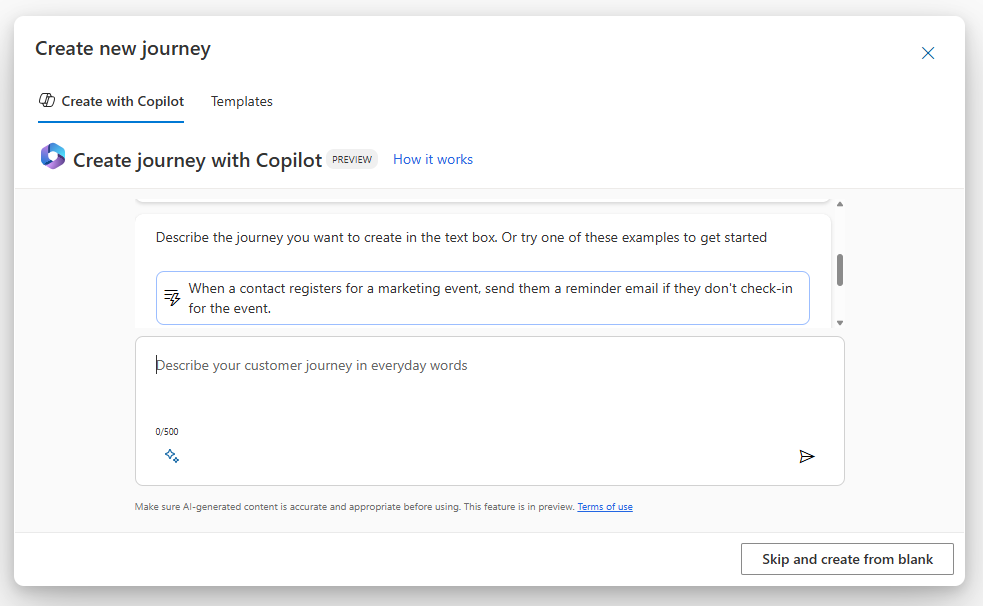
With Journey Copilot, you use everyday conversational language to draft a real-time journey without deep knowledge of every journey element upfront. Instead of starting from a blank canvas, you describe the outcome you want and the follow-up sequence. For example: "After a landing page is completed, send the customer a thank you message in their preferred channel. Then wait two days and send a survey." Copilot turns that intent into an initial journey draft that you review and refine.
The typical workflow includes:
- Start in Journeys, then select Copilot to draft the journey. Instead of selecting every tile manually, you open the Copilot experience to describe the journey in natural language.
- Describe the entry point and the follow-up you want in plain language. Tell Copilot what starts the journey, for example, a form submission, event registration, or a segment. Then describe what should happen next: send a message, wait, send another message, check engagement, or create a task.
- Review the draft Copilot creates. Confirm the journey type (trigger-based versus segment-based), verify the timing, and ensure the logic matches your business intent.
- Connect the building blocks Copilot can't finalize for you. Select or create the actual assets the journey uses, such as approved emails, the right marketing form, the correct segment, and any event assets, so the draft becomes runnable in your environment.
- Add or refine responsiveness with conditions and branching. Adjust how the journey adapts based on customer behavior like opens, link selections, submissions, or registrations. Also consider business events like lead qualified or purchase completed. Keep branches purposeful: stronger CTA for high-intent actions, lighter nurture for low engagement, and clear stop conditions when the goal is achieved.
- Apply governance before you publish. Add exclusions and suppression logic, frequency caps, and reentry rules so the journey doesn't over-message people or conflict with other campaigns.
- Validate with previews and test records. Preview the connected emails including sender and brand profile, consent, links, and personalization. Test that the journey routes people the way you expect.
- Publish and monitor. After the journey is live, monitor performance and tune timing, content, and branches over time. Many teams iterate by cloning the journey and adjusting the prompt and assets for the next campaign.
Copilot helps you get to a sensible first draft of the journey quickly, but the quality comes from the review loop: confirming the right trigger or segment, connecting approved assets, adding the right branching and guardrails, and testing before you go live.
Interactive simulation
Select the following image to open an interactive simulation where you can walk through the process of creating customer journeys in Dynamics 365 Customer Insights - Journeys.