Explore virtual private networks
A VPN provides a point-to-point connection between components of a private network, through a public network such as the Internet. Tunneling protocols enable a VPN client to establish and maintain a connection to the listening virtual port of a VPN server. To emulate a point-to-point link, the data is encapsulated, or wrapped, and prefixed with a header. This header provides routing information that enables the data to traverse the public network to reach its endpoint.
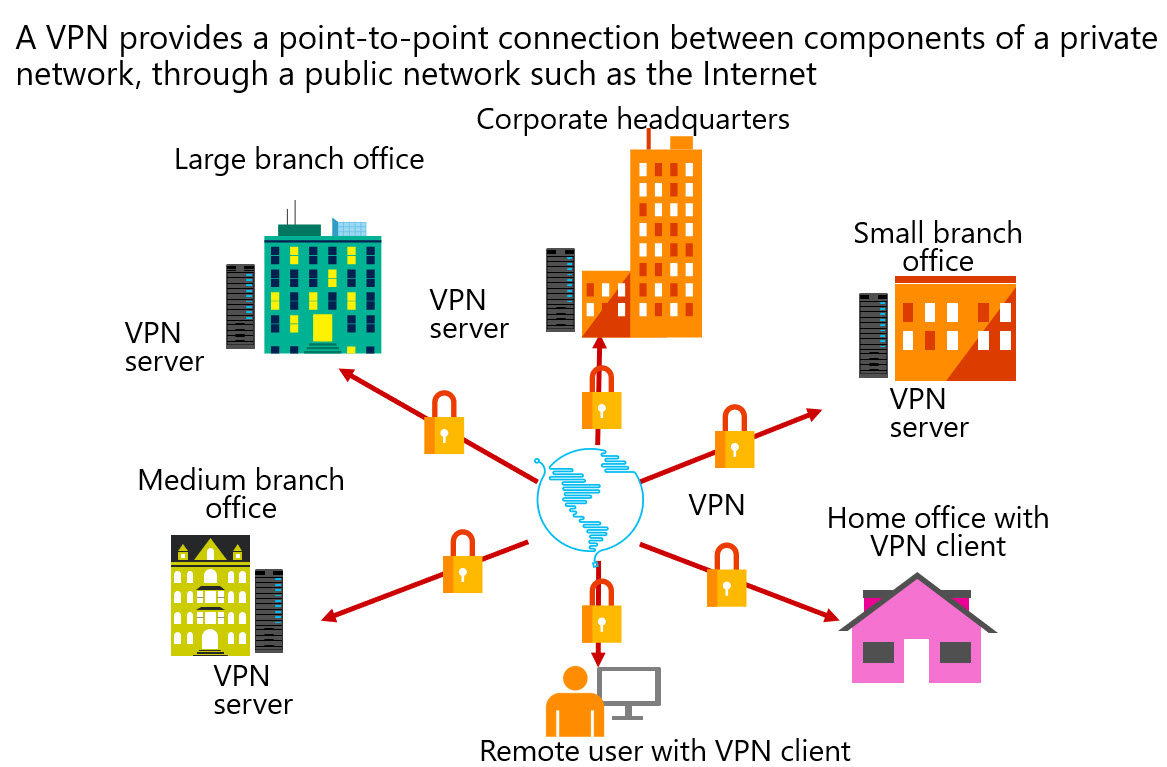
To emulate a private link, the data is encrypted to ensure confidentiality. Packets that are intercepted on the public network are indecipherable without encryption keys. Two types of VPN connections exist:
- Remote access. Remote access VPN connections enable users who are working at home, at customer sites, or from public wireless access points to access a server that exists in your organization’s private network. They do so by using the infrastructure that a public network, such as the Internet, provides. From the user’s perspective, the VPN is a point-to-point connection between the computer, the VPN client, and your organization’s server. The exact infrastructure of the shared or public network is irrelevant, because it logically appears as if the data is sent over a dedicated private link.
- Site-to-site. Site-to-site VPN connections, which also are known as router-to-router VPN connections, enable your organization to have routed connections between separate offices or with other organizations over a public network, while maintaining secure communications.
Properties of VPN connections
VPN connections in Windows can use:
- Point-to-Point Tunneling Protocol (PPTP)
- Layer Two Tunneling Protocol with IPsec (L2TP/IPsec)
- Secure Socket Tunneling Protocol (SSTP)
- Internet Key Exchange version 2 (IKEv2)
Note
An IKEv2 VPN provides resilience to the VPN client when the client either moves from one wireless hotspot to another or switches from a wireless to a wired connection. This ability is a requirement of VPN Reconnect.
All VPN connections, irrespective of tunneling protocol, share some common characteristics:
- Encapsulation. With VPN technology, private data is encapsulated with a header that contains routing information, which allows the data to traverse the transit network.
- Authentication. Authentication ensures that the two communicating parties know with whom they are communicating.
- Data encryption. To ensure data confidentiality as the data traverses the shared or public transit network, the sender encrypts the data and the receiver decrypts it. The encryption and decryption processes depend on both the sender and the receiver using a common encryption key. Intercepted packets sent along the VPN connection in the transit network will be unintelligible to anyone who does not have the common encryption key.
Conditional Access Framework
You can provide additional security for your remote access connections by integrating VPN with the Microsoft Entra Conditional Access Framework. The Conditional Access Framework is a Microsoft Entra ID–based policy engine that in combination with a mobile device management (MDM) solution such as Microsoft Intune, can verify device compliance before granting access to a corporate network or Microsoft Online.
Conditional Access policies analyze signals such as user, device, and location to automate decisions and enforce organizational access policies for resources. Conditional Access policies allow you to build conditions that manage security controls that can block access, require multifactor authentication, or restrict the user’s session when needed and stay out of the user’s way when not.
Conditional Access policies at their simplest are if-then statements. If a user wants to access a resource, then they must complete an action. Example: A payroll manager wants to access the company's payroll application and is required to complete multifactor authentication to access it.
Common signals that Conditional Access can take in to account when making a policy decision include the following signals:
- User or group membership. Policies can be targeted to specific users and groups giving administrators fine-grained control over access.
- IP Location information. Organizations can create trusted IP address ranges that can be used when making policy decisions. Administrators can specify entire countries/regions IP ranges to block or allow traffic from.
- Device. Users with devices of specific platforms or marked with a specific state can be used when enforcing Conditional Access policies.
- Application. Users attempting to access specific applications can trigger different Conditional Access policies.
- Real-time and calculated risk detection. Signals integration with Microsoft Entra ID Protection allows Conditional Access policies to identify risky sign-in behavior. Policies can then force users to change their password, do multifactor authentication to reduce their risk level, or block access until an administrator takes manual action.
- Microsoft Defender for Cloud Apps. Enables user application access and sessions to be monitored and controlled in real time, increasing visibility and control over access to and activities done within your cloud environment.
Many organizations have common access concerns that Conditional Access policies can help with, such as:
- Requiring multifactor authentication for users with administrative roles.
- Requiring multifactor authentication for Azure management tasks.
- Blocking sign-ins for users attempting to use legacy authentication protocols.
- Requiring trusted locations for Microsoft Entra multifactor authentication registration.
- Blocking or granting access from specific locations.
- Blocking risky sign-in behaviors.
- Requiring organization-managed devices for specific applications.
Windows Information Protection
Another security-related feature is the VPN client integration with Windows Information Protection. Windows Information Protection is a feature that uses a number of technologies (including BitLocker Drive Encryption, AppLocker, and Microsoft Azure Rights Management) to protect enterprise data against leakage and unauthorized use. It relies on Microsoft Intune, Microsoft Endpoint Configuration Manager, or another third-party MDM solution to create and deploy policies that you use to specify protected apps, and to apply desired protection levels to your data.
With the new VPNv2 configuration service provider, you have the ability to use an MDM solution to configure VPN profiles on managed devices. In case of Microsoft Intune, you have access to pre-defined policy templates that include built-in support for VPN plug-ins.
Additional remote access usability improvements that you can configure via VPN profiles include:
Always On. This feature triggers automatic connections following a user sign-in or a network change.
App-triggered VPN. This feature triggers automatic connections following a launch of applications that you specify, based on a Universal Windows Platform package family name or a file path.
Note
This functionality is available on both workgroup and domain-joined computers, unlike Windows 8.1, which is limited it to workgroup computers only.
Traffic filters. With this feature, you can control the types of network traffic that will be able to reach your corporate network. You can accomplish this by defining either app-based or traffic-based rules. With app-based rules, you specify a list of allowed applications. The definition of traffic-based rules consists of 5-tuple policies, that take into account the source and destination IP addresses, the source and destination ports, and the network protocol.
LockDown VPN. This feature enforces a number of VPN device settings that affect its connectivity. For example, you can ensure that a user cannot modify the VPN profile or disconnect an active VPN connection. You also can implement forced tunneling and block outbound traffic if the VPN connection is not available.