Explore advanced data security
As developers, ensuring the security of your data is crucial. There are several advanced data security options that protect Azure SQL Database from unauthorized access.
These advanced data security options are designed to provide a robust security framework for your Azure SQL Database, helping you protect your data from unauthorized access and potential threats.
Configure dynamic data masking
Dynamic Data Masking obfuscates data to limit its exposure, allowing users to view columns without seeing the actual sensitive data. It operates at the presentation layer, so high privileged users can always see unmasked data.
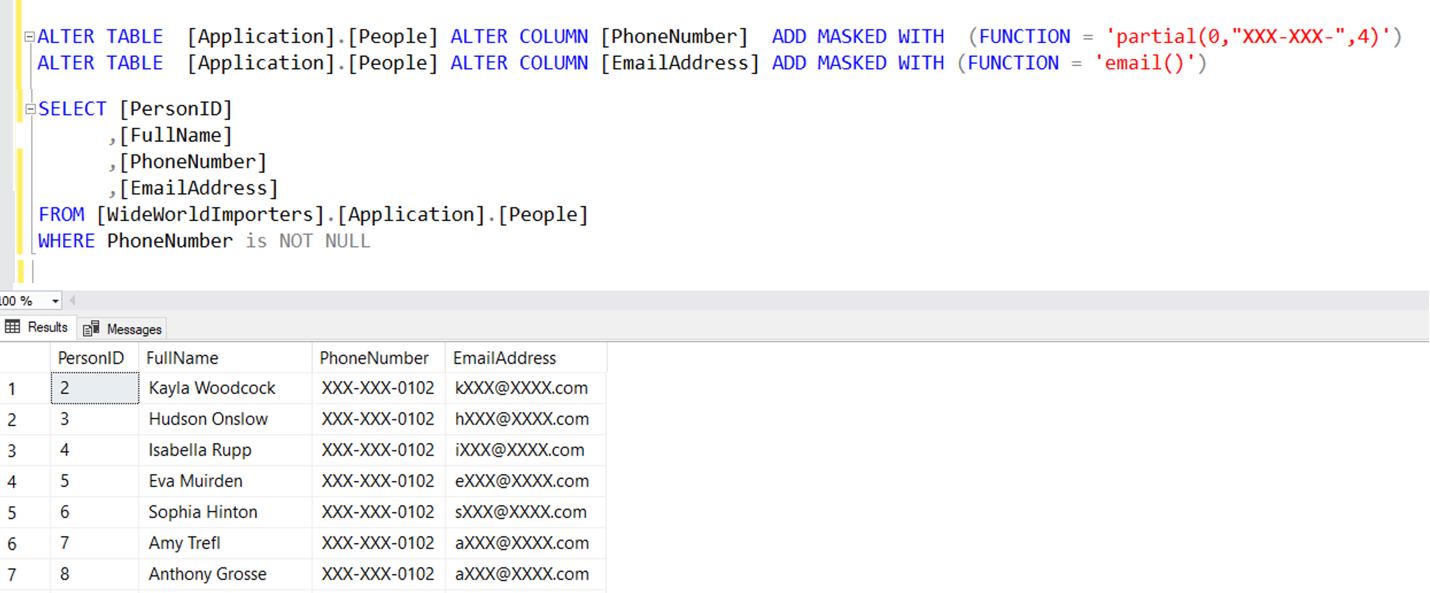
Data masking is an ideal option for scenarios such as providing masked data from application users who have no direct access to the database, and restricting private information for a group of users.
Understand Microsoft Defender for SQL
Microsoft Defender for SQL provides a comprehensive suite of protections for Azure SQL Database, including SQL vulnerability assessment and Advanced Threat Protection. These advanced built-in features help identify and manage database threats, making it accessible even for those without security expertise.
SQL vulnerability assessment - is a service that scans your database for security best practices. It flags non-compliant items, identifies misconfigurations, excessive permissions, and sensitive data exposure. This feature helps detect potential risks and provides actionable steps to enhance your database security.
Advanced Threat Protection - monitors database connections and queries to detect potentially harmful activities, such as potential SQL injection, access from unfamiliar location and principal, and brute force SQL credentials. You can manage and access it through the central Microsoft Defender for SQL portal.
Tip
If you're interested in learning more about other security and protection options, you can check out the documentation on Azure SQL Database.