Manage Git integration
Git integration for Dataverse enables direct synchronization between your development environments and a Git repository in Azure DevOps or GitHub. Instead of manually exporting and importing solution files, makers and developers commit changes directly from their environment to a branch - making Git the single source of truth for solution components.
Understand how Git integration works
When you enable Git integration for an environment, Dataverse writes solution components as human-readable YAML files to the connected repository. Each component from a table, form, canvas app, or plug-in is stored as a separate file or set of files, allowing Git to track changes at the component level rather than as a monolithic solution archive.
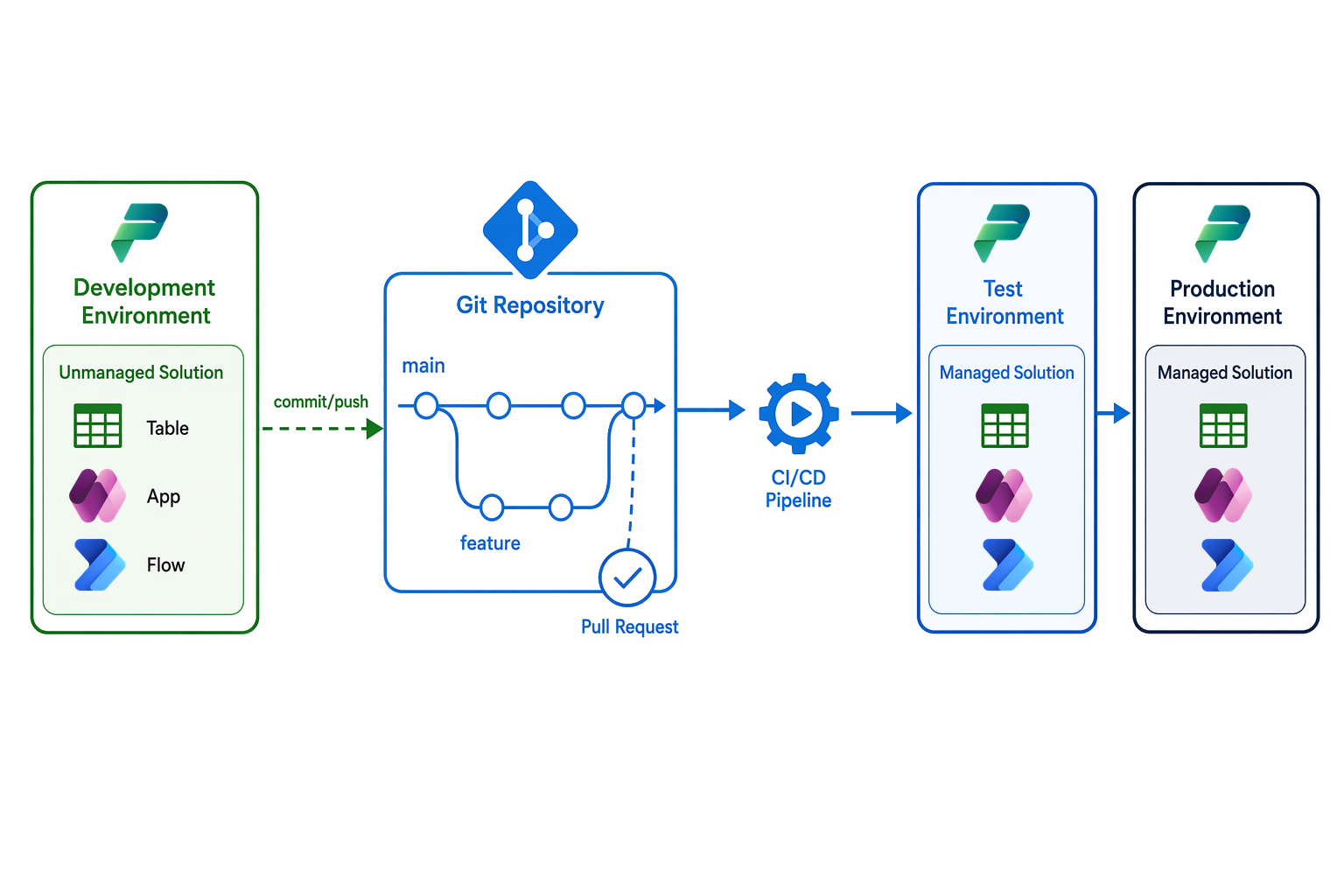
The integration operates on a push-to-Git model:
- Developers work in unmanaged solutions within their development environment.
- When changes are ready, they commit and push those changes to a feature branch in Git.
- Team members review the changes through a pull request.
- After merge to the main branch, a CI/CD pipeline deploys the solution as managed to downstream environments.
This approach separates the development experience (unmanaged, editable) from the deployment target (managed, locked). Git holds the canonical version of each component, and any environment can be rebuilt from the repository.
Configure Git integration
To enable Git integration for an environment:
- Open the Power Platform admin center and go to the environment.
- Select Settings > Features.
- Under Git integration, toggle the feature to On.
- Provide the repository URL (Azure DevOps or GitHub) and the target branch.
- Authenticate using a service principal or personal access token with appropriate repository permissions.
- Map one or more unmanaged solutions to folders in the repository.
Note
Git integration is designed for development environments only. Don't enable it on test or production environments - those should receive managed solutions through automated pipelines.
Supported components
Git integration supports the majority of Power Platform solution components:
- Canvas apps and model-driven apps
- Dataverse tables, columns, and relationships
- Power Automate cloud flows
- Power Apps component framework (PCF) controls
- Dataverse plug-ins and custom workflow activities
- Security roles and field-level security profiles
- Connection references and environment variables
The Git feature uses YAML to represent solution content because it's easier to read and understand, and it facilitates easier merges.
Choose a branch strategy
Your branch strategy defines how teams collaborate and when changes flow to production. Common patterns for Power Platform Git integration include:
| Strategy | When to use |
|---|---|
| Feature branches | Individual makers work on isolated branches, then submit pull requests to a shared development branch |
| Environment-per-branch | Each long-lived branch maps to a specific downstream environment (dev, test, prod) |
| Trunk-based | All developers commit to a single main branch with short-lived feature branches; CI/CD deploys every merge |
For most Power Platform teams, feature branches with pull requests offer the best balance of collaboration and governance. Pull requests enable code review, automated solution checker validation, and approval before changes merge.
Coordinate code-first and low-code development
In fusion teams, code-first developers (building plug-ins, PCF controls, or custom connectors) work differently from low-code makers building canvas apps and flows. Git integration supports both workflows:
- Low-code makers commit directly from the Power Apps maker portal to their feature branch, using the built-in Git panel.
- Code-first developers use the Power Platform CLI (
pac) or Visual Studio Code extensions to pull solution components locally, make changes in their IDE, and push back to the repository.
The key coordination point is the solution. Both groups contribute components to the same solution, so they must agree on branching conventions and pull request workflows to avoid conflicts.
Tip
For code-first components like plug-ins and PCF controls, store only the source code in Git. Build compiled artifacts as part of your CI/CD pipeline rather than committing binaries to the repository.