Manage layers, references, and non-solution components
Automated deployments introduce complexities that don't arise with manual solution imports. To ensure reliable CI/CD, you need to understand solution layers, manage environment-specific configuration, and handle components that don't travel in solutions.
Understand solution layers in automated deployments
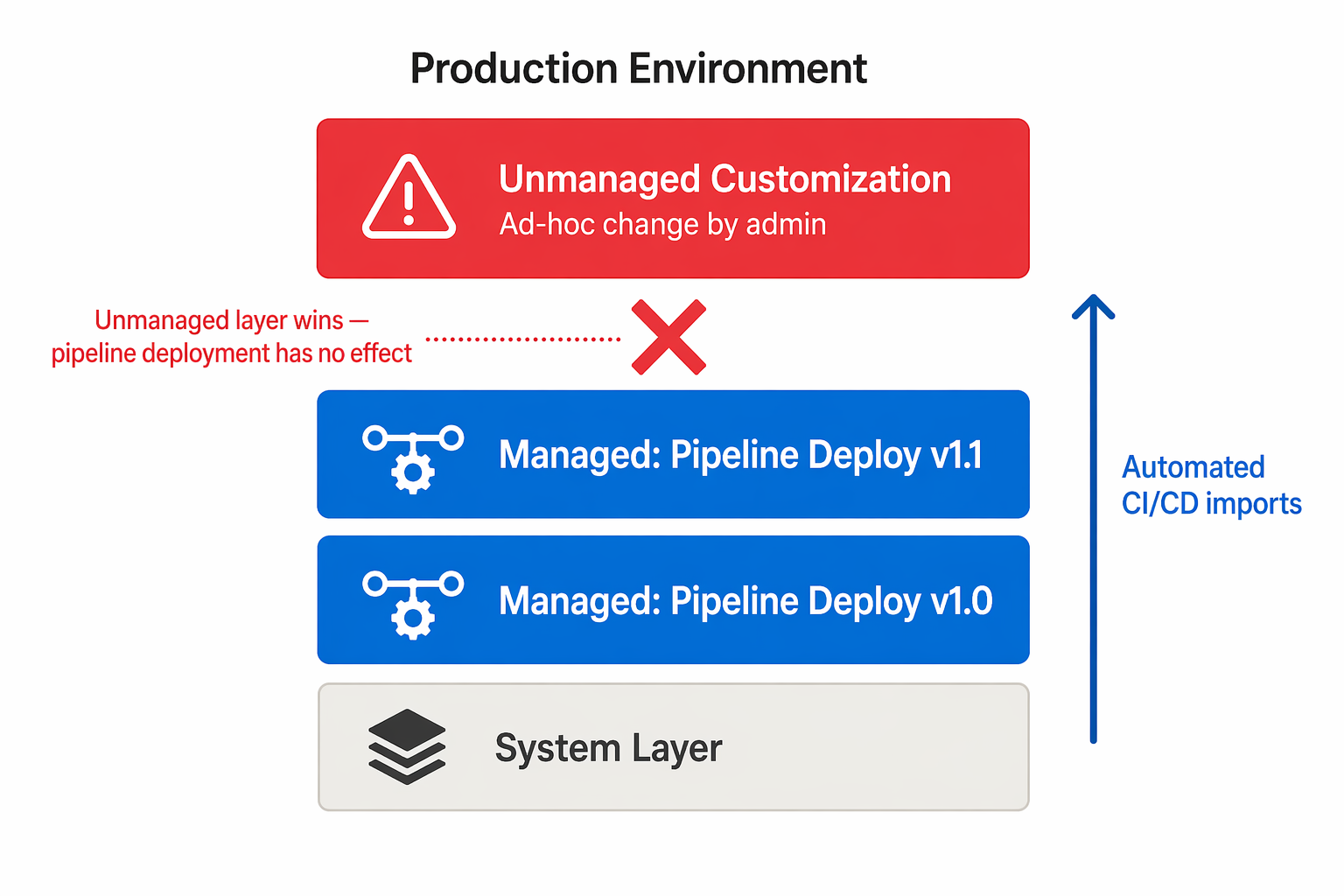
When your pipeline imports a managed solution, Dataverse stacks it as a layer in the target environment. The layering rules you encountered in manual deployments apply equally in CI/CD. However, automation amplifies the consequences of conflicts because deployments happen faster and more frequently.
Key layering behaviors to account for in pipelines:
- Top wins - For most components, the topmost managed layer defines runtime behavior. If another solution already customized a component, your import might not override it depending on layer order.
- Merge behavior - Model-driven app navigation, forms, and site maps use merge logic during import. Changes from multiple solutions are combined rather than one overwriting the other.
- Unmanaged customizations - Any unmanaged customization in the target environment sits above all managed layers and takes precedence. This situation means ad-hoc changes in production can silently override your pipeline deployments.
Important
Unmanaged customizations in target environments are the most common source of "the deployment worked but nothing changed" problems. Establish a governance policy that prevents unmanaged changes in test and production environments.
To handle layer conflicts in your pipeline:
- Use the Import Solution task's
overwriteUnmanagedCustomizationsparameter to force your managed solution to take precedence. - Check solution layers through the admin center after deployment to verify expected behavior.
- Segment your solutions to minimize overlap - keep shared foundation components in a separate base solution that's deployed first.
Configure connection references for automated deployment
In a manual import, the portal prompts you to select a connection for each connection reference. Automated pipelines can't pause for interactive input, so you must preconfigure these values in a deployment settings file.
A deployment settings file is an XML document that maps connection reference logical names to existing connection IDs in the target environment:
<connectionreferences>
  <connectionreference logicalname="cr_sharepointonline">
    <connectionid>shared-sharepointonl-xxxxxxxx-xxxx</connectionid>
  </connectionreference>
  <connectionreference logicalname="cr_dataverse">
    <connectionid>shared-commondataser-xxxxxxxx-xxxx</connectionid>
  </connectionreference>
</connectionreferences>
Create a separate deployment settings file for each target environment, since connection IDs differ between test and production. Store these files in your repository alongside your pipeline definition.
Tip
Retrieve connection IDs from the target environment by using Power Platform CLI: pac connection list --environment <environment-id>. Store these values as pipeline variables or secrets for dynamic injection.
Configure environment variables for automated deployment
Environment variables also need target-specific values. Include them in the same deployment settings file:
<environmentvariables>
  <environmentvariable logicalname="ev_apibaseurl">
    <value>https://api.contoso.com/v2</value>
  </environmentvariable>
  <environmentvariable logicalname="ev_featureflag_newui">
    <value>true</value>
  </environmentvariable>
</environmentvariables>
The import task reads this file and sets the current values for each environment variable in the target. This approach keeps sensitive or environment-specific configuration out of the solution package itself.
For secrets (API keys, connection strings), use the secret environment variable type. Set the value through the pipeline by using a secure variable rather than storing it in plain text in the deployment settings file.
Handle reference data
Some solutions depend on configuration data stored in Dataverse tables - lookup values, category definitions, or seed data. This reference data doesn't travel automatically with a managed solution.
Strategies for managing reference data in CI/CD:
| Approach | When to use |
|---|---|
| Configuration Migration Tool | Export reference data as a schema + data package and import it as a pipeline step |
| Environment variables | Store simple configuration values (URLs, feature flags) as environment variables |
| Pipeline data scripts | Use Power Platform CLI or custom scripts to upsert required records |
| Solution-aware configuration | For Dataverse table data that supports it, include rows in the solution via the "Add existing" component option |
For the Configuration Migration Tool approach, add an Import Data task to your pipeline after the solution import step. This ensures reference data is current in each target environment.
Transport non-solution-aware components
Not all Power Platform components are fully solution-aware. Some components require separate deployment steps outside the standard solution import:
| Component | Transport method |
|---|---|
| Power Pages sites | Use upload-paportal and download-paportal tasks. Deploy by using deployment profiles for environment-specific settings. |
| Dataverse plug-in packages | Build from source in CI pipeline. Include compiled packages in the solution. |
| Canvas app data connections | Re-establish after import by using connection references (don't hardcode connections). |
| Flow ownership | Reassign by using post-deployment scripts or service principal ownership. |
| Embedded canvas apps in forms | Verify after import. Some require manual reconnection. |
Plan your pipeline to include explicit steps for these components. A common pattern is to run the solution import first, then execute post-deployment scripts that handle non-solution components and final configuration.
Note
As Power Platform evolves, more components become solution-aware. Check current documentation when designing pipelines. A component that required manual transport six months ago might now travel in solutions automatically.