What is Azure Document Intelligence?
Tip
See the Text and images tab for more details!
Azure Document Intelligence is a cloud-based AI service in Microsoft Foundry that uses OCR and deep learning models to extract text, key-value pairs, selection marks, and tables from documents.
OCR captures document structure by creating bounding boxes around detected objects in an image. The locations of the bounding boxes are recorded as coordinates in relation to the rest of the page. Azure Document Intelligence returns bounding box data and other information in a structured JSON format that preserves the relationships from the original document.
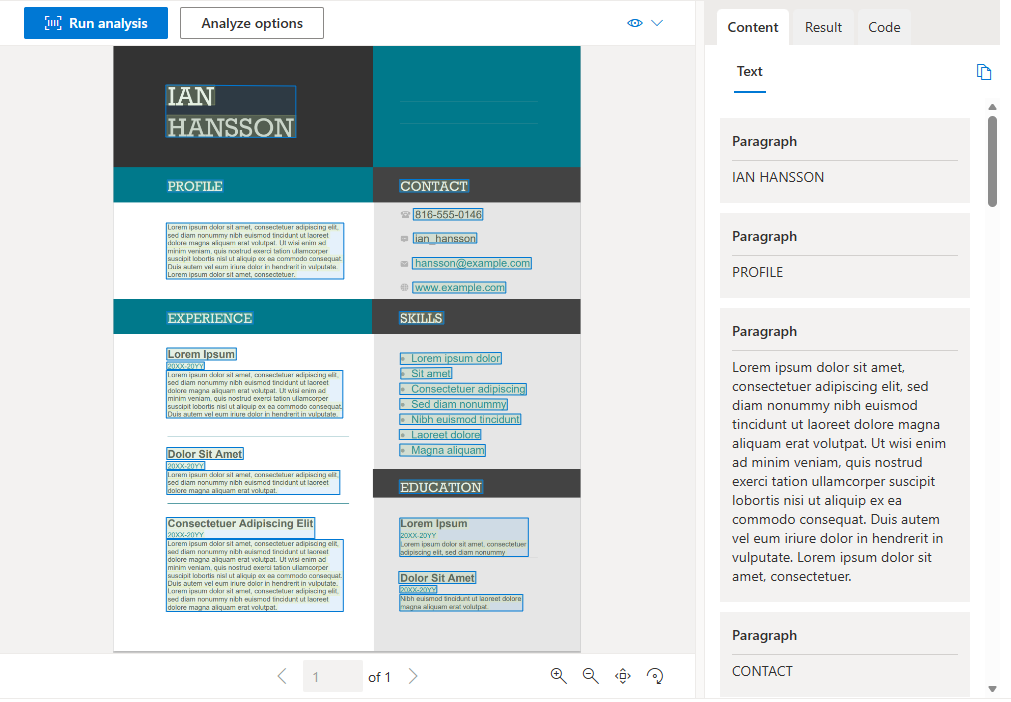
To build a high-accuracy document extraction model from scratch requires deep learning expertise, large amounts of compute, and long training times. Azure Document Intelligence provides underlying models already trained on thousands of form examples, so you can achieve high-accuracy data extraction with minimal effort.
Document Intelligence service components
Azure Document Intelligence is composed of three categories of models:
Document analysis models: Extract text, structure, tables, and selection marks from documents. The read model extracts text and detects languages, while the layout model adds table and structure extraction. You'll explore these models in detail in the Use prebuilt models unit.
Prebuilt models: Extract information from common document types — such as invoices, receipts, tax forms, ID documents, and more — without any training required. You'll see the full list of available prebuilt models in the Use prebuilt models unit.
Custom models: Extract data from forms specific to your business using your own labeled datasets. Options include custom template models (fast and cost-effective for fixed layouts), custom neural models (higher accuracy for varying layouts), composed models, and custom classifiers. You'll learn about training and using custom models in the Train and use custom models unit.
Access Document Intelligence services
You can access Azure Document Intelligence in several ways:
- REST API: Call the service directly using HTTP requests.
- Client library SDKs: Use SDKs for Python, C#, Java, and JavaScript.
- Document Intelligence Studio: An online tool for visually exploring, testing, and building Document Intelligence solutions.
- Microsoft Foundry portal: Integrate Document Intelligence with other Foundry tools.
Tip
This module's exercise focuses on the Python SDK. The underlying REST services can be used by any language.
Create a Document Intelligence resource
To use Azure Document Intelligence, you need an Azure resource. You can use either:
- A Foundry resource: A multi-service subscription that provides access to multiple AI services under a single endpoint and key.
- An Azure Document Intelligence resource: A single-service resource used only with Document Intelligence.
Note
Create a Foundry resource if you plan to access multiple Foundry tools under a single endpoint and key. For Document Intelligence access only, create a dedicated Document Intelligence resource.
Input requirements
Azure Document Intelligence works on input documents that meet these requirements:
- Format must be JPEG, PNG, BMP, PDF (text or scanned), or TIFF. The read model also accepts Microsoft Office file formats.
- File size must be less than 500 MB for the standard tier and 4 MB for the free tier.
- Image dimensions must be between 50 x 50 pixels and 10,000 x 10,000 pixels.
- PDF documents must have dimensions less than 17 x 17 inches (A3 paper size).
- PDF documents must not be password-protected.