Use prebuilt models
Prebuilt models in Azure Document Intelligence enable you to extract data from common form types without training your own models. Microsoft trains these models on large numbers of sample documents, so you can expect accurate and reliable results for standard document types.
Document analysis models
Before looking at the domain-specific prebuilt models, it's important to understand the document analysis models that underpin them.
Read model
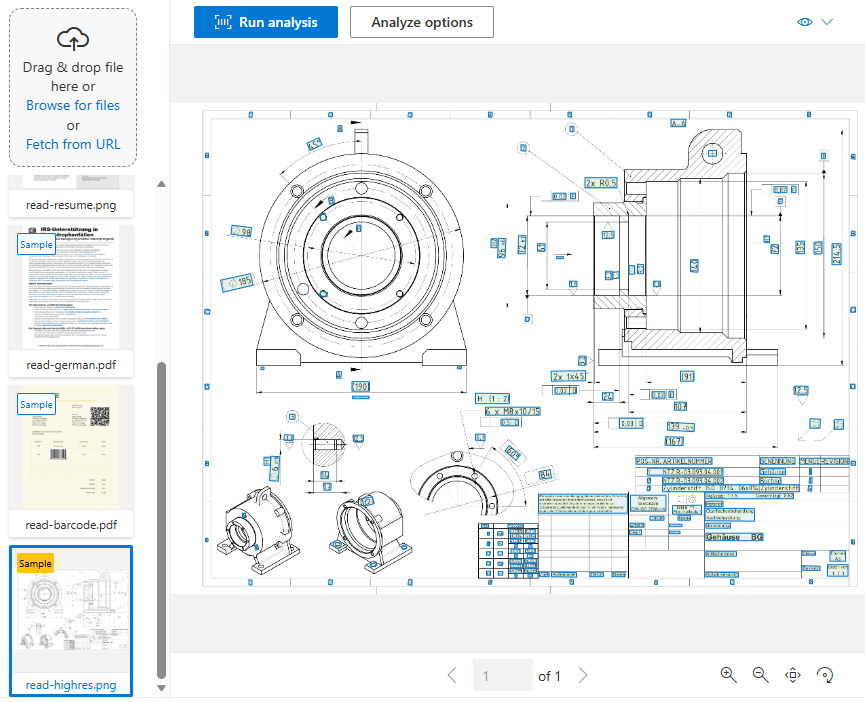
The read model extracts printed and handwritten text from documents and images. It detects the language of each text line and classifies whether text is handwritten or printed. The read model is used as the foundation for text extraction in all other Document Intelligence models.
For multi-page PDF or TIFF files, you can use the pages parameter in your request to specify a page range for analysis.
The read model is ideal when you want to extract words and lines from documents with no fixed or predictable structure.
Layout model
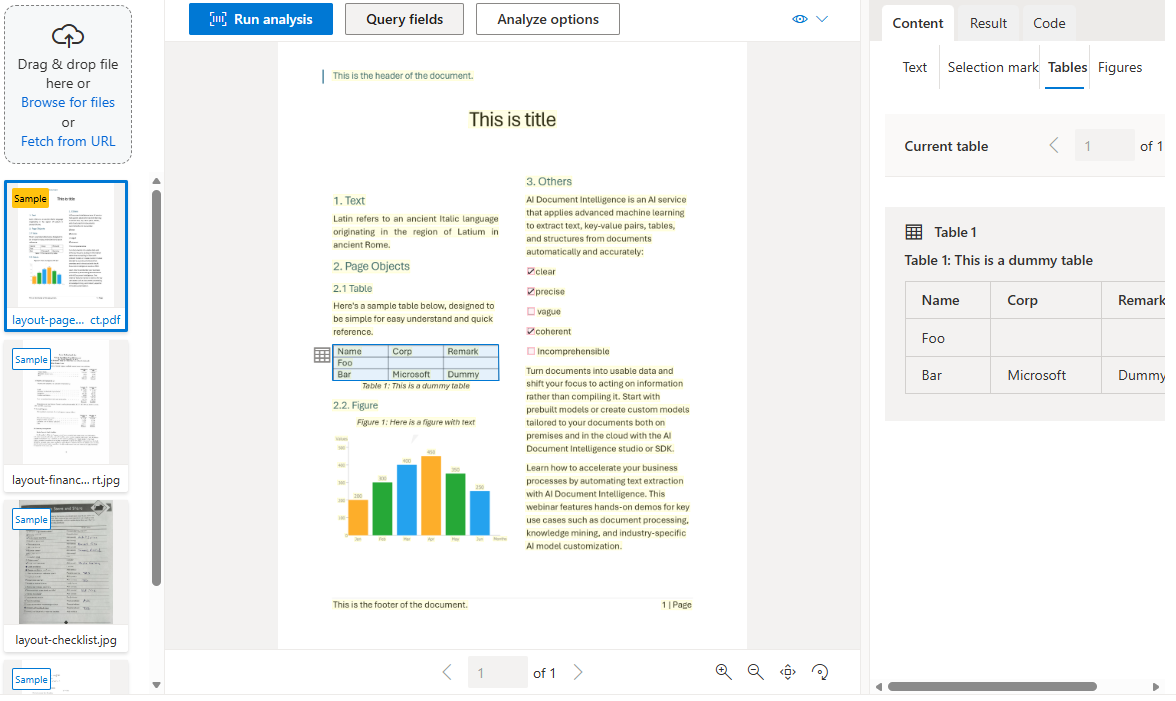
The layout model extends the read model's text extraction with detection of selection marks, tables, and document structure information. It also supports an optional keyValuePairs feature to extract key-value pairs.
When you digitize a document, it might be angled, or tables might have complex structures with merged cells or incomplete rows. The layout model can handle these difficulties. Each table cell is extracted with its content, bounding box position, and row/column indexes.
Selection marks (checkboxes and radio buttons) are extracted with their bounding box, confidence level, and whether they're selected.
Note
The general document model was available in earlier versions of Document Intelligence, but was deprecated in the 2023-10-31-preview release. Its functionality for key-value pair and entity extraction has been incorporated into the layout model and other features.
Prebuilt models for specific document types
Azure Document Intelligence includes prebuilt models trained on specific document types. The following prebuilt models are some examples available to extract fields from common business documents:
Financial and legal documents
| Model | Description |
|---|---|
| Invoice | Extracts customer name, vendor details, purchase order number, invoice and due dates, billing and shipping addresses, line items, and totals. |
| Receipt | Extracts merchant details, transaction date and time, line items, and totals. Supports single-page hotel receipt processing. |
| Bank statement | Extracts account information, beginning and ending balances, and transaction details. |
| Check | Extracts payee, amount, date, and other relevant information. |
| Pay stub | Extracts wages, hours, deductions, net pay, and other common pay stub fields. |
| Credit card | Extracts payment card information. |
| Contract | Extracts agreement and party details. |
US tax documents
| Model | Description |
|---|---|
| Unified US tax | A single model that extracts from any supported US tax form type. |
| W-2 | Extracts taxable compensation details. |
| 1098 and variations | Extracts mortgage interest and related details. |
| 1099 and variations | Extracts income from various sources. |
| 1040 and variations | Extracts individual income tax return details. |
US mortgage documents
| Model | Description |
|---|---|
| 1003 (URLA) | Extracts loan application details. |
| 1004 (URAR) | Extracts information from property appraisals. |
| 1005 | Extracts validation-of-employment information. |
| 1008 | Extracts loan transmittal details. |
| Closing disclosure | Extracts final closing loan terms. |
Personal identification documents
| Model | Description |
|---|---|
| ID document | Extracts details from US driver's licenses, European Union IDs and driver's licenses, and international passports. Includes names, dates of birth, document numbers, and endorsements or restrictions. |
| Health insurance card | Extracts common fields from US health insurance cards. |
| Marriage certificate | Extracts certified marriage information. |
Important
The ID document model extracts personal information covered by data protection laws in most jurisdictions. Ensure you have the individual's permission to store their data and that you comply with all applicable legal requirements.
Features of prebuilt models
Prebuilt models are designed to extract different types of data from documents. These features include:
- Text extraction: All prebuilt models extract lines and words from handwritten and printed text.
- Key-value pairs: Spans of text that identify a label and its response. For example, Weight and 31 kg.
- Selection marks: Checkboxes and radio buttons, including whether they're selected or not.
- Tables: Data in cells, including the number of columns and rows, column and row headings, and merged cells.
- Fields: Models trained for a specific form type identify a fixed set of fields. For example, the invoice model extracts
CustomerNameandInvoiceTotal.
When to use prebuilt vs. custom models
Prebuilt models cover the most common document types. If you have an industry-specific or unique form type, you might get more accurate results with a custom model. However, custom models require time and sample data to train. Always check whether a prebuilt model exists for your scenario before investing in custom model development.