Extract event log data
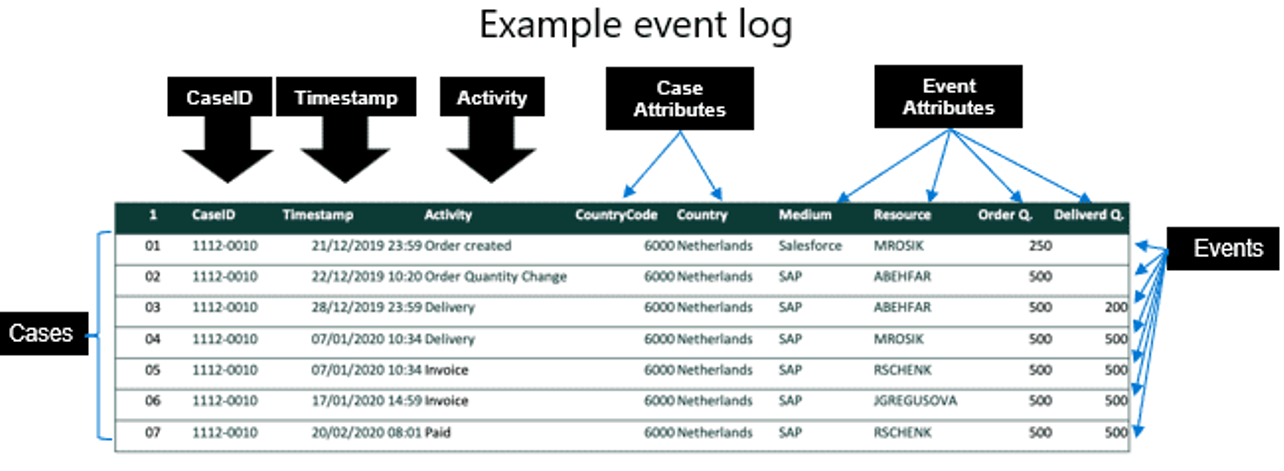
The event log data that you need to ingest into process mining must provide the required information. Also, it can contain more data to allow for deeper analysis in process mining. The event log contains one or more cases, each case documenting the steps that make up the process that you're analyzing.
Cases consist of the collection of events that are part of the case. A single case most likely has several events. The events might run consecutively or concurrently. The events that make up a complete case might come from multiple different systems that are all involved in the business process that you intend to analyze with process mining.
Events have certain attributes to identify data points for evaluation. The event log data must contain case ID, activity name, and start/end timestamps to allow process mining to analyze the data. Case ID is the most important component because it identifies the object that the process acts on, such as an Order ID, Patient ID, or Part ID. The system uses the case ID to correlate events across the different steps and systems that are involved in the process. In addition to the required data, you can and should provide more data to help the analysis process, such as resource, event-level attributes, case-level attributes, and financial information.
Mandatory fields
The three required fields for each case are:
Case ID - Represents an instance of the entire process. This field might require mapping if one system of record doesn't contain the field. For example, you might need to match CRM ID to internal Order ID.
Activity name - Are the steps in the process. The names describe each step, and they must be unique between different systems. For example, if the name Process Order is in two systems, it's considered one step. In this instance, consider entering the system name or something else to make it unique.
Timestamps - Indicate the exact time that an event or activity took place. Some systems might have an activity that indicates the start time and an end activity that's the end timestamp; however, they might not be on the same row.
Other fields
More fields bring more data points, and with more data points, process mining can evaluate more contributors to a process.
Resources - This field indicates a technical resource or a human resource who's implementing a specific event.
Event Level Attributes - This field contains extra analytical attributes and a different value for each event. Event-level attributes might include department, source, medium, or order amounts.
Case Level Attributes (first event) - This field contains an extra attribute, which analytically considers a single value for each case. For example, the system might identify a region attribute in the first event of the case. The region is the same across all events in the case. While the system stores the values as-is (including minor variants), by using the case-level attribute interpretation mechanism, process mining interprets all events to have this same value. Additionally, the system takes a Case Level Attribute (last event) from the chronologically last event in the case.
Financial per event - This field contains a fixed cost/revenue/numeric value that changes for each activity that the system performs, such as courier service costs. The system calculates financial value as a sum (mean, minimum, maximum) of the financial values for each event.
Financial per case (first event) - This field contains an extra numeric attribute that's considered to be a single value for each case, like the Case Level Attribute (first event). It's the value that appears in the first event that the system uses for all events in the case. This attribute also uses the case-level attribute interpretation mechanism. Additionally, the system takes a Financial per case (last event) from the chronologically last event in the case.
Case-level attributes on events
Several types of attributes are available in event logs. Case-level attributes appear on an individual event. With the collection of events that make the case, you need to properly identify and map that case-level attribute. If you're certain that all events in the same case have the same value, the specific field type doesn't matter (first event or last event). However, when it's possible or probable that slight differences might occur in the attribute details on an individual event, you can define which event from the case should be the defined case attribute.
In the following tables, the resulting case attribute Region is the same: South.
Case attribute (first event)
| CaseID | Event | Resource | Region |
|---|---|---|---|
| 123 | A | User1 | South |
| 123 | B | System3 | South |
| 123 | C | User7 | East |
| 123 | D | User2 | East |
Case attribute (last event)
| CaseID | Event | Resource | Region |
|---|---|---|---|
| 123 | A | User1 | West |
| 123 | B | System3 | South |
| 123 | C | User7 | East |
| 123 | D | User2 | South |
Use Copilot to help identify data for mapping
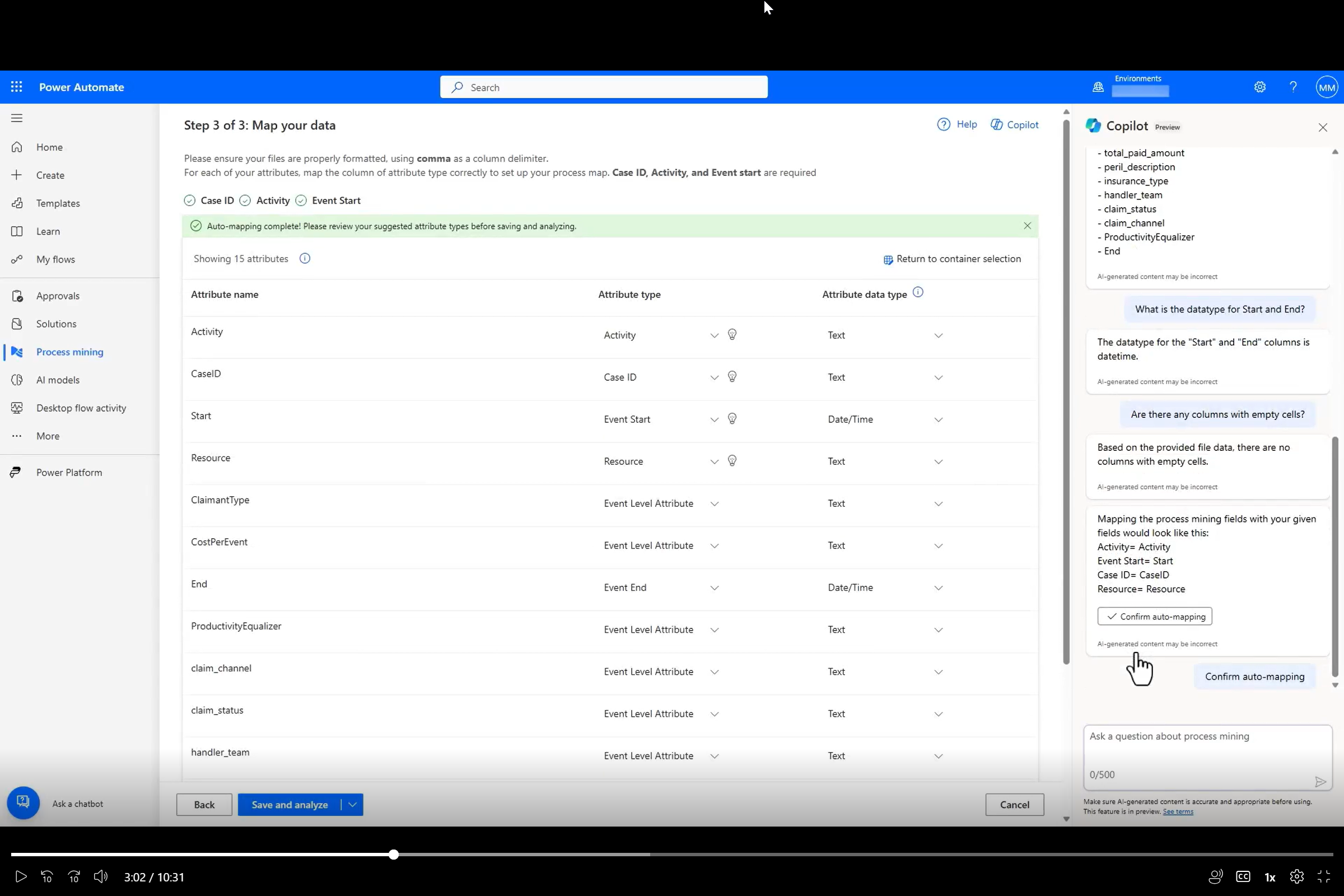
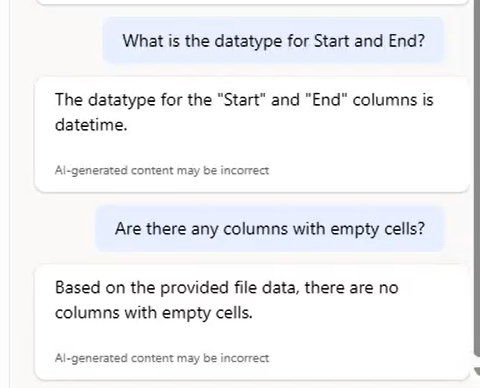
While you're evaluating and ingesting data, Microsoft Copilot can answer your questions about the process, such as which columns are in the process.
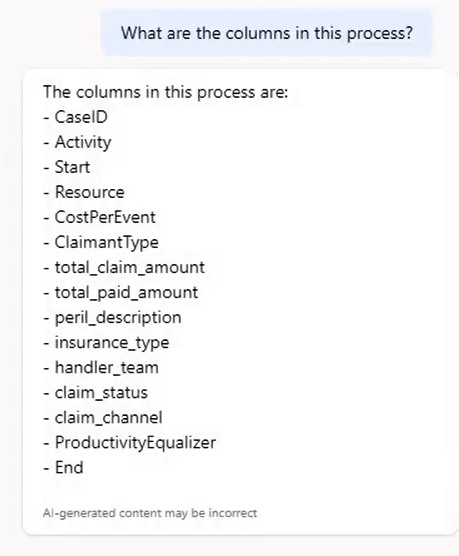
Copilot can answer questions about the data.
When you're ready to map the attribute type and the attribute data type, Copilot offers mappings for you. With a simple action, you can approve the suggested mappings and the system automatically maps them for your review.