Create multi-app deliverables
So far you have delegated work that came back as sorted mail, a recap, and a set of action items. Much of your week, though, ends in a deliverable: a status report that pulls numbers from three places, a deck built from this quarter's real work, a board that shows where a rollout stands. Building one means gathering, analyzing, assembling, and formatting, usually across several apps. That's the kind of work you can hand to Cowork end to end from a single request.
Describe the deliverable, not how to build it
By now, the move is familiar: name the outcome and the sources, and let Cowork plan the steps. A deliverable just raises the stakes, so the detail matters more.
"Draft a one-page status report on the Beacon rollout to Northwind Traders. Pull the latest from my email threads, the last two project syncs, and the Beacon Rollout Plan in my Beacon OneDrive folder. Cover what shipped, what's at risk, and the decision I need to make. Save it as a Word doc I can review."
That request names a finished thing (a one-page report), the sources to build it from, and what it must cover. Cowork gathers from each source, organizes what it finds, and assembles the document. Here's an example of what it hands back:
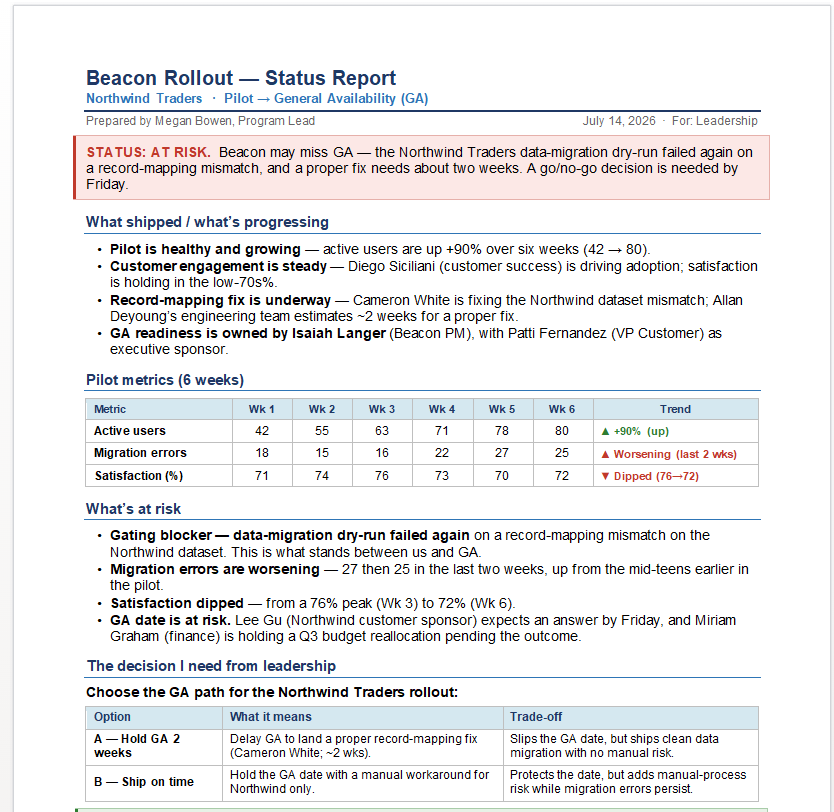
Notice what makes this useful: it isn't a template. Every figure and every name came from your own threads, meetings, and metrics. Cowork gathered them, reconciled the ones that overlapped, and wrote the summary around the decision you actually face.
The same request can end in a different format depending on what you need. Ask for a deck instead of a doc, and Cowork builds slides. Ask it to crunch the numbers first, and it can work through the pilot metrics in a spreadsheet before writing the summary. You describe the destination; Cowork picks the route.
Outside context can be part of the same job, too. Add a research step to the request—"...research how comparable rollouts have handled a mid-pilot data-migration slip, and fold the findings into the 'what's at risk' section with sources I can check"—and Cowork does the digging, tracks where each point came from, and works it into the deliverable instead of sending you off to gather it separately.
Go beyond a document
A deliverable doesn't have to be an Office file. From the same work context, Cowork can build an interactive web page—a project board, a status dashboard, a visual tracker—rendered as something you can open, click through, and share.
- "Take the Beacon rollout and build an interactive project board I can share with the team. Group the work into Not started, In progress, and Done, pull the owners and due dates from our recent threads and syncs, and flag anything blocked or overdue. Save it so I can send a link."
From that one request, Cowork assembles a board out of your real work:
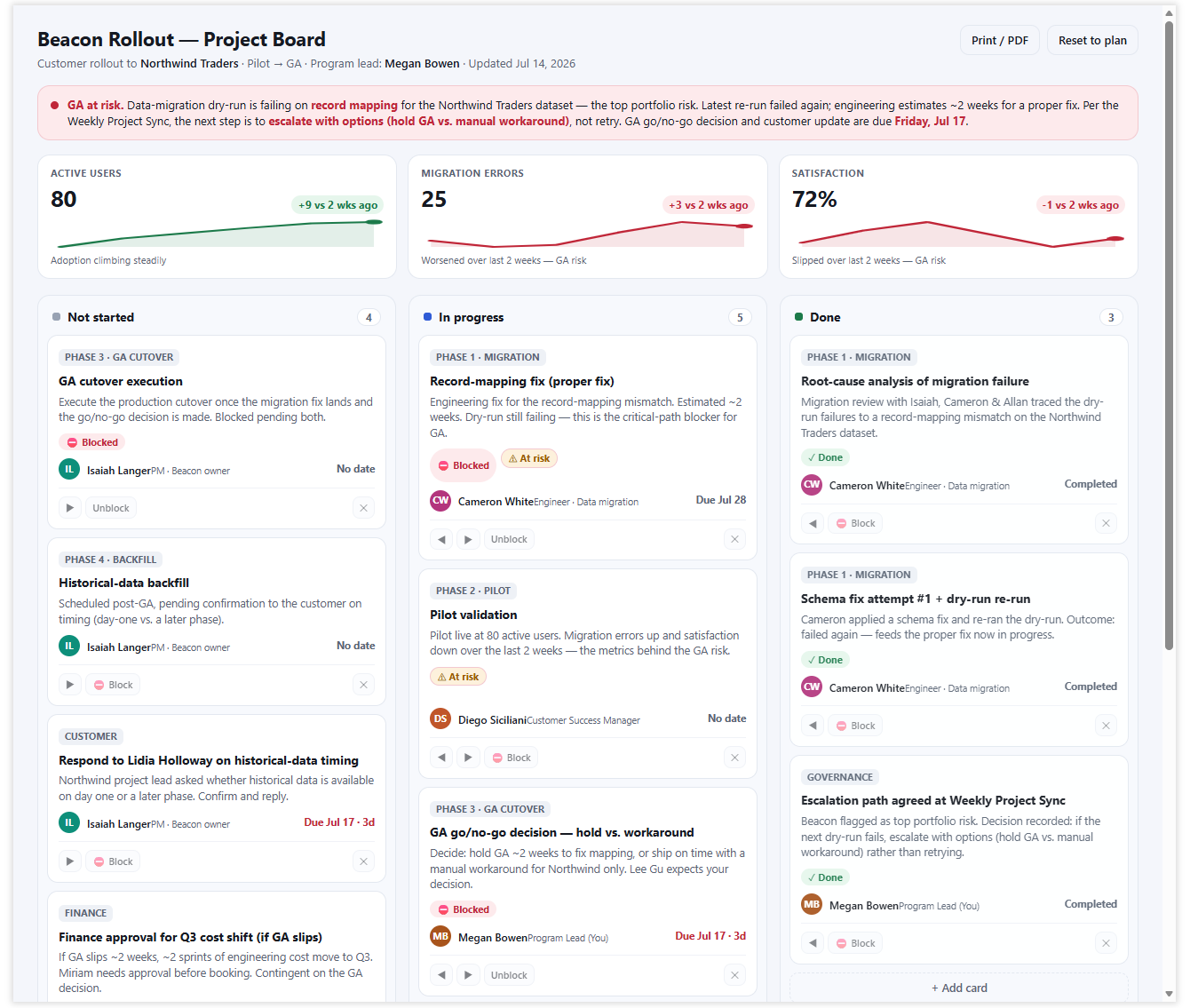
Where a chat could describe what a project board might contain and help you imagine it, Cowork hands you the board itself—built from your work and saved as a page you can share.
Tip
When you want a visual, interactive result, say so directly: ask for a "dashboard," a "board," or an "interactive page." Naming the format helps Cowork choose the correct output.
Review the result before you rely on it
A first result is a draft, not a final answer. Because Cowork pulls figures and names from across your work, it can misread a thread, miss a newer number, or assume the wrong owner. Before you share a deliverable or approve an action, check the parts that matter: the metrics, the names, and the decision it's steering you toward.
Human judgment still matters in AI. You control the result, and you're accountable for the content you produce. Cowork does the gathering and assembling, but the review—and the decision to send—stays with you.
When something's off, refine instead of starting over. Stay in the same conversation and correct just the part that's wrong:
- "The migration-error figure is stale—pull the latest from Tuesday's sync and update the metrics table and the 'what's at risk' section to match."
Cowork keeps the rest of the deliverable and reworks only what you flagged. A short correction is faster than rewriting the whole prompt and running it again.
Why this is worth delegating
Across every deliverable here, what came back wasn't an answer about the work—it was the work itself. That's what makes a deliverable worth delegating: you get a finished artifact, not a description of one, built from your actual work and saved where you can open it.
Try these prompts
Each of these asks for a complete deliverable. Start with a short version, then name your real sources, choose the format, and review what comes back before you share it.
Short and reusable:
- "Build a one-page status report on [project] from my recent email, meetings, and files. Cover progress, risks, and any decisions needed, and save it as a doc I can review."
- "Build an interactive dashboard for [project or team]: current work grouped by stage, owners and due dates from my recent threads, and anything overdue flagged. Save it as a page I can share."
Fully loaded:
- "Build a one-page report on [project or topic] from my recent email, meetings, and files. Cover progress, risks, and any decisions needed, and research [competitor or market question] to add outside context with sources. Save it as a doc I can review before sharing."