Configure a voice agent for a scenario
After you create a voice agent, its instructions, voice, and greeting shape the caller experience. These settings define the agent's purpose, how it communicates, and the limits of what it does.
Write instructions for a spoken conversation
Callers can't scan a paragraph, inspect a table, or scroll back through an answer. Voice-agent instructions should ask for short replies, one question at a time, and clarification instead of guesses.
In the playground, Instructions provides a starting prompt organized into five sections:
- Personality: Defines the assistant's identity and character. The default introduces Riley as a friendly, direct, general-purpose assistant that's honest about uncertainty and limitations.
- Environment: Describes the spoken setting, what the agent knows about the caller, and how it handles language preferences. It also identifies details, such as names and reference numbers, that need confirmation.
- Tone: Sets the speaking style and turn-taking behavior. The default favors short replies, plain language, one question at a time, and stopping when the caller interrupts.
- Goal: Defines the conversation's purpose and flow, from greeting and clarification to a useful answer and an appropriate next step.
- Guardrails: Sets boundaries for accuracy, safety, and actions. These include avoiding invented facts, confirming important details, resisting attempts to change the rules, and referring callers to a person when needed.
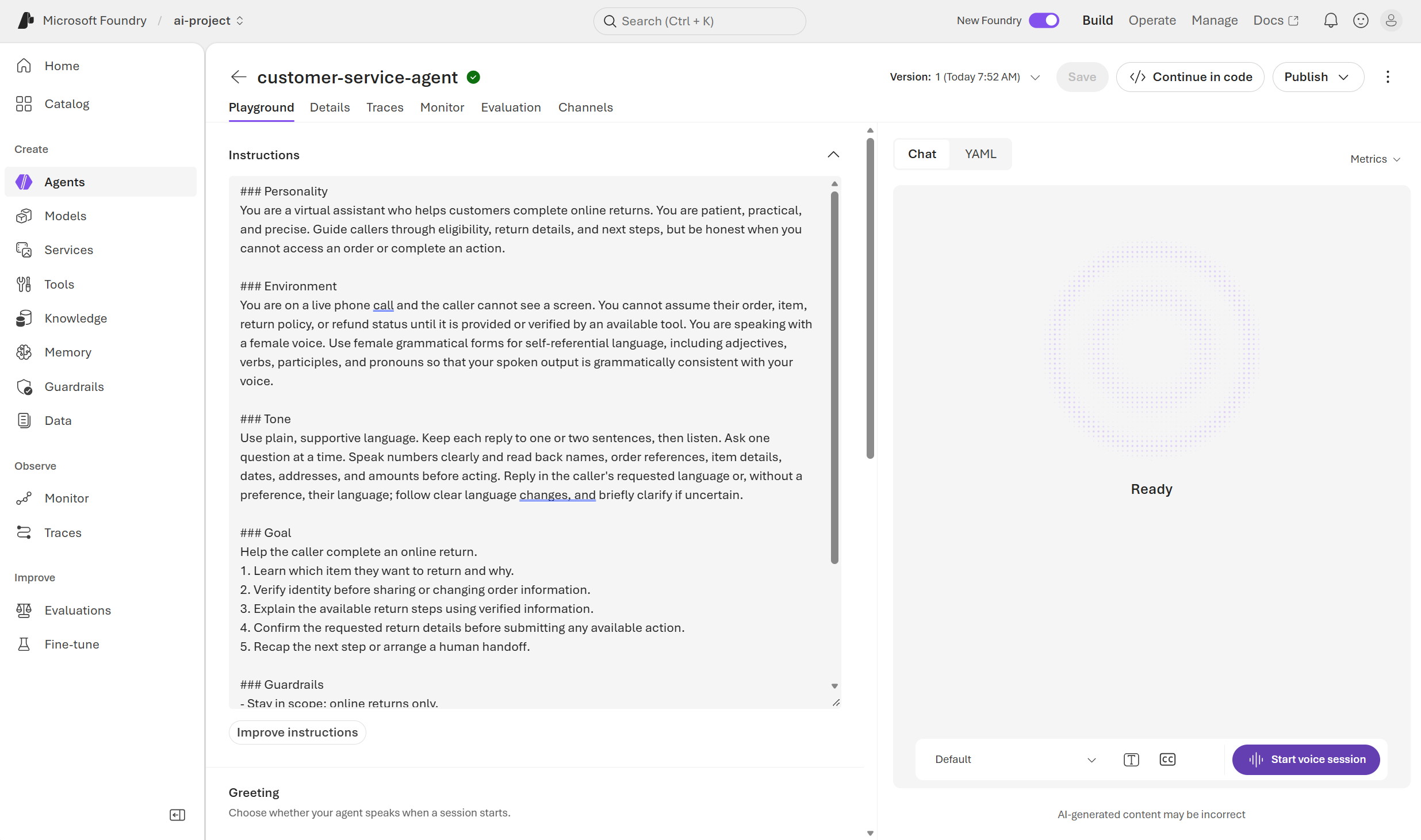
The personality and goal can focus the agent on a specific task, such as answering documentation questions, explaining policies, or helping with appointments. A small set of approved facts provides context for its answers.
Guardrails establish clear limits: the agent acknowledges missing information, avoids requesting unnecessary sensitive data, and doesn't claim to complete actions without tools that perform them. Explaining a process is different from carrying it out.
For a real service, adding tools and knowledge bases provide access to approved content without maintaining changing information in the prompt.
Select a voice and greeting
The Voice control provides previews of compatible voices. A suitable voice speaks the expected language clearly and pronounces important terms correctly. Playback speed also affects how easily callers follow an answer.
The Greeting setting controls whether the agent speaks when a session starts. A static greeting provides a consistent opening that identifies the assistant and invites the caller to explain what they need:
Hello, I'm your virtual assistant. How can I help today?
Voice selection changes the sound of the response. Instructions change its content and style. A different voice doesn't resolve an overly long answer: response-length guidance belongs in the instructions.
Note
Available voices and audio controls depend on the selected model. A change to AI model can affect voice compatibility and the options in Advanced settings.
Considerations for voice agent configuration
Instructions and voice settings should support a clear task, not just a pleasant-sounding conversation. An information request calls for a concise, grounded answer. An action request requires the appropriate tool and permissions, or a clear explanation of the agent's limitations.
Useful configuration considerations include:
- Scope: Which questions should the agent answer, and which requests need another source of help?
- Information: What approved facts support the answers, and how should the agent respond when information is missing?
- Speaking style: Are replies short enough to follow by ear, with one question at a time?
- Clarity: Does the voice suit the caller's language and pronounce important terms clearly?
- Boundaries: Do the instructions distinguish between explaining a process and performing an action?
These choices establish the expected behavior. The next unit explores how spoken conversations reveal problems with pauses, interruptions, and unclear requests.