Test and improve a voice agent
After you configure a voice agent, spoken conversations help you assess both its answers and the caller experience. A useful response needs accurate information, clear speech, and appropriate timing.
Test realistic conversations
A small, repeatable set of conversations helps reveal whether the agent follows its instructions and handles natural speech. Useful test cases include:
- Straightforward questions with a known answer.
- Ambiguous requests that need clarification.
- Questions outside the agent's knowledge or scope.
- Mid-sentence pauses while the caller thinks.
- Interruptions that correct or change a request.
- Tool calls that succeed, fail, or return no relevant information.
For example, a caller might pause before giving an important detail or correct a date while the agent is speaking. The agent should allow time for the caller to finish and respond to the updated information rather than continue with an outdated assumption.
Typed questions help assess instructions and answer quality, but they don't exercise incoming audio, turn detection, or spoken delivery. Audio testing also reveals unclear pronunciation, overly long replies, and unnecessary requests for sensitive information.
Understand conversation timing
Turn detection decides when the caller finishes speaking. In Advanced settings, Azure semantic uses the meaning of spoken content to detect turns. Basic uses audio volume and timing controls, including how much silence ends a turn.
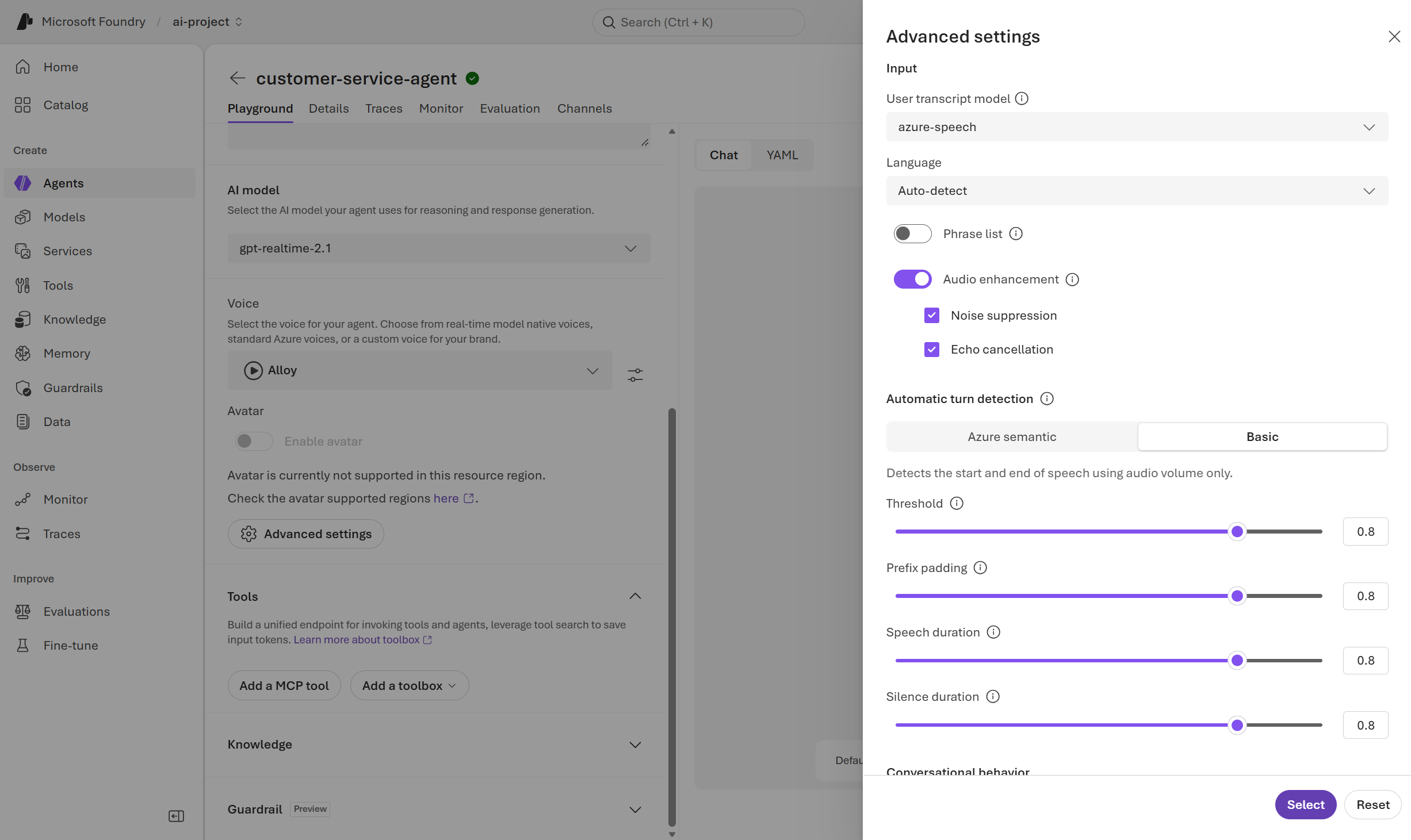
Default settings provide a starting point, but suitable timing depends on how callers speak. With Basic detection, a longer Silence duration allows more time for mid-sentence pauses, but can also delay the response after the caller finishes. A shorter duration reduces that wait but risks treating a pause as the end of a request.
Tool execution and response generation can also create pauses. An Interim response is a brief acknowledgment, such as "One moment while I check," that covers a wait when supported by the model and voice. It signals that work is in progress, not that an action succeeded.
Review and improve the experience
The transcript and recorded conversations in Traces, when available, help explain what happened during a session. Tool activity can reveal whether the agent requested the right information, received a usable result, and accurately described the outcome.
With a native speech-to-speech model, the readable transcript is a separate output. It doesn't replace the model's direct audio processing, so the transcript alone isn't enough to assess the spoken interaction.
Different symptoms point to different configuration areas:
- Long or unfocused answers: Response-length guidance and task scope in Instructions.
- Premature replies or excessive waits: Turn detection settings in Advanced settings.
- Hard-to-understand speech: Voice selection and supported playback controls.
- Unexplained pauses during tool use: Tool latency and supported interim responses.
Answer quality and conversation quality need separate assessment. An accurate answer can still be difficult to follow if it's too long or arrives before the caller finishes. A natural-sounding reply can still contain unsupported information or claim an action that didn't occur.
Comparisons are more useful when only one setting changes and the same test cases are repeated. Each save creates a new agent version, and playground sessions use the latest saved settings. Tracking the tested version helps distinguish configuration changes from differences between conversations. Monitoring over time can reveal knowledge gaps, unreliable tools, and timing that needs refinement.
For model-specific controls, see Configure a voice agent.