Compare server, cloud, connector, and agent extension options
Unit 3 compares options that run inside an app or on a device. This unit turns to options that run on the server, in the cloud, through a connector, or inside an agent.
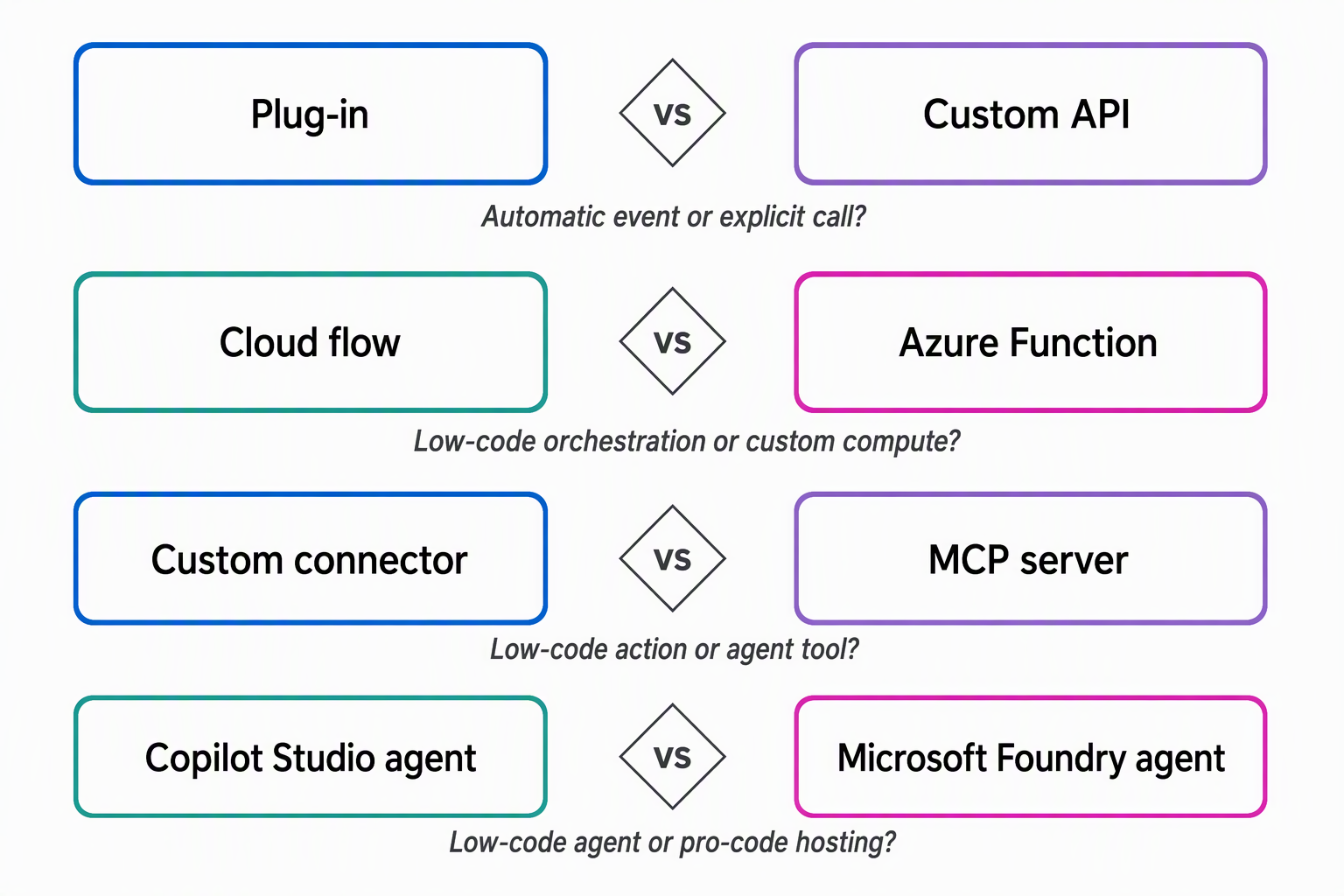
Decide between an automatic plug-in and an explicit custom API
A plug-in is server-side code registered against the event framework. It reacts the moment a specific Dataverse message fires, whether that message comes from a model-driven form, a cloud flow, or an external integration. In the equipment-provisioning scenario, a plug-in registered on the request table's update step enforces eligibility rules on every change to a request record. That holds regardless of which app or process made the change.
A custom API takes the opposite stance: it's a new named operation you define, and callers invoke it on purpose rather than triggering it incidentally. Suppose a mobile app, a cloud flow, and another team's system all need to ask whether an employee is eligible for a device category.
Exposing that logic as a CheckEligibility custom API gives every caller one reusable contract instead of three separate implementations. A custom API can be global or table-bound, which makes it fit named operations that callers choose to invoke.
The deciding question is whether the logic must fire automatically whenever a record changes, no matter who's responsible, or whether it's something a caller deliberately asks for. Eligibility enforcement on every update favors the plug-in. A reusable eligibility check other systems call on demand favors the custom API. It's also common to pair them, because a custom API often uses a plug-in behind the scenes.
Decide between a cloud flow and an Azure Function
A cloud flow orchestrates a multi-step process across connectors with little or no custom code, triggered manually, by an event, or on a schedule. The notify-approve-fulfill sequence in the equipment-provisioning scenario is a natural fit for a cloud flow. Each step maps to a connector action, and the whole sequence stays visible without custom integration code.
An Azure Function is what you reach for only when a cloud flow's built-in actions genuinely can't do the job. Suppose the scenario needs a proration calculation that's too involved for a cloud flow's expression language. That calculation can live in a function that the cloud flow calls as one step in its sequence. The function doesn't replace the cloud flow's orchestration. It supplements the one step the cloud flow can't handle on its own.
A cloud flow isn't the only automation concept in this landscape. In Copilot Studio, an agent can work with topics or workflows, and those workflows stay distinct from a Power Automate cloud flow even though both describe multi-step automation.
Decide between a custom connector and an MCP server
A custom connector wraps a REST API so its operations show up as ordinary triggers and actions inside low-code tools, described through an OpenAPI 2.0 definition or an exported API collection. The equipment-provisioning scenario already has an external availability service with a REST API.
Wrapping that service as a custom connector lets a cloud flow, an app, or a conversational agent call it the same way they call any prebuilt connector. No caller needs to reinvent the integration. Building the connector once in Power Automate makes it available in Power Apps and Copilot Studio too.
An MCP server takes a different approach, aimed at agent-oriented tool use rather than low-code actions and triggers. Dataverse exposes itself as an MCP server through the standard /api/mcp endpoint, and the core tool surface for querying data, reading schema details, and creating or updating records is generally available. Only additional, newer tools sit behind a separate preview opt-in, reached through the /api/mcp_preview endpoint.
Suppose several agents need to query live request data. Defining that capability once as an MCP tool means every agent discovers and consumes the same definition instead of carrying its own bespoke integration.
The distinction comes down to who's calling and how they expect to discover the capability. A caller that works in triggers and actions, such as a cloud flow or a canvas app, is better served by a custom connector. A caller that's an agent reasoning over which tool to invoke is better served by an MCP server.
Decide between a Copilot Studio agent and a Microsoft Foundry agent
A Copilot Studio agent is built and published through a low-code studio, combining instructions, knowledge, and tools. It can reason over a conversation or a task and publish across channels like Teams or a website.
A coordinator who wants a conversational assistant that reads request details, checks eligibility through a tool call, and summarizes a recommendation in plain language is well served here. The authoring experience is graphical, and publishing to a channel like Teams doesn't require building a hosting environment from scratch.
A Microsoft Foundry agent, built and run through Foundry Agent Service, is the pro-code path when the comparison calls for one. Instead of composing an agent through a low-code studio, you bring your own orchestration code and framework as a hosted agent. Microsoft Foundry then provides the managed endpoint, scaling, identity, and observability around it. That full control matters when the equipment-provisioning scenario grows beyond a single conversational assistant and needs custom orchestration across multiple data sources.
The decision mirrors the cloud-flow-versus-function choice earlier in this unit: start with the low-code agent builder, and move to the pro-code, hosted path only when the orchestration logic genuinely outgrows what a low-code agent can represent.
Compare all eight options at a glance
Four decisions, eight options. The table below puts them side by side so you can match a requirement to an option in one pass.
| Option | Primary use case | When to reach for it | Key limitation |
|---|---|---|---|
| Plug-in | Server-side logic that must run automatically on a Dataverse event | Enforcing a rule on every record change, regardless of caller | Requires developer skill. Synchronous steps must stay fast |
| Custom API | An explicit, reusable, intentionally invoked operation | Multiple callers need one shared contract for the same logic | Must be created as an Action to work through the Dataverse connector in a cloud flow |
| Cloud flow | Low-code orchestration across connectors | A multi-step business process spans several systems | Not suited to complex calculations. High volume can hit service limits |
| Azure Function | Custom, code-first compute | A cloud flow's built-in actions can't express the logic needed | Code-first with fewer prebuilt connectors. An addition to a cloud flow, not a default |
| Custom connector | Wrapping a REST API for low-code triggers and actions | You already have a usable REST API without a prebuilt connector | Needs an OpenAPI 2.0 definition or an exported API collection. OpenAPI 3.0 definitions aren't supported |
| MCP server | A discoverable tool surface shared across agents | Several agents need the same tool defined once, centrally | Requires generative orchestration in Copilot Studio to consume |
| Copilot Studio agent | Low-code conversational or task agent | A conversational assistant needs to reason over a goal and publish to a channel | Capabilities and billing vary by how the agent is configured |
| Microsoft Foundry agent | Pro-code, full-control agent hosting | Custom orchestration or multi-source logic outgrows a low-code agent | The hosted, pro-code path adds custom code and compute to maintain |
Reflect: The equipment-provisioning system is being extended to handle software license requests. One requirement adds a nightly allowance recalculation that's too complex for a cloud flow expression. Another asks three internal chat assistants to share one live request-status lookup. For each requirement, decide which extension option you'd reach for, and name the option you'd rule out and why.
Server, cloud, connector, and agent options now give you a decision framework for every piece of custom logic in the equipment-provisioning system. What's still missing is how all of these pieces, client components and server logic alike, travel together from one environment to another, which is where the module turns next.