Package extensions in Power Platform solutions
Units 2 through 4 worked out where each piece of equipment-provisioning logic runs: a client script, a PCF device picker, an eligibility plug-in, a custom API, a cloud flow, a custom connector. Now that those placement decisions are made, this unit explores how all of them package together and travel from your development environment to test and production as one coherent unit.
Solutions: packaging every extension option into one moving unit
A solution is the container that groups components so they move between environments together, instead of as a scattered collection of individual customizations. Nothing in Dataverse reaches another environment on its own. A table, a form, a plug-in assembly, a cloud flow definition, and a PCF control each exist as separate pieces until a solution wraps around them. From that point on, exporting or importing the solution carries every piece inside it at once.
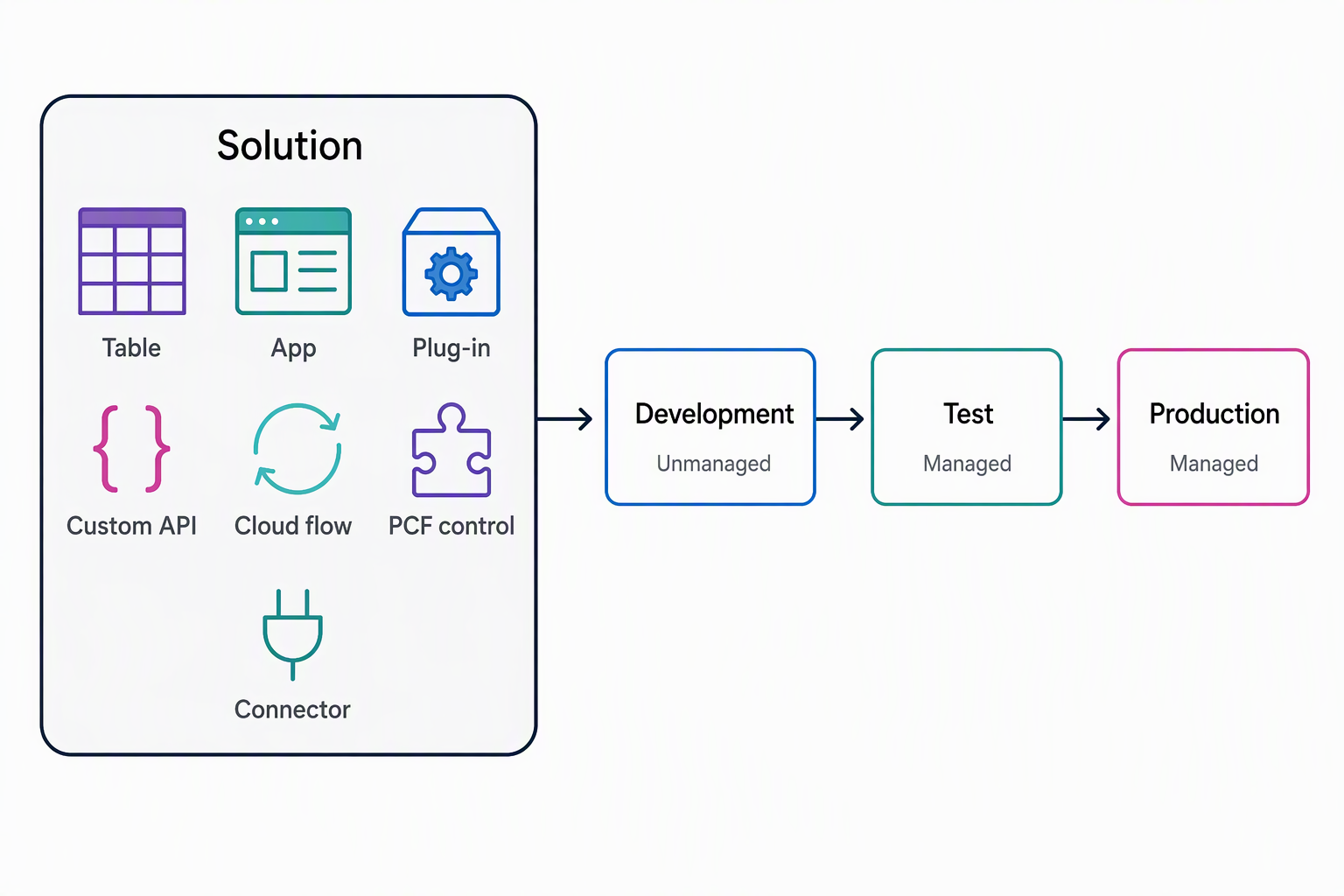
That framing changes how you look back at units 2 through 4. Each extension option is a separate answer to the question "where does this logic run":
- The client script that validates a device identifier.
- The PCF control that renders a searchable device picker.
- The plug-in that enforces eligibility.
- The custom API that exposes a reusable eligibility check.
- The cloud flow that notifies, approves, and fulfills a request.
- The custom connector that wraps the external availability service.
A solution answers a different question: how does a working set of those answers reach the next environment as a single, coherent unit rather than a dozen individual moves?
Publishers: the identity behind every component
Every solution has a publisher, an identity made up of a name and a prefix, and that identity attaches to every component the publisher creates. The prefix exists to prevent naming collisions: when two solutions from different sources land in the same environment, their customizations stay distinguishable because each one carries its creator's prefix in front of the name.
Picture the equipment-provisioning project using a dedicated publisher with a prefix such as equip. Every table, column, and custom component the project creates carries that prefix. As a result, a reviewer can trace a piece of logic back to this project, instead of guessing whether it belongs to this solution or another one installed alongside it.
The publisher also matters beyond naming: whoever's publisher creates a component is considered its owner, and that ownership controls what other solutions are allowed to change about it later. The default publisher that comes with every environment works for quick experiments. A dedicated publisher is worth creating before any component exists, because you can't change a component's publisher once it's part of a managed solution.
Components: what counts as one
A component is any individual piece a solution can contain. Tables such as employee, device, request, and allowance are components. So are forms and views. So is every extension option compared across units 2 through 4:
- A client script attached to a form.
- The PCF device-picker control.
- The eligibility plug-in.
- The
CheckEligibilitycustom API. - The notify-approve-fulfill cloud flow.
- The custom connector wrapping the availability service.
- Even a Copilot Studio agent built to guide the coordinator through approvals.
In other words, every decision you made in the previous two units produces something that eventually becomes a component in this solution. Comparing extension options decided where logic runs. Packaging those same options as components is what makes the whole set portable.
Choose between an editable and a locked solution
A solution is either unmanaged or managed, and the difference comes down to what you can still change after it lands in an environment.
| Aspect | Unmanaged solution | Managed solution |
|---|---|---|
| State | Editable | Locked, read-only after import |
| Typical environment | Development, while you're actively adding and changing components | Test, UAT, and production |
| What it represents | The working version a developer customizes directly | A build artifact distributed for deployment |
| Changing it later | Edit the components directly | You can't edit components directly. Add them to a separate unmanaged solution first |
In the equipment-provisioning scenario, you work in an unmanaged solution throughout development, adding the tables, the PCF control, the plug-in, and every other component as the scenario comes together. When that solution is ready to move, exporting it as managed and importing it into a test environment locks those components down, which is exactly the point: test and production shouldn't be a second place where anyone edits components directly.
If something needs to change after that, the fix happens back in the unmanaged solution in development, not in the locked copy downstream.
Decide between adding an existing component and creating one from scratch
A solution doesn't require every component to be created inside it. The employee, device, request, and allowance tables might already exist in the environment from earlier work. An existing cloud flow or connector built for a different project might already do part of what this scenario needs.
For any of these, the solution's Add existing command brings the already-created component in, so it starts traveling with this solution without being rebuilt. Creating new is the other path: a brand-new PCF control or a plug-in written specifically for this project doesn't exist anywhere yet, so it's created directly inside the solution instead.
The question worth asking for every component is simple: does this already exist somewhere in the environment, or does this project create it for the first time? That question, more than anything else in this unit, is what turns a list of extension decisions into an actual, assembled solution.
The equipment-provisioning solution needs to carry four things: the eligibility plug-in built for this project and the employee and device tables that already exist in the environment from earlier work. It also needs the PCF device picker the team is building right now, and a custom connector another team already created for a different integration.
Reflect: For each one, would you add it as an existing component or create it new inside the solution? Which one raises a publisher question you'd want to resolve before moving on?
With solutions, publishers, components, and the managed-unmanaged distinction mapped, you have a complete picture of this module's two central decisions: where a piece of equipment-provisioning logic runs, and how the whole set of those decisions packages together and moves from one environment to the next.