Explain deployment options
Azure SQL Database, a Platform as a Service (PaaS), offers high scalability and minimal maintenance, making it an excellent solution for specific workloads. It's suited for new application development, providing developers with significant flexibility in building new services and offering granular deployment options at scale. This low-maintenance solution is ideal for various workloads, ensuring efficient and effective application development.
Understand deployment models
When deploying Azure SQL Database, there are two primary deployment models: single database and elastic pools. In the elastic pools model, resources are shared among multiple databases within the same pool, whereas in the single database model, resources are managed independently for each database.
Similar to virtual machines, SQL Database can be deployed using various methods, including PowerShell, Azure CLI, or the Azure portal.
Single database
The single database deployment model is the simplest way to use Azure SQL Database. In this model, you manage each database individually in terms of scale and data size. Each database has its own dedicated resources, even if multiple databases are deployed on the same logical server.
You can monitor the resource utilization of each database through the Azure portal. This feature allows you to easily track and assess the performance of your databases.
Elastic pools
Elastic pools allow you to allocate storage and compute resources to a group of databases, simplifying management compared to handling each database individually. They're easier to scale than single databases, as changes to the elastic pool automatically adjust resources for all included databases.
This model is cost-effective for software as a service applications, as resources are shared among all databases. You can configure resources using either the DTU-based or vCore-based purchasing model.
It's important to continuously monitor resources to identify performance spikes that could affect other databases in the pool. Regularly revisiting your allocation strategy ensures sufficient resources for all databases.
Elastic pools are ideal for multitenant architectures with low average utilization, where each tenant has its own database copy.
Understand purchasing models
Once you've chosen the appropriate deployment model for your SQL Database, the next step is to select the purchasing model that best fits your workload and budget requirements. Azure SQL Database offers two purchasing models: the vCore model and the DTU-based model. Each model has its own advantages, so it's crucial to understand which one aligns best with your workload requirements and cost considerations.
vCore-based
This is the recommended purchasing model, where compute and storage resources are decoupled. It means you can scale storage and compute resources independently from one another. This flexibility ensures that you can adjust resources according to your specific needs without affecting other components.
In the vCore-based purchasing model, your costs depend on several factors, including the service tier, hardware configuration, number of vCores and amount of memory, reserved database storage, and actual backup storage.
Note
For pricing details, see the Azure SQL Database pricing page.
A service tier is a predefined configuration that determines the performance, storage type, high availability, disaster recovery options, and the availability of certain features for your database.
The vCore purchasing model offers three service tier options:
| Service tier | Capability |
|---|---|
| General Purpose | This service tier is designed for less intensive operations and offers a cost-effective balance of compute and storage options. It includes both provisioned and serverless compute tiers, providing flexibility to meet varying workload demands while optimizing budget. |
| Business Critical | This tier is ideal for applications that demand low-latency and high-performance storage. It supports In-Memory OLTP and includes a built-in read-only replica. Additionally, it offers more memory per core and uses local SSD storage, making it ideal for performance-sensitive workloads. |
| Hyperscale | This tier is tailored for applications with large databases and high throughput requirements. Hyperscale introduces advanced horizontal scaling features, allowing the addition of compute nodes as data size increases. It's supported on both single databases and elastic pools, enabling significant scaling of storage and compute resources beyond the limits of the General Purpose and Business Critical service tiers. |
DTU-based
In the DTU model, there are three service tiers: Basic, Standard, and Premium. Compute and storage resources depend on the DTU level, offering a range of performance capabilities with fixed storage limits, backup retention, and costs.
For instance, if your database reaches its maximum storage limit, you would need to increase your DTU capacity, even if compute utilization is low. Also, scaling operations on Azure SQL Database can cause brief connection interruptions at the end of the process. This can occur in two main scenarios:
- Initiating a scaling operation that requires an internal failover.
- Adding or removing databases from the elastic pool.
Note
To handle connection errors, implement proper retry logic in your application.
Understanding the interplay between deployment and purchasing models is crucial for optimizing performance and cost-efficiency. By carefully selecting the right combination, you can ensure that your Azure SQL Database deployment meets your application's demands while staying within budget.
For instance, if you opt for the single database deployment model, you might prefer the vCore purchasing model for its flexibility in scaling compute and storage resources independently. On the other hand, if you choose the elastic pool deployment model, the DTU-based purchasing model could be more cost-effective, as it allows you to share resources among multiple databases within the pool.
Perform backup and restore
Azure provides seamless backup and restore capabilities for SQL Database. Here are some key features:
Continuous backup
Azure SQL Database ensures regular backups, continuously copying them to read-access geo-redundant storage (RA-GRS). Full backups occur weekly, differential backups every 12 to 24 hours, and transaction log backups every 5 to 10 minutes.
Geo-Restore
With geo-redundant backups by default, you can easily restore databases to different regions, useful for less strict disaster recovery scenarios. Backup storage is billed separately but created at no extra cost with the maximum size of the selected data tier. Geo-restore duration depends on database size, transaction logs, and simultaneous restore requests.
Note
Geo-restore is available when the backup storage redundancy property is set to geo-redundant backup storage.
Point-in-Time Restore (PITR)
Allows you to configure a specific point-in-time retention policy for each database, ranging from 1 to 35 days (default is seven days). You can also restore databases to a specific point in time within the same server using Azure portal, PowerShell, CLI, or REST API.
Long-Term Retention (LTR)
Long-term retention is useful for scenarios that require you to set the retention policy beyond what is offered by Azure. You can set a retention policy for up to 10 years, and this option is disabled by default.

For more information about automated backups, see Automated backups - Azure SQL Database & Azure SQL Managed Instance.
Enable automatic tuning
Automatic tuning is a powerful built-in feature that applies machine learning to optimize your query performance. It automatically identifies tuning opportunities and implements them to enhance your database's efficiency.
Currently, automatic tuning includes the following features:
- Identifying Expensive Queries
- Forcing the Last Good Execution Plan
- Adding Indexes
- Removing Indexes
Azure services use advanced algorithms to determine the best indexes for your query patterns. These indexes are initially tested on a copy of your database before being applied to the live environment, ensuring minimal disruption.
All databases inherit their configuration from the parent server, and you can easily disable this feature if needed. This flexibility allows developers to maintain control while benefiting from automated performance enhancements.

Use elastic query
Elastic query enables you to run T-SQL queries across multiple databases in SQL Database. This feature is useful for applications that use three- and four-part names that can't be changed, and it enhances portability by facilitating migration.
Elastic queries support the following partitioning scenarios:
| Service Tier | Capability |
|---|---|
| Vertical Partitioning | Also known as cross-database queries. Data is partitioned vertically across multiple databases with different schemas. For example, you might have one database for customer data and another for payment information. Vertical partitioning allows you to run cross-database queries between these databases. |
| Horizontal Partitioning | Also known as sharding. Data is partitioned horizontally to distribute rows across several scaled-out databases, all sharing the same schema. This topology supports both single-tenant and multitenant models. |
This flexibility makes elastic queries a powerful tool for managing and querying data across multiple databases.
Configure elastic jobs
The elastic job feature serves as the SQL Server Agent replacement for Azure SQL Database, similar to the Multi Server Administration feature in an on-premises SQL Server instance.
With elastic jobs, you can execute T-SQL commands across various target deployments, including SQL Databases, SQL Database elastic pools, and SQL Databases in shard maps. These database resources can span different Azure subscriptions and regions. The parallel execution capability is useful for automating database maintenance tasks, ensuring efficiency and consistency across your deployments.
Move data using SQL Data Sync
SQL Data Sync enables incremental synchronization of data across multiple databases, whether they're running on SQL Database or on-premises SQL Server. This feature is useful for offloading intensive production workloads to a separate database for analytics or unplanned operations.
Data Sync operates on a hub topology, where one database in the sync group is designated as the hub. The sync group can include multiple member databases, and synchronization occurs between the hub and individual member databases. Changes are tracked using insert, update, and delete triggers through a historical table created on the user database.
When creating a sync group, you must specify a database to store the sync group metadata. This metadata database can be either new or existing, as long as it resides in the same region as your sync group.
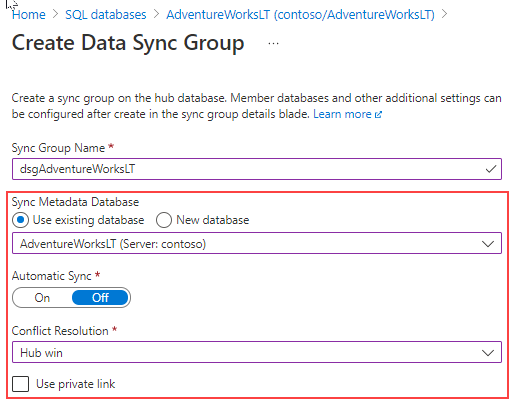
For more information about how to configure SQL Data Sync, see Tutorial: Set up SQL Data Sync between databases in Azure SQL Database and SQL Server.