Subcontracting process
Generally, the subcontracting process involves several steps.
The following diagram shows a general process where a project manager starts the process.
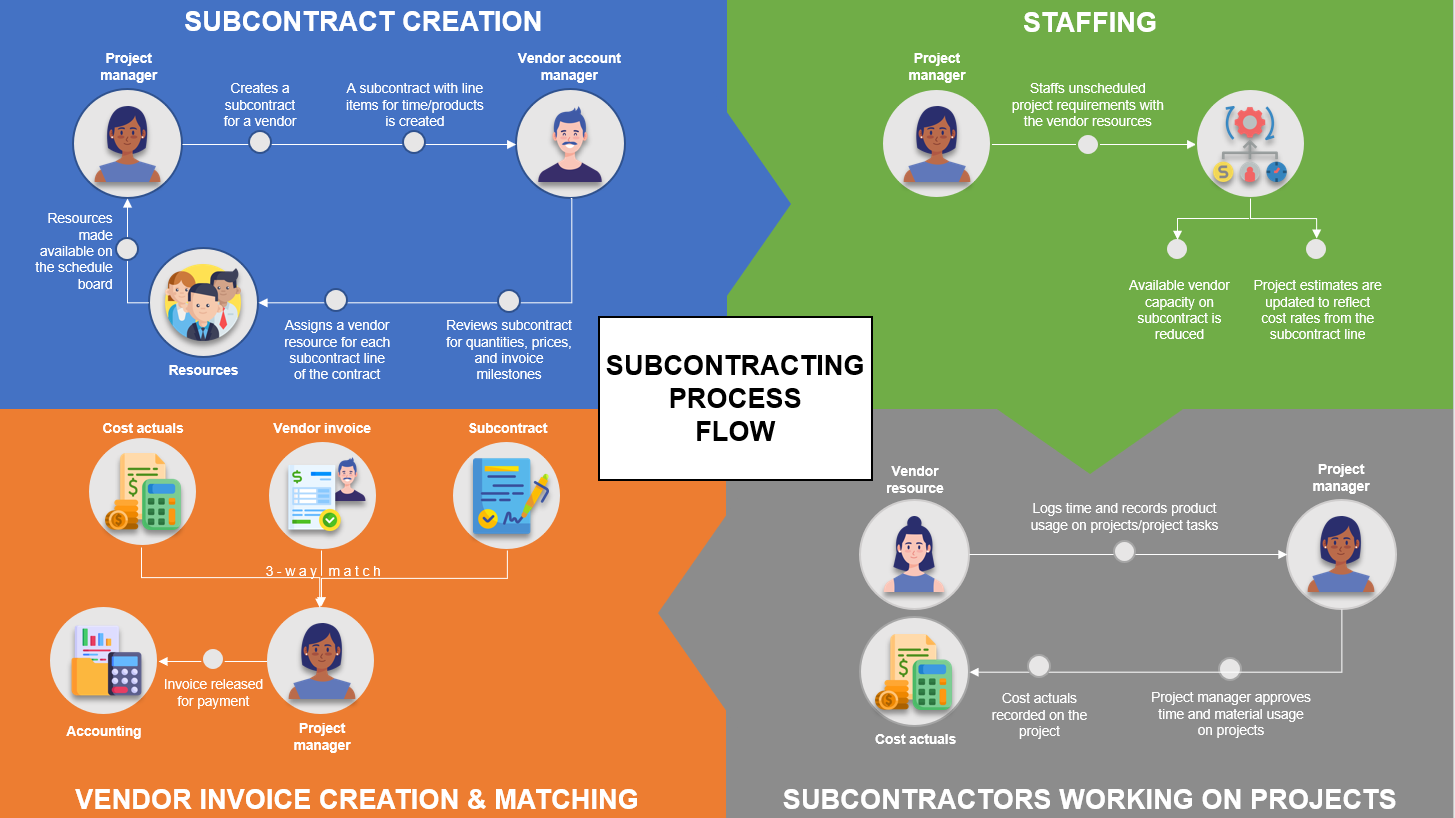
First, the project manager creates a subcontract with a vendor. By default, the price lists that are attached to the vendor record in the system are used for the subcontract, and each vendor account can have a relationship type. When the subcontracting process is started, the project manager can itemize all purchases as line items on the subcontract. The manager can use these lines for time, expenses, or products. Additionally, they can adjust pricing in the purchase price lists that are attached to the subcontract, where the vendor account manager and the project manager can iterate over the document.
At this point, or later, if the subcontract line is for time, the vendor account manager will associate the vendor contacts with each line. This association provides information to the project manager who's working on the same subcontract. The system automatically creates a bookable resource from the contract, if it doesn't already exist, after the vendor contact has been associated with the subcontract line. The billing method on each line can be a Fixed Price or Time and Material. Alternatively, for a fixed-price subcontract, a milestone-based invoice schedule will be set up. Negotiations take place, and after they're complete, the subcontract will be confirmed. Confirmed subcontracts can't be edited; however, if a change needs to be made, you can reopen the subcontract for edits. This action changes the status from Confirmed to Draft until it's completed again.
You'll also add team members to your project, which you can associate with a subcontract line. This addition indicates that a need exists for staffing the position with a team member who has the subcontractor capacity. These team members can be generic or named. You can create named team members directly on a project or you can create them by booking and then using the resource scheduling experiences. The subcontractor resources can log time, expenses, and material usage on the project and project tasks and then submit it for approval. This process is similar for employees of your own organization.
On project approval, the time that has been approved by the subcontracts will be recorded with project cost actuals that are based on the contract price of the worker or the role that they performed on the project. You can record vendor invoices and invoice line items in the system. Additionally, you can record the work that's performed by a vendor resource or products that the vendor has delivered. These invoice lines must be specific to a project and for a transaction class of time, expense, product/material, milestone, or fee. Optionally, the lines can also reference the subcontract line that's associated with the vendors' work.
Then, the system will automatically associate all cost actuals that match the subcontract line and project to the vendor invoice. This association will facilitate a three-way match and verification process. The project manager will review the automatically matched project actuals, remove or add other project cost actuals, and complete other steps in the verification process. Completion of the verification on all lines will mark the vendor invoice as Ready for Payment. At this stage, you can transfer the vendor invoice and lines to an accounting or payables system to process the payment to the vendor. Finally, the system will review other recorded projects and then will record actual costs from the vendor invoice lines on the project.
Explore advanced subcontract capabilities
The accounts payable department can see project manager-created and managed subcontracts as purchase orders. When the subcontractor inputs completion of work, receipts for those purchase orders are automatically created. The advanced subcontract capabilities feature ensures incorrect vendor invoices are not accepted by the accounts payable clerk when the vendor invoice is matched to the reported work through three-way matching.