Work with AI features
Artificial Intelligence (AI) is changing how organizations do business. It's helping end users to be more productive by simplifying the tasks they perform daily and by providing suggestions. Dynamics 365 Customer Service provides multiple features that can be used to simplify tasks that representatives perform throughout the day.
Sentiment analysis
Being able to understand how a customer is feeling during their interaction with your organization is important. Many things can affect how the customer is feeling. For example, how long it takes to respond, the severity of the item, or even how many times they have contacted support about an issue. Within a conversation, a customer's sentiment might change. Sentiment analysis settings in Omnichannel for Customer Service provide representatives and supervisors with real-time insight regarding how customers are interacting with representatives during chat sessions. You can let representatives and supervisors see the customer's satisfaction levels instantly while communicating with the customer, by enabling sentiment analysis.
By default, sentiment analysis should be enabled, but, if necessary, you can enable the sentiment analysis feature in the Customer Service admin center. In the site map, select Insights in Operations. The Insights page appears. In the Sentiment analysis section, select Manage.
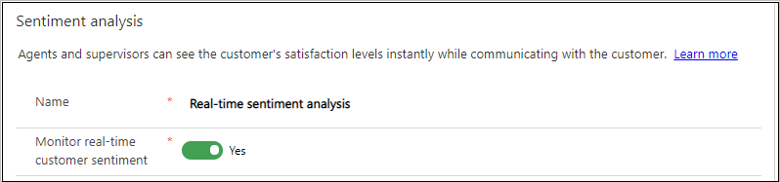
After you enable real-time customer sentiment, you can view scores in the Omnichannel Insights dashboards.
Agent settings
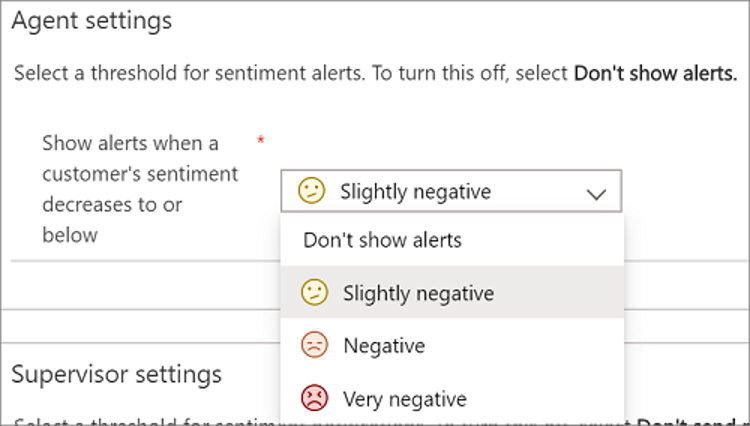
As representatives engage with customers, the customer sentiment is displayed in the communication panel for the active conversation session and is displayed. For any session that isn't displayed, a sentiment alert is shown on the session panel. You can choose to show alerts to the representatives if a customer's sentiment decreases to or falls below a particular value.
You can set the customer's sentiment to any of the following values:
Don't show alerts: Doesn't display any alerts when customer sentiment changes.
Slightly negative: Alerts when customer sentiment is Slightly negative or lower.
Negative: Alerts when customer sentiment is Negative or lower.
Very negative: Alerts when customer sentiment is Very Negative.
Agent alert settings can be modified on the Sentiment analysis page. In the Agent settings section, select a value from the Show alerts when a customer's sentiment decreases to or below list.
Supervisor settings
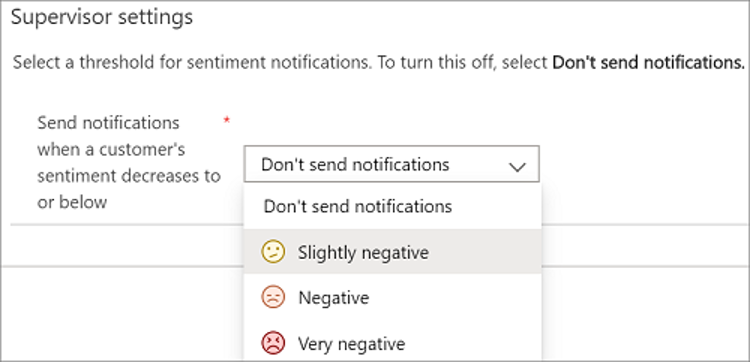
Unlike representatives, who are concerned with the sentiment of the individual cases they're managing, supervisors are typically looking at the bigger picture. Supervisors can view customer sentiment in real-time using the Omnichannel Ongoing Conversations dashboard. Like representatives, notifications can be displayed to supervisors when a customer's sentiment decreases to a particular value or below it. The primary difference is that the supervisor must be assigned to the queue to receive sentiment notifications.
You can set the sentiment threshold to any of the following values:
Don't show notifications
Slightly negative
Negative
Very negative
Supervisor alert settings are also modified on the Sentiment analysis page. In the Supervisor settings section, select a value from the Show alerts when a customer's sentiment decreases to or below list.
AI suggestions for contacts
One of the easiest ways for representatives to connect with team members is using Microsoft Teams. By using Teams to collaborate, representatives can resolve issues quickly. Organizations can enable the Microsoft Teams collaboration feature to assist representatives in finding the right contacts. This feature uses AI to suggest contacts in real-time, based on the currently open active case or support conversation when representatives explore contacts in the embedded chat experience. It uses similar case suggestions to find similar cases. It then identifies the most logical contacts based on different factors related to the contacts experience and proficiency in resolving those similar cases.
This includes:
How many similar cases the suggested contacts have resolved: A higher number of similar cases that the suggested contacts have resolved might indicate that they have more experience in resolving the issue described in the cases or conversations.
The similarity level of the similar cases to the active case: A higher similarity of the cases means that the similar cases the contacts have resolved are more related to the active case or conversation that representatives are currently working on.
How recently the suggested contacts have resolved the similar cases: More recent experience might indicate the contact has more current knowledge about resolving the issue described in the cases or conversations.
The average time that the suggested contacts use to resolve similar cases: Less time spent in resolving similar cases compared to others might indicate that the contact is more familiar than others about how to resolve the issue type.
The AI-suggested contacts feature uses a set of out-of-the-box AI models. This means that administrators can easily enable the feature without the need for extra model training.
Before you can enable Teams collaboration and contact recommendations, you need to make sure you have enabled AI suggestions for similar cases must be enabled. More information: Enable AI suggestions for similar cases
You can enable this functionality in the Dynamics 365 Customer Service admin center. Under Agent experience, select Collaboration. This opens the Microsoft Teams collaboration settings. In Embedded chat using Teams, select Manage.
On the Microsoft Teams collaboration and chat, set the toggle for Turn on the linking of Dynamics 365 records to Microsoft Teams channels to Yes.
To get suggested contacts for active cases or supported conversations, perform the following steps:
In Connect chat to Dynamics 365 records, select Case or Conversation. Based on your selection, the Case settings or Conversation settings pane appears on the right.
In Suggest contacts, turn on the toggle for AI-based suggested contacts.
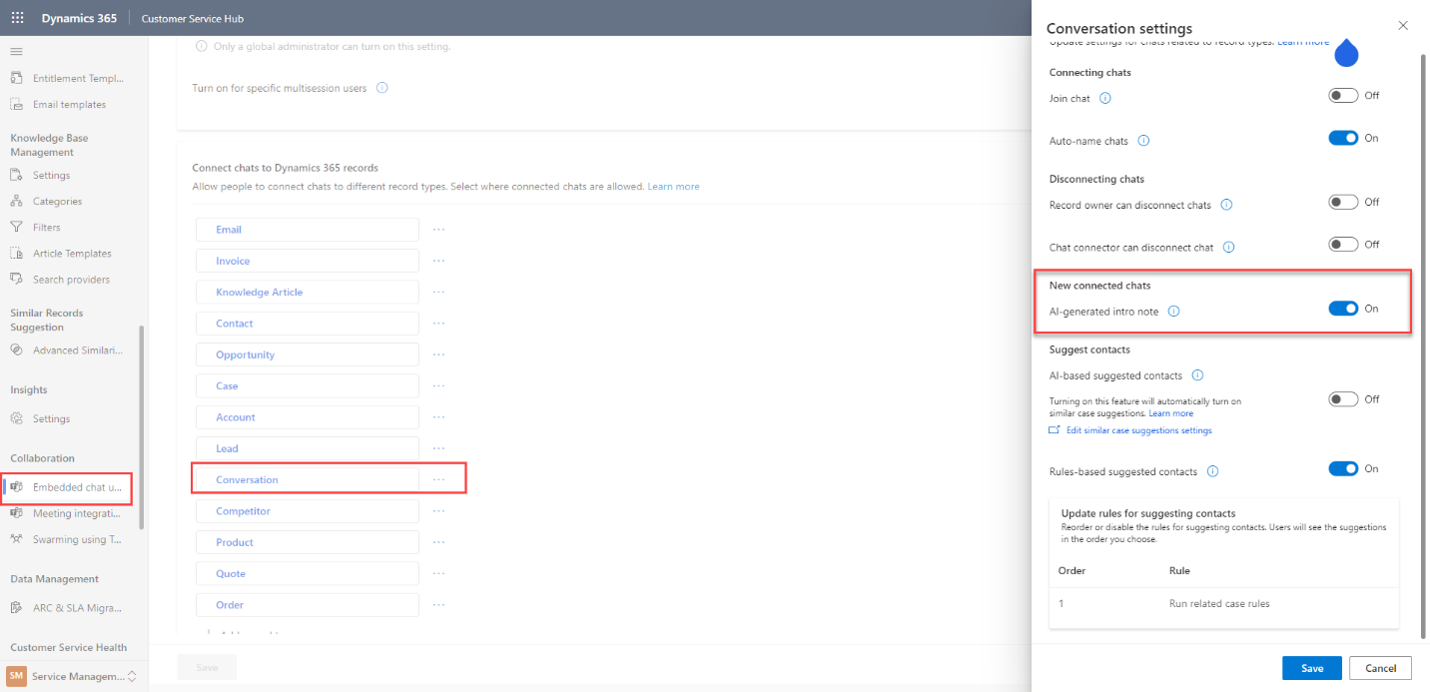
It takes 24 hours for the data to be preprocessed for the first-time use.
Case and conversation summarization
One of the major advances in AI for Microsoft is Copilot. In Dynamics 365 Customer Service, Copilot provides real-time AI assistance that helps representatives automate time-consuming tasks. This automation lets them handle cases efficiently and resolve issues faster so that they can deliver value to customers. It assists representatives in tasks such as responding to questions, creating emails, and summarizing case details.
Case summaries help representatives understand the context of a case, enabling them to resolve customer issues efficiently. They're provided with a concise summary of the case with the:
Case title
Customer
Case subject
Product
Priority
Case type
Case description
Before you can enable case and conversation summaries, you must Make Copilot available to agents in Copilot help pane (preview). For more information, see Enable Copilot in Customer Service.
Once copilot is enabled, you can enable summaries in Customer Service admin center by going to either one of these paths:
Agent Experience > Productivity > Summaries
Operations > Insights > Summaries
Select Manage in Summaries. Select Make case summaries available to agents to display a summary of the case on the Case page.
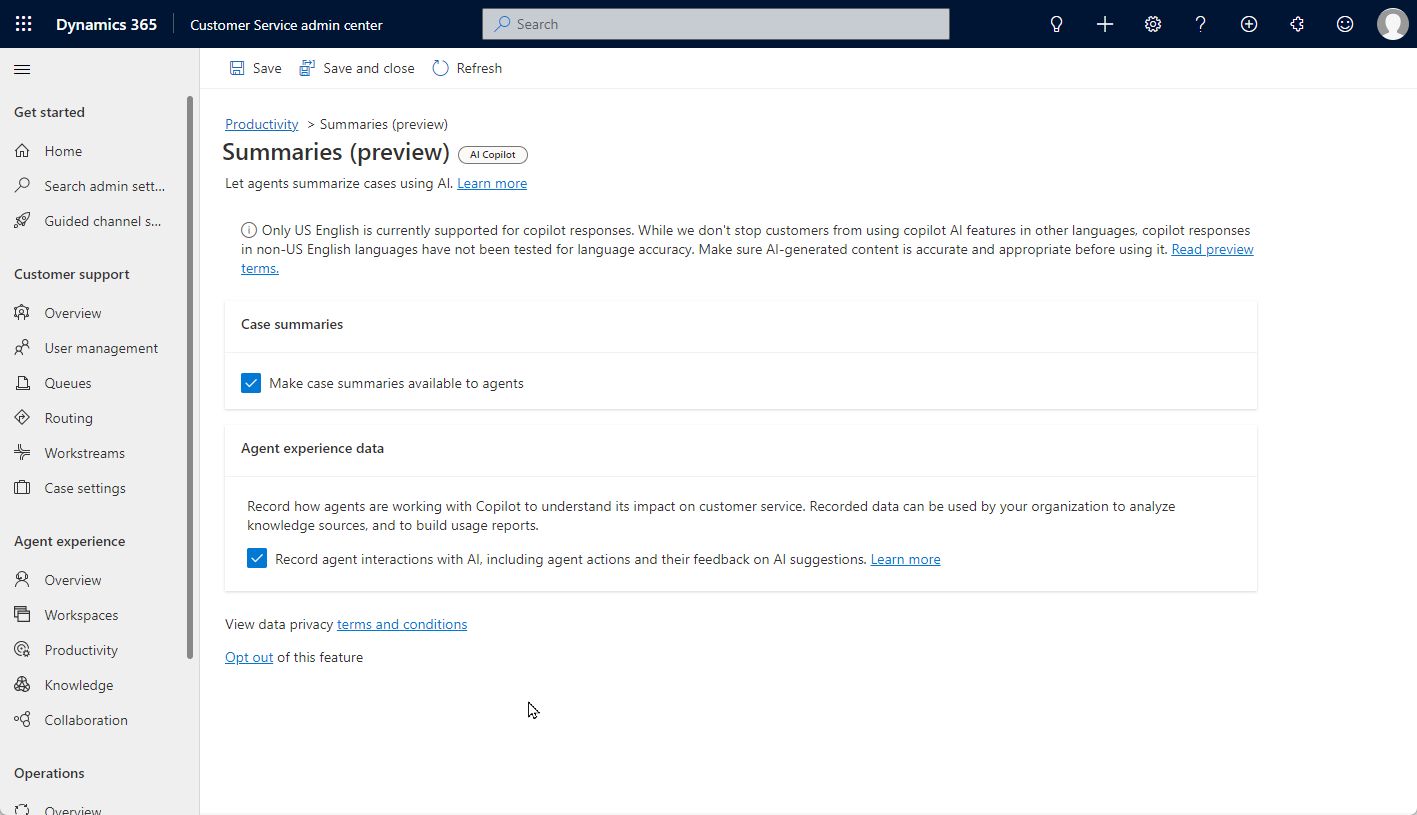
For more information about configuring case summaries, see Manage Copilot features in Customer Service..