What is GitHub Advanced Security?
GitHub has many features that help you improve and maintain the quality of your code. Some of these features are included in all plans, such as the dependency graph and Dependabot alerts. Others provide limited functionality on public repositories, while advanced capabilities for private repositories require GitHub Code Security and GitHub Secret Protection.
In this unit, you'll learn more about GitHub Advanced Security and discover what a project with advanced security capabilities looks like.
GitHub Advanced Security overview
GitHub Advanced Security capabilities are now delivered through two main products:
- GitHub Code Security (vulnerability detection and remediation)
- GitHub Secret Protection (secret detection and prevention)
Together, these products provide a broader security platform that extends beyond the original GitHub Advanced Security feature set.
Feature availability
The following table summarizes the availability of GitHub security features across repository types and products.
| Feature | Public repository | Private repository | GitHub Code Security | GitHub Secret Protection |
|---|---|---|---|---|
| Code scanning (CodeQL) | Yes | No | Yes | No |
| Copilot Autofix | Yes (limited) | No | Yes | No |
| Dependency review | Yes | No | Yes | No |
| Dependabot alerts | Yes | Yes | Yes | No |
| Dependabot auto-triage rules | No | No | Yes | No |
| Security campaigns | No | No | Yes | No |
| Security Overview | No | No | Yes | No |
| Secret scanning | Yes (basic) | No | No | Yes |
| Push protection | No | No | No | Yes |
| Custom secret patterns | No | No | No | Yes |
As shown in the preceding table, many core security features—including code scanning, basic secret scanning, dependency review, and Dependabot alerts—are available by default for public repositories on GitHub.com. Advanced capabilities for private and internal repositories require GitHub Enterprise Cloud or GitHub Team with GitHub Code Security and/or GitHub Secret Protection enabled.
GitHub Code Security and GitHub Secret Protection provide the following enhanced capabilities for private and internal repositories:
- Code scanning (CodeQL): Automatically detects vulnerabilities and coding errors and supports AI-assisted fixes through Copilot Autofix (where enabled).
- Secret scanning: Detects exposed secrets in code, blocks leaks with push protection, supports custom secret patterns, and provides enhanced alerting and remediation workflows.
- Dependency review: Shows the impact of dependency changes and highlights vulnerable versions before pull requests are merged.
- Security Overview: Provides organization-wide visibility into security posture, risks, and repository-level alerts.
- Security campaigns: Enables organizations to group, prioritize, and systematically remediate multiple security alerts across repositories, helping teams reduce vulnerabilities faster and at scale.
Key notes
GitHub has evolved from a single GitHub Advanced Security bundle into a modular platform consisting of:
- GitHub Code Security
- GitHub Secret Protection
Other important points include:
- Public repositories continue to receive a strong baseline of free security features.
- Advanced features focus on prevention (such as push protection), automation, and AI-assisted remediation.
GitHub Advanced Security in the software development lifecycle
What difference do GitHub Advanced Security features make in the software development lifecycle? Let's first look at a basic security scenario.
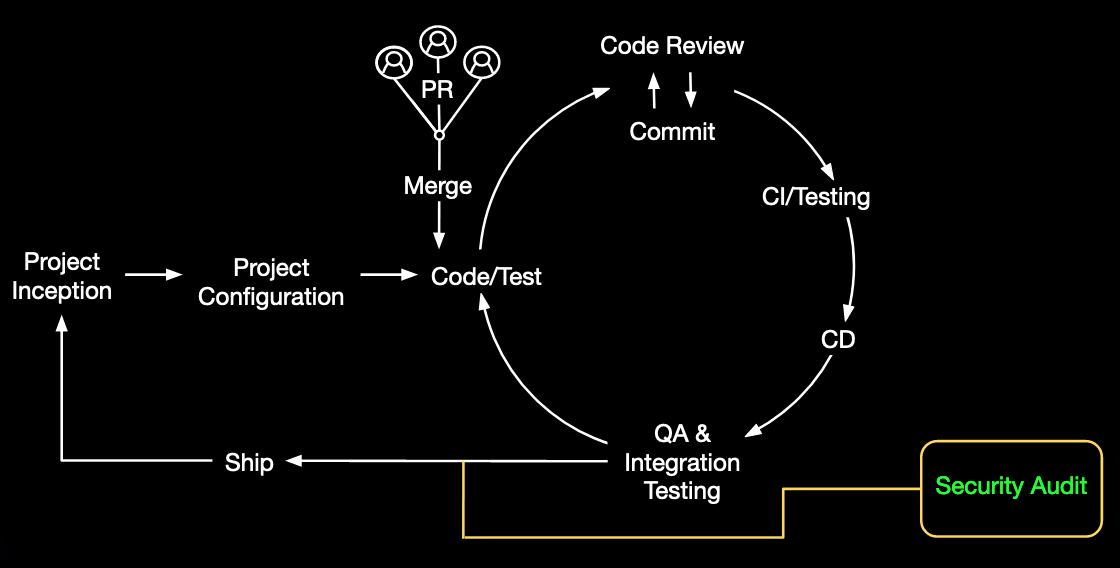
This example illustrates a traditional security as a gate approach, where one or more security tests take place during the quality assurance phase. In this scenario, security often becomes a bottleneck that delays software delivery. Many organizations address this challenge by shifting security left.
Now, let's look at the same software development lifecycle with GitHub Advanced Security.
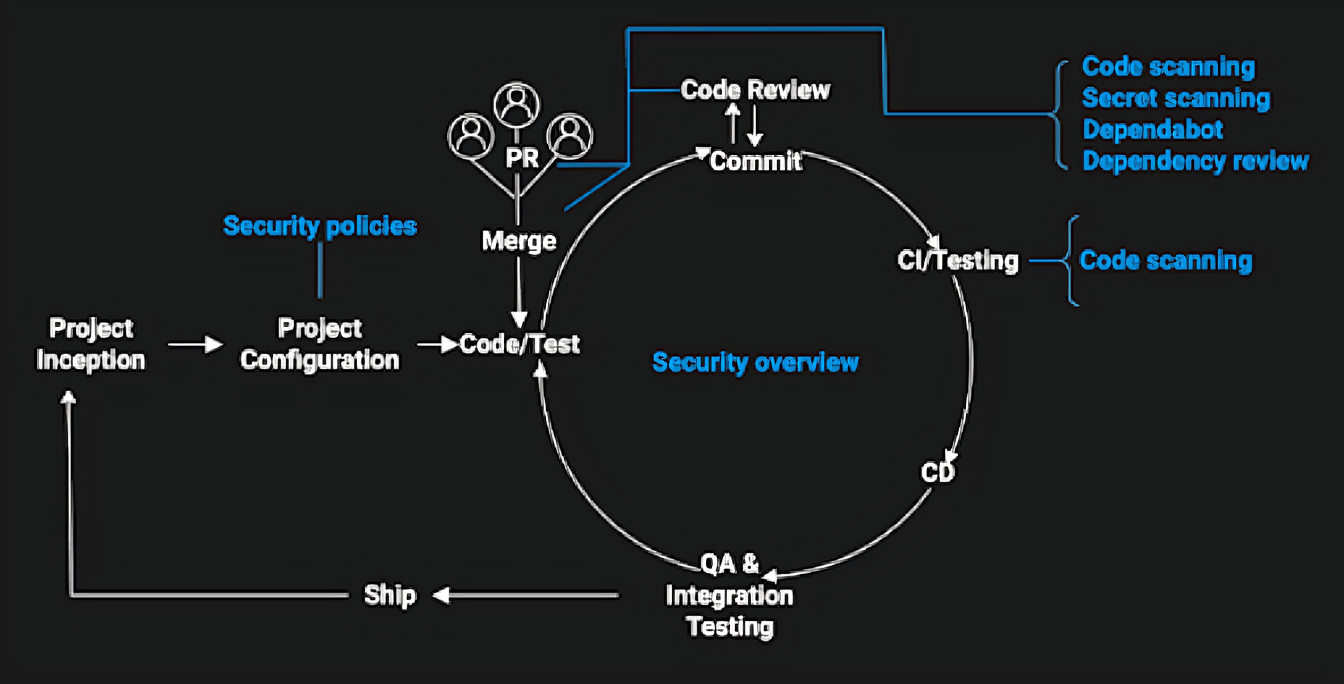
In this scenario, security is integrated from the beginning through security policies configured during project setup. Developers receive security feedback throughout the development process.
- Code scanning: Scans every commit and merge for vulnerabilities and coding errors.
- Secret scanning: Scans every commit and merge for accidentally committed secrets, such as tokens and private keys.
- Dependency review: Monitors dependency changes and evaluates their impact on project security by comparing manifest files against databases of known vulnerabilities during every pull request.
In addition, Security Overview provides administrators with a high-level view of the organization's security posture. This view helps identify repositories that require attention or remediation.
Because security checks occur throughout the development lifecycle, potential issues are identified and addressed earlier. This approach reduces bottlenecks during quality assurance and minimizes technical debt before software is released.