Manage the GitHub Advanced Security features and alerts
Now that the security for your project is set up, all you have to do is monitor and manage the GitHub Advanced Security features and alerts for your project.
In this unit, you'll learn how to use Security Overview to monitor the security risks in your project. You'll also learn how to use GitHub Advanced Security endpoints to manage security features and alerts.
Use Security Overview
Security Overview is available in the Security and quality tab for organizations and repositories. You can use it to get a high-level view of your organization's security posture or identify repositories that require attention.
- Organization level: Displays aggregate and repository-specific security information for repositories owned by the organization. Information can also be filtered by security feature.
- Team level: Displays repository-specific security information for repositories where the team has administrator privileges.
- Repository level: Shows which security features are enabled for the repository and provides options to configure available features that aren't currently enabled.
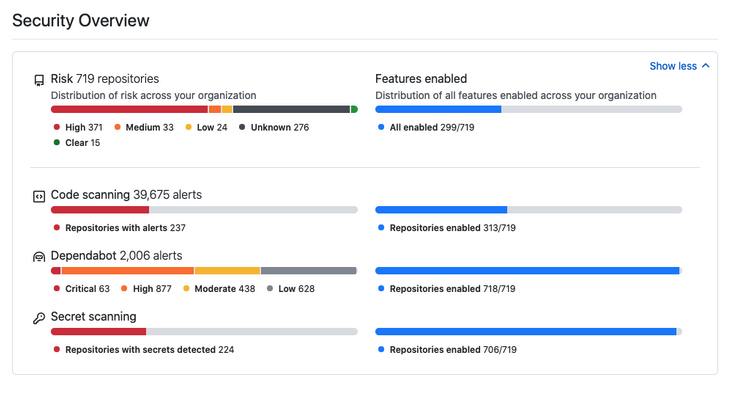
Thanks to its interactive interface and filtering capabilities, Security Overview supports both broad and targeted security analysis.
For example, you can use it to:
- Monitor the adoption of security features across your organization.
- Track adoption by individual teams during GitHub Advanced Security rollout.
- Review alerts of a specific type or severity across all repositories.
Use GitHub Advanced Security endpoints
The following table summarizes the available API endpoints for each GitHub Advanced Security feature.
| Feature | Endpoints | Documentation |
|---|---|---|
| Code scanning | Retrieve and update code scanning alerts. Create automated reports for organizations. Upload offline CodeQL analysis results. |
Code Scanning API |
| Secret scanning | Enable or disable secret scanning for repositories. Retrieve and update secret scanning alerts. |
Repositories API Secret Scanning API |
| Dependency review | Enable or disable dependency alerts and dependency graph. Enable or disable security fixes. View dependency information. |
Repositories API GraphQL API |
Configure GITHUB_TOKEN permissions
If you use GitHub Actions to automate security workflows, it's important to configure the permissions granted to the GITHUB_TOKEN used for authenticated API calls.
The following table summarizes the default permissions.
| Scope | Default access (permissive) | Default access (restricted) | Maximum access from forked repositories |
|---|---|---|---|
| actions | read/write | none | read |
| checks | read/write | none | read |
| contents | read/write | read | read |
| deployments | read/write | none | read |
| id-token | read/write | none | read |
| issues | read/write | none | read |
| metadata | read | read | read |
| packages | read/write | none | read |
| pull-requests | read/write | none | read |
| repository-projects | read/write | none | read |
| security-events | read/write | none | read |
| statuses | read/write | none | read |
You can modify the permissions granted to GITHUB_TOKEN in individual workflow files.
- If the default permissions are restrictive, you may need to increase permissions so workflows can complete successfully.
- If the default permissions are permissive, you should remove unnecessary permissions.
As a security best practice, always grant the least privilege required.
You can also use the permissions key to configure permissions for an entire workflow or individual jobs. When permissions is specified, all unspecified permissions are set to none, except for the metadata scope, which always receives read access.
name: Create issue on commit

on:
  - push

jobs:
  create_commit:
    runs-on: ubuntu-latest
    permissions:
      issues: write

    steps:
      - name: Create issue using REST API
        run: |
          curl --request POST \
            --url http(s)://[hostname]/api/v3/repos/${{ github.repository }}/issues \
            --header 'authorization: Bearer ${{ secrets.GITHUB_TOKEN }}' \
            --header 'content-type: application/json' \
            --data '{
              "title": "Automated issue for commit: ${{ github.sha }}",
              "body": "This issue was automatically created by the GitHub Action workflow **${{ github.workflow }}**.\n\nThe commit hash was: _${{ github.sha }}_."
            }' \
            --fail
In the preceding example, write access is granted to the issues scope for a single job.
You can also use the permissions key to add or remove read permissions for workflows triggered from forked repositories. Write permissions generally can't be granted unless the Send write tokens to workflows from pull requests option is enabled in GitHub Actions settings.
Detection, remediation, and prevention views
Security Overview organizes insights into three primary views.
| View | Purpose |
|---|---|
| Detection | Monitor where vulnerabilities, secrets, and dependency risks are discovered. |
| Remediation | Track how alerts are fixed, prioritized, and resolved across repositories. |
| Prevention | Measure how vulnerabilities are prevented before reaching protected branches. |
The Prevention view helps organizations evaluate how effectively security controls stop risky changes before they are merged.
Examples include:
- Vulnerabilities fixed during pull request review.
- Code scanning findings resolved before merge.
- Copilot Autofix remediation activity.
- Secret scanning push protection events.
- Prevented dependency risks.
Interpreting alerts across security features
Security Overview aggregates information from multiple GitHub security features to help teams understand organizational risk.
Common alert sources include:
- Code scanning alerts: Vulnerabilities and insecure coding patterns detected by CodeQL or third-party scanners.
- Secret scanning alerts: Exposed credentials, API keys, and tokens.
- Dependabot alerts: Vulnerable dependencies and package risks.
- Dependency review: Risks introduced through dependency changes in pull requests.
Teams can filter alerts by:
- Severity
- Repository
- Feature type
- Time range
- Team ownership
- Alert state
These filters support both organization-wide analysis and focused investigations.
Remediation tracking and Autofix insights
Security Overview also helps monitor remediation progress.
Security teams can track:
- Pull request alerts fixed before merge.
- Remediation trends.
- Copilot Autofix-generated pull requests.
- Validation and merge completion rates.
- Repositories with recurring unresolved alerts.
These insights help organizations identify bottlenecks, prioritize high-risk repositories, and measure remediation effectiveness.
Visibility into bypass events and governance signals
Security Overview also surfaces governance and policy metrics across the organization.
Examples include:
- Push protection bypass events.
- Branch protection enforcement activity.
- Alert dismissal trends.
- Audit log activity.
- Policy adoption and coverage metrics.
These metrics help administrators understand:
- Where users bypass protections.
- Whether policies require refinement.
- Whether security controls are consistently enforced.
Combined with audit logs, rulesets, and branch protection policies, these insights support compliance reporting, operational reviews, and continuous security improvement.
Security roles and responsibilities
Successful GitHub Advanced Security adoption requires clear ownership across development, security, and administrative teams.
Different roles interact with GitHub Advanced Security features throughout the software development and incident response lifecycle.
| Responsibility | Developers | Security Engineers | Repository / Organization Administrators |
|---|---|---|---|
| Review and fix code scanning alerts | Yes | Yes | No |
| Review secret scanning alerts | Yes | Yes | Yes |
| Update vulnerable dependencies | Yes | Yes | No |
| Validate Copilot Autofix pull requests | Yes | Yes | No |
| Triage and prioritize security alerts | No | Yes | Yes |
| Configure security policies and rulesets | No | Yes | Yes |
| Manage branch protection and workflow policies | No | No | Yes |
| Monitor Security Overview dashboards | No | Yes | Yes |
| Review audit logs and governance signals | No | Yes | Yes |
| Configure repository and organization security settings | No | No | Yes |
| Coordinate incident response workflows | No | Yes | Yes |
| Approve policy exceptions or dismissals | No | Yes | Yes |
Example workflow ownership
A typical GitHub Advanced Security workflow involves multiple roles working together.
- A developer receives a code scanning alert in a pull request.
- A security engineer reviews the alert severity and recommends a remediation approach.
- Copilot Autofix proposes a pull request update.
- The developer validates the fix and updates the code if necessary.
- Repository administrators enforce branch protections and required checks before merging.
- Security teams review audit logs and remediation trends through Security Overview.
Clearly defining responsibilities helps organizations scale GitHub Advanced Security adoption while maintaining governance, accountability, and operational consistency.