Control knowledge sources and capabilities
Beyond data residency, administrators must govern what information AI features can access and which capabilities are available to makers. Copilot Studio agents draw answers from knowledge sources, Power Platform exposes Copilot features across multiple products, and external models can extend AI processing.
Manage knowledge source availability
Copilot Studio agents use knowledge sources to ground their responses in organizational data. Each knowledge source type carries different governance implications:
| Knowledge source | Limit | Data access model | Governance consideration |
|---|---|---|---|
| Public websites | 25 URLs | Publicly accessible content | Content accuracy not controlled by your organization |
| Documents (uploaded) | Unlimited | Stored in Dataverse | Training data subject to environment security |
| SharePoint/OneDrive | 25 URLs | User's Entra ID permissions | Access scoped to authenticated user's permissions |
| Dataverse tables | Unlimited | User's Entra ID permissions | Row-level security applies automatically |
| Enterprise connectors | Unlimited | Connector authentication | Depends on connector security model |
Administrators control knowledge source availability through DLP virtual connectors (covered in the previous module). Blocking the relevant virtual connector prevents makers from adding that knowledge source type to any agent in the affected environments.
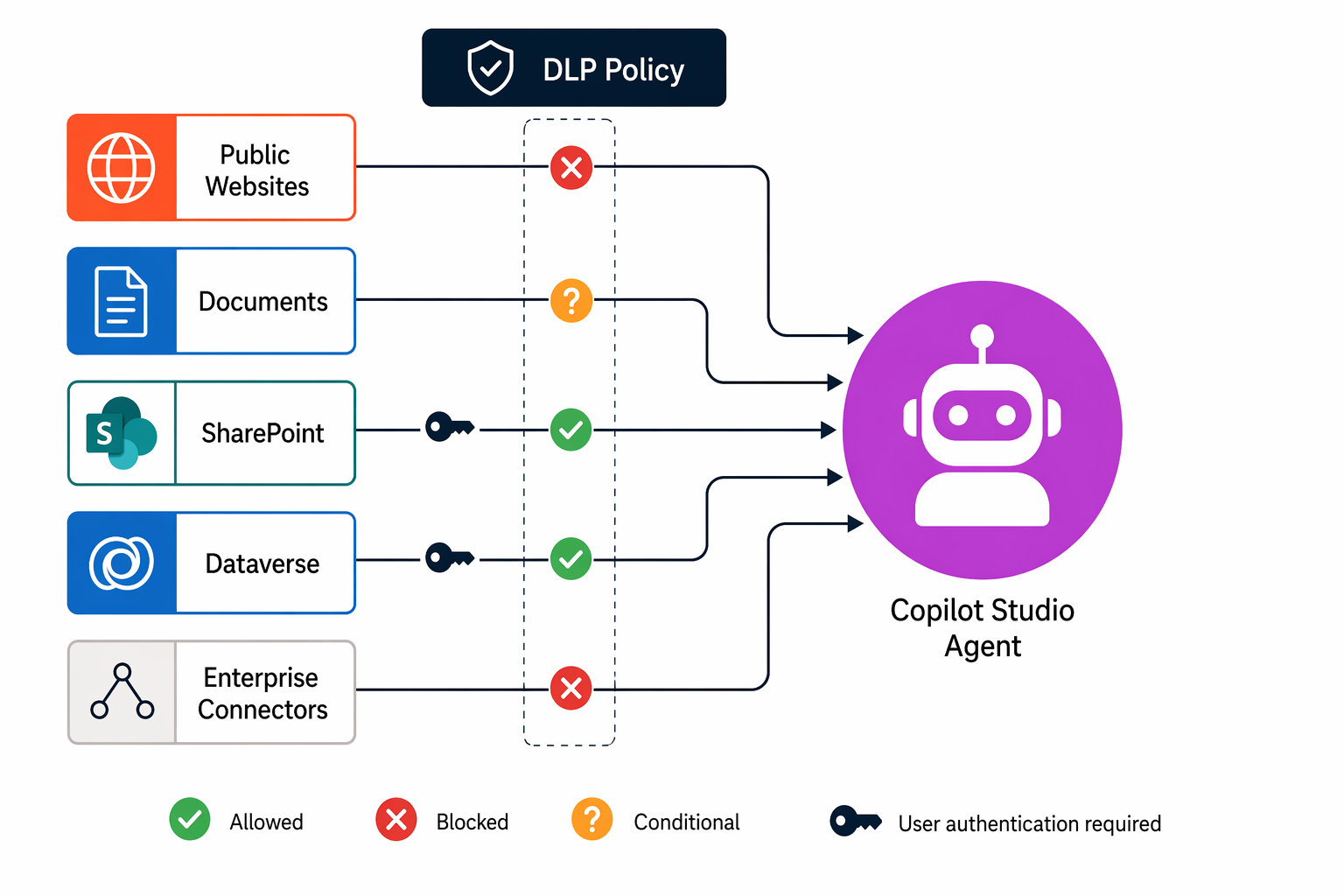
Key governance decisions for knowledge sources:
- Public websites - Block in Red zone environments where agents must only use verified internal data. Allow in Green/Yellow zones where marketing or support agents need external content.
- Documents - Generally safe to allow because they're stored in Dataverse and subject to environment security. However, it's good practice to evaluate and restrict who can upload documents to prevent unauthorized training data.
- SharePoint/OneDrive - Allow broadly because access inherits the user's existing permissions. The agent can't access content the user can't already see.
Note
When a user interacts with an agent using SharePoint or Dataverse knowledge, the agent respects the user's existing security permissions. The agent can't surface data the user doesn't already have access to through their normal SharePoint or Dataverse security roles.
Control web search grounding
Beyond curated knowledge sources, Copilot Studio agents can use Bing-powered web search to answer questions that fall outside configured knowledge. This "Use information from the web" setting enables broad internet grounding.
For governance purposes, consider web search grounding separately from knowledge source URLs:
- Knowledge source URLs - You curate specific public websites as authoritative sources. The agent retrieves content only from those URLs.
- Web search grounding - The agent searches the broader internet for relevant information, potentially returning unverified content.
Disable web search grounding for any agent that handles sensitive or regulated data. At Zava, the admin team disables web search for all Yellow and Red zone agents, allowing it only for Green zone personal-productivity agents where broad answers are acceptable.
Govern Copilot features across products
Power Platform embeds Copilot assistance across multiple products: Copilot in Power Apps (app generation), Copilot in Power Automate (flow generation), and Copilot in Dataverse (natural language queries). Administrators control availability of these features at the environment level.
To manage Copilot feature availability:
- In the Power Platform admin center, go to Environments > select environment > Settings.
- Under Features, find the AI-related toggles.
- Enable or disable features based on your governance requirements.
Key feature toggles include:
- Copilot for model-driven apps - Allows end users to interact with Copilot within model-driven Power Apps.
- Copilot for canvas apps - Enables the AI assistant for canvas app makers.
- AI-generated descriptions - Automatically generates descriptions for apps, flows, and tables.
- Natural language to Dataverse queries - Allows users to query data using conversational language.
For regulated environments, you might disable generative Copilot features while keeping the environment available for standard app development. This action prevents AI-generated content from appearing in compliance-sensitive workflows.
Manage external model connections
Power Platform supports connections to external AI models beyond Microsoft's built-in capabilities. Makers can connect agents and flows to:
- Azure OpenAI Service - Custom deployments with organization-specific models and configurations.
- AI Builder custom models - Models trained on organizational data for specific tasks.
- Third-party AI services - Via HTTP connectors or custom connectors.
Governance for external models requires multiple layers:
- Data policies: Block or restrict the HTTP connector and custom connectors that could reach unauthorized AI endpoints. Use endpoint filtering to allow only approved AI service URLs.
- Environment-level controls: Disable external model connections in environments that should use only Microsoft-provided AI.
- Connector action controls: Allow the Azure OpenAI connector but block specific actions that might expose sensitive data.
Tip
Create an approved list of AI service endpoints and enforce it through DLP endpoint filtering. For example, allow https://*.openai.azure.com/* for your organization's Azure OpenAI deployments while blocking all other AI endpoints.
Control MCP server and tool access
Model Context Protocol (MCP) servers extend Copilot Studio agents with external tools and data sources. When you block Power Platform connectors through data policies, you also block access to tools in connected MCP servers that depend on those connectors.
This means your existing data policy governance automatically extends to MCP tool access and no separate configuration is needed. However, you should ensure your data policy strategy accounts for this dependency:
- Blocking a connector blocks its MCP tools in all agents.
- Makers can't work around data policy by accessing blocked data through an MCP server instead of a direct connector.
Govern agent publishing channels
Data policy virtual connectors control which channels agents can publish to. Available channel controls include:
- Microsoft Teams
- Direct Line (web chat embed)
- Facebook Messenger
- Omnichannel for Customer Service
- SharePoint sites
For regulated agents, restrict publishing to internal channels only (Teams, SharePoint). Block external-facing channels (Facebook, WhatsApp) until the agent passes your organization's review process for customer-facing AI.
Important
Channel restrictions are enforced through DLP policies using virtual connectors. Review the "Configure data policies for Copilot Studio agents" content in the previous module for detailed configuration steps.