Administer custom models and prompts
AI Builder provides custom and prebuilt models for document processing, prediction, object detection, and text generation. These models along with AI prompts and semantic search capabilities require dedicated administration effort to ensure they operate within your governance framework.
Manage AI Builder credits and access
AI Builder features require credits allocated to each environment. Without credits, makers can't create or run AI models. This requirement gives administrators a natural governance lever:
- Credit allocation - Distribute AI Builder credits to environments based on governance zone. Red zone production environments receive dedicated capacity, while green zone environments might share a limited pool.
- Usage monitoring - Track credit consumption per environment to identify unexpected AI resource growth before it impacts capacity.
- Access removal - Removing credits from an environment effectively disables AI Builder without requiring DLP changes.
To manage AI Builder credit allocation:
- In the Power Platform admin center, go to Licensing > Capacity Add-ons.
- Select AI Builder Credits to distribute AI Builder credits.
- Monitor consumption through the capacity reports.
Note
From a data policy perspective, AI Builder is part of the Dataverse connector. Blocking the Dataverse connector blocks AI Builder. Since you can't block Dataverse, use credit allocation and feature toggles for AI Builder governance.
Control preview and experimental features
Microsoft regularly releases new AI Builder models and capabilities in preview. Administrators control whether makers can use these experimental features:
- Go to Environments > select the environment > Settings > Product > Features.
- Find the toggle: Let people use AI models that are experimental or in preview....
- Enable or disable it based on your governance needs.
For zoned governance at Zava:
- Green zone - Enable preview features. Makers can experiment with new AI capabilities freely.
- Yellow zone - Enable selectively. Assess each preview feature before allowing it in team environments.
- Red zone - Disable. Only generally available, fully supported AI models are permitted in production.
Use environment group rules to enforce preview feature settings at scale. Create a rule that disables preview AI for your "Production" group and enables it for your "Development" group. Environment groups are available with Managed Environments.
Enable customer-managed encryption for AI data
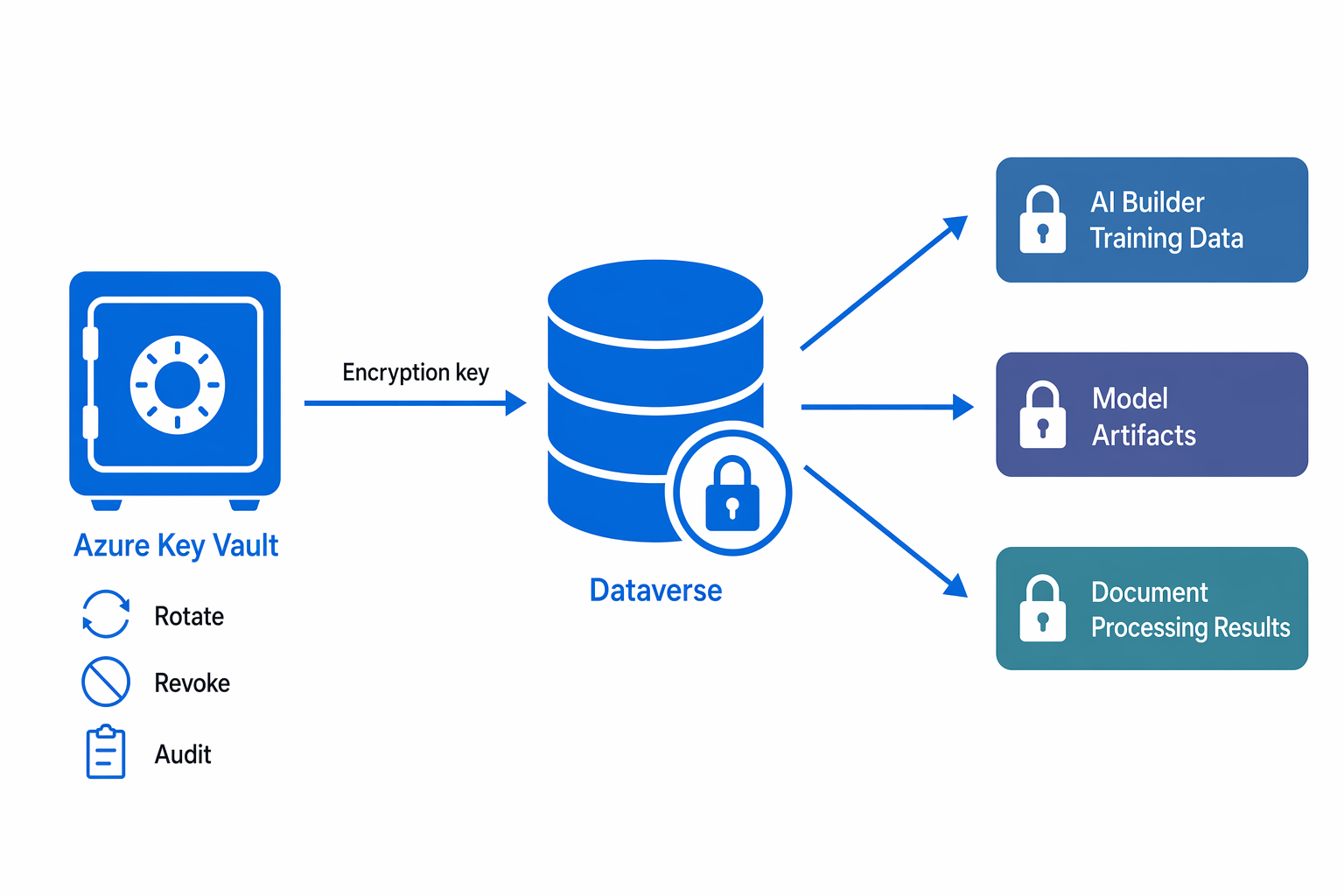
AI Builder stores training data and model artifacts in Dataverse. For organizations with strict data protection requirements, customer-managed keys (CMK) provide additional encryption control:
- Default encryption - Microsoft manages encryption keys. Data is encrypted at rest using Microsoft-managed keys.
- Customer-managed keys - Your organization controls the encryption keys through Azure Key Vault. You can rotate, revoke, or audit key access independently.
When you enable CMK for an environment, it encrypts all Dataverse data - including AI Builder training data, model configurations, and document processing results - with your organization's keys.
Important
Enabling customer-managed keys is an environment-level decision that affects all Dataverse data, not just AI Builder. Plan this decision as part of your overall data protection strategy for Red zone environments handling regulated data.
Administer AI prompts
AI prompts (custom and prebuilt) help makers create reusable text generation templates. Administrators govern prompts through several mechanisms:
Feature-level control - Enable or disable AI prompts per environment:
- Go to Environments > select environment > Settings > Features.
- Toggle the AI prompts setting to control availability.
Credit requirements - Prompts consume Copilot credits (separate from AI Builder credits). Environments need Copilot credit allocation for prompt execution.
Regional availability - Prompts require the environment to be in a supported region or have cross-region data movement enabled (configured in the previous unit).
Governance best practices for prompts:
- Require makers to document prompt purpose and expected outputs before promoting to production.
- Establish a review process for prompts that generate customer-facing content.
- Monitor prompt usage through environment analytics to identify unexpected or high-volume execution patterns.
- Ensure makers follow human oversight principles - AI-generated content from prompts should be reviewed before reaching end users in regulated contexts.
Configure Microsoft Graph semantic index integration
The Microsoft Graph semantic index enhances knowledge retrieval for Copilot Studio agents by enabling semantic (meaning-based) search across SharePoint and connector data sources:
- Work IQ - When enabled in Copilot Studio, agents use Microsoft 365 Copilot infrastructure to improve search quality for SharePoint knowledge sources.
- Semantic search - Instead of keyword matching, the agent understands user intent and retrieves conceptually relevant content.
Requirements for Graph semantic index:
- Microsoft 365 Copilot license must be present in the tenant.
- The "Turn on Work IQ" toggle must be enabled in Copilot Studio agent settings.
- SharePoint knowledge sources must be configured with appropriate permissions.
From a governance perspective, enabling Work IQ doesn't expand data access; it improves search quality within existing permission boundaries. Users still see only content they're authorized to access. However, better search means agents might surface sensitive-but-authorized content more readily, so ensure your SharePoint information architecture and permissions are well-designed.
Monitor AI resource health
Effective AI governance requires ongoing monitoring, not just initial configuration. Establish monitoring practices for:
- Model accuracy - AI Builder models degrade over time as data patterns change. Schedule periodic accuracy reviews and retrain models when performance drops below acceptable thresholds.
- Prompt quality - Review a sample of prompt outputs monthly to ensure they still meet quality and accuracy standards.
- Knowledge freshness - Verify that knowledge sources (SharePoint sites, uploaded documents) contain current, accurate information. Stale knowledge leads to incorrect agent answers.
- Credit consumption trends - Monitor for sudden spikes in AI credit usage that might indicate runaway automation or unauthorized model training.
Tip
Assign quarterly AI resource reviews to the resource owners you defined in your responsible AI framework. Owners verify model accuracy, knowledge freshness, and appropriate usage for their assigned resources.