Design a data policy strategy
Individual data policies are straightforward to create, but governing an enterprise tenant requires a deliberate strategy. Multiple policies interact, new connectors appear regularly, and different parts of the organization have different risk tolerances. A well-designed data policy strategy balances security with maker productivity using layered policies and clear governance processes.
Layer policies from broad to specific
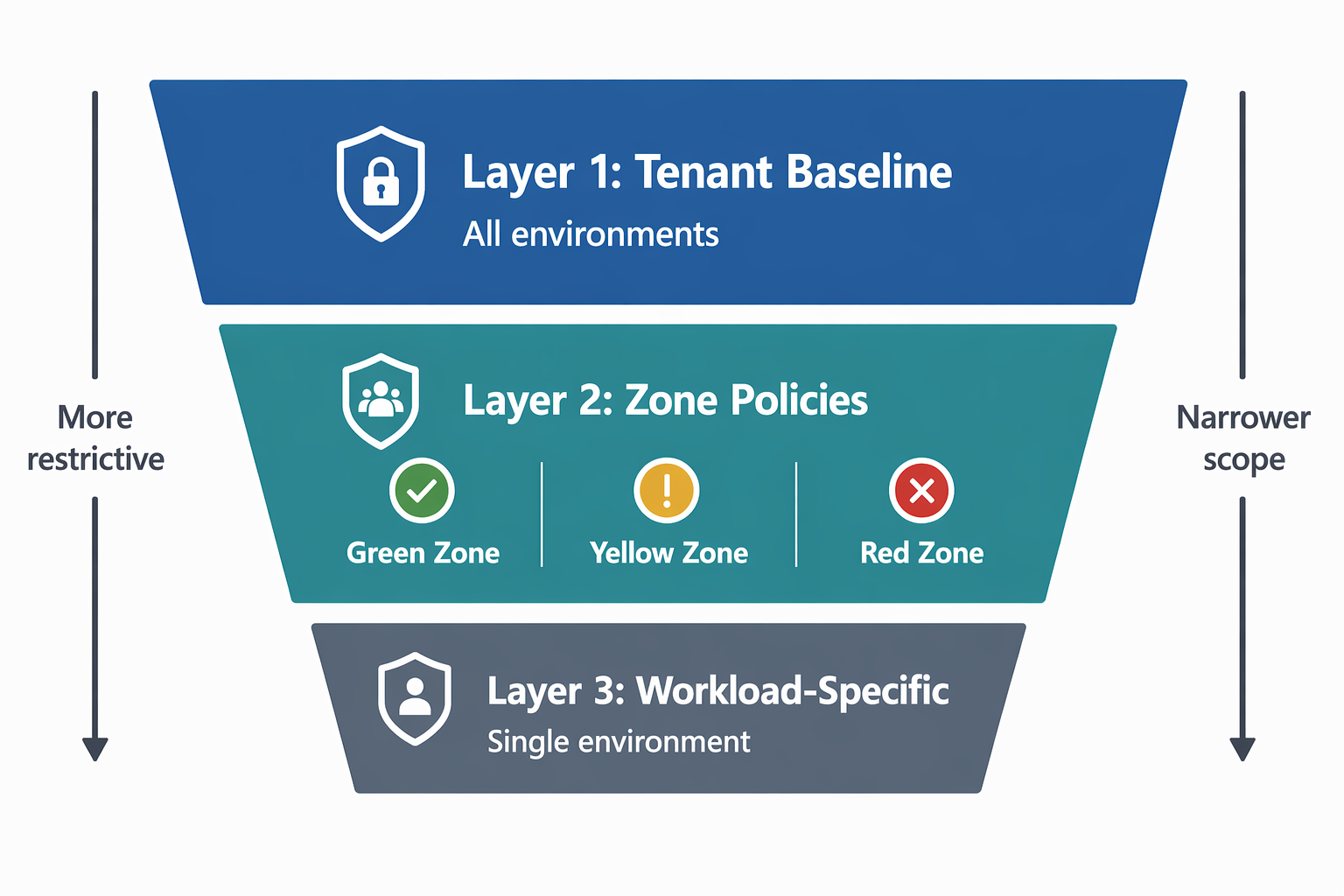
The most effective data policy strategy uses a layered approach. Here's an example:
Layer 1: Tenant-wide baseline - A single policy that applies to all environments (including future environments). This policy:
- Places core business connectors (Dataverse, SharePoint, Office 365, Dynamics 365) in the Business group.
- Blocks connectors that are never appropriate for business data (social media posting, consumer file sharing, unapproved AI services).
- Leaves the Non-Business group as the default for new connectors - allowing makers to use general-purpose connectors freely as long as they don't mix them with business data.
Layer 2: Zone-specific policies - Additional policies scoped to specific environments based on your governance zones:
- Green zone (personal productivity) - No additional restrictions beyond the baseline. Makers experiment freely within the guardrails.
- Yellow zone (team/department workloads) - Add restrictions on sensitive connectors that don't need baseline blocking but shouldn't be used in shared solutions (for example, block HTTP connector to prevent unmonitored external calls).
- Red zone (production/regulated) - Tightly restrict to only approved connectors. Block everything except the specific connectors validated for that workload.
Layer 3: Workload-specific policies - For high-compliance environments like Zava Pay, create a narrow policy that includes only that environment. Apply workload-specific controls such as endpoint filtering on approved APIs, desktop flow module restrictions, and agent knowledge source limits.
Evaluate how multiple policies combine
When multiple policies apply to the same environment, the system applies the most restrictive outcome for each connector:
| Tenant policy | Environment policy | Effective result |
|---|---|---|
| Business | Business | Business |
| Business | Non-Business | Non-Business (can't share with Business connectors in that environment) |
| Business | Blocked | Blocked |
| Non-Business | Blocked | Blocked |
| Non-Business | Non-Business | Non-Business |
The key implication: you can only add restrictions at lower layers, never remove them. If your tenant baseline places a connector in the Business group, an environment policy can move it to Blocked but not to a less restrictive position.
Tip
Before creating a new policy, map out which existing policies already apply to the target environments. Use the Power Platform admin center to view the effective policy summary for an environment to avoid unexpected interactions.
Plan for new connectors
Microsoft regularly adds new connectors to Power Platform. Your strategy must account for these additions:
- Default classification matters - New connectors land in the Non-Business group by default. If your baseline policy treats Non-Business as "general use permitted," new connectors are automatically available to makers without explicit approval.
- Quarterly connector review - Schedule a regular review of connectors added since your last review. Decide whether each belongs in Business, stays in Non-Business, or should be blocked.
- Default for new actions - When configuring action-level controls, set the default for new actions to Block on sensitive connectors. This ensures new actions require explicit approval before makers can use them.
For organizations with a stricter posture, consider Advanced Connector Policies (ACP), which offer a block-by-default model where only explicitly allowed connectors are available.
Understand Advanced Connector Policies
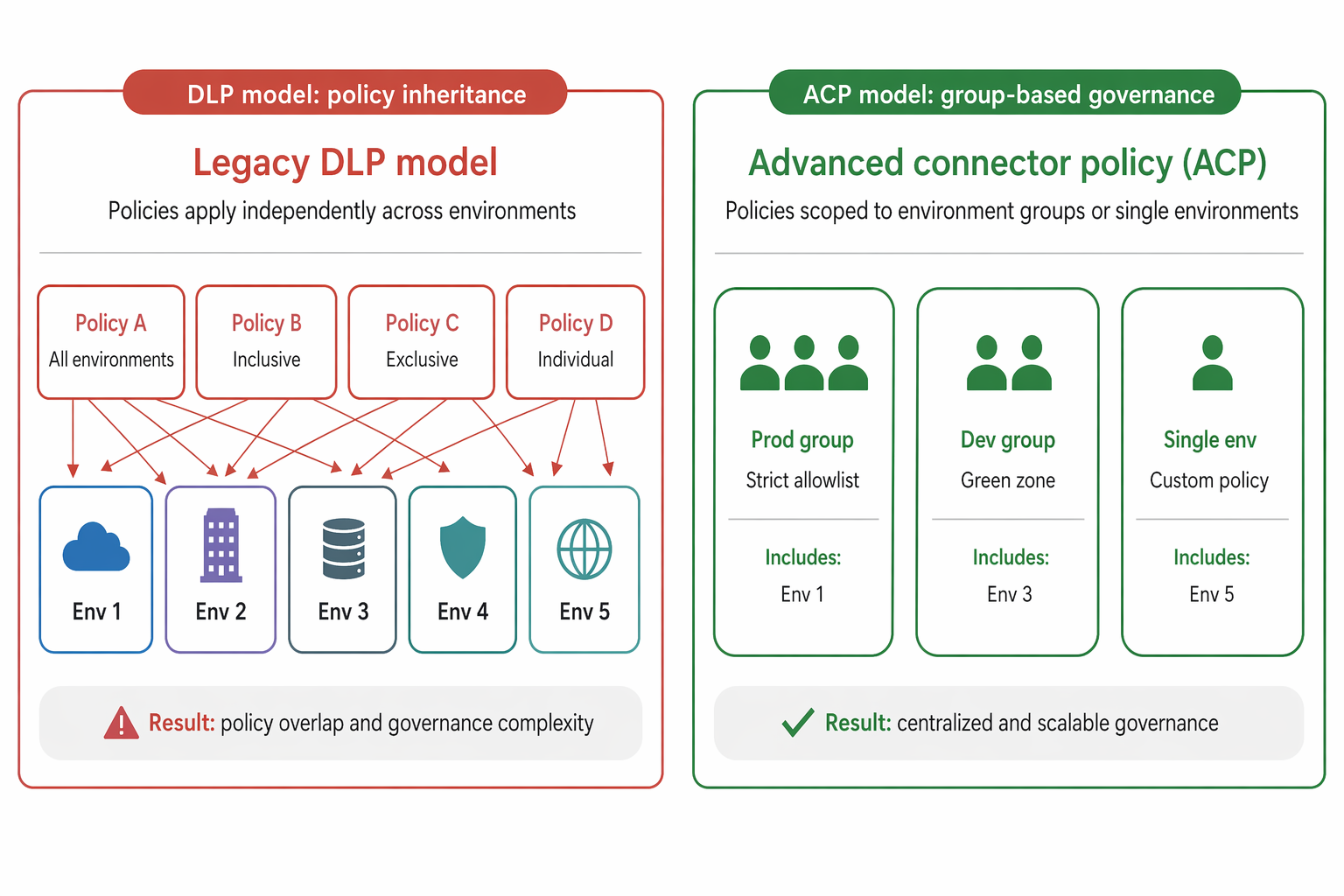
Advanced Connector Policies (ACP) represent the next generation of DLP governance in Power Platform. While classic DLP policies use an allow-by-default model (everything is available unless blocked), ACP uses a strict allowlist:
- Only connectors explicitly added to the policy are available to makers.
- Everything else is blocked by default.
- ACP natively supports action-level and trigger-level control.
- You can scope policies to environment groups or individual environments.
ACP can run in two modes:
- Mixed mode - ACP evaluates alongside classic DLP policies. The most restrictive result wins.
- ACP-only mode - Classic DLP evaluation is skipped entirely. Only ACP rules apply.
With classic DLP, every connector had to be sorted into a category, and a single environment could be touched by several overlapping DLP policies at once. A tenant-wide rule here, an exception there, even an environment-specific DLP policy a maker created themselves. This model made it harder for administrators to predict the impact of changes. ACP reduces the complexity: every environment has at most one policy in effect. It can be inherited from an environment group or set directly on the environment. The following diagram illustrates the difference in the two policy implementations.
Manage enforcement change
Rolling out new DLP policies to an active maker community requires change management. Abruptly blocking connectors that are in active use suspends existing apps and flows, disrupting business operations.
Follow a staged rollout approach:
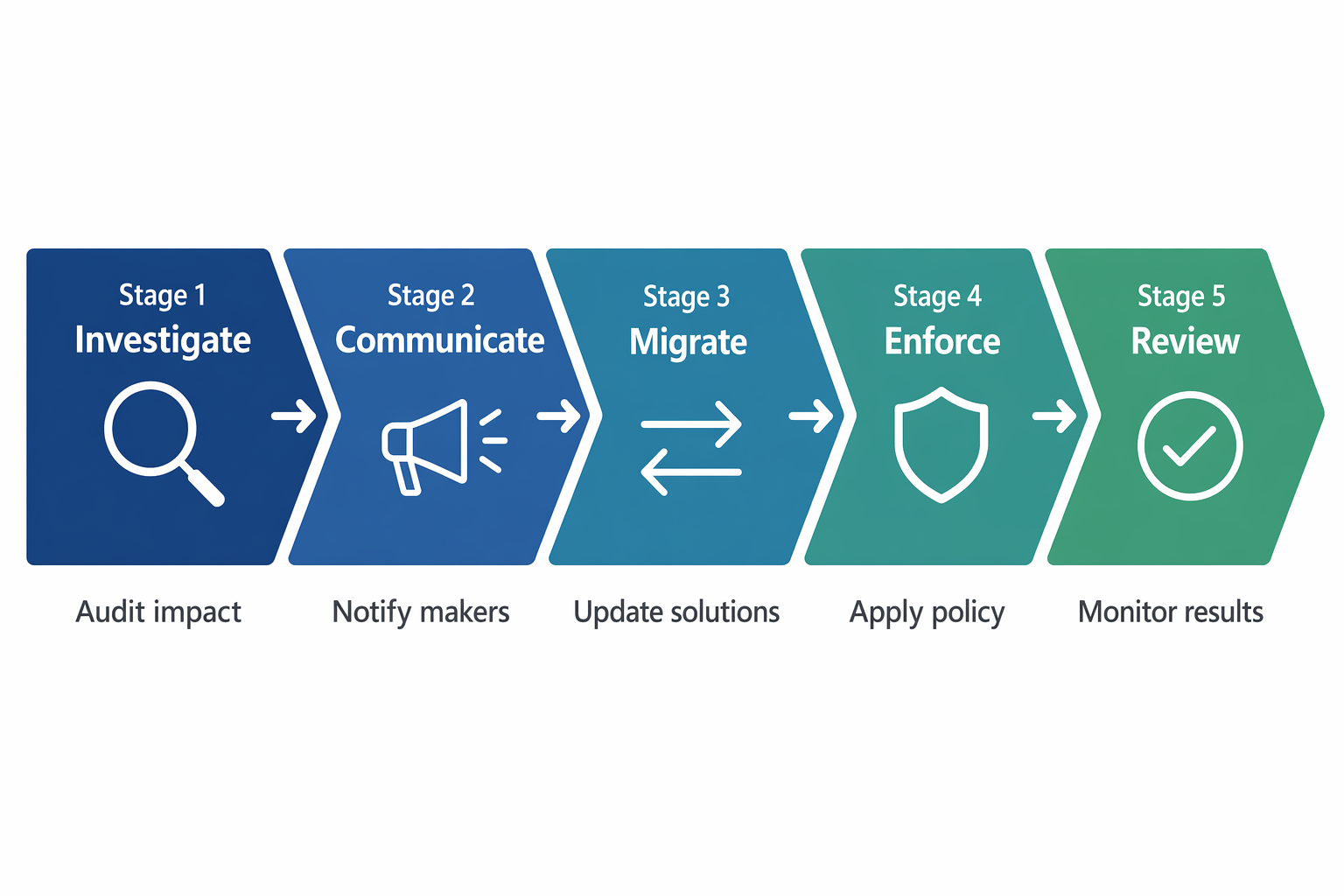
- Investigate - Identify which apps and flows currently use the connectors you plan to restrict. Use the admin center inventory to assess impact.
- Communicate - Notify affected makers about upcoming policy changes. Provide a timeline and alternatives for connectors being blocked.
- Migrate - Give makers time to update their solutions. Provide guidance on approved alternatives (for example, "Use the Power Automate approval connector instead of third-party email for approvals").
- Enforce - Apply the policy. Monitor for suspensions and help makers remediate.
- Review - After enforcement, review suspension logs to identify any missed cases. Adjust policy if legitimate use cases were inadvertently blocked.
Important
Runtime enforcement suspends existing apps and flows that violate new policies. Always audit existing resources before applying restrictive policies to production environments.
Document and communicate your strategy
A DLP strategy is only effective if makers understand it. Document and share:
- Which connectors are available in each zone - Publish a reference list so makers know what's possible before they start building.
- How to request connector access - Define a process for makers to request that a connector be unblocked or reclassified for their environment.
- Policy change cadence - Communicate when and how policies are reviewed and updated (for example, quarterly connector reviews after each Microsoft release wave).
- Escalation path - Define who to contact when a policy blocks a legitimate business need.
At Zava, the admin team publishes a "Connector Catalog" on their internal SharePoint site, updated quarterly, showing which connectors are available in each governance zone. Makers consult this before designing solutions, reducing support requests and after-the-fact suspensions.