Choose the right control for the job
Unit 8 closed with a question it deliberately left open: given a specific requirement, which control fits—today, not a version of today that assumes a retiring feature is still an option? You now know all three candidates individually. Restricted Content Discovery hides a site from search and Copilot's broad discovery without touching a single permission. Restricted Access Control locks a site's front door to one or more designated groups, overriding any permission or link that existed before. Restricted SharePoint Search maintains a tenant-wide allow-list, but new enablement blocks starting July 31, 2026. This unit puts all three side by side and gives you the judgment call an exam question—and a real deployment—actually rewards.
Three controls, one table
The table below is this unit's spine. Every decision you make from here comes back to these four dimensions: what the control covers, what it does to permissions, what it does to discovery, and how long it's meant to last.
| Control | Scope | Effect on permissions | Effect on search and Copilot discovery | Intended duration | Status today |
|---|---|---|---|---|---|
| Restricted Content Discovery | One site at a time | None—every permission and link stays exactly as it was | Removes the site from organization-wide search and Copilot's broad, general-purpose discovery | Interim, pending full permissions remediation | Recommended for new adoption |
| Restricted Access Control | One site at a time, scoped to up to 10 groups | Hard block—overrides existing permissions and sharing links for anyone outside the designated group(s) | Restricted site's content is hidden from organization-wide search and Copilot for users outside the group; search index propagates the policy on a delay that scales with site size | Interim, pending full permissions remediation | Recommended for new adoption |
| Restricted SharePoint Search | Tenant-wide allow-list, up to 100 sites | None—every permission and link stays exactly as it was | Governs organization-wide search and Copilot's chat and agentic answers only for sites on the list; owned or recently touched content still surfaces individually | Interim, pending full permissions remediation | Retiring—new enablement blocked starting July 31, 2026 |
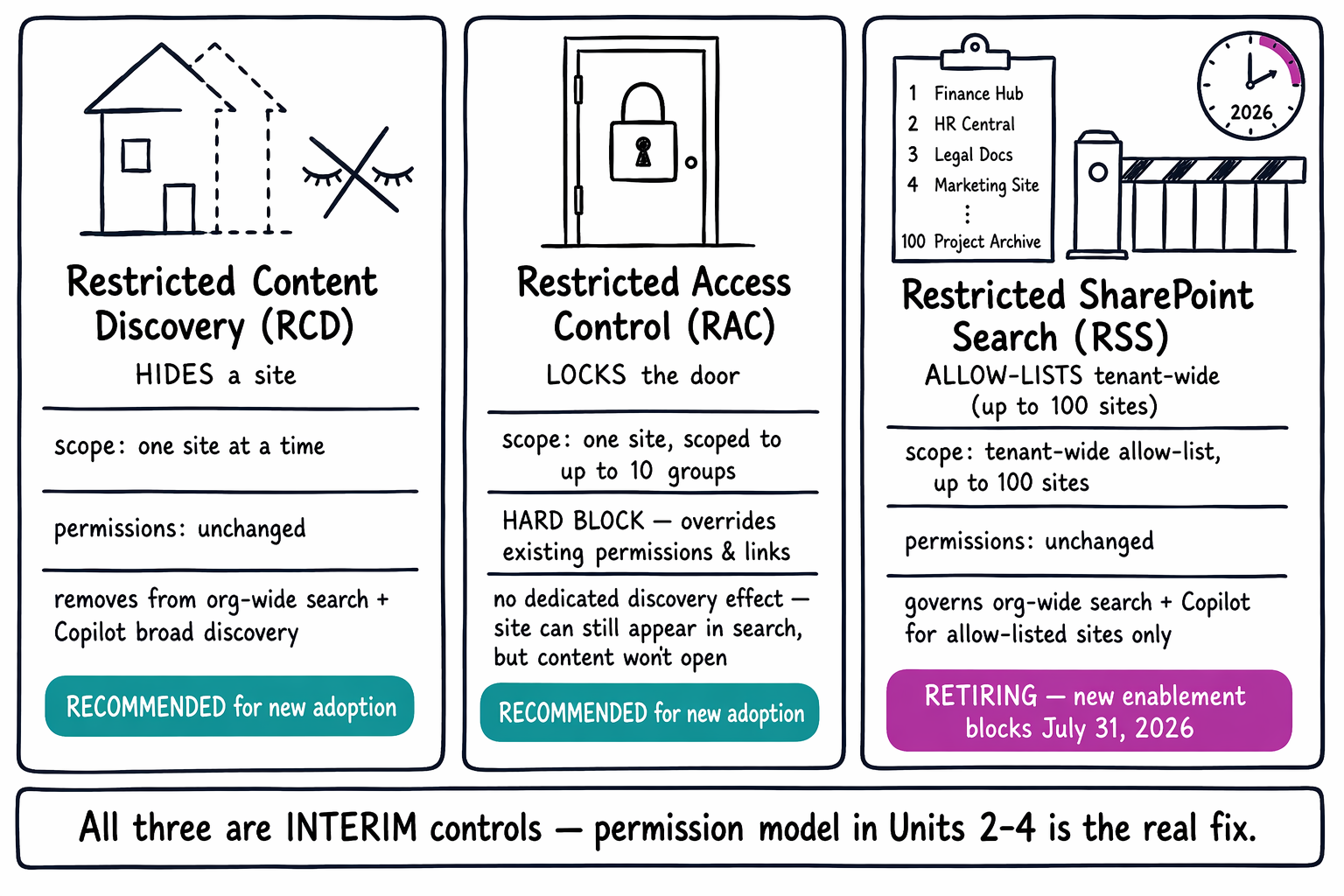
Notice what the three controls share before you notice what separates them. All three are explicitly temporary, all three sit on top of the same permission model instead of replacing it, and none of them is a substitute for the permissions and sharing work Units 2 through 4 cover. RSS earns its place in this table for completeness and because it still appears in existing tenants and on the exam—but it's the one control here that's retiring, and that status belongs in your decision, not just a footnote.
Predict-and-try: match the requirement to the control
Before you read the answers, make your own call on each of these three requirements. They're designed to look alike.
Synthesis prompt: Match each requirement below to Restricted Content Discovery (RCD), Restricted Access Control (RAC), or Restricted SharePoint Search (RSS). Make your pick before you keep reading.
- Hide a site from search and Copilot but preserve everyone's existing access.
- Lock a site's access to one defined group, even for people who already have a sharing link.
- Temporarily limit which sites show up in search and Copilot company-wide during a rollout, without touching any site's permissions.
Here's how each one resolves. The first requirement is RCD, because it names the exact job RCD does and nothing more: pull a site out of broad discovery while leaving every permission untouched. The second requirement is RAC, because "even for people who already have a sharing link" is the tell—only RAC overrides existing access instead of leaving it alone. The third requirement historically pointed to RSS, and if you're troubleshooting a tenant that configured it before the cutoff, that history still explains real behavior. But for a rollout starting today, RSS isn't the answer to reach for. Microsoft's current guidance points to applying RCD broadly across the sites that need review instead—the same discoverability outcome, without adopting a control that stops accepting new enablement in a matter of weeks.
Two wrong picks worth naming
Two mistakes show up often enough to call out directly. The first is reaching for RCD when the real requirement is to prevent access, not just reduce visibility. RCD can't do that—it was never an access control, and a site restricted with RCD stays reachable to anyone who already holds a permission or a link. If the requirement includes words like "lock down," "block," or "even for people who already have access," that's RAC's job, not RCD's.
The second mistake is treating RSS as a long-term architecture instead of the interim bridge it was always documented as. That mistake was already a stretch before the retirement—RSS never touched a permission, so leaning on it as a permanent strategy meant leaning on a control that was never built to be permanent. Now the retirement makes the mistake unambiguous: recommending RSS for new adoption after July 31, 2026, isn't just architecturally shaky, it's recommending a control your tenant can't even enable anymore.
The truth all three controls sit on top of
Strip away the differences in this table, and one sentence explains all three rows: Copilot inherits access, it never grants it. Restricted Content Discovery changes what shows up in broad discovery, not who can reach a site. Restricted Access Control changes who can reach a site, not what a site's owner intended those permissions to be in the first place. Restricted SharePoint Search changed what showed up tenant-wide, and now it's disappearing entirely, which is the clearest proof yet that none of these three controls was ever meant to last. The real, permanent fix was always the site permissions and sharing settings you worked with back in Units 2 through 4—every interim control in this table is a way to buy time while that fix gets made, not a replacement for making it.
Back to the marketing employee
That brings you back to where this module started: a marketing employee with no reason to be near payroll data, getting a detailed answer from Copilot sourced straight from the Finance site. You now have the full answer. Restricted Content Discovery alone would have hidden the site from broad search without closing off the access that let the employee reach it directly. Restricted Access Control would have closed that access off, provided the employee's group was correctly excluded. Restricted SharePoint Search would have kept the site out of the tenant-wide allow-list, which still wouldn't have stopped someone with a direct permission or link. Three genuine lookalikes, one correct answer per requirement—and now you can defend the pick, not just guess at it.
The next unit puts that judgment to work. You apply Restricted Content Discovery to a site and practice this exact matching exercise hands-on, so the decision you just made on paper becomes one you can make with confidence in a live tenant.