Design secure OpenSharing strategy
Sharing data securely with external partners, other teams, or across organizational boundaries requires a deliberate strategy. OpenSharing (formerly Delta Sharing) in Azure Databricks lets you share live data without copying it, while maintaining full control over who accesses what. Designing a secure sharing strategy means choosing the right authentication method, applying appropriate access controls, and establishing monitoring practices that keep your data governance intact.
In this unit, you learn how to evaluate sharing protocols, implement security controls, and design fine-grained access patterns that align with your organization's compliance requirements.
Choose the right sharing protocol
OpenSharing offers two primary protocols, each suited for different recipient scenarios. Your choice affects how authentication works and what assets you can share.
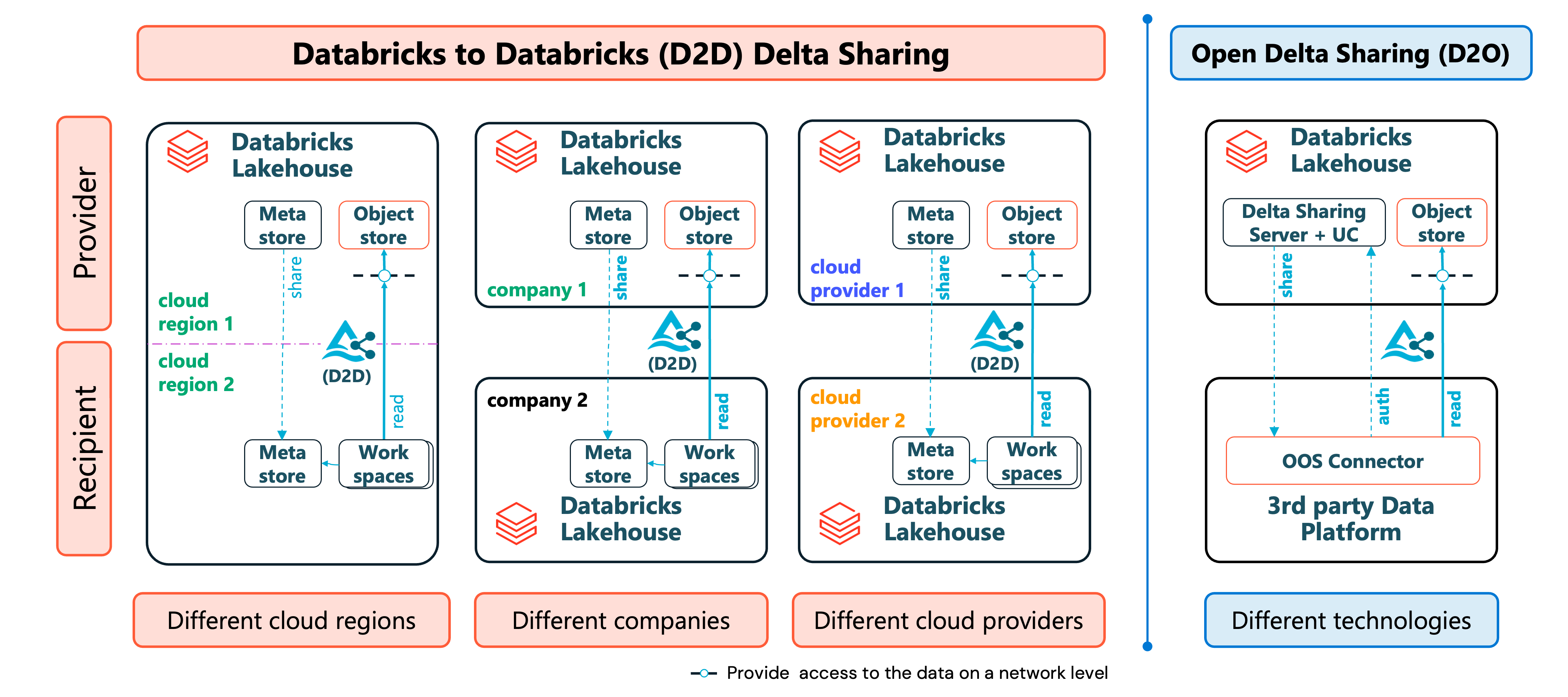
Databricks-to-Databricks sharing is the preferred option when recipients have access to a Unity Catalog-enabled Azure Databricks workspace. This protocol handles all security automatically through the platform. Recipients provide their sharing identifier—a string containing their metastore's cloud, region, and unique ID—and the connection establishes without token management. You can share tables, views, volumes, notebook files, and AI models through this approach.
Open sharing (the Databricks-to-Open protocol) works when recipients use platforms other than Azure Databricks or lack access to Unity Catalog. You manage authentication by generating bearer tokens or configuring OIDC (OpenID Connect) federation. While more flexible, this approach requires careful token lifecycle management and supports only tabular data.
Consider these factors when selecting your protocol:
| Factor | Databricks-to-Databricks | Open sharing |
|---|---|---|
| Recipient platform | Databricks with Unity Catalog | Any platform |
| Authentication | Platform-managed | Token or OIDC |
| Shareable assets | Tables, views, volumes, notebook files, models | Tables only |
| Token management | Not required | Required |
| Performance | Optimized with history sharing | Standard |
When recipients exist on both Databricks and non-Databricks platforms, you can create multiple recipient objects for the same logical organization—one for each access pattern.
Design authentication and access controls
A secure sharing strategy starts with proper authentication configuration and follows the principle of least privilege.
For open sharing recipients, configure token expiration to limit exposure if credentials are compromised. Set the default token lifetime at the metastore level:
- In the account console, select Catalog, and then select your metastore.
- Select Allow OpenSharing with parties outside your organization.
- Set an expiration period rather than allowing tokens to live indefinitely. Tokens are valid for a maximum of one year after creation.
For recipients who shouldn't rotate tokens frequently, consider OIDC federation instead. This approach grants short-lived Databricks OAuth tokens in exchange for JWT tokens from the recipient's identity provider, removing long-lived credentials entirely.
Restrict network access for sensitive shares by assigning IP access lists to open sharing recipients. You can limit access to specific IPv4 addresses or CIDR ranges (Classless Inter-Domain Routing). In Catalog Explorer, select Catalog > OpenSharing > Shared by me > Recipients, select the recipient, and then use the IP access list tab. You can also set the list with the Databricks CLI. To review a recipient's current restrictions, run:
-- View recipient details including IP restrictions
DESCRIBE RECIPIENT finance_partner;
Each recipient supports up to 100 IP/CIDR values. When a request originates from an unlisted address, OpenSharing denies access and logs the attempt.
Delegate sharing privileges carefully. Rather than granting metastore admin access broadly, use specific privileges:
CREATE SHARE: Allows creating new sharesCREATE RECIPIENT: Allows creating new recipientsUSE SHARE: Allows listing and viewing details of sharesUSE RECIPIENT: Allows listing and viewing details of recipientsUSE RECIPIENT,USE SHARE, andSET SHARE PERMISSION: Together allow granting share access to recipients
Assign these privileges to groups representing your data stewardship team rather than individuals.
Configure shares and recipients
After designing your security approach, you need to create the actual share and recipient objects in Unity Catalog. This section walks through the configuration steps for both sharing protocols.
Create a share
A share is a securable object that contains a collection of tables, views, volumes, notebooks, and models you want to share. Create a share using SQL or Catalog Explorer:
-- Create a new share
CREATE SHARE IF NOT EXISTS partner_analytics
COMMENT 'Sales analytics data for partner integration';
Add assets to a share
Once created, add the data assets recipients should access. You can share individual tables, views, or entire schemas:
-- Add a table to the share
ALTER SHARE partner_analytics ADD TABLE catalog.schema.sales_summary;

-- Add a table with an alias (the name recipients see, in schema.table format)
ALTER SHARE partner_analytics ADD TABLE catalog.schema.internal_metrics
AS analytics.metrics;

-- Share a table with history for time travel queries
ALTER SHARE partner_analytics ADD TABLE catalog.schema.transactions
WITH HISTORY;

-- Add an entire schema (includes all current and future assets)
ALTER SHARE partner_analytics ADD SCHEMA catalog.analytics_schema;
For Databricks-to-Databricks sharing, you can also add volumes and views:
-- Add a volume
ALTER SHARE partner_analytics ADD VOLUME catalog.schema.documentation;

-- Add a view
ALTER SHARE partner_analytics ADD VIEW catalog.schema.aggregated_sales;
Note
To add notebook files to a share, use Catalog Explorer. Select Catalog > OpenSharing > Shared by me, select your share, select Manage assets > Add notebook file, and browse for the notebook you want to share.
Create a recipient for Databricks-to-Databricks sharing
For recipients with Unity Catalog-enabled workspaces, request their sharing identifier first. This string contains their metastore's cloud, region, and UUID:
-- Create a recipient using their sharing identifier
CREATE RECIPIENT IF NOT EXISTS contoso_analytics
USING ID 'azure:westeurope:a1b2c3d4-e5f6-7890-abcd-ef1234567890'
COMMENT 'Contoso data analytics team';
The recipient can find their sharing identifier by running:
SELECT CURRENT_METASTORE();
Create a recipient for open sharing
For recipients without Databricks access, create a token-authenticated recipient:
-- Create an open sharing recipient
CREATE RECIPIENT IF NOT EXISTS external_partner
COMMENT 'External analytics platform integration';
After creation, retrieve the activation link to send to your recipient:
DESCRIBE RECIPIENT external_partner;
The activation link allows the recipient to download their credential file once. If the recipient already downloaded the file, the link isn't returned. Share this link through a secure channel.
Grant recipients access to shares
After creating both the share and recipient, grant access:
-- Grant a recipient access to a share
GRANT SELECT ON SHARE partner_analytics TO RECIPIENT contoso_analytics;

-- View current grants on a share
SHOW GRANT ON SHARE partner_analytics;

-- View shares accessible to a recipient
SHOW GRANTS TO RECIPIENT contoso_analytics;
Manage shares and recipients
Use these commands to view and manage your sharing configuration:
-- List all shares
SHOW SHARES;

-- View share details including assets
DESCRIBE SHARE partner_analytics;
SHOW ALL IN SHARE partner_analytics;

-- List all recipients
SHOW RECIPIENTS;

-- Remove a table from a share
ALTER SHARE partner_analytics REMOVE TABLE catalog.schema.deprecated_table;

-- Revoke recipient access
REVOKE SELECT ON SHARE partner_analytics FROM RECIPIENT former_partner;

-- Delete a recipient
DROP RECIPIENT former_partner;
Implement fine-grained access with dynamic views
Standard table sharing grants recipients access to all rows and columns. When you need to restrict what specific recipients see, use dynamic views that filter data based on recipient properties.
Attach custom properties to recipients that correspond to your data segmentation:
-- Set country_region property for partition filtering
ALTER RECIPIENT regional_partner SET PROPERTIES ('country_region' = 'US');
Create a dynamic view that filters rows based on the recipient's property:
CREATE VIEW catalog.schema.regional_sales AS
SELECT * FROM catalog.schema.all_sales
WHERE region = CURRENT_RECIPIENT('country_region');
For column-level security, mask sensitive data for recipients who shouldn't see it:
CREATE VIEW catalog.schema.customer_data AS
SELECT
  customer_id,
  CASE
    WHEN CURRENT_RECIPIENT('access_level') = 'full' THEN email
    ELSE 'REDACTED'
  END AS email,
  purchase_history
FROM catalog.schema.customers;
When you share this dynamic view, each recipient sees only the data their properties permit. The provider can't query views using CURRENT_RECIPIENT() directly—test by sharing with yourself as a recipient.
For simpler scenarios, partition filtering lets you share specific slices of a table without creating views:
ALTER SHARE partner_share ADD TABLE catalog.schema.inventory
PARTITION (region = CURRENT_RECIPIENT().region);
Monitor sharing activity through audit logs
Tracking who accesses shared data and when is essential for compliance and security investigations. Azure Databricks captures OpenSharing events in the audit log system table.
Query the audit logs to understand sharing patterns:
-- Track share and recipient creation
SELECT
  event_time,
  user_identity.email AS performed_by,
  action_name,
  request_params
FROM system.access.audit
WHERE service_name = 'unityCatalog'
  AND action_name IN ('createShare', 'createRecipient', 'updateShare', 'updateSharePermissions')
ORDER BY event_time DESC;
Monitor recipient access to shared tables:
-- View recipient data access events
SELECT
  event_time,
  request_params.recipient_name,
  COALESCE(request_params.share, request_params.share_name) AS share_name,
  action_name
FROM system.access.audit
WHERE service_name = 'unityCatalog'
  AND action_name IN ('deltaSharingQueriedTable', 'generateTemporaryTableCredential')
  AND event_date > CURRENT_DATE() - INTERVAL 7 DAYS;
The deltaSharingQueriedTable event appears when recipients query tables through pre-signed URL access, which includes open sharing and tables shared without history. The generateTemporaryTableCredential event appears when recipients get temporary storage credentials, which includes tables shared with history sharing to Databricks recipients. Both events include details about what was accessed and by whom.
Establish regular review cycles for your sharing configuration:
- Audit active recipients monthly to confirm continued business need
- Review share contents to ensure only necessary data is exposed
- Verify token expiration settings haven't been modified
- Check for failed access attempts that might indicate credential compromise
Tip
OpenSharing events aren't available through Azure diagnostic settings. For alerting on suspicious sharing activity, schedule queries or alerts against the audit log system table.
Apply security best practices
Building a robust OpenSharing strategy requires combining technical controls with operational practices.
Document sharing agreements before configuring access. Establish what data is shared, for what purpose, and for how long. This documentation supports compliance audits and helps when reviewing whether shares should continue.
Share only what's necessary. When adding tables to a share, consider whether recipients need the entire table or just specific partitions. Use schema sharing with caution—it automatically includes future tables added to that schema.
Combine controls for defense in depth. A sensitive share might include:
- Databricks-to-Databricks authentication for platform-managed security
- Dynamic views for row-level filtering
- Recipient properties for parameterized access
- Regular audit log reviews
Plan for credential rotation. For open sharing recipients, implement processes to rotate tokens before expiration. When you rotate a token, you choose when the existing token expires (a value of 0 expires it immediately), which gives recipients time to update their configuration. A recipient can have at most two tokens at a time.
Review shares when personnel changes. When a recipient organization restructures, verify that the current sharing identifier still represents the appropriate metastore and that access should continue.
By designing your OpenSharing strategy around these principles, you create a framework for secure collaboration that scales with your organization's needs while maintaining the governance controls your compliance requirements demand.