Optimize plug-in performance
The eligibility-check plug-in runs synchronously every time someone creates a request. As request volume grows, that single step increasingly determines how fast the whole operation feels to the employee who submitted it. This unit moves you from "the plug-in works" to "I can diagnose why it's slow and apply the right fix."
Time and resource limits
Every Dataverse message operation enforces a hard ceiling: the operation must complete within 2 minutes. If execution runs past that ceiling, Dataverse throws a TimeoutException and rolls back the entire operation, not just the step that ran long. For the eligibility-check plug-in, that means a slow external availability check doesn't just delay request creation. It can fail the operation outright.
The 2-minute ceiling is a hard limit, but it isn't a target. Dataverse recommends keeping any single plug-in's own execution under 2 seconds. There's no immediate failure at 2 seconds, but consistently running longer is a signal that the logic belongs somewhere other than the synchronous pipeline. Dataverse also enforces CPU, memory, and handle limits independent of time. If a plug-in exceeds those, the sandbox process is terminated and that invocation fails, although the next request-scoped invocation runs normally.
IExecutionContext.Depth rises each time plug-in logic triggers another operation; by default, past a depth of 8 within an hour, Dataverse stops execution as a suspected infinite loop. A plug-in that updates the table it's registered on is the usual cause, so don't build business logic on a specific depth value.
| Limit | Threshold | What happens when it's exceeded |
|---|---|---|
| Total message operation time | 2 minutes | Dataverse throws a TimeoutException; the whole operation rolls back |
| Recommended single plug-in execution time | 2 seconds | No automatic failure, but it's the signal to reconsider synchronous execution |
| CPU, memory, and handle usage | Platform-enforced resource caps | Dataverse kills the sandbox process; that invocation fails, the next one runs normally |
Learn more about plug-in performance analysis.
Choose synchronous or asynchronous execution
Once you know the eligibility check is approaching that 2-second guideline, the next decision is whether request creation genuinely needs to wait for it. A synchronous registration blocks the caller until the plug-in finishes, which is exactly why users feel every millisecond the eligibility check adds. An asynchronous registration lets Dataverse queue the work and return control to the caller immediately, trading instant feedback for a short delay before the result is available.
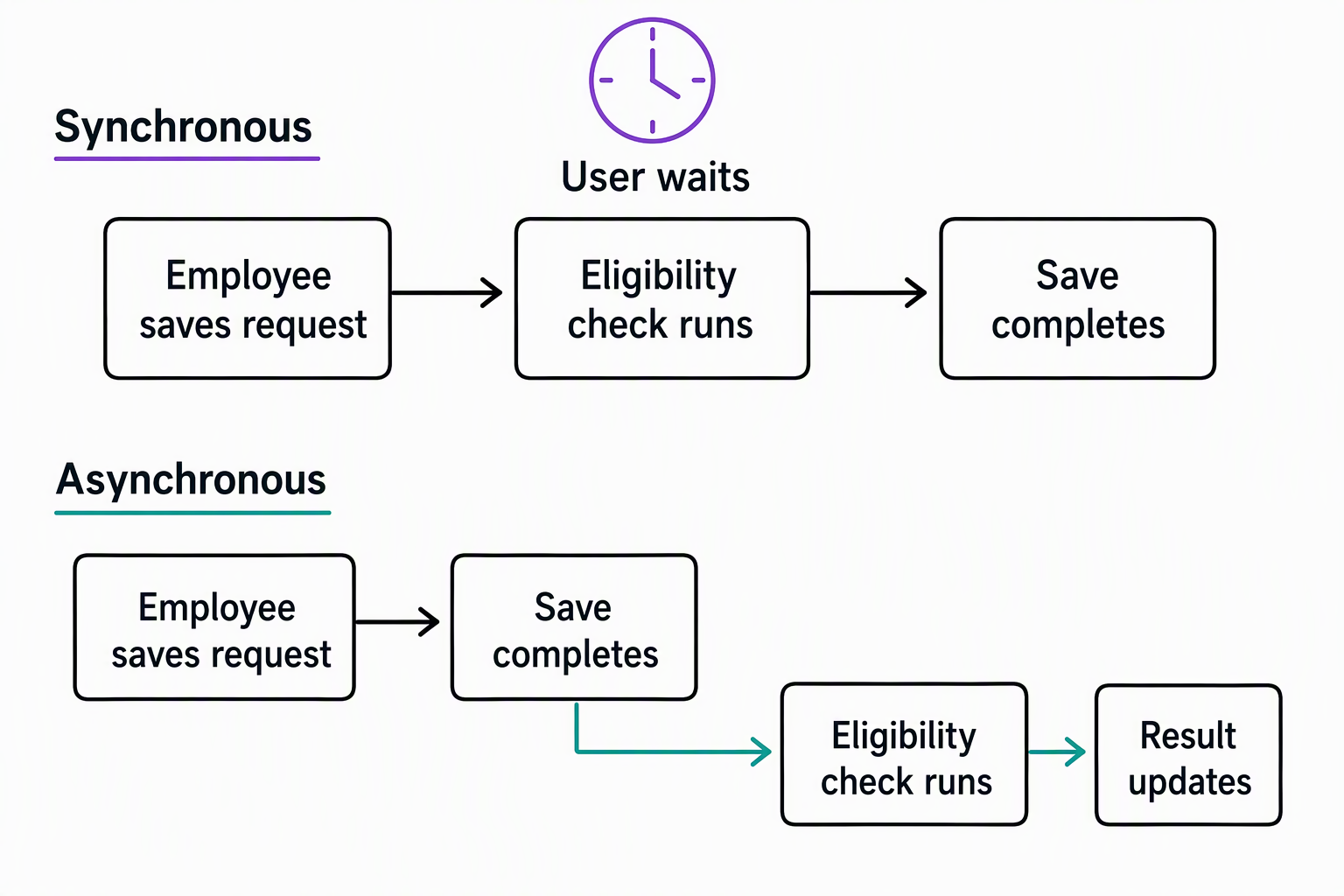
Not every step is a candidate for the switch. If downstream logic, or the user interface, depends on knowing the eligibility result before the request record finishes saving, synchronous execution stays correct even if it's slower. But if the check only needs to happen soon after creation, rather than before it, asynchronous execution removes it from the critical path entirely.
| Consideration | Synchronous | Asynchronous |
|---|---|---|
| Caller experience | Waits for completion; adds to perceived latency | Returns immediately; result available shortly after |
| Correct when... | The result must exist before the transaction completes | The result can be available shortly after, not immediately |
| Counts toward the 2-minute pipeline ceiling | Yes, as part of the same operation | Runs after the record operation completes, outside the database transaction |
| Failure handling | Can roll back the entire operation | Fails independently; visible in the system job, doesn't block the user |
For the eligibility-check plug-in, registering it asynchronously means the employee's request saves immediately. The eligibility result then updates moments later, instead of making every submission wait on an external availability call. Always consider asynchronous execution first when the business process allows it—it's consistently better for responsiveness and scalability than defaulting to synchronous.
Guiding question: Think about a plug-in you've worked with, or the eligibility-check plug-in itself. Does anything truly depend on its result existing before the triggering operation completes, or could it run a moment later without anyone noticing?
Keep plug-ins stateless and efficient
Even after you settle the synchronous-versus-asynchronous question, the plug-in's own code can still waste the time it's given. Dataverse caches and reuses the same class instance across invocations. As a result, anything stored as a class-level property persists in ways you don't control, and leaks between unrelated requests from different users. A stateless design, where the plug-in reads only from constants and helper methods and never holds service instances or context data on the class itself, avoids that entirely.
Efficiency inside the method body matters as much as statelessness. Three practices keep a plug-in's own code fast:
- Avoid batch request types in plug-in code.
ExecuteMultipleRequestandExecuteTransactionRequesttarget client applications, not plug-in code running inside another operation, so reach for direct service calls instead. - Don't multi-thread. Multi-threading inside a plug-in is unsupported, which rules out spinning up parallel work to shave time off a slow step.
- Tune the external call's settings. When the eligibility-check plug-in calls the external availability service, set
KeepAlivetofalseinstead of leaving ittrueor undefined, and set an explicit timeout so a hung external call can't consume the plug-in's own time budget.
Scope queries and registrations precisely
A plug-in that's efficient internally can still run too often. Filtering attributes on the step registration tell Dataverse which column changes actually matter. Without them, the eligibility-check plug-in fires on every update to the request table, not just the ones relevant to eligibility, multiplying the work for no benefit.
The same principle extends to query shape: if a plug-in is registered for RetrieveMultiple PreOperation, filtering needs to apply to every query type that message can carry, not just the one you tested against.
Some registrations are worth avoiding altogether, and some query habits are worth tightening:
- Avoid synchronous logic on
RetrieveorRetrieveMultiple. Those messages fire constantly across the system, so a small per-call cost compounds into broad slowness. - Avoid duplicate step registrations. The same message and event registered twice causes the logic to run and bill its cost twice without you noticing anything in the code itself.
- Retrieve only the columns the query actually needs. That keeps memory use proportional to the work being done, rather than pulling an entire record to read one field.
- Register a pre- or post-entity image for the same purpose. It lets you include only the columns the logic needs for the target record's attribute data, instead of retrieving the record inside the plug-in, where the default selects every column and hurts performance.
Try it yourself: Open a plug-in step registration for the eligibility-check plug-in (or any plug-in you have access to) in your registration tool and look at its filtering attributes. Are they scoped to the columns the logic actually reads, or does the step fire on every column change?
Measure before and after
None of these decisions are worth making on instinct alone. The Power Platform admin center's Analytics area for Dataverse includes a Plug-ins dashboard that surfaces average execution time, failure counts, and the most active plug-ins in an environment. That's where you can confirm whether the eligibility-check plug-in is actually the bottleneck before changing anything.
Inside the plug-in itself, ITracingService records what the code is doing at each step, so when something does fail, the trace log shows where time went instead of leaving you guessing. When trace output alone doesn't explain the behavior, turn to Plug-in Profiler, installed through the Plug-in Registration Tool. It captures a plug-in's execution context so you can replay and debug it in Visual Studio.
When the plug-in needs to reject a request, InvalidPluginExecutionException is the mechanism for surfacing that failure back to the caller with a meaningful message. It avoids letting an unrelated exception type obscure what went wrong. Together, the dashboard, the tracing, and the structured exception give you the same before-and-after evidence a performance fix needs: a measurement that shows the problem, a trace that explains it, and a clear signal when the fixed version behaves correctly.
With the eligibility-check plug-in now scoped, measured, and running on the right execution path, the next unit turns to a new goal. It gives other processes a way to call its logic directly, instead of only reacting to table events.
Learn more about business logic best practices for plug-ins.