Configure Dataverse business events
The device-reservation custom API from the previous unit gives the team a callable operation: something that checks availability and reserves a device on request. But reserving a device isn't the only moment that matters.
Once a request gets approved, a notification service and a procurement-tracking system both need to respond, and neither one should wire directly into the approval logic to find out. This unit shifts you from exposing a callable operation to exposing and cataloging an event, so other systems can discover it and react on their own terms.
Business events: What they add
Dataverse already has an event framework: the same one that runs the plug-ins you registered in earlier units, triggered by messages like Create or Update. Business events don't replace that framework. They add a new way to expose and discover events on top of it. They relay event data to subscribers through Power Automate flows, Azure Service Bus, Azure Event Hub, webhooks, and Dataverse plug-ins.
The piece that makes this discoverable is the event catalog. A catalog is a hierarchical structure where the top level represents a solution, and the next level down is a category you define. You assign relevant tables and events to a category, and that's what a subscriber browses to find out what's available.
A catalog should include only selected, high-value events relevant to that solution, not every table and every message the solution happens to touch. For the equipment-provisioning solution, that means cataloging the request-approval moment deliberately, instead of exposing everything and leaving subscribers to sort out what matters.
Decide between a table event and a custom event
Before cataloging anything, you need to know which kind of event you're exposing. Assigning a table to a category gives you table events: Create, Update, and Delete come in as a set if the table supports them, and you can't pick operations individually. User-owned tables also bring sharing-related events along (GrantAccess, ModifyAccess, RevokeAccess).
That's a reasonable fit if a subscriber genuinely cares whenever any request record changes. But "request approved" isn't "request changed": it's one specific transition, and a table event can't isolate it from every other update to that record.
A custom event, built from a custom API, isolates exactly that transition. Each custom API is its own new Dataverse message, so an operation like OnRequestApproved becomes an event with a name, a purpose, and nothing else bundled in. The table below summarizes the distinction.
| Characteristic | Table event | Custom event |
|---|---|---|
| Granularity | All Create/Update/Delete as a set, plus sharing events on user-owned tables | One specific, named operation |
| Good fit when | A subscriber cares about any change to a table | A subscriber cares about one specific business moment |
| Notifies on | Every matching operation, including unrelated field edits | Only when the custom API completes successfully |
That last row matters here. Custom business events only notify after an event completes successfully, unlike the general event framework, which can still run synchronous logic that cancels or changes an operation's outcome. For "request approved," the approval itself already happened by the time subscribers hear about it. That's exactly the guarantee a notification service and a procurement system need before they act.
Design an event worth subscribing to
Naming the operation OnRequestApproved isn't just a style preference. When a custom API exists purely for subscribers to react to it, its name should start with On (OnCustomerPurchase and OnVendorPaymentPosted are the pattern to follow). That way, anyone browsing the catalog can tell at a glance that this is a notification, not a command.
Beyond naming, three design principles separate an event worth subscribing to from one subscribers learn to ignore:
| Principle | What it means for OnRequestApproved |
|---|---|
| Clear intent | Know why the event exists and how a subscriber uses it: here, "tell downstream systems a request moved to approved" |
| Specific | Scope it narrowly so a subscriber doesn't have to filter; don't fold "approved," "rejected," and "escalated" into one generic event |
| Lightweight | Include only what describes the event: a request identifier and the approval outcome, not the employee's full profile or the entire allowance history |
That last principle is worth dwelling on, because it's where events most often go wrong. Business events aren't a data-export mechanism. Suppose the procurement-tracking system needs more detail than OnRequestApproved provides. The event should still give it only enough context, such as a request reference it can resolve, so it can go retrieve that detail itself.
It shouldn't carry the entire record graph along for the ride. Think back to the response-property design from the custom API unit: the same instinct to keep the contract narrow applies here, on the outbound side instead of the response side.
Guiding question: Suppose a subscriber later asks for the employee's full device history inside the
OnRequestApprovedpayload. Is that a sign the event needs more fields, or a sign the subscriber should query theemployeeanddevicetables itself once it receives the event?
Catalog the event so subscribers can find it
Building OnRequestApproved as a custom API makes it callable, but it doesn't make it discoverable. Cataloging is what exposes it. Adding it to a category under the solution's catalog is the step that lets a subscriber find it at all. That's the same way the eligibility-check and device-reservation operations only became reusable, once they existed as named messages.
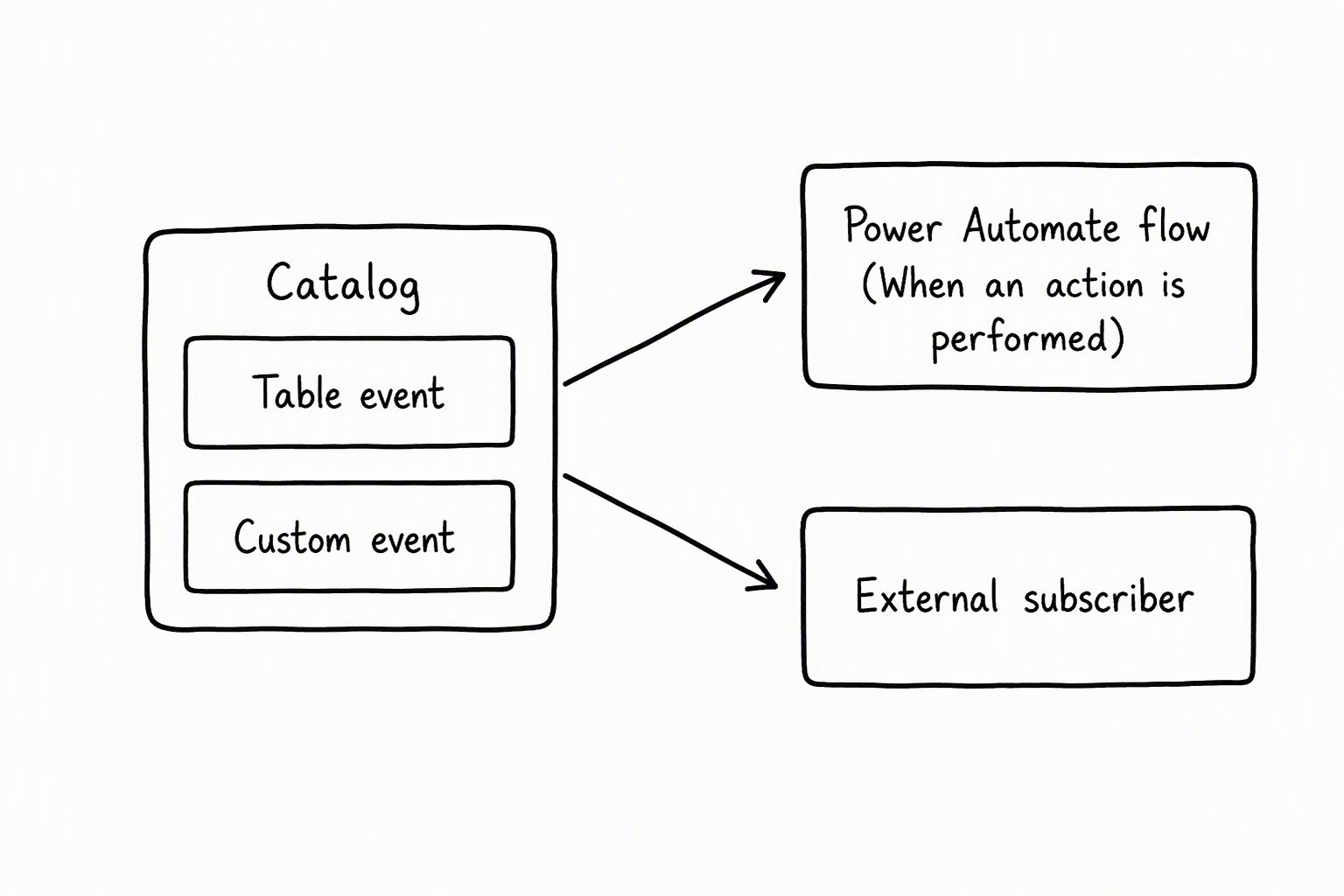
Once OnRequestApproved enters the catalog, it surfaces in Power Automate's Dataverse connector through the "When an action is performed" trigger. That's a different trigger from the one that handles ordinary table changes. Create, Update, and Delete events don't appear there at all; those already have a home in the "When a row is added, modified or deleted" trigger.
A notification flow and a procurement-tracking flow each subscribe independently through "When an action is performed." Neither one needs to know the other exists, or that the approval plug-in exists, for that matter. That's the decoupling this unit is building toward: the approval logic emits an event and moves on, and every subscriber reacts asynchronously on its own schedule.
You can also catalog custom process actions as business events, but Dataverse guidance for custom business events recommends custom API. For a new event like OnRequestApproved, custom API is the better foundation because it gives you the event-specific settings this module already relied on, including Allowed Custom Processing Step Type.
External events: When something happened outside Dataverse
Not every event originates inside Dataverse. Suppose procurement confirms a purchase order outside the system entirely, and that external confirmation needs to land in Dataverse as an event other flows can react to. A custom API representing an event that already happened somewhere else follows a different configuration than OnRequestApproved. Specify no plug-in for the main operation, and set Allowed Custom Processing Step Type to Async Only.
That's the same setting you weighed in the custom API unit, now applied for a different reason. There it kept the reservation operation open to reaction without letting others cancel it. Here it rules out synchronous logic entirely, because the event already happened and there's nothing left to block or change. An external event's custom API also includes only request parameters, never response properties, since there's no synchronous logic left to set them.
OnRequestApproved itself stays an internal event: the approval happens inside Dataverse, so a plug-in behind it's appropriate. But recognizing the external pattern matters for the module's final concern. Once a plug-in starts calling out to confirm something with an external system, it needs a way to authenticate that doesn't depend on a stored secret. That's exactly where the next unit picks up.