Identify attack paths and choke points
Attack path analysis in Defender CSPM reveals the realistic exploitation chains that could allow an attacker to reach your critical assets. For Contoso Healthcare, understanding attack paths is essential. If an internet-exposed VM with a vulnerability exists in the environment, the security team needs to know whether an attacker could use it to reach the patient triage assistant or the medical records dataset that grounds the AI models. Here, you explore how attack path analysis works, navigate the attack path experience in the Defender portal, investigate individual paths, and understand how attack paths extend to AI workloads.
| Attack path element | Description |
|---|---|
| Entry point | External access point where an attack could begin — for example, an internet-exposed VM or publicly accessible storage |
| Target asset | The critical resource an attacker is trying to reach — for example, a database with patient health records or an Azure AI model endpoint |
| Choke point | A node where multiple attack paths converge — remediating a choke point can break several attack paths simultaneously |
| Vulnerable node | A resource with a security issue that enables lateral movement along the path |
Understand how attack path analysis works
Attack path analysis uses a proprietary algorithm to identify realistic exploitation chains in your environment. The algorithm focuses on real, externally driven and exploitable threats — paths that begin outside your organization and progress toward business-critical targets.
The algorithm considers only what's actually reachable and exploitable from external entry points. A short or empty attack paths list means the algorithm found no confirmed externally exploitable paths to your critical assets — a positive security signal, not a platform issue.
Attack path analysis requires the Defender CSPM plan with agentless scanning enabled. By default, attack paths are organized by risk level — High, Medium, or Low — using the same context-aware risk-prioritization engine that scores security recommendations. The risk level reflects environmental factors such as internet exposure, identity permissions, and the criticality of target assets.
Note
Attack path analysis is currently in preview. Preview features are subject to change and may have limited availability.
Navigate attack path analysis in the Defender portal
You access attack path analysis through the Exposure Management section of the Microsoft Defender portal. Sign in to the Microsoft Defender portal at security.microsoft.com, then navigate to Exposure Management > Attack surface > Attack paths. The attack path experience provides three primary views: the Overview tab, the Attack paths list tab, and the Choke points tab.
The Overview tab displays a visual summary of your attack path data. You see a trend chart showing attack paths over time, the top five choke points where multiple paths converge, the top five attack path scenarios sorted by risk, and lists of top targets and top entry points.
The Attack paths list tab shows a filterable table of all detected attack paths in your environment. You can filter by risk level (High, Medium, Low), asset type, remediation status, or time frame such as the last 30 days. Select an attack path from the list to open the Attack Path Map, a graph-based visualization that highlights vulnerable nodes, entry points, target assets, and choke points.
The Choke points tab lists nodes where multiple attack paths intersect. These are the highest-leverage remediation targets — resolving a security issue at a choke point can break several attack paths simultaneously.
Note
You may see an empty attack paths list. This is expected behavior and indicates that the algorithm found no confirmed externally exploitable paths to your critical assets — a positive security signal.
Investigate an attack path map
When you select an attack path from the list, the Attack Path Map opens to show you the full exploitation chain. For example, consider an attack path titled "Internet-exposed VM can reach Azure OpenAI endpoint with access to patient health data." The map displays this chain visually: an entry point (internet-exposed VM) connects to a vulnerable node (VM with CVE vulnerability), which connects to a choke point (storage account shared between services), which ultimately reaches the target asset (Azure OpenAI service with access to patient health data).
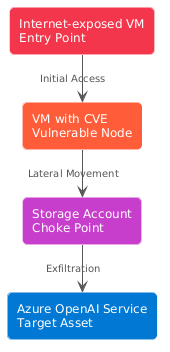
Select any node in the map to open its details panel. You see the MITRE ATT&CK tactics and techniques relevant to that step — for example, Initial Access for the entry point, Lateral Movement for intermediate nodes, or Exfiltration for nodes near sensitive data. The panel also lists risk factors such as excessive permissions, internet exposure, or unpatched vulnerabilities.
The details panel includes a Recommendations section with two categories. Recommendations are security fixes that break this attack path entirely — resolving these removes the path from your environment. Additional recommendations reduce exploitation risk but don't fully break the path when resolved alone — they're still valuable to address as defense-in-depth measures. Each recommendation includes its risk level, affected resources, and remediation guidance.
Once you remediate the necessary recommendations, it can take up to 24 hours for the resolved path to be removed from the list.
How attack paths extend to AI workloads
Defender CSPM's attack path analysis extends to AI workloads deployed on Azure OpenAI Service, Azure AI Foundry, Azure Machine Learning, Amazon Bedrock, and Google Vertex AI.
Attack path analysis identifies scenarios where AI model training data, fine-tuning datasets, and inference data are at risk during model grounding operations. For example, an internet-exposed compute resource with excessive managed identity permissions could reach an Azure AI Foundry project with access to the medical records dataset used for model grounding.
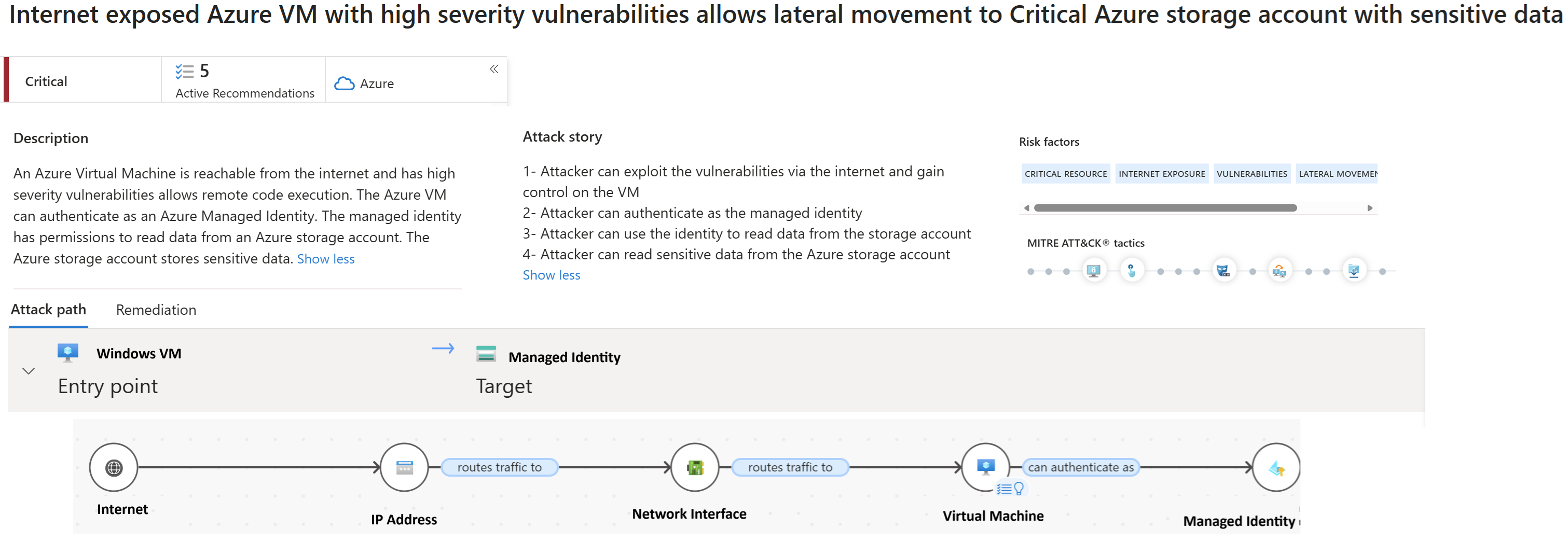
Attack path analysis surfaces this exploitation chain and highlights the specific security issues that enable the lateral movement — such as overly permissive role assignments or publicly exposed AI service endpoints.
AI-specific attack path findings appear in the same attack paths list and map view you use for traditional infrastructure. Target assets are labeled as AI model data or AI service endpoints, making it clear when an attack path threatens AI workloads.
Attack path analysis shows you the exploitation chains that already exist in your environment.