Apply Zero Trust principles for endpoint protection
Zero Trust is based on a simple assumption: no user, device, app, or network should be trusted automatically. Every access request should be verified using signals such as identity, device health, compliance state, risk level, and the sensitivity of the resource being accessed.
For endpoint protection, Zero Trust means that devices must be enrolled, configured, monitored, and continuously evaluated before they can access organizational resources. Microsoft Intune provides device management, compliance, and policy enforcement. Microsoft Defender provides threat detection, device risk signals, vulnerability insights, and response capabilities. Together, they help organizations make access decisions based on the current security state of each endpoint.
Introduction to Zero Trust for endpoints
Zero Trust for endpoints is built on three core principles:
- Verify explicitly: Check identity, device health, compliance state, risk signals, and access context before allowing access.
- Use least privilege access: Give users and devices only the access they need, for only as long as they need it.
- Assume breach: Design controls as if attackers might already have access to a user account, device, or network segment.
Apply Zero Trust to device access
Zero Trust access decisions should evaluate both the user and the device. A successful sign-in alone shouldn’t be enough to access sensitive resources. The device should also meet the organization’s security requirements.
With Microsoft Intune, administrators can define device compliance policies that check conditions such as operating system version, encryption, password requirements, jailbreak or root status, and Microsoft Defender device risk level. Intune can pass device compliance status to Microsoft Entra ID, and Conditional Access can use that compliance state to allow, block, or limit access to corporate resources.
For example, an organization might require that only compliant devices can access Microsoft 365 apps. If a device doesn’t meet compliance requirements, Conditional Access can block access or require remediation before the user can continue.
This approach helps organizations move from static access decisions to risk-aware access decisions.
Use operational controls for continuous validation
Zero Trust is not a one-time configuration. It requires continuous monitoring, assessment, and response. Endpoint protection controls should be reviewed throughout the device lifecycle.
Operational controls include:
- Enrolling devices into Intune.
- Applying security baselines and endpoint security policies.
- Enforcing device compliance requirements.
- Onboarding devices to Microsoft Defender.
- Monitoring device risk and security posture.
- Responding to threats and remediating configuration gaps.
- Re-evaluating access when device risk changes.
Intune can help organizations apply configuration and security policies across platforms to enforce encryption, restrict unauthorized access, and reduce vulnerability exposure. These controls strengthen endpoint security and support Zero Trust objectives.
Use Microsoft Defender and Intune to enforce Zero Trust
The integration between Microsoft Defender and Intune is important for endpoint Zero Trust. Defender detects threats and assigns device risk levels. Intune can use those risk signals in compliance policies, and Conditional Access can use the resulting compliance state to control access. Integrating Defender with Intune lets organizations assess device risk in real time and block compromised devices from corporate resources by marking them as noncompliant.
A typical enforcement flow is:
- A device is enrolled and managed by Intune.
- Microsoft Intune applies security policies and compliance requirements.
- Defender monitors the device for threats and risk.
- Defender reports device risk to Intune.
- Intune marks the device compliant or noncompliant based on policy.
- Conditional Access allows, blocks, or limits access based on compliance state.
- Administrators or automation remediate the device before access is restored.
The following diagram shows this enforcement flow as a continuous cycle, from enrollment through monitoring and remediation.
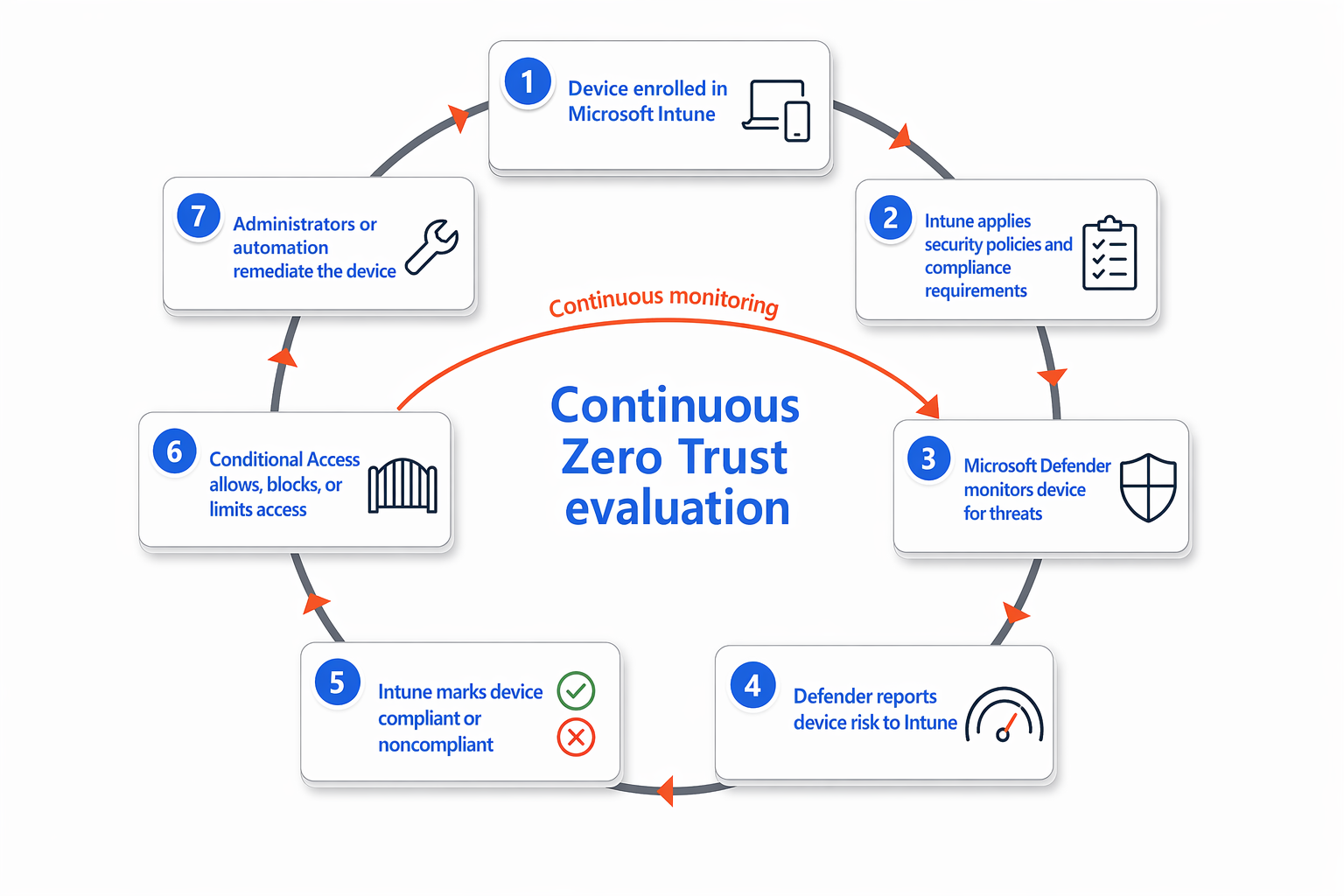
For example, if malware compromises a laptop, Defender can detect the threat and mark the device as high risk. A compliance policy that evaluates device risk can mark the device as noncompliant, and Conditional Access can block access to organizational resources until the threat is remediated and the device risk returns to an acceptable level.