Understand the AI-assisted Azure Cosmos DB toolset
Contoso's shopping assistant needs three capabilities from the catalog: a way for a developer to explore the data while designing against it, a place to keep what each shopper says, and a retrieval path good enough to answer questions that span dozens of products. In this unit, you learn which tool addresses each of those needs and what design decisions each one encodes on your behalf.
One store behind all of them
Azure Cosmos DB for NoSQL can store operational documents, vector embeddings, and full-text content together in the same items and containers. After the required vector embedding policy, vector index, full-text policy, and full-text index are configured, queries can combine document filters, full-text search, and vector similarity without synchronizing a separate vector database.
That property is why the tools exist in this shape. An agent-memory library on a document database alone needs a separate vector store bolted alongside it, plus code that keeps the two in sync and reconciles their failure modes. On Azure Cosmos DB, a memory record and its embedding are one document, so the library ships a storage layer instead of an integration layer. The same holds for retrieval: a pipeline that combines keyword and vector evidence issues both queries against one container rather than fanning out across two systems.
The tools also inherit what the database already provides underneath: partition-level scale-out, the change feed as a processing trigger, and Microsoft Entra ID for data-plane authorization. Each toolkit uses at least one of them, and recognizing which one tells you much about its runtime cost.
Three families of tools
The tools fall into three families based on where they participate in development and runtime. One family consists of Model Context Protocol (MCP) servers.
| Family | What it connects | Where it runs |
|---|---|---|
| Model Context Protocol (MCP) servers | An AI assistant or agent to Azure resources and Azure Cosmos DB operations | Alongside your editor, on your command line, or as a deployed service |
| Application Accelerators | Application code to memory and retrieval implementations | Inside a Python application, optionally with a background processor |
| Azure Cosmos DB Agent Kit | An AI coding agent to curated Azure Cosmos DB development guidance | In an Agent Skills-compatible development tool |
An MCP server exposes operations as tools an AI model can call. The model decides when to invoke them, and the server performs the authorized operation against Azure Cosmos DB. The server’s capabilities and the caller’s permissions determine whether those operations are read-only or can modify data.
Application accelerators run as part of the application. The Agent Memory Toolkit supplies storage and processing for durable agent memory. Agentic Retrieval supplies a multistage retrieval and answer-generation reference implementation.
The Azure Cosmos DB Agent Kit serves a different purpose. It installs curated best-practice instructions for coding agents working on data modeling, partition keys, queries, SDK usage, vector search, full-text search, security, and related topics. It doesn’t connect to Azure Cosmos DB, inspect account data, or execute database operations.
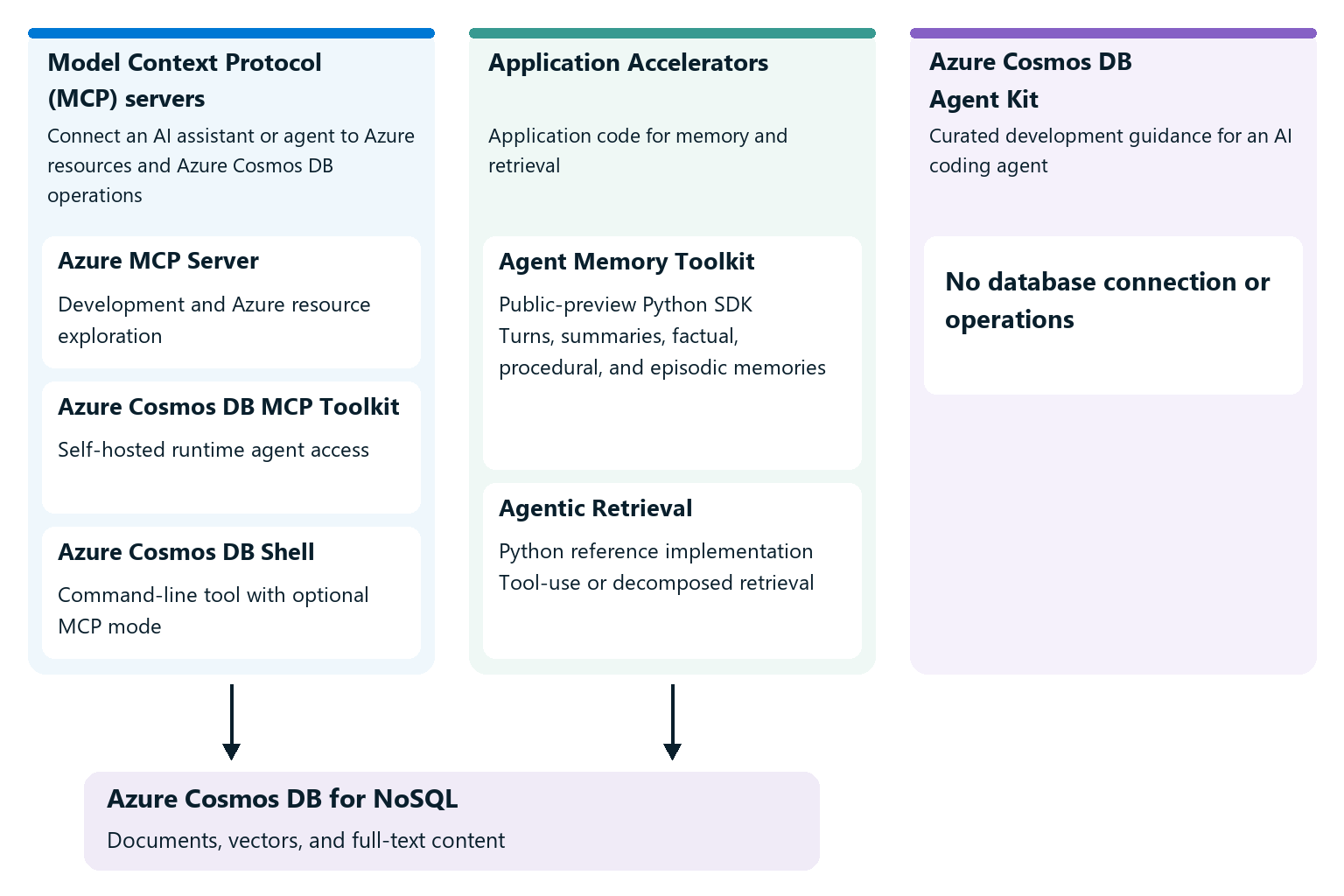
The MCP servers
Three MCP surfaces reach Azure Cosmos DB, and they serve different moments in a project.
Azure MCP Server is the broad Azure server, with a set of Azure Cosmos DB tools among many other services. You install it into an editor such as Visual Studio Code, and it authenticates as you, using credentials your local development tools already hold: the Azure CLI, the Azure Developer CLI, Visual Studio, and Visual Studio Code are all valid sources. Its Azure Cosmos DB tools list accounts, databases, and containers; run queries in the Azure Cosmos DB for NoSQL query language; read a single item; list recently modified items; search by text or by vector similarity; and infer a container's approximate schema. This server is the design-time surface, and it's where a developer exploring an unfamiliar container spends time.
Azure Cosmos DB MCP Toolkit is a dedicated server for Azure Cosmos DB that you deploy into your own subscription, typically to Azure Container Apps. It authenticates callers with Microsoft Entra ID tokens and reaches the database through a managed identity. It carries a similar set of read and search operations plus hybrid search, though it has no tool for arbitrary queries in the Azure Cosmos DB for NoSQL query language, and it's built for agents running in production, including agents hosted in Microsoft Foundry. This server is the runtime surface.
Azure Cosmos DB Shell is a command-line tool for navigating accounts, databases, containers, and items, and it carries an optional MCP server mode. Enable that mode, and any MCP-compatible client, including GitHub Copilot, calls the shell's operations as tools. It runs on your own machine under your own identity, so it suits workflows that reach past the editor into scripts. Its tools mirror the shell's own commands, which means that unlike the other two servers' Azure Cosmos DB tools, its tools read, write, and delete.
The distinction is worth holding onto: one server helps you build the application, another serves the application you built, and the third puts the same reach on your command line.
The agent toolkits
Two toolkits address the two hardest parts of an agent that reasons over your data.
Agent Memory Toolkit is a public-preview Python SDK that stores and processes agent memory in Azure Cosmos DB. It stores raw conversation turns, creates thread summaries, extracts facts, procedural memories, and episodic memories, and builds cross-thread user summaries. Facts, procedural memories, and episodic memories can be retrieved through vector, full-text, and filtered search. Extracted memories carry confidence values, and the toolkit includes reconciliation logic for contradictory facts.
Agentic Retrieval Toolkit is a reference implementation of multi-step retrieval-augmented generation, and it offers two pipelines. Its default tool-use mode hands the model a set of search tools and lets it decide what to call and when, pruning context as the exchange grows. Its optional decomposed mode is more prescriptive: it drafts a preliminary answer, identifies what's missing or weakly supported, generates focused follow-up questions, retrieves evidence for each, and synthesizes a final grounded answer over a configurable number of rounds. Either pipeline earns its cost on complex questions that span many documents, and either is excessive for a lookup a single query answers.
Note
Release and packaging status differs across this toolset. Azure MCP Server 2.0 is generally available; newer 3.0 beta packages are prerelease builds rather than the current generally available version. Azure Cosmos DB MCP Toolkit is a versioned, open-source, self-hosted project rather than a managed Azure service. Agent Memory Toolkit is a public-preview Python SDK. Agentic Retrieval is a product-owned Python reference implementation that you clone and adapt rather than a versioned SDK package. Check each project’s current documentation before taking a production dependency on it.
What the tools encode
Each tool carries a set of decisions its authors made so you don't have to. Knowing which decisions they made is what makes the tool safe to adopt.
- A unified store. They keep documents, vectors, and full-text content in Azure Cosmos DB rather than coordinating a separate vector database. The memory toolkit spreads its own data across three containers, but each one holds its vectors alongside the documents they describe.
- A memory taxonomy. The Agent Memory Toolkit classifies extracted material as factual, procedural, episodic, or unclassified. Each extracted memory carries a confidence score so retrieval can suppress weakly grounded material. Procedural memories are classified during extraction rather than synthesized separately from previously stored memory.
- A processing topology. Memory processing runs either inside your process or in a background service driven by the change feed, which is the same event-driven pattern you'd build by hand for any derived data.
- A retrieval loop. Agentic retrieval combines vector and full-text results and runs more than one pass. In decomposed mode, it also selects a diverse subset rather than the top-scoring near-duplicates, and it runs up to a configurable number of rounds, stopping early when gap analysis finds nothing worth another pass.
Processing cadence and retrieval settings are configurable. Other choices, such as the toolkit's memory taxonomy and container key structure, require code changes. The last unit in this module returns to which settings you should expect to tune.