Evaluate and scope the authentication method catalog
- 9 minutes
Before you can explain why one sign-in succeeds and a near-identical one fails, you need an answer to a more basic question: what authentication methods does Relecloud actually allow, and how strong is each one? That answer doesn't live in a single toggle. It lives in a catalog of methods with different strengths, and in one policy that decides who gets to use which method.
Rank the catalog from phishing-resistant to weakest
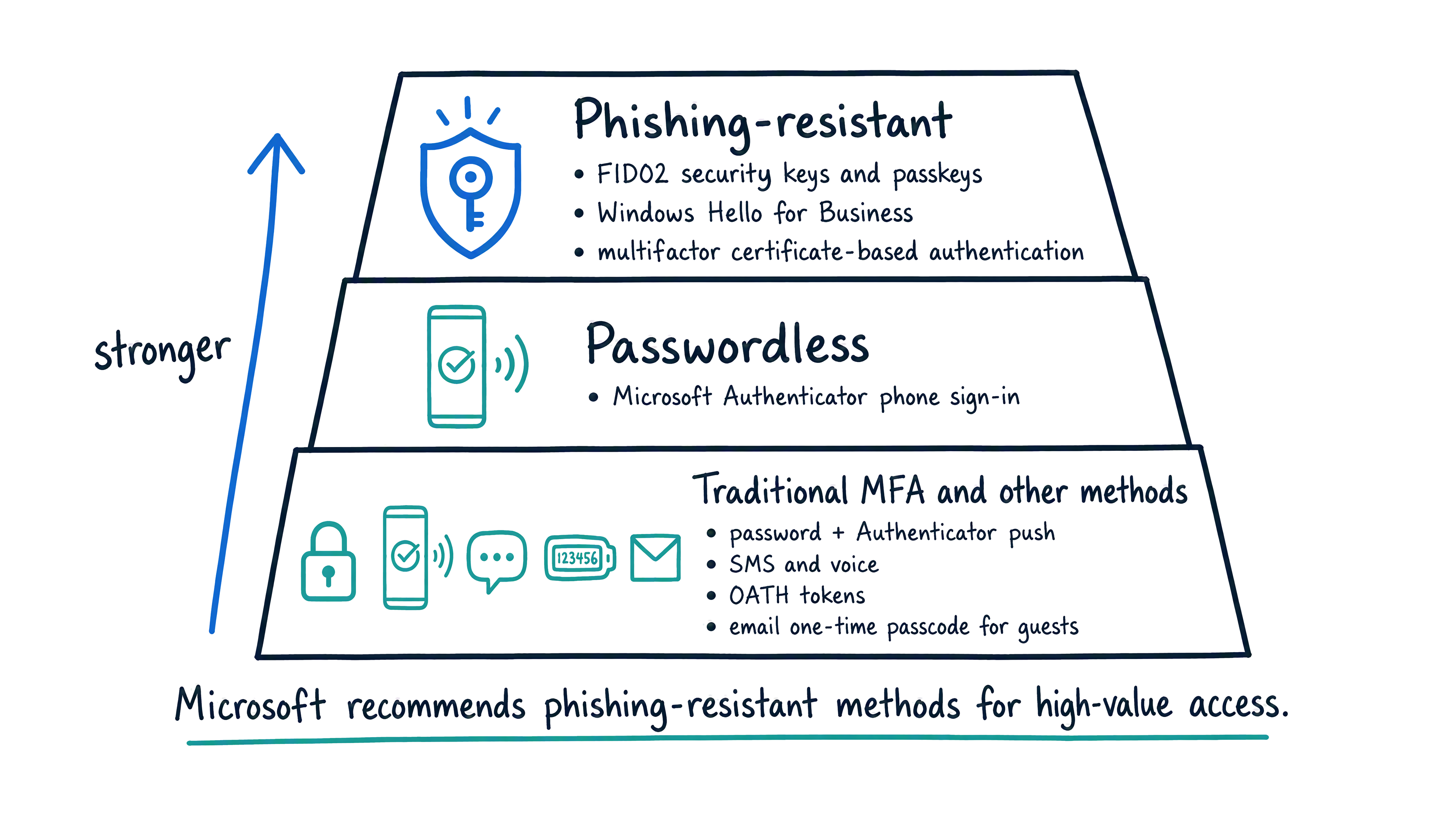
Microsoft Entra ID supports a whole catalog of sign-in methods, and they don't all carry the same weight. At the strong end, phishing-resistant methods bind a credential to a specific device or key, so a stolen password or an intercepted code can't substitute for them: FIDO2 security keys and passkeys, Windows Hello for Business, and multifactor certificate-based authentication all fall into this tier. One step down, Microsoft Authenticator phone sign-in is passwordless. At the traditional end sit the methods most administrators recognize from years of MFA rollouts: Authenticator push (a password plus a push notification), SMS and voice call, OATH hardware and software tokens, and email one-time passcodes for guests.
That ranking isn't academic. Choosing which method to require for a group of users is a security decision, not just a setting to turn on, and Microsoft recommends phishing-resistant methods for high-value access—exactly the kind of access Relecloud needs to protect most closely. With the strength continuum in view, the next question is where each method actually fits in Relecloud's day-to-day operations.
Match each method to a job it's built for
A few methods deserve a closer look before you touch any policy setting—the one most tenants deploy first, and two others that don't behave the way their names suggest.
Microsoft Authenticator is Microsoft's free mobile app for iOS and Android, and the default choice when an organization wants MFA or passwordless sign-in without buying dedicated hardware. It supports push-notification approval (with number-matching to defeat MFA-fatigue attacks, where an attacker floods a user with prompts hoping they'll accidentally approve one), phone sign-in as a full password replacement, and a time-based one-time passcode as an offline fallback for when push notifications can't reach the phone. That flexibility—one app, multiple modes, no hardware to buy or ship—is why most tenants enable it for the entire workforce. Authenticator can also register a device-bound passkey on iOS and Android, which puts the same app in the phishing-resistant tier when used that way.
Users who prefer a different authenticator app aren't locked out. Any RFC 6238–compliant TOTP app—Google Authenticator, Authy, Duo Mobile, 1Password, and similar—can be registered in Combined Registration as a third-party software OATH token, producing the same rotating six-digit code. What those apps don't provide is push approval, number matching, or passwordless sign-in—those experiences are Microsoft Authenticator exclusives. If Relecloud wants Authenticator's stronger MFA-fatigue defenses tenant-wide, TOTP-only apps are a fallback, not an equivalent substitute.
A Temporary Access Pass (TAP) is a time-limited passcode, and it isn't meant for everyday sign-in at all. You use it for onboarding and account recovery—most often to bootstrap a phishing-resistant credential for a new hire who has nothing registered yet, or to get a locked-out user back in when every other method is unavailable. Depending on how you configure it, a TAP works once or for repeated use during its validity window, which makes it useful for both a single recovery event and a supervised onboarding session.
Windows Hello for Business is phishing-resistant and counts toward authentication strength evaluation, but you don't typically roll it out from the Authentication methods policy screen. Its deployment is driven largely through device management—Microsoft Intune or Group Policy—because it's tied to a specific Windows device rather than a portable credential. The policy still evaluates it as an available strong method; it just isn't where you go to enable it in the first place.
One more piece completes the picture: system-preferred authentication. When it's enabled, Microsoft Entra ID nudges a user toward their strongest registered method automatically during sign-in, instead of defaulting to whichever method happens to be first in the list.
| Method | What it's built for |
|---|---|
| Microsoft Authenticator | Default MFA/passwordless—push with number-matching, phone sign-in, TOTP fallback; can register a device-bound passkey |
| Third-party software OATH token | RFC 6238 TOTP apps (Google Authenticator, Authy, and similar)—rotating code only, no push, number-matching, or passwordless |
| Temporary Access Pass (TAP) | Onboarding and account recovery—bootstrap a phishing-resistant credential or recover a locked-out user; not for everyday sign-in |
| Windows Hello for Business | Phishing-resistant, device-bound; deployed through Intune or Group Policy, not the Authentication methods policy screen |
| System-preferred authentication | Nudges the user toward their strongest registered method automatically at sign-in |
Guiding question: A new Relecloud engineer needs a credential today, but a departing contractor's account needs to disappear from sign-in entirely. Which method serves the engineer's first day, and which method doesn't apply to the contractor's departure at all?
Separate 'available' from 'required'
The Authentication methods policy controls which methods users can use. It doesn't control which methods users must use for any given sign-in—that decision lives in Conditional Access, covered later in this module. Turning Microsoft Authenticator on for engineering makes it a valid option for that group; it doesn't force anyone to use it, and it doesn't require MFA at all.
That split matters because making a method available and requiring it on a specific sign-in are two separate jobs, done in two separate places. Enabling Microsoft Authenticator here doesn't tell Microsoft Entra ID when to challenge a Relecloud engineer for MFA; a Conditional Access policy does that, and only for the sign-ins its assignments actually catch.
Scope a stronger method to the group that needs it
With that split in mind, the actual scoping task in front of you isn't "turn Authenticator on for a subset of the tenant." Microsoft Authenticator is already enabled tenant-wide at Relecloud, matching the default in new tenants and Microsoft's own guidance to make Authenticator broadly available so every user has a strong MFA option. What engineering needs on top of that baseline is a phishing-resistant option for the team that handles Woodgrove's regulated data—one that a stolen password or an intercepted code can't substitute for. Enabling Passkey (FIDO2) for the engineering security group gives those users the option to register a passkey or hardware security key, without opening that registration path to every account in the tenant.
In the Microsoft Entra admin center, under Protection > Authentication methods > Policies, each method carries its own Include and Exclude group targeting. You add the engineering group to Include on the Passkey (FIDO2) method, and passkey registration becomes available to those members the next time they visit their security info page.
Include and Exclude don't carry equal weight. If a user belongs to both an included group and an excluded group for the same method, the exclusion wins—a pattern that holds consistently across Entra features. In practice, if Relecloud adds a contractors group to Exclude on Passkey (FIDO2) and an engineer temporarily sits in both groups, the engineer loses passkey registration until the overlap is resolved.
Turning a method on for a group isn't the same as accepting every credential under that method, either. The Passkey (FIDO2) policy has its own settings—attestation enforcement, allowed AAGUIDs (so Relecloud can accept only trusted passkey providers, blocking synced consumer ones like iCloud Keychain or Google Password Manager if compliance requires), and whether device-bound or synced passkeys are permitted. A group included for the method still depends on those settings to determine which credentials sign-in actually accepts.
Get users onto the method
Enabling a method for a group is only useful if those users actually register for it. Users self-register through the Combined Registration portal at aka.ms/mysecurityinfo, where they view, add, or remove their MFA and SSPR methods in one place—including registering a passkey once the method is scoped to them. In parallel with targeted scoping, admins can nudge the whole tenant off phishable methods with a Registration Campaign—a policy that interrupts sign-in for scoped users and prompts them to add Microsoft Authenticator when they've been signing in with SMS or voice. That's the two-track pattern: broad Authenticator adoption tenant-wide, plus stronger phishing-resistant methods scoped to groups that need them.
Retire the legacy blades for good
One habit is worth breaking before you finish scoping methods: don't go looking for the old per-method MFA or SSPR policy screens. Since September 30, 2025, authentication methods can no longer be managed in those legacy MFA and SSPR policies (Microsoft announced the deprecation in March 2023). The unified Authentication methods policy is the only supported surface today, and managing it requires the Authentication Policy Administrator role.
Learn more about the full authentication method catalog, authentication strengths in Conditional Access, running a Registration Campaign, and configuring a Temporary Access Pass.
Resolve the sign-in puzzle
Recall the promise from the top of this unit: why does one sign-in succeed and a near-identical one fail? You now have the first piece of the answer. Two sign-ins can differ because different methods are available to the two users (Include/Exclude scoping), or because Conditional Access requires MFA on one session and not the other (covered later in this module).
But sign-in only matters if the password behind it is worth defending. Nothing you've configured so far stops a Relecloud user from choosing a weak, guessable password in the first place—one an attacker can spray without ever reaching the MFA gate you scoped so carefully. Closing that gap is where Microsoft Entra Password Protection picks up next.
Check your understanding
Feedback
Was this page helpful?
No
Need help with this topic?
Want to try using Ask Learn to clarify or guide you through this topic?