Protect data with encryption
Tip
See the Text and images tab for more details!
Data encryption forms the foundation of database security. Even if attackers gain access to your underlying storage, encryption keeps your sensitive information unreadable. Microsoft's SQL platforms offer multiple encryption options, from protecting data at rest to securing data while it's being processed.
Understanding when to use each method helps you balance protection with performance. Let's explore the encryption technologies available in SQL Server, Azure SQL, and SQL databases in Microsoft Fabric.
Understand encryption layers
Database encryption operates at different layers, each solving a specific problem. Transparent Data Encryption (TDE) encrypts data at rest—think of it as protecting your database files on disk. Column-level encryption targets specific sensitive columns, while Always Encrypted goes further by protecting data throughout its lifecycle, even during query processing.
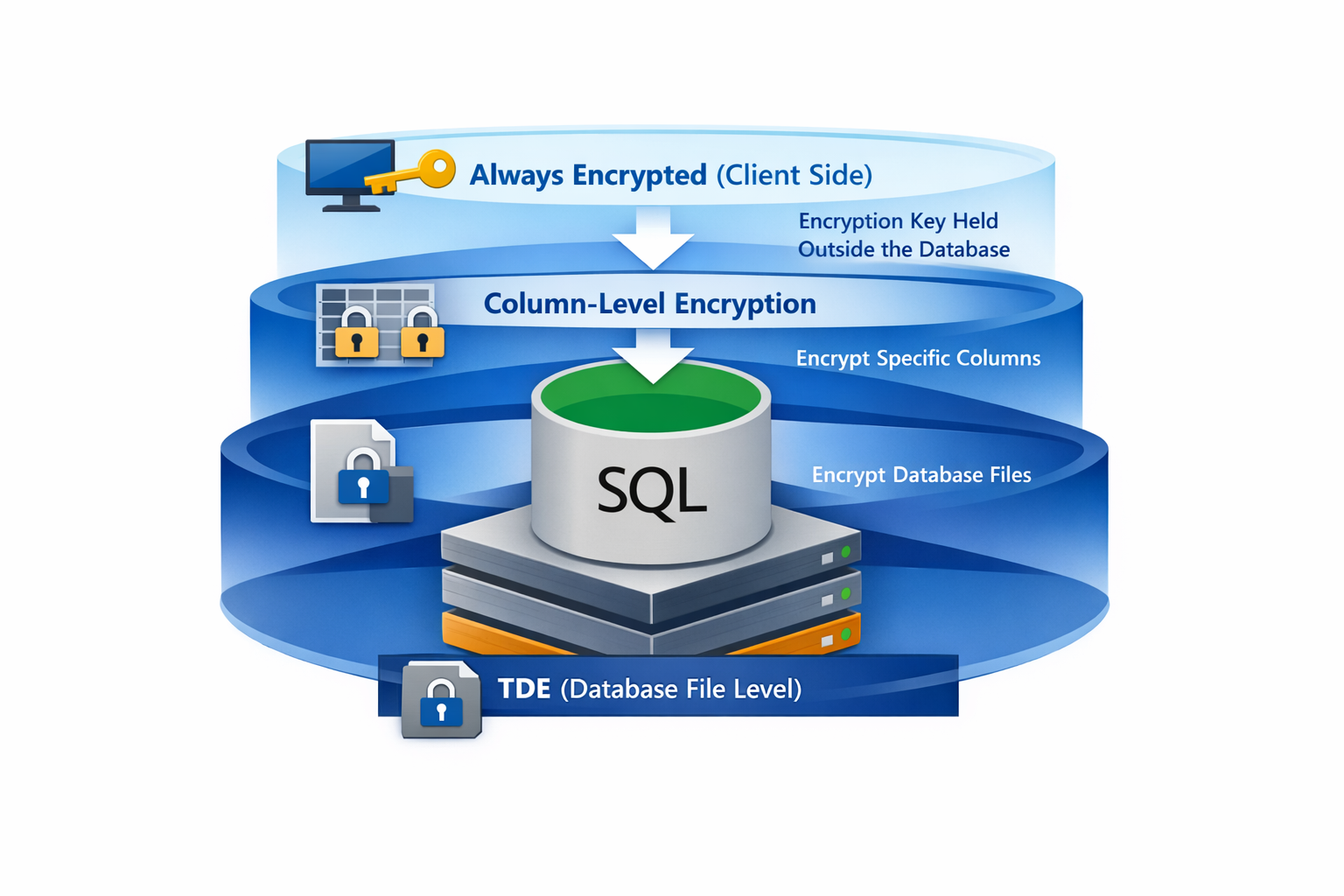
When you enable TDE, SQL Server automatically encrypts database files, transaction logs, and backups. Your applications don't need any code changes—encryption happens transparently behind the scenes. TDE uses a database encryption key protected by a certificate stored in the master database.
Column-level encryption works differently. You explicitly encrypt and decrypt data in your T-SQL code or application, giving you granular control over which columns contain sensitive data and who can decrypt them.
Always Encrypted takes yet another approach by keeping encryption keys outside the database engine entirely. The database never sees your plaintext data, which means even database administrators with high-level access can't view protected information.
Configure Always Encrypted
Always Encrypted ensures the database engine never processes plaintext values. Your client applications hold the encryption keys and handle all encryption and decryption. This separation means that even someone with administrative access to the database can't view the protected data.
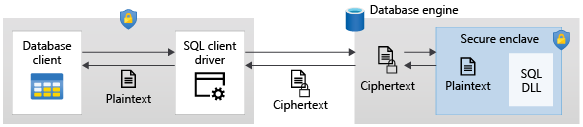
To get started with Always Encrypted, you first create a column master key (CMK) that protects your column encryption keys. Store the CMK in a secure key store such as Azure Key Vault, Windows Certificate Store, or a hardware security module.
The following T-SQL statement creates a metadata entry pointing to your key in Azure Key Vault. The actual key material remains in the vault, never stored in the database.
CREATE COLUMN MASTER KEY MyCMK
WITH (
    KEY_STORE_PROVIDER_NAME = 'AZURE_KEY_VAULT',
    KEY_PATH = 'https://mykeyvault.vault.azure.net/keys/MyCMK/abc123'
);
Next, create a column encryption key (CEK) protected by the column master key:
CREATE COLUMN ENCRYPTION KEY MyCEK
WITH VALUES (
    COLUMN_MASTER_KEY = MyCMK,
    ALGORITHM = 'RSA_OAEP',
    ENCRYPTED_VALUE = 0x01700000016C006F00...
);
Notice that the CEK itself is stored in encrypted form. When your application needs to work with encrypted data, it retrieves this value and uses the CMK to decrypt it locally.
When creating or altering tables, you specify the encryption type for sensitive columns:
CREATE TABLE Employees (
    EmployeeID int PRIMARY KEY,
    SSN char(11) COLLATE Latin1_General_BIN2
        ENCRYPTED WITH (
            ENCRYPTION_TYPE = DETERMINISTIC,
            ALGORITHM = 'AEAD_AES_256_CBC_HMAC_SHA_256',
            COLUMN_ENCRYPTION_KEY = MyCEK
        ),
    Salary money
        ENCRYPTED WITH (
            ENCRYPTION_TYPE = RANDOMIZED,
            ALGORITHM = 'AEAD_AES_256_CBC_HMAC_SHA_256',
            COLUMN_ENCRYPTION_KEY = MyCEK
        )
);
You have two encryption types to choose from. Use deterministic when you need to perform equality comparisons, joins, or filter with WHERE clauses—the same plaintext always produces the same ciphertext. Use randomized for stronger security when you don't need those query operations.
Implement column-level encryption
Column-level encryption using T-SQL functions gives you an alternative when you need more control over the encryption process, or when Always Encrypted isn't the right fit. With this approach, you manage symmetric or asymmetric keys stored within the database.
Start by creating a database master key and certificate:
CREATE MASTER KEY ENCRYPTION BY PASSWORD = 'StrongPassword123!';

CREATE CERTIFICATE SensitiveDataCert
WITH SUBJECT = 'Certificate for sensitive data encryption';
Create a symmetric key protected by the certificate:
CREATE SYMMETRIC KEY SensitiveDataKey
WITH ALGORITHM = AES_256
ENCRYPTION BY CERTIFICATE SensitiveDataCert;
To encrypt data, open the symmetric key and use the ENCRYPTBYKEY function:
OPEN SYMMETRIC KEY SensitiveDataKey
DECRYPTION BY CERTIFICATE SensitiveDataCert;

INSERT INTO CustomerData (CustomerID, CreditCardNumber)
VALUES (1, ENCRYPTBYKEY(KEY_GUID('SensitiveDataKey'), '4111-1111-1111-1111'));

CLOSE SYMMETRIC KEY SensitiveDataKey;
Decryption follows a similar pattern using DECRYPTBYKEY:
OPEN SYMMETRIC KEY SensitiveDataKey
DECRYPTION BY CERTIFICATE SensitiveDataCert;

SELECT CustomerID,
       CONVERT(varchar(20), DECRYPTBYKEY(CreditCardNumber)) AS CardNumber
FROM CustomerData;

CLOSE SYMMETRIC KEY SensitiveDataKey;
Yes, this approach requires more work—you're managing keys explicitly in your code. But that complexity comes with flexibility. You can grant or deny permissions to the symmetric key, giving you precise control over who can decrypt your data.
Choose the right encryption approach
Which encryption method should you use? It depends on your security requirements and application constraints.
TDE is your best choice when you need to protect data at rest without touching your application code. It's great for compliance requirements that mandate encryption of database files and backups. Keep in mind, though, that TDE doesn't protect data from users who can connect to the database with the right permissions.
Always Encrypted shines when you need to protect data from database administrators, or when sensitive data must stay encrypted even during query processing. The tradeoff? You need client driver support, and you're limited in what operations you can perform on encrypted columns.
Column-level encryption works well when you need granular control over encryption and decryption, or when you want to encrypt specific columns without the infrastructure overhead of Always Encrypted. It takes more development effort, but you get maximum flexibility in key management.
Tip
You can combine encryption methods. For example, enable TDE for baseline protection of data at rest, then add Always Encrypted for your most sensitive columns.
For SQL databases in Microsoft Fabric, TDE is enabled by default and managed automatically. Focus your encryption design decisions on column-level protection using Always Encrypted or symmetric key encryption based on your application requirements.