Implement row-level security
Tip
See the Text and images tab for more details!
Row-Level Security (RLS) enables you to control access to rows in a database table based on the characteristics of the user executing a query. Unlike table-level permissions that grant or deny access to entire tables, RLS filters rows dynamically so users see only the data they're authorized to access.
This capability is useful when multiple users or tenants share the same tables but should only see their own data. Sales representatives see their own customer records, managers see their team's data, and regional directors see all data for their region. The filtering happens automatically without requiring application code changes.
Understand RLS components
Row-Level Security uses two components that work together: security predicates and security policies.
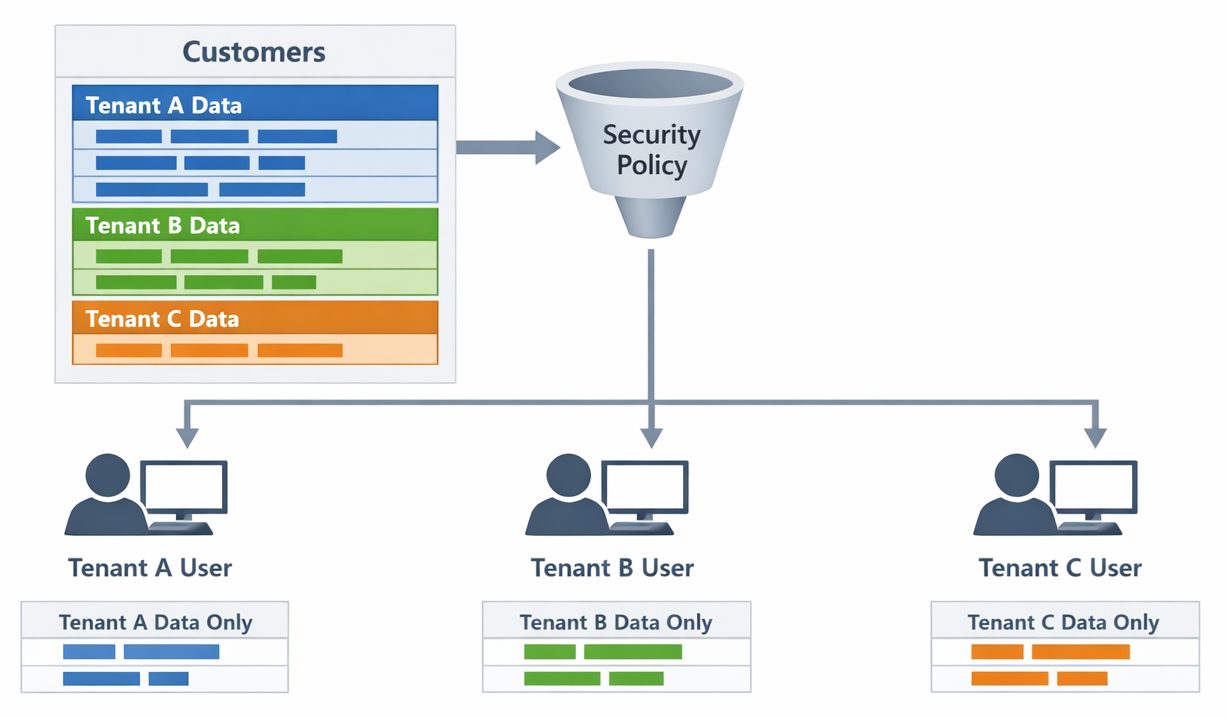
A security predicate is an inline table-valued function that returns 1 (true) or 0 (false) for each row. It receives the current user context and row values, then decides whether that user should see the row. Think of it as your business logic for data access, packaged as a function.
A security policy binds your predicate functions to tables and specifies the type of filtering. You can create filter predicates that silently exclude unauthorized rows from query results, or block predicates that prevent unauthorized insert, update, and delete operations.
Filter predicates affect SELECT, UPDATE, and DELETE statements by removing rows the user can't access. Users don't get errors—they just see a filtered result set. Block predicates work differently: they raise an error when users attempt unauthorized changes.
Create filter predicates
Let's start by creating a predicate function that evaluates row access. The function accepts parameters representing the column values to check and returns a table with a single row when access is allowed.
Here's a common scenario: a multitenant application where each row has a TenantID column:
CREATE SCHEMA Security;
GO

CREATE FUNCTION Security.fn_TenantAccessPredicate(@TenantID int)
RETURNS TABLE
WITH SCHEMABINDING
AS
RETURN SELECT 1 AS fn_TenantAccessPredicate_Result
    WHERE @TenantID = CAST(SESSION_CONTEXT(N'TenantID') AS int);
This function checks whether the row's TenantID matches the value stored in session context. Your application sets this context after the user authenticates:
EXEC sp_set_session_context @key = N'TenantID', @value = 42;
For scenarios based on database users rather than session context, the predicate can reference the current user:
CREATE FUNCTION Security.fn_SalesRepPredicate(@SalesRepID int)
RETURNS TABLE
WITH SCHEMABINDING
AS
RETURN SELECT 1 AS fn_SalesRepPredicate_Result
    WHERE @SalesRepID = DATABASE_PRINCIPAL_ID()
       OR IS_MEMBER('SalesManagers') = 1;
This predicate allows sales representatives to see their own records while managers in the SalesManagers role can see all records.
Create security policies
Once you've defined your predicate functions, create a security policy that applies them to tables:
CREATE SECURITY POLICY TenantSecurityPolicy
ADD FILTER PREDICATE Security.fn_TenantAccessPredicate(TenantID)
    ON dbo.Orders,
ADD FILTER PREDICATE Security.fn_TenantAccessPredicate(TenantID)
    ON dbo.OrderDetails
WITH (STATE = ON);
This policy filters both the Orders and OrderDetails tables using the same predicate function. When users query these tables, they only see rows matching their tenant context.
You can combine filter and block predicates in a single policy:
CREATE SECURITY POLICY SalesSecurityPolicy
ADD FILTER PREDICATE Security.fn_SalesRepPredicate(SalesRepID)
    ON dbo.CustomerAccounts,
ADD BLOCK PREDICATE Security.fn_SalesRepPredicate(SalesRepID)
    ON dbo.CustomerAccounts AFTER INSERT,
ADD BLOCK PREDICATE Security.fn_SalesRepPredicate(SalesRepID)
    ON dbo.CustomerAccounts AFTER UPDATE
WITH (STATE = ON);
Why add block predicates? Without them, a user could insert a row with a different SalesRepID and then lose access to data they just created. The block predicates ensure users can only insert or update rows they'd be able to see.
Implement hierarchical access patterns
Many organizations need hierarchical data access—managers should see their subordinates' data. You can implement this by combining RLS with a management hierarchy table.
Here's a function that traverses the hierarchy:
CREATE FUNCTION Security.fn_HierarchyPredicate(@OwnerID int)
RETURNS TABLE
WITH SCHEMABINDING
AS
RETURN
    WITH EmployeeHierarchy AS (
        SELECT EmployeeID, ManagerID
        FROM dbo.Employees
        WHERE EmployeeID = DATABASE_PRINCIPAL_ID()

        UNION ALL

        SELECT e.EmployeeID, e.ManagerID
        FROM dbo.Employees e
        INNER JOIN EmployeeHierarchy h ON e.ManagerID = h.EmployeeID
    )
    SELECT 1 AS fn_HierarchyPredicate_Result
    WHERE @OwnerID IN (SELECT EmployeeID FROM EmployeeHierarchy);
This recursive common table expression (CTE) builds the complete chain of employees reporting to the current user. The predicate allows access to any row owned by someone in that hierarchy.
Note
Recursive predicates can affect query performance on large datasets. Consider caching hierarchy relationships or limiting recursion depth for better performance.
Manage security policies
Security policies support several management operations for ongoing maintenance. You can disable a policy temporarily without removing it:
ALTER SECURITY POLICY TenantSecurityPolicy
WITH (STATE = OFF);
You can add new predicates to existing policies:
ALTER SECURITY POLICY TenantSecurityPolicy
ADD FILTER PREDICATE Security.fn_TenantAccessPredicate(TenantID)
    ON dbo.Shipments;
Or remove predicates when tables no longer need filtering:
ALTER SECURITY POLICY TenantSecurityPolicy
DROP FILTER PREDICATE ON dbo.Orders;
To view existing security policies and their predicates:
SELECT p.name AS PolicyName,
       p.is_enabled,
       o.name AS TableName,
       pred.predicate_definition
FROM sys.security_policies p
INNER JOIN sys.security_predicates pred ON p.object_id = pred.object_id
INNER JOIN sys.objects o ON pred.target_object_id = o.object_id;
Tip
When troubleshooting RLS issues, temporarily disable the security policy and compare results. This helps determine whether unexpected results come from the RLS predicates or other query logic.
Row-Level Security works transparently with views, stored procedures, and other database objects that query the protected tables. Users accessing data through any path receive consistently filtered results based on their security context.