Secure data API endpoints
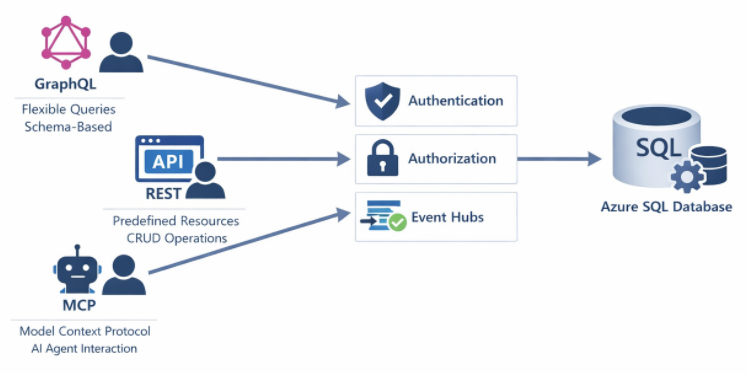
Modern database solutions expose data through various API endpoints, enabling applications to access information without writing traditional SQL queries. GraphQL, REST, and Model Context Protocol (MCP) endpoints each present unique security considerations. Properly securing these endpoints protects your data while enabling the flexibility that modern applications require.
These endpoints often serve as the primary data access layer for web and mobile applications. Without appropriate security controls, they can expose sensitive data, allow unauthorized modifications, or become targets for denial-of-service attacks.
Understand endpoint types and risks
GraphQL endpoints provide flexible query capabilities, allowing clients to request exactly the data they need. This flexibility creates security challenges because clients can construct complex queries that might expose unintended data or consume excessive resources.
REST endpoints follow a more structured pattern with predefined resources and operations. Security focuses on authentication, authorization for specific endpoints, and input validation. REST APIs have been around long enough that security patterns are well established.
MCP endpoints enable AI models and agents to interact with databases, providing context and executing actions. These endpoints require careful security consideration because AI systems may attempt operations that human users wouldn't, and prompt injection attacks can manipulate AI behavior.
Secure GraphQL endpoints
Azure SQL Database and SQL databases in Microsoft Fabric support GraphQL through Data API builder and Microsoft Fabric's GraphQL API. Securing these endpoints involves authentication, authorization, and query controls.
Here's how to configure authentication requirements:
{
  "runtime": {
    "rest": { "enabled": false },
    "graphql": {
      "enabled": true,
      "path": "/graphql",
      "allow-introspection": false
    }
  },
  "authentication": {
    "provider": "AzureAD",
    "jwt": {
      "audience": "api://my-graphql-api",
      "issuer": "https://login.microsoftonline.com/{tenant-id}/v2.0"
    }
  }
}
Notice the allow-introspection: false setting. Disable introspection in production to prevent attackers from discovering your schema structure. Introspection queries reveal all available types, fields, and relationships.
Next, implement entity-level permissions to control which roles can access which data:
{
  "entities": {
    "Customer": {
      "source": "dbo.Customers",
      "permissions": [
        {
          "role": "authenticated",
          "actions": ["read"]
        },
        {
          "role": "admin",
          "actions": ["*"]
        }
      ]
    },
    "Order": {
      "source": "dbo.Orders",
      "permissions": [
        {
          "role": "authenticated",
          "actions": ["read"],
          "fields": {
            "include": ["OrderID", "OrderDate", "Status"],
            "exclude": ["InternalNotes", "CostPrice"]
          }
        }
      ]
    }
  }
}
See how the Order entity excludes sensitive columns like InternalNotes and CostPrice? Even authenticated users can't access those fields.
Tip
Implement query depth and complexity limits to prevent denial-of-service attacks through deeply nested queries. Data API builder includes built-in protections against excessive query complexity.
Secure REST endpoints
REST endpoints in Data API builder or custom implementations need authentication and endpoint-specific authorization. Here's an example:
{
  "entities": {
    "Product": {
      "source": "dbo.Products",
      "rest": {
        "enabled": true,
        "path": "/products"
      },
      "permissions": [
        {
          "role": "anonymous",
          "actions": [
            { "action": "read", "policy": { "database": "@item.IsPublic eq true" } }
          ]
        },
        {
          "role": "inventory-manager",
          "actions": ["create", "read", "update"]
        },
        {
          "role": "admin",
          "actions": ["*"]
        }
      ]
    }
  }
}
Notice the database policy on anonymous access? It filters results to only public products. Role-based permissions then control what actions each role can perform.
For custom REST endpoints built with stored procedures, implement security at the database level:
CREATE PROCEDURE api.GetCustomerOrders
    @CustomerID int
AS
BEGIN
    -- Verify the caller has access to this customer
    IF NOT EXISTS (
        SELECT 1 FROM dbo.CustomerAccess
        WHERE CustomerID = @CustomerID
        AND UserPrincipal = ORIGINAL_LOGIN()
    )
    BEGIN
        THROW 50401, 'Unauthorized access to customer data', 1;
        RETURN;
    END

    SELECT OrderID, OrderDate, TotalAmount
    FROM dbo.Orders
    WHERE CustomerID = @CustomerID;
END;
Secure MCP endpoints
Model Context Protocol (MCP) endpoints let AI assistants and agents interact with your database. MCP requires extra security attention because AI systems might process untrusted user input.
Here's how to configure MCP server authentication:
{
  "mcpServers": {
    "sqlDatabase": {
      "transport": "stdio",
      "authentication": {
        "type": "azure-identity",
        "scope": "https://database.windows.net/.default"
      },
      "security": {
        "allowedOperations": ["read"],
        "deniedTables": ["dbo.Passwords", "dbo.APIKeys"],
        "maxRowsReturned": 1000
      }
    }
  }
}
The key is limiting what MCP endpoints can do:
- Restrict operations to read-only when write access isn't needed
- Explicitly deny access to tables containing credentials or sensitive configuration
- Limit result set sizes to prevent data exfiltration through large queries
- Log all MCP operations for security monitoring
You'll also want to implement prompt injection defenses by validating AI-generated queries:
CREATE PROCEDURE mcp.ExecuteQuery
    @QueryDescription nvarchar(max),
    @GeneratedQuery nvarchar(max) OUTPUT
AS
BEGIN
    -- Validate the generated query doesn't access restricted objects
    IF @GeneratedQuery LIKE '%sys.%' OR @GeneratedQuery LIKE '%INFORMATION_SCHEMA%'
    BEGIN
        THROW 50403, 'Access to system objects not permitted', 1;
        RETURN;
    END

    -- Ensure query is read-only
    IF @GeneratedQuery LIKE '%INSERT%' OR @GeneratedQuery LIKE '%UPDATE%'
       OR @GeneratedQuery LIKE '%DELETE%' OR @GeneratedQuery LIKE '%DROP%'
    BEGIN
        THROW 50403, 'Write operations not permitted', 1;
        RETURN;
    END

    -- Execute the validated query
    EXEC sp_executesql @GeneratedQuery;
END;
Important
Never trust AI-generated queries without validation. Implement allow lists for permitted tables and operations rather than trying to block malicious patterns.
Implement network security
Regardless of endpoint type, protect the network layer:
-- Azure SQL: Configure firewall rules
-- Deny all public access, allow only specific IPs or virtual networks
EXECUTE sp_set_firewall_rule
    @name = 'AllowAppService',
    @start_ip_address = '10.0.0.1',
    @end_ip_address = '10.0.0.255';
Use Private Link or service endpoints to keep traffic on the Microsoft network:
- Configure virtual network integration for App Services hosting API endpoints
- Use Private Endpoints for Azure SQL Database
- Enable managed private endpoints in Microsoft Fabric
These network controls add defense in depth, ensuring that even if application-level security is bypassed, attackers can't reach your database from unauthorized networks.