Implement business logic with images and the Organization service
Unit 3's ValidateRequestAllowance class reads Target to stop a Request save outright, but real business logic also needs to compare what changed and update other rows in the same operation. This unit builds both capabilities into Contoso's plug-ins, so a Request approval can also update an Allowance record in the same transaction.
Entity images: pre-images and post-images
When Dataverse processes an Update message, Target contains only the columns included in the update request, not the row's full set of values. That's a problem the moment your logic needs to know what a column's value was before the change.
For example, you might need to detect that a Request's status column moved from "Pending" to "Approved". An entity image gives your plug-in a snapshot of the row at a specific point in time, so your logic can compare values instead of guessing at them.
A pre-image captures the row before the main operation runs, so it holds the previous value. A post-image captures the row's updated values after the main operation runs, and that image becomes available to a step registered in PostOperation. For a synchronous step, PostOperation still runs inside the transaction, before that transaction commits.
The three sources Contoso's sample code can read line up like this:
| Source | Example status value | What it holds |
|---|---|---|
| Pre-image | Pending | The row's previous value, captured before the main operation runs |
Target |
Approved | The value included in the update request; Target carries the columns the request supplies, whether or not their value actually changed |
| Post-image | Approved | The updated result, available to a step registered in PostOperation |
The sample code later in this unit detects the Pending-to-Approved transition using only the pre-image and Target. It doesn't need a post-image for that check. A post-image becomes useful when your logic needs the row's values after the operation completes, including anything Dataverse or another plug-in set during that operation.
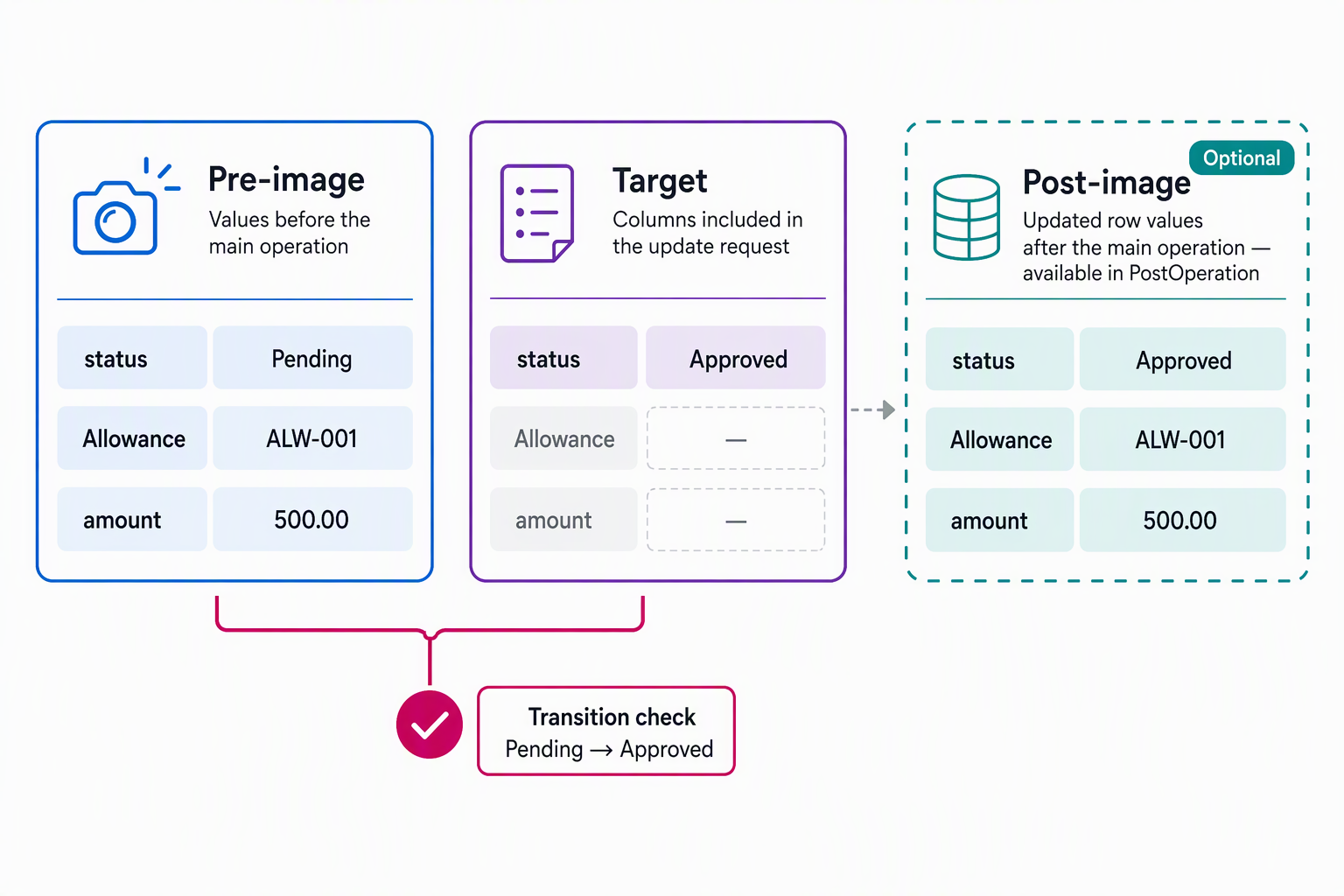
You register each image on a step in the Plug-in Registration tool, and you give it an alias, a name you choose. That alias is the key you use to pull the image back out inside Execute, from the pre-image or post-image collection. The platform doesn't require any particular alias string: Contoso registers its pre-image with the alias "PreRequest", and the sample later in this unit retrieves it as context.PreEntityImages["PreRequest"].
Not every message supports images, and not every stage supports both kinds. Only Assign, Create, Delete, DeliverIncoming, DeliverPromote, Merge, Route, Send, SetState, and Update carry entity images at all. Beyond that, the message and stage you register against decide which image is actually available:
| Message | Pre-image available | Post-image available |
|---|---|---|
Create |
No; the row doesn't exist yet | Yes, but only if the step runs in PostOperation |
Update |
Yes | Yes, but only if the step runs in PostOperation |
Delete |
Yes | No; the row no longer exists |
Dataverse ties a post-image to PostOperation because the updated values don't exist until after the main operation runs. That same timing is why PostOperation is the stage for reacting to a change that already happened.
Register a step for Request's Update message in PostOperation with both a pre-image and a post-image, and your plug-in can compare the two directly: the pre-image alias holds the status value before the save, and the post-image alias holds it after.
One habit is worth building early: when you define an image, Dataverse defaults to selecting every column on the row. Don't accept that default. Pulling every column back costs performance for no benefit, so select only the columns your logic actually reads.
For Contoso's approval-handling logic, that means the status column, the Allowance lookup, and the Request amount—the exact values the plug-in reads later in this unit. A pre-image is the efficient way to recover a value the context doesn't already carry. When a pre-image would do the job, querying that same value back out through the Organization service instead adds a needless round trip.
Learn more about registering a plug-in and its images.
Try it yourself: Contoso wants a PostOperation step on Request's Update message that deducts from an employee's Allowance. The deduction should happen only the moment a Request's status changes to "Approved", not on every unrelated edit to the Request. Sketch which image or images you register, which alias names you'd give them, and which columns each image needs to include.
Use the Organization service from a plug-in
An entity image tells you what changed on the row your plug-in is already handling. Approving a Request, though, means touching a different row (the employee's Allowance record), and images can't reach across tables. For that, your plug-in uses the Organization service, the same data access surface that lets you create, retrieve, update, and delete rows, and execute other messages from inside your code.
You obtain an instance through the service provider, the same way unit 3 obtains the execution context:
IOrganizationServiceFactory serviceFactory = (IOrganizationServiceFactory)
    serviceProvider.GetService(typeof(IOrganizationServiceFactory));
IOrganizationService orgService = serviceFactory.CreateOrganizationService(context.UserId);
Passing context.UserId to CreateOrganizationService makes service calls use the identity configured for the plug-in step. Registration defaults to Calling User. With that default, Contoso's Allowance update uses the security context of the person who updates the Request. If Contoso configures a different execution identity, the service uses that identity instead.
One restriction is worth calling out directly: for plug-ins, IOrganizationService is the supported, in-process way to reach other rows. The web API targets callers outside the current Dataverse operation that still need to authenticate, while your plug-in is already running inside an authenticated Dataverse operation. Reaching for a web client from inside a plug-in adds complexity the platform already handles for you.
Learn more about using the Organization service.
Combine entity images with the Organization service
Here's how Contoso's PostOperation step on Request's Update message brings both pieces together: detecting an approval through the pre-image comparison, then updating the Allowance record through the Organization service.
public class DeductAllowanceOnApproval : IPlugin
{
    public void Execute(IServiceProvider serviceProvider)
    {
        IPluginExecutionContext context = (IPluginExecutionContext)
            serviceProvider.GetService(typeof(IPluginExecutionContext));
        ITracingService tracingService = (ITracingService)
            serviceProvider.GetService(typeof(ITracingService));

        Entity preImage = context.PreEntityImages["PreRequest"];
        Entity target = (Entity)context.InputParameters["Target"];

        OptionSetValue statusBeforeValue =
            preImage.GetAttributeValue<OptionSetValue>("cont_status");
        bool wasPending = statusBeforeValue?.Value == 1;
        bool approvedNow = target.Contains("cont_status") &&
            target.GetAttributeValue<OptionSetValue>("cont_status").Value == 2; // Approved

        // Guard condition: only act on an actual Pending -> Approved transition,
        // and never on a row this same plug-in already updated.
        if (wasPending && approvedNow)
        {
            try
            {
                IOrganizationServiceFactory serviceFactory = (IOrganizationServiceFactory)
                    serviceProvider.GetService(typeof(IOrganizationServiceFactory));
                IOrganizationService orgService =
                    serviceFactory.CreateOrganizationService(context.UserId);

                EntityReference allowanceRef = preImage.GetAttributeValue<EntityReference>("cont_allowanceid");
                Entity allowance = orgService.Retrieve("cont_allowance", allowanceRef.Id,
                    new ColumnSet("cont_remainingallowance"));

                Money remaining = allowance.GetAttributeValue<Money>("cont_remainingallowance");
                Money requestAmount = preImage.GetAttributeValue<Money>("cont_amount");

                Entity allowanceUpdate = new Entity("cont_allowance", allowanceRef.Id);
                allowanceUpdate["cont_remainingallowance"] =
                    new Money(remaining.Value - requestAmount.Value);
                orgService.Update(allowanceUpdate);
            }
            catch (Exception ex)
            {
                tracingService.Trace("Allowance deduction failed: {0}", ex.Message);
                throw new InvalidPluginExecutionException(
                    "This request can't be approved because the allowance couldn't be updated.");
            }
        }
    }
}
The pre-image, aliased "PreRequest", supplies the status value before the save, the Allowance reference, and the Request amount. The Update message's Target doesn't necessarily carry those values if the caller only changed the status column. The Organization service then performs the actual retrieve-and-update against a completely different table, inside the same transaction as the Request save.
Handle exceptions, tracing, and recursion
Notice the try/catch around the Organization service call. An Allowance update can fail because a record is missing or the execution identity lacks permission. For this synchronous step, an unhandled exception produces a generic error for the caller. The sample traces the underlying exception and throws InvalidPluginExecutionException with a clear, caller-facing explanation.
Five concerns are at play here, and each deserves separate treatment:
| Concern | What happens in the sample | Why it matters |
|---|---|---|
| Caller-facing message | catch converts the failure to InvalidPluginExecutionException with a clear message |
It's the only way to control what the caller actually sees |
| Tracing detail | ITracingService.Trace records the underlying ex.Message |
Diagnostic detail for troubleshooting, without exposing internals to the caller |
| Transaction rollback | An unhandled exception in this synchronous PostOperation step rolls back the transaction | The Request save and the Allowance update succeed or fail together |
| Recursion risk | Updating the row that triggered the plug-in can retrigger the same plug-in | Depth halts a runaway loop once it crosses an internal limit, but that's a safety net, not a design |
| Guard condition | The sample acts only when the pre-image is Pending and Target includes Approved |
Updates that don't meet this transition check skip the Allowance deduction |
This rollback behavior applies to the sample's synchronous PostOperation step. A PreValidation step usually rejects a request before the main transaction begins, although nested operations can already be inside a transaction.
The sample updates the related Allowance row rather than updating the Request again. Its transition check excludes unrelated Request updates, but it doesn't prevent every possible cycle involving other plug-ins. Treat Depth as a platform safety net, not as a substitute for reviewing the updates your plug-in triggers.
With business logic now reading images and writing through the Organization service, the next unit turns to registration: using the Plug-in Registration tool to tell Dataverse which message, stage, and images each of Contoso's plug-in steps needs.