Understand how Microsoft Defender protects endpoints
Microsoft Defender delivers cloud-based endpoint security that protects devices across your organization. Defender helps security teams identify, investigate, and respond to threats by combining endpoint telemetry, Microsoft threat intelligence, behavioral analytics, and cloud-based protection.
Traditional antivirus solutions focus mainly on blocking known malware. Defender takes a broader approach. It includes next-generation protection, attack surface reduction, endpoint detection and response, automated investigation and remediation, advanced hunting, and vulnerability management.
Defender supports a wide range of platforms, including Windows, macOS, Linux, Android, and iOS. This cross-platform support helps organizations protect different types of devices while maintaining centralized visibility in the Microsoft Defender portal.
Use Defender to reduce your attack surface, detect suspicious behavior, investigate alerts, respond to incidents, and improve the overall security posture of your endpoints.
Core architecture and components
At its foundation, Defender's endpoint security consists of three main components: endpoint sensors, a cloud service, and integration points with other Microsoft security solutions. Each component plays a crucial role in delivering comprehensive endpoint protection.
The following diagram shows how these three components work together to detect threats and report risk.
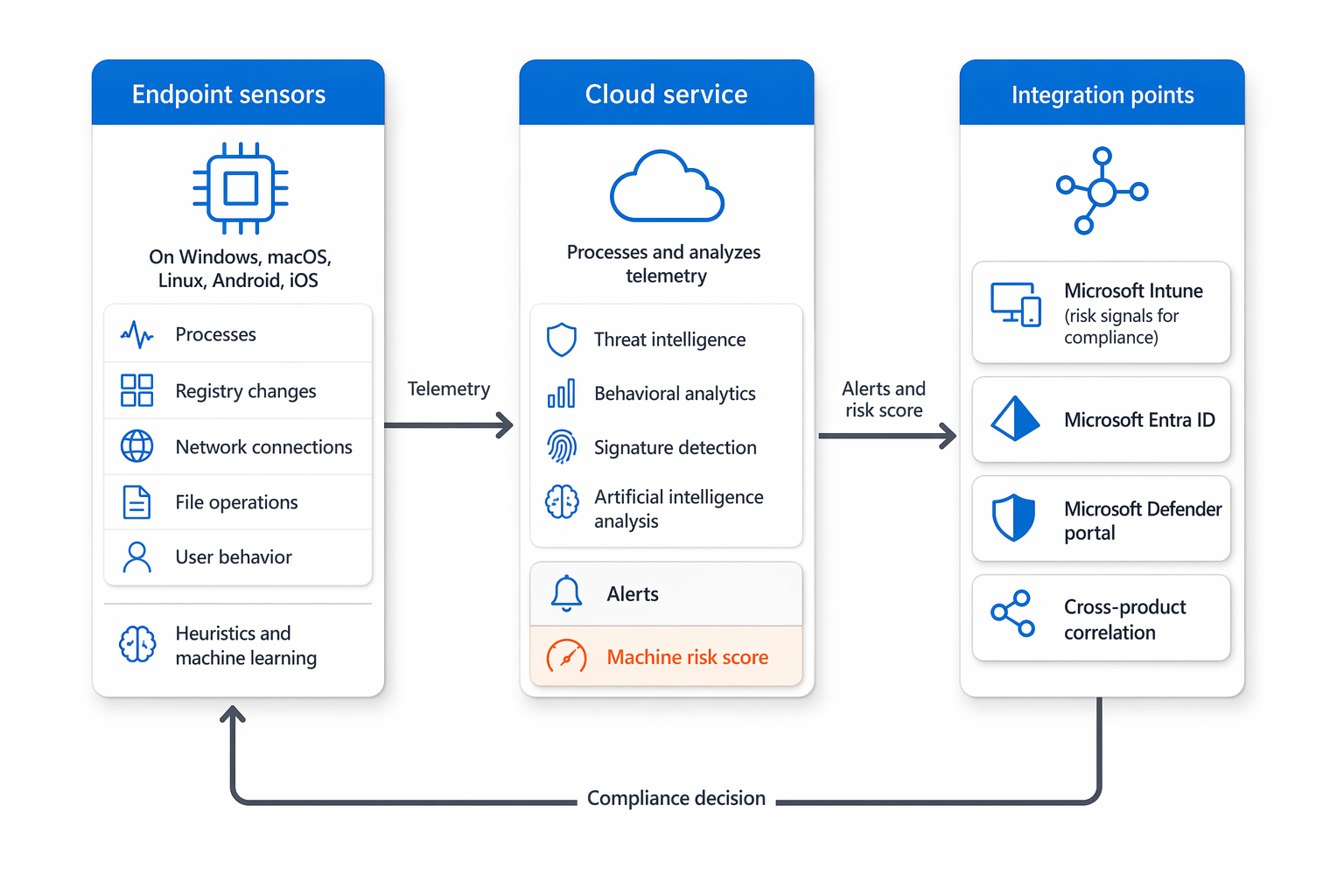
Endpoint sensors run locally on devices and collect telemetry data about system activities, processes, network connections, and file operations. These sensors operate with minimal performance impact, ensuring they don't interfere with user productivity. The collected data includes information about running processes, registry changes, network traffic, and user behaviors. Sensors use advanced heuristics and machine learning to detect anomalies that might indicate malicious activity.
The cloud service processes and analyzes the telemetry data from all enrolled endpoints. It uses Microsoft's vast security intelligence database, which includes threat indicators from millions of devices worldwide. The cloud service applies behavioral analytics, signature-based detection, and artificial intelligence to identify threats. When a potential threat is detected, the service generates alerts and can initiate automated response actions.
Defender brings endpoint, identity, email, and cloud signals together in the Microsoft Defender portal to give your security team a unified view across the environment. This correlation lets you tie events from different sources together for richer investigations. For example, an endpoint alert can be linked to a suspicious email or identity compromise, helping you understand the full scope of an attack.
Defender also integrates with Microsoft Intune for device management and policy enforcement. This integration lets you deploy security policies through Intune while Defender provides the threat detection and response capabilities. Together, they create a comprehensive endpoint management and security solution.
Key endpoint security capabilities
Defender offers several key capabilities that address different aspects of endpoint security. These capabilities work together to provide layered protection against various threat types.
Next-generation protection serves as the frontline of defense, blocking known malware and potentially unwanted applications. It uses signature-based detection, behavioral analysis, and cloud-based machine learning to identify and prevent threats. This capability includes real-time scanning, scheduled scans, and protection against ransomware and other destructive malware.
Endpoint detection and response (EDR) capabilities enable you to detect and investigate advanced threats that might evade traditional defenses. EDR collects detailed telemetry about endpoint activities and provides tools for deep analysis. You can use the Microsoft Defender portal to query endpoint data, examine process trees, and identify indicators of compromise. This visibility is crucial for understanding how threats operate and preventing lateral movement within networks.
Attack surface reduction features help you minimize the opportunities for attackers to exploit vulnerabilities. These features include application control policies, web protection, and hardware-based isolation. For example, attack surface reduction rules can block common attack techniques like credential theft or malicious script execution. You can configure these rules and deploy them through Intune to ensure consistent application across your managed devices.
Vulnerability management provides continuous assessment of your endpoint security posture. It identifies vulnerabilities in your software and configurations, prioritizes remediation based on risk, and provides guidance for addressing issues. Defender's vulnerability management capabilities deliver comprehensive insights across your organization.
Automated investigation and remediation helps reduce the manual effort required to investigate and respond to threats. When certain alerts are generated, Defender can automatically investigate related evidence and recommend or take remediation actions, depending on configuration and approval settings.
Advanced hunting allows you to proactively search for threats using a powerful query language. You can write custom queries to hunt for specific indicators of compromise or anomalous behaviors across your organization. This capability uses the rich telemetry Defender collects to uncover hidden threats that might not trigger alerts.
How Microsoft Defender supports endpoint security
Defender supports endpoint security across the full security lifecycle. It helps reduce risk before attacks occur through next-generation protection, attack surface reduction, web protection, network protection, and vulnerability management. During an attack, Defender analyzes endpoint telemetry, threat intelligence, and behavioral signals to detect suspicious activity. After a threat is detected, it helps security teams investigate alerts, identify affected devices, understand the scope of the incident, and take response actions.
Microsoft Intune and Microsoft Defender have complementary roles in this strategy. Intune manages devices and deploys policies, while Defender provides security intelligence, threat detection, device risk signals, vulnerability insights, and response capabilities.
When the two services are integrated, you can use Intune to onboard devices to Defender, configure endpoint security settings, deploy antivirus and firewall policies, manage attack surface reduction rules, and evaluate device compliance. Defender can send device risk signals to Intune, allowing high-risk devices to be marked as noncompliant. Microsoft Entra Conditional Access can then block or limit access to corporate resources until the device is remediated.
Together, Defender and Intune support a risk-based endpoint protection strategy. Instead of only checking whether a device is enrolled or configured, organizations can also evaluate whether the device has active security risks and take action through compliance policies, Conditional Access, security tasks, and endpoint security policies.