Implement testing strategy
Testing forms a critical foundation of reliable data engineering solutions. When you implement a comprehensive testing strategy, you catch problems early, validate assumptions, and ensure your pipelines deliver consistent, trustworthy results. As data volumes grow and pipelines become more complex, automated testing becomes essential for maintaining quality and reducing the risk of production failures.
In this unit, you learn how to implement a testing strategy that covers unit tests, integration tests, end-to-end tests, and user acceptance testing (UAT) in Azure Databricks.
Understand the testing pyramid
A well-designed testing strategy follows the testing pyramid concept. At the base, you have many fast, isolated unit tests. Moving up, you have fewer integration tests that verify component interactions. At the top, you have a small number of comprehensive end-to-end tests and UAT scenarios.
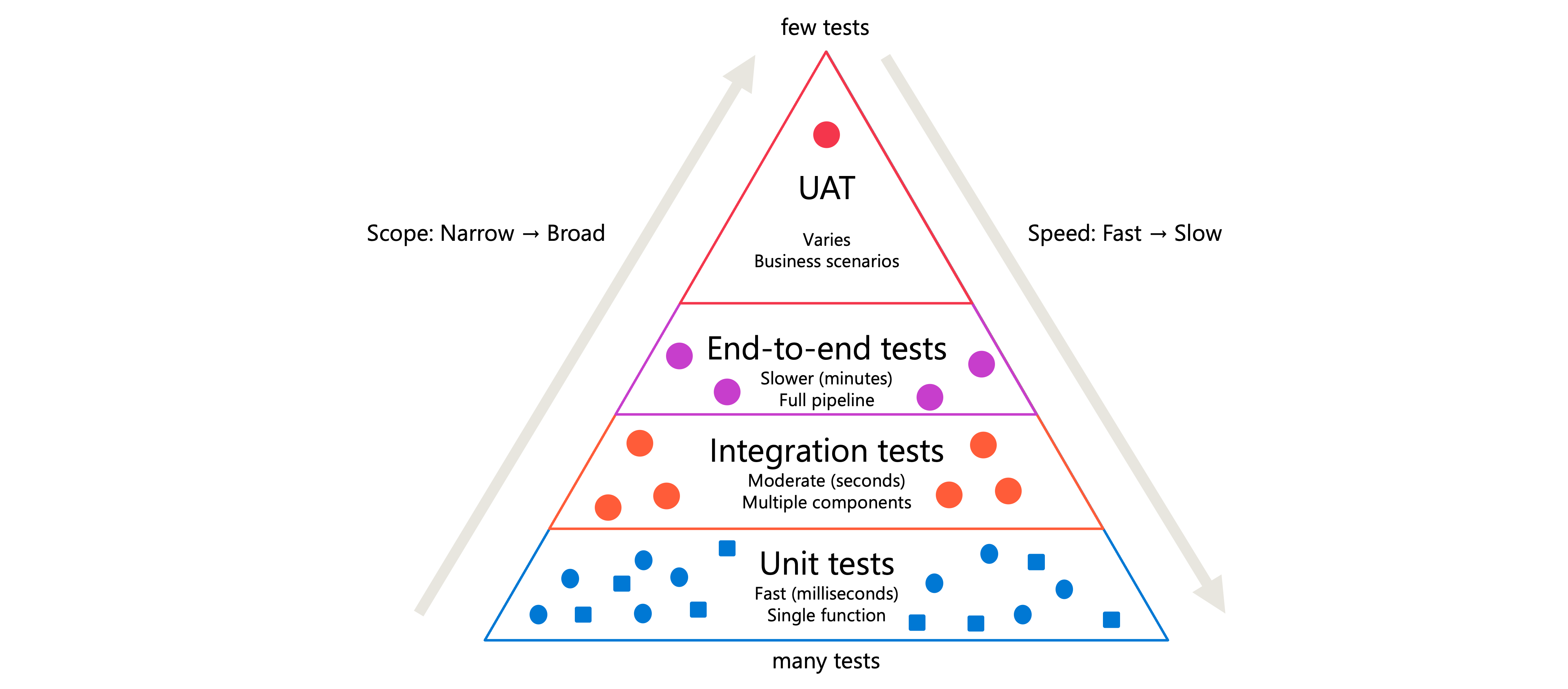
This structure exists because different test types serve different purposes:
| Test type | Purpose | Scope | Speed |
|---|---|---|---|
| Unit tests | Verify individual functions work correctly | Single function or class | Fast (milliseconds) |
| Integration tests | Validate components work together | Multiple components | Moderate (seconds) |
| End-to-end tests | Confirm complete workflows produce expected results | Full pipeline | Slower (minutes) |
| UAT | Ensure solution meets business requirements | Business scenarios | Varies |
Starting with unit tests, you build confidence in your code's fundamental building blocks. Integration tests then confirm those blocks connect properly. End-to-end tests validate the entire system delivers correct results. UAT ensures stakeholders approve the solution before production deployment.
Implement unit tests with pytest
Unit tests focus on testing individual functions in isolation. In Azure Databricks, the pytest framework provides a powerful way to write and run unit tests for your Python code.
Consider a data transformation function that filters records by country/region:
def filter_country_region(df, country_region="USA"):
    return df[df.iso_code == country_region]
To test this function, create a test file that follows pytest naming conventions. Files should start with test_ or end with _test.py:
import pytest
import pandas as pd
from transforms import filter_country_region

@pytest.fixture
def sample_data():
    """Create test data that mimics production structure."""
    return pd.DataFrame({
        'iso_code': ['USA', 'USA', 'CAN', 'GBR'],
        'value': [100, 200, 150, 175]
    })

def test_filter_country_region_default(sample_data):
    result = filter_country_region(sample_data)
    assert len(result) == 2
    assert all(result.iso_code == 'USA')

def test_filter_country_region_specific(sample_data):
    result = filter_country_region(sample_data, country_region='CAN')
    assert len(result) == 1
    assert result.iloc[0]['value'] == 150
The @pytest.fixture decorator creates reusable test data. This approach protects production data by using synthetic datasets that mirror your actual data structure without exposing sensitive information.
To run these tests in a Databricks notebook, install pytest and execute it:
%pip install pytest

import pytest
retcode = pytest.main([".", "-v", "-p", "no:cacheprovider"])
assert retcode == 0, "Tests failed. Check the output above."
Tip
Design functions to return predictable, single-type outputs. A function that returns either a DataFrame or False becomes difficult to test. Instead, have it always return a DataFrame, even if empty.
Design integration tests
Integration tests verify that multiple components work together correctly. In data pipelines, these tests confirm that data flows properly between ingestion, transformation, and storage stages.
Unlike unit tests that use mocked data, integration tests often run against actual Databricks resources. You might read from a test table, apply transformations, and verify the output format:
def test_pipeline_integration(spark):
    """Test that transformation pipeline produces expected schema."""
    # Read from test table
    input_df = spark.sql("SELECT * FROM test_catalog.test_schema.raw_data")

    # Apply transformation pipeline
    result_df = transform_pipeline(input_df)

    # Verify output structure
    expected_columns = ['id', 'processed_date', 'category', 'amount']
    assert result_df.columns == expected_columns

    # Verify data types
    assert result_df.schema['amount'].dataType.simpleString() == 'decimal(10,2)'
Integration tests require more setup than unit tests. Create dedicated test schemas or catalogs that contain representative data samples. This isolation prevents tests from affecting production data while still validating real component interactions.
Important
Never run integration tests against production tables. Create separate test environments with data that mirrors production structure but contains no sensitive information.
Create end-to-end tests
End-to-end tests simulate complete workflows from start to finish. These tests validate that your entire pipeline produces the expected results when given specific inputs.
Structure end-to-end tests to cover realistic scenarios:
def test_daily_processing_pipeline():
    """Validate complete daily data processing workflow."""
    # Setup: Create test input files
    test_date = "2024-01-15"
    setup_test_input_files(test_date)

    # Execute: Run the complete pipeline
    run_daily_pipeline(test_date)

    # Verify: Check final output table
    result = spark.sql(f"""
        SELECT COUNT(*) as row_count,
               SUM(amount) as total_amount
        FROM production.daily_summary
        WHERE process_date = '{test_date}'
    """)

    row = result.first()
    assert row.row_count == 1000, f"Expected 1000 rows, got {row.row_count}"
    assert abs(row.total_amount - 50000.00) < 0.01

    # Cleanup: Remove test data
    cleanup_test_data(test_date)
End-to-end tests take longer to run than unit or integration tests. Schedule them to run during off-peak hours or as part of your deployment pipeline rather than on every code change.
Plan user acceptance testing
User acceptance testing (UAT) involves stakeholders validating that your solution meets business requirements. While the previous test types focus on technical correctness, UAT confirms the solution delivers business value.
Effective UAT requires careful planning:
- Define acceptance criteria with stakeholders before development begins
- Create a staging environment that mirrors production
- Prepare test scenarios that reflect actual business use cases
- Document expected outcomes for each scenario
- Establish a feedback process for reporting issues
UAT often runs in a staging environment where business users can interact with the solution using realistic data. Consider creating notebooks that stakeholders can execute to validate specific scenarios:
# UAT Scenario: Monthly revenue reconciliation
# Expected outcome: Total matches finance system within 1%

finance_total = 1_250_000.00  # From finance system

pipeline_result = spark.sql("""
    SELECT SUM(revenue) as total_revenue
    FROM reporting.monthly_revenue
    WHERE month = '2024-01'
""").first()

variance = abs(pipeline_result.total_revenue - finance_total) / finance_total
print(f"Variance: {variance:.2%}")

if variance < 0.01:
    print("✓ UAT PASSED: Revenue totals match within tolerance")
else:
    print("✗ UAT FAILED: Revenue variance exceeds 1% threshold")
Organize your test structure
A well-organized test structure makes tests easier to maintain and run. Follow these conventions for your Azure Databricks projects:
project/
├── src/
│   └── transforms.py
├── tests/
│   ├── unit/
│   │   └── test_transforms.py
│   ├── integration/
│   │   └── test_pipeline.py
│   └── e2e/
│       └── test_daily_workflow.py
├── notebooks/
│   └── run_tests.py
└── requirements.txt
Databricks recommends storing functions and their unit tests outside of notebooks for Python projects. This approach enables better code reuse and makes testing more straightforward. Store your functions in .py files within a Git folder, and import them into notebooks as needed.
For running tests, create a dedicated notebook that executes pytest:
%pip install -r ../requirements.txt

import pytest
import sys

# Prevent pytest from caching to readonly filesystem
sys.dont_write_bytecode = True

# Run all tests with verbose output
retcode = pytest.main([
    "tests/",
    "-v",
    "-p", "no:cacheprovider"
])

assert retcode == 0, "Test suite failed"
Automate test execution by creating a Databricks job that runs your test notebook before deploying changes to production. This automation ensures that code changes don't introduce regressions.