Design vector data and policies
Full-text search finds the words that are there. A Contoso shopper who types something to protect my head uses none of the words in Sport-100 Helmet, Red, and BM25 has nothing to score. Answering that request means comparing meaning rather than tokens, and meaning is represented as a vector.
An embedding model converts text, an image, or audio into an array of floating-point numbers. Each position in the array corresponds to a learned feature, and the array as a whole places the item at a point in a high-dimensional space. Items with similar meanings occupy points near each other. Vector search measures the distance between a query vector and the stored vectors and returns the nearest ones, which is why it retrieves the helmet for a request that never says helmet.
In this unit, you decide what a vector store built into your operational database offers you, and you write the container vector policy that makes one.
Store vectors beside the data they describe
A pure vector database stores embeddings and a little metadata, separate from the system that owns the original records. An integrated vector store keeps the embedding in the same item as the data it was generated from, indexed and queried in the same engine.
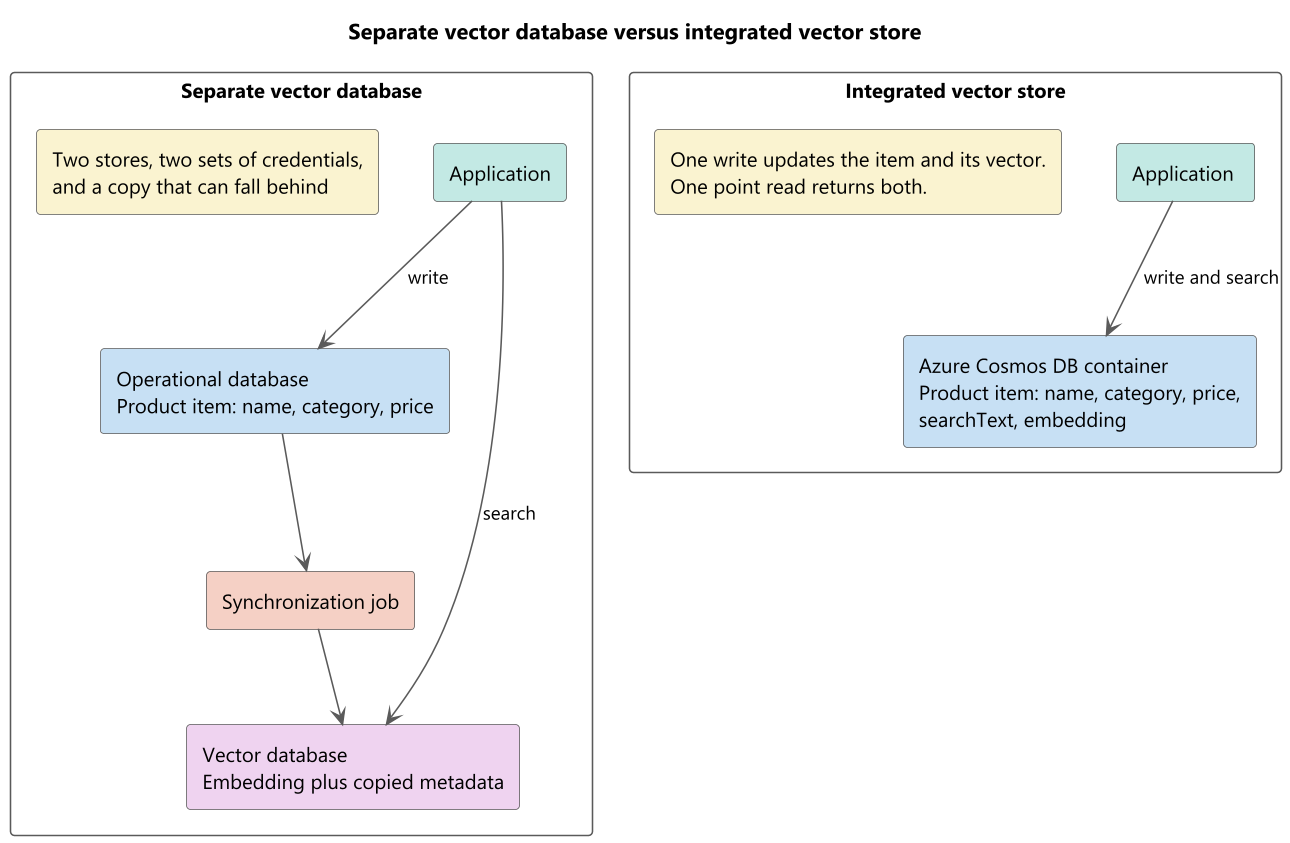
The difference shows up in operations rather than in query syntax. With a separate store, you own a copy of the catalog, a pipeline that keeps the copy current, a second set of credentials, and a class of bug where search results describe a product at yesterday's price. With an integrated store, the embedding is a property of the item, so a single write updates both, a single point read returns both, and a single role assignment governs both.
Colocation also makes multimodal retrieval straightforward. A product item can carry an embedding of its text and an embedding of its photograph, and a query can rank on either without a join across systems.
Important
Vector search is an account-level feature you turn on before you use it. In the Azure portal, open Settings > Features and enable Vector Search for NoSQL API. The Azure CLI equivalent is az cosmosdb update --resource-group <resource-group-name> --name <account-name> --capabilities EnableNoSQLVectorSearch. Replace the resource group and account name placeholders with your values. Approval is automatic, and the change can take up to 15 minutes to take effect. Enabling vector search on a container is permanent, and accounts using shared throughput don't support it.
Declare a container vector policy
A vector policy tells the query engine how to interpret the numbers in a property. Without one, VectorDistance has no basis for comparing an array of floats to anything.
Each entry in vectorEmbeddings sets four properties.
| Property | Purpose | Values |
|---|---|---|
path |
The property that holds the vector | Any property path. Wildcards and paths nested inside arrays aren't supported |
dataType |
The type of each element | float32 (default), float16, int8, uint8 |
dimensions |
The length of every vector at that path | Default 1,536 |
distanceFunction |
How similarity is computed | cosine (default), dotproduct, euclidean |
{
    "vectorEmbeddings": [
        {
            "path": "/embedding",
            "dataType": "float32",
            "distanceFunction": "cosine",
            "dimensions": 1536
        }
    ]
}
A container can declare several vector paths, and each path takes at most one policy entry. Contoso could add /imageEmbedding beside /embedding with its own dimensions and distance function, because the model that embeds photographs isn't the model that embeds text.
vector_embedding_policy = {
    "vectorEmbeddings": [
        {
            "path": "/embedding",
            "dataType": "float32",
            "distanceFunction": "cosine",
            "dimensions": 1536
        }
    ]
}

container = database.create_container(
    id="productSearch",
    partition_key=PartitionKey(path="/categoryId"),
    indexing_policy=indexing_policy,
    vector_embedding_policy=vector_embedding_policy
)
Collection<Embedding> embeddings = new Collection<Embedding>()
{
    new Embedding()
    {
        Path = "/embedding",
        DataType = VectorDataType.Float32,
        DistanceFunction = DistanceFunction.Cosine,
        Dimensions = 1536
    }
};

ContainerProperties properties = new ContainerProperties(
    id: "productSearch",
    partitionKeyPath: "/categoryId")
{
    VectorEmbeddingPolicy = new VectorEmbeddingPolicy(embeddings)
};
Choose a distance function
The three functions describe similarity differently, and the direction of "better" isn't the same for all of them.
- Cosine measures the angle between two vectors and ignores their length. Values run from -1 for least similar to +1 for most similar. It's the default, and it suits text embeddings, where the direction of a vector carries the meaning and its magnitude mostly reflects document length.
- Dot product accounts for angle and magnitude together. Values run from negative infinity to positive infinity, with higher meaning more similar. For embeddings that are already normalized to unit length, it ranks identically to cosine.
- Euclidean measures straight-line distance. Values start at 0 for identical vectors and grow without bound, so lower means more similar. It fits cases where magnitude carries information you want to keep.
Match the function to what your model's documentation recommends. Changing it later means rebuilding the container.
Match dimensions and data type to the model
dimensions is not a tuning knob. It has to equal the length of the vectors your model produces, and every vector stored at that path has to be the same length. An Azure OpenAI text-embedding-3-small deployment produces 1,536 numbers by default, so the policy says 1,536.
dataType is a real trade-off. Most embedding models emit float32. Storing the same vectors as float16 halves the space they occupy, at the cost of some precision, and for many retrieval workloads that loss is invisible in the ranking. The integer types compress further, and they assume vectors that were quantized before they arrived. Start at float32 while you're establishing whether the retrieval quality is acceptable at all, and revisit the type once storage becomes the constraint you face.
Plan the vector configuration before indexing data
You can add or remove vector path configurations after creating a container, but you can't edit an existing vector embedding or vector index configuration directly. To change its path, data type, dimensions, distance function, index type, or index parameters, remove the affected configuration and add it again with the new settings.
These changes can still be disruptive. Changing the embedding model, dimensions, or data type might require regenerating stored embeddings. Changing a vector index configuration requires the service to build the replacement index. Plan these changes and test their effect on retrieval quality before applying them to production data.
Before configuring the container, decide:
- Which property path stores each vector.
- Which embedding model and model version generate it.
- The configured output dimensions.
- The vector data type.
- The distance function recommended for that model.
- How documents are divided when they exceed the model’s input limit.
The vector policy records the path, data type, dimensions, and distance function. The application owns the embedding model and chunking strategy, so record those choices separately and keep them aligned with the policy.
In this unit, you focus on designing vector data policies that align with your embedding model and retrieval requirements. Proper planning ensures efficient indexing, accurate similarity search, and manageable storage costs. Next, you learn how to implement these policies in Azure Cosmos DB for NoSQL.