Keep embeddings current with the change feed
An embedding is a snapshot of text at the moment it was embedded. Change the text and the snapshot stops describing it, but nothing fails: the query still runs, the index still returns results, and the results are quietly about the old wording. Contoso renames a product line, and semantic search keeps recommending it under the name it had last quarter.
Full-text indexes are maintained automatically as items change. Vector embeddings also need to be regenerated when their source content changes. You can generate the embedding before writing the item, refresh it asynchronously through the change feed, or use Integrated Embeddings when its preview capabilities meet your requirements.
Change-feed processing separates model latency from the application’s write path and works well when multiple applications update the same data. However, the source content and embedding are eventually consistent: search can use an older embedding until processing completes. Use synchronous generation when an accepted write must immediately contain its matching embedding.
Detect the changes that matter
The change feed is a persistent, ordered log of the inserts and updates in a container. It's on by default. It retains changes so a consumer that was offline can catch up, and within a logical partition, it delivers changes in the order they happened.
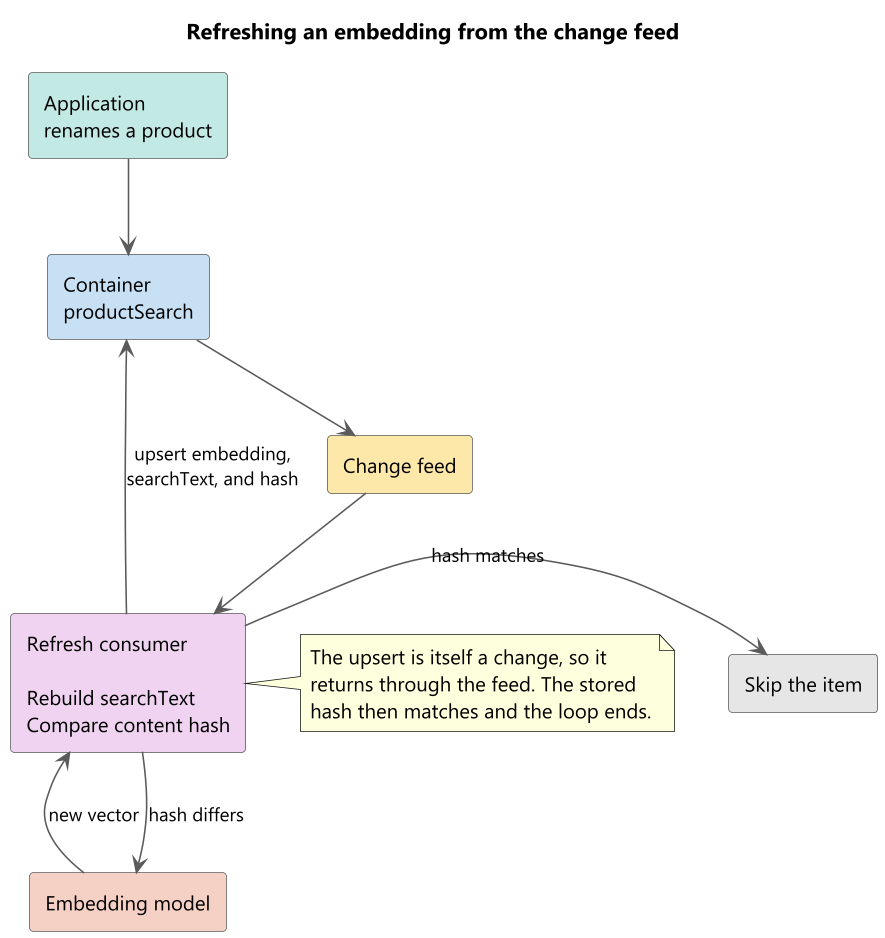
Note
The diagram shows the write-back flow with an upsert. To avoid overwriting concurrent changes or recreating deleted items, the examples use a replacement conditioned on an entity tag (ETag).
Not every change deserves an embedding call. Adjusting a price, flipping a stock flag, or correcting a category identifier leaves the searchable text untouched, and re-embedding on those changes spends money and quota for an identical vector.
Store an embedding fingerprint alongside the vector. Calculate it from the source text and an application-defined embedding-configuration version. Increment that version whenever you change the model, dimensions, preprocessing, or chunking strategy. This approach detects both content changes and model migrations.
import hashlib

def build_search_text(item):
    return f"{item['name']} {item['categoryName']}"

def content_hash(text):
    return hashlib.sha256(text.encode("utf-8")).hexdigest()

def needs_embedding(item):
    return content_hash(build_search_text(item)) != item.get("contentHash")
static string BuildSearchText(dynamic item) =>
    $"{item.name} {item.categoryName}";

static string ContentHash(string text)
{
    byte[] bytes = SHA256.HashData(Encoding.UTF8.GetBytes(text));
    return Convert.ToHexString(bytes);
}

static bool NeedsEmbedding(dynamic item) =>
    ContentHash(BuildSearchText(item)) != (string)item.contentHash;
The hash also settles a subtler question. A consumer that regenerates embeddings and writes them back to the same container produces a new change for every item it touches, and that change arrives in the feed it's reading. Without a guard, the consumer feeds itself forever. With the hash written in the same operation as the vector, the second pass sees a matching hash and does nothing, and the loop terminates after one round.
Read the change feed and re-embed
Two ways to consume the feed exist, and they differ in who does the work of tracking progress.
The push model delivers changes to your code. The change feed processor library and the Azure Functions trigger built on it handle partition assignment, load balancing across instances, and checkpointing, using a lease container whose partition key path is /id. It suits a service that runs continuously and has to keep up with a live catalog.
The pull model asks for changes when you're ready for them. Start from the beginning only for an initial backfill. For recurring processing, persist the continuation token after each successfully processed page and resume from that token during the next run. It suits scheduled backfills, one-time migrations, and any job where you want to control exactly when embedding calls happen, which is often the case when the model deployment has a quota you share with other workloads.
from azure.core import MatchConditions
from azure.cosmos import exceptions

for page in container.query_items_change_feed(start_time="Beginning").by_page():
    for change in page:
        try:
            current = container.read_item(
                item=change["id"],
                partition_key=change["categoryId"]
            )
            if not needs_embedding(current):
                continue

            text = build_search_text(current)
            response = openai_client.embeddings.create(
                input=text,
                model="text-embedding-3-small"
            )

            current["embedding"] = response.data[0].embedding
            current["searchText"] = text
            current["contentHash"] = content_hash(text)
            container.replace_item(
                item=current["id"],
                body=current,
                etag=current["_etag"],
                match_condition=MatchConditions.IfNotModified
            )
        except exceptions.CosmosHttpResponseError as error:
            if error.status_code not in (404, 412):
                raise
FeedIterator<dynamic> changeFeed = container.GetChangeFeedIterator<dynamic>(
    ChangeFeedStartFrom.Beginning(),
    ChangeFeedMode.LatestVersion);

while (changeFeed.HasMoreResults)
{
    FeedResponse<dynamic> page = await changeFeed.ReadNextAsync();

    if (page.StatusCode == HttpStatusCode.NotModified) { break; }

    foreach (dynamic change in page)
    {
        try
        {
            ItemResponse<dynamic> currentResponse = await container.ReadItemAsync<dynamic>(
                (string)change.id, new PartitionKey((string)change.categoryId));
            dynamic current = currentResponse.Resource;
            if (!NeedsEmbedding(current)) { continue; }

            string text = BuildSearchText(current);
            OpenAIEmbedding embedding = await embeddingClient.GenerateEmbeddingAsync(text);

            current.embedding = Newtonsoft.Json.Linq.JArray.FromObject(embedding.ToFloats().ToArray());
            current.searchText = text;
            current.contentHash = ContentHash(text);

            await container.ReplaceItemAsync<dynamic>(
                current,
                (string)current.id,
                new PartitionKey((string)current.categoryId),
                new ItemRequestOptions { IfMatchEtag = currentResponse.ETag });
        }
        catch (CosmosException error) when (
            error.StatusCode == HttpStatusCode.NotFound ||
            error.StatusCode == HttpStatusCode.PreconditionFailed)
        {
            continue;
        }
    }
}
Write the vector, the text that produced it, and the hash of that text in a single conditional replacement. Splitting them across operations creates a window in which the hash claims an embedding that isn't there yet. The ETag condition rejects a write if the item changes during the model call. A replacement also fails if the item is deleted instead of creating it again.
Keep the consumer safe to rerun
Read the current item before checking its hash. A replayed feed event can carry an old hash even after a successful refresh.
Change feed processing can deliver the same change more than once after a failure, so the handler has to be safe to run twice. Make the handler idempotent by checking the embedding fingerprint before calling the model and by using an ETag-conditional write. Don't depend on the embedding service returning a bit-for-bit identical vector after retries or model updates. Three edge cases still need handling.
- The item is gone. An item deleted after its change is read from the feed raises a not-found error on the current-state read or replacement. Skip it rather than recreating it with an upsert.
- The item changed again. A concurrent update can land while you're embedding the previous version. To prevent overwriting that update, use an ETag precondition on the replacement. If the precondition fails, discard the stale result and let a later feed event or retry process the current item.
- The model call failed. Rate limiting and transient failures are ordinary. Retry with exponential backoff, and after repeated failures, move the item aside rather than blocking every item behind it.
Keep the embedding budget under control
Embedding calls cost money and consume quota, and a bulk catalog update can produce thousands of them in a minute.
Batching reduces request overhead, but a change-feed page isn't automatically a valid embedding batch. Build batches that remain within the model deployment’s input-count, per-input token, aggregate-token, and quota limits. Split oversized pages into smaller requests and preserve the mapping between each input and returned vector.
texts = [build_search_text(item) for item in batch]

response = openai_client.embeddings.create(
    input=texts,
    model="text-embedding-3-small"
)

for item, data in zip(batch, response.data):
    item["embedding"] = data.embedding
List<string> texts = batch.Select(item => (string)BuildSearchText(item)).ToList();

OpenAIEmbeddingCollection embeddings =
    await embeddingClient.GenerateEmbeddingsAsync(texts);

for (int i = 0; i < batch.Count; i++)
{
    batch[i].embedding = Newtonsoft.Json.Linq.JArray.FromObject(embeddings[i].ToFloats().ToArray());
}
Decoupling is the second. Writing change events to a queue and embedding them from a separate worker lets the two scale independently and gives you a buffer when a bulk import arrives faster than the model deployment can absorb.
Prioritization is the third. A catalog rarely needs every item refreshed at the same urgency. Refresh what customers search most first, and let archived or low-traffic content catch up on a slower path.
In this unit, you learn how to refresh application-managed embeddings using the change feed, handle edge cases safely, and control the embedding budget through batching, decoupling, and prioritization.