Implement validation checks
Data pipelines often encounter records with missing values, duplicate identifiers, or values that fall outside acceptable ranges. Without validation checks in place, these data quality issues propagate downstream, causing incorrect analytics, failed reports, and unreliable business decisions. Validation checks catch these problems at the point of data ingestion, ensuring that only quality data flows through your pipeline.
In this unit, you learn how to implement validation checks for nullability, data cardinality, and range checking using Lakeflow Spark Declarative Pipelines expectations and Delta Lake table constraints.
Understand validation approaches in Azure Databricks
Azure Databricks provides two primary mechanisms for implementing validation checks: pipeline expectations and table constraints. Each approach serves different scenarios and offers distinct capabilities.
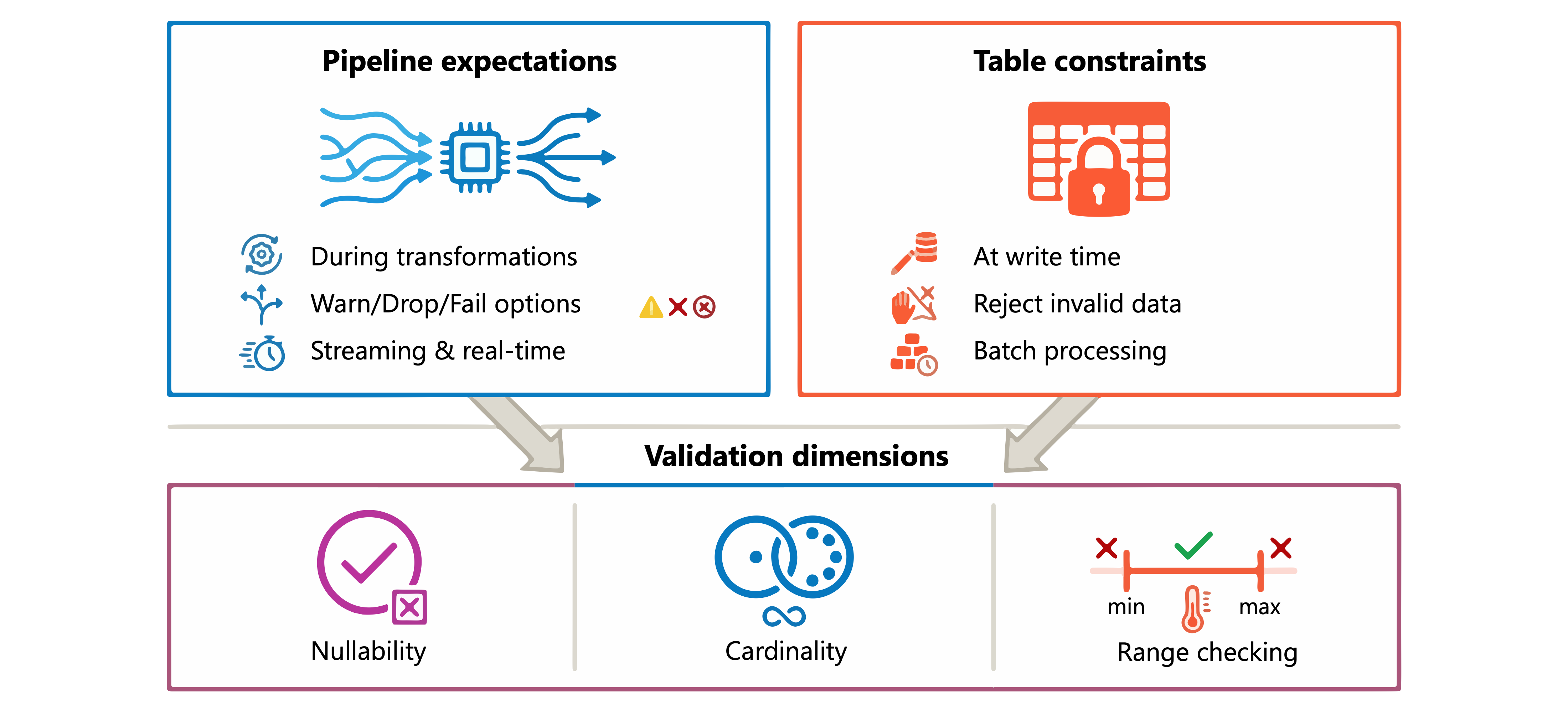
Pipeline expectations apply validation during data transformations in Lakeflow Spark Declarative Pipelines. Expectations let you warn, drop invalid records, or fail the pipeline when data violates your rules. This approach works well for streaming tables and materialized views where you need real-time quality control.
Table constraints enforce rules directly on Delta Lake tables. Constraints reject invalid data at write time, preventing bad records from ever entering your tables. This approach suits batch processing and scenarios requiring strict data integrity guarantees.
With these approaches, you can validate three key dimensions of data quality: nullability (ensuring required values exist), data cardinality (verifying uniqueness where expected), and range checking (confirming values fall within acceptable bounds).
Implement nullability checks
Nullability validation ensures that required columns contain values. Consider a customer table where email and customer_id must always have values. You can implement these checks using expectations in your pipeline.
Using Python, add expectation decorators to your streaming table definition:
from pyspark import pipelines as dp

@dp.table
@dp.expect_or_drop("valid_email", "email IS NOT NULL")
@dp.expect_or_drop("valid_customer_id", "customer_id IS NOT NULL")
def customers():
    return spark.readStream.table("raw.customers")
The same validation in SQL uses the CONSTRAINT clause:
CREATE OR REFRESH STREAMING TABLE customers(
    CONSTRAINT valid_email EXPECT (email IS NOT NULL) ON VIOLATION DROP ROW,
    CONSTRAINT valid_customer_id EXPECT (customer_id IS NOT NULL) ON VIOLATION DROP ROW
) AS SELECT * FROM STREAM(raw.customers);
For Delta Lake tables outside of pipelines, use NOT NULL constraints in the table definition:
CREATE TABLE customers (
    customer_id INT NOT NULL,
    email STRING NOT NULL,
    first_name STRING,
    last_name STRING
);
You can also add nullability constraints to existing tables:
ALTER TABLE customers ALTER COLUMN email SET NOT NULL;
Note
Before adding a NOT NULL constraint to an existing table, Azure Databricks verifies that all existing rows satisfy the constraint. The operation fails if any null values exist in the column.
Validate data cardinality
Cardinality validation ensures that columns expected to contain unique values actually do. This check is essential for primary keys, transaction identifiers, and other fields where duplicates indicate data quality problems.
Pipeline expectations can validate cardinality by checking for conditions that indicate uniqueness issues. For example, you can verify that a Social Security Number appears only once per person:
from pyspark.sql.window import Window
from pyspark.sql.functions import count

@dp.table
@dp.expect("unique_ssn_per_person", "ssn_count = 1")
def employees():
    df = spark.table("raw.employees")
    w = Window.partitionBy("ssn")
    return df.withColumn("ssn_count", count("*").over(w))
For more comprehensive cardinality checks, combine expectations with aggregation logic in your transformation:
CREATE OR REFRESH MATERIALIZED VIEW order_validation AS
SELECT
    order_id,
    COUNT(*) as occurrence_count
FROM orders
GROUP BY order_id
HAVING COUNT(*) > 1;
This materialized view identifies any duplicate order IDs, enabling you to investigate and resolve cardinality issues.
Delta Lake supports primary key constraints that document expected uniqueness, though these constraints are informational and not enforced:
CREATE TABLE orders (
    order_id INT NOT NULL,
    customer_id INT,
    order_date DATE,
    CONSTRAINT orders_pk PRIMARY KEY (order_id)
);
Tip
While primary key constraints aren't enforced, they help query optimization and document your data model's intended structure. Use pipeline expectations to actively enforce uniqueness.
Apply range checking
Range validation confirms that numeric, date, and other values fall within acceptable bounds. This check catches data entry errors, system glitches, and integration issues that produce out-of-range values.
Define range expectations using comparison operators or the BETWEEN clause:
@dp.table
@dp.expect_or_fail("valid_age", "age BETWEEN 0 AND 150")
@dp.expect_or_fail("valid_salary", "salary >= 0")
@dp.expect_or_fail("valid_hire_date", "hire_date <= current_date()")
def employees():
    return spark.readStream.table("raw.employees")
In SQL, apply the same range checks:
CREATE OR REFRESH STREAMING TABLE transactions(
    CONSTRAINT valid_amount EXPECT (amount > 0) ON VIOLATION DROP ROW,
    CONSTRAINT valid_date EXPECT (transaction_date <= current_date()) ON VIOLATION DROP ROW,
    CONSTRAINT valid_quantity EXPECT (quantity BETWEEN 1 AND 10000) ON VIOLATION DROP ROW
) AS SELECT * FROM STREAM(raw.transactions);
For Delta Lake tables, use CHECK constraints to enforce ranges at write time:
ALTER TABLE employees ADD CONSTRAINT valid_age CHECK (age >= 18 AND age <= 120);
ALTER TABLE transactions ADD CONSTRAINT positive_amount CHECK (amount > 0);
Range checks can also validate business rules that combine multiple conditions:
@dp.expect("valid_discount", """
    discount_percent >= 0
    AND discount_percent <= 100
    AND (discount_percent <= 50 OR customer_tier = 'PREMIUM')
""")
This expectation ensures discounts stay within bounds and enforces that only premium customers receive discounts over 50%.
Choose actions for validation failures
When validation fails, you choose how your pipeline responds. Each action suits different business requirements and data criticality levels.
| Action | Use case | Behavior |
|---|---|---|
| Warn (default) | Monitoring and analysis | Invalid records write to target; metrics logged |
| Drop | Data cleansing | Invalid records removed before write |
| Fail | Critical data integrity | Pipeline stops; transaction rolls back |
Use the warn action when you need visibility into data quality issues without blocking data flow:
@dp.expect("has_phone", "phone_number IS NOT NULL")
Use drop when invalid records should be filtered out silently:
@dp.expect_or_drop("complete_address", "street IS NOT NULL AND city IS NOT NULL")
Use fail when data integrity is critical and invalid records are unacceptable:
@dp.expect_or_fail("valid_account_balance", "balance >= 0")
You can view expectation metrics in the pipeline UI by selecting a dataset with expectations and opening the Data quality tab. These metrics help you monitor validation pass rates and identify systematic data quality issues.
Now that you understand how to implement validation checks, you can ensure your data pipelines maintain quality standards for nullability, cardinality, and value ranges.