Detect and manage schema drift
Data pipelines often receive data from sources that evolve over time. New columns appear, others disappear, and the structure of incoming data changes as business requirements shift. Without proper controls, these changes can silently corrupt your data or break your pipelines entirely.
In this unit, you learn how to detect and manage schema drift—the structural changes that occur when source systems add, remove, or rename columns over time.
Recognize schema drift challenges
While data type validation ensures values match expected types (as covered in the previous unit), schema drift addresses a different challenge: the structure of your data changes over time. A source system adds a new phone_number column, removes a deprecated legacy_id field, or renames customer_email to email_address. These structural changes happen independently of type validation.
Delta Lake's schema enforcement blocks structural mismatches by default. When incoming data contains columns not present in the target table, or when required columns are missing, the write operation fails. This fail-fast behavior protects your tables from unexpected structural changes, but you need strategies to handle legitimate schema evolution.
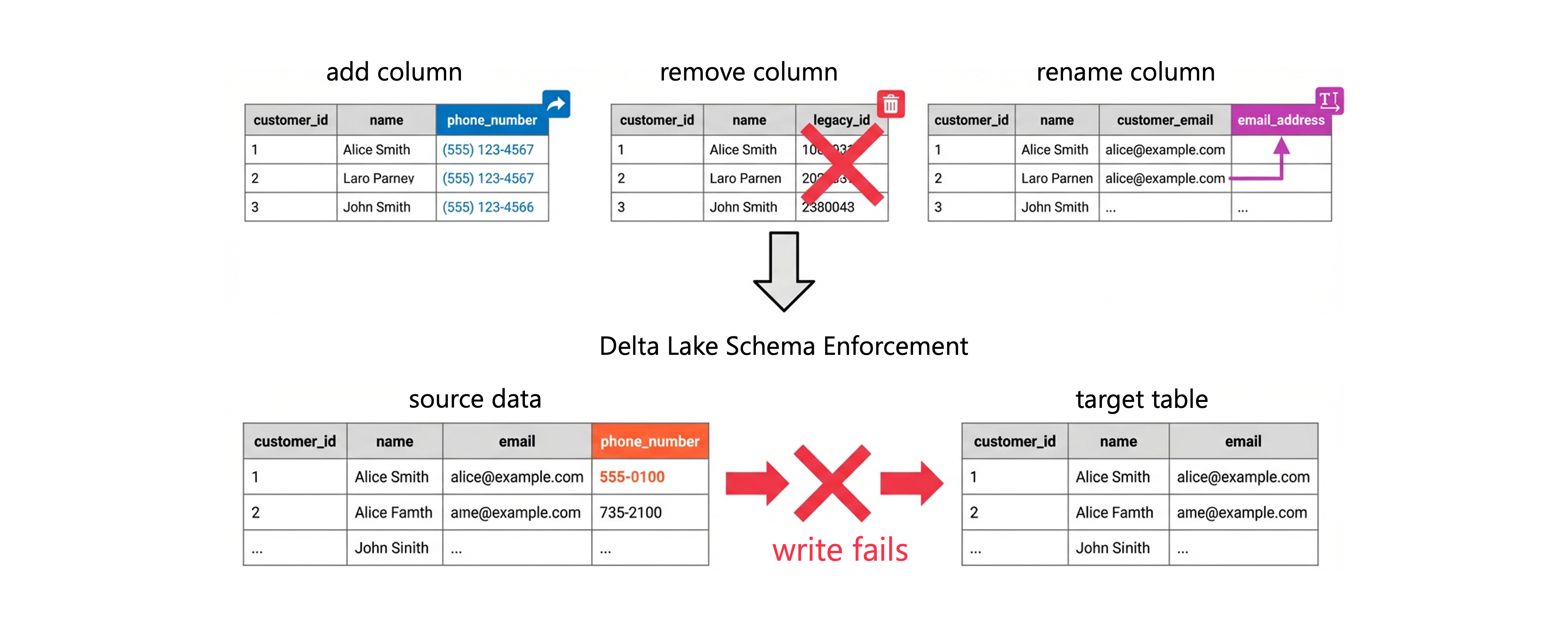
Consider a streaming pipeline that processes customer data:
CREATE TABLE customers (
    customer_id INT,
    name STRING,
    email STRING
);
When your source system adds a phone_number column and starts sending it in the data feed, writes fail because the target table doesn't include this column. Your pipeline stops until you decide how to handle the new field—either by rejecting it, adding it to the table schema, or preserving it for later analysis.
Detect and respond to schema drift
Schema drift occurs when the structure of incoming data changes over time. Your data pipelines must detect these changes and respond appropriately—either by adapting to the new schema or by alerting operators to investigate.
Azure Databricks provides several approaches for handling schema drift depending on your requirements.
Fail on schema mismatch
The strictest approach stops processing when schema drift is detected. This strategy works well when data structure changes require manual review before pipeline updates.
With Auto Loader, you can configure this behavior using the failOnNewColumns mode:
(spark.readStream
    .format("cloudFiles")
    .option("cloudFiles.format", "json")
    .option("cloudFiles.schemaLocation", "/path/to/schema")
    .option("cloudFiles.schemaEvolutionMode", "failOnNewColumns")
    .load("/path/to/source")
    .writeStream
    .option("checkpointLocation", "/path/to/checkpoint")
    .toTable("target_table")
)
When Auto Loader encounters a new column not defined in the schema, the stream stops with an UnknownFieldException. You must update the schema or remove the offending data before the pipeline can resume.
Automatically adapt to new columns
For scenarios where adding new columns is acceptable, you can enable schema evolution. This approach automatically adds new columns to the target table without manual intervention.
Enable schema evolution for write operations:
(df.write
    .format("delta")
    .mode("append")
    .option("mergeSchema", "true")
    .saveAsTable("target_table")
)
For MERGE operations, use the schema evolution syntax:
MERGE WITH SCHEMA EVOLUTION INTO target_table t
USING source_data s
ON t.customer_id = s.customer_id
WHEN MATCHED THEN UPDATE SET *
WHEN NOT MATCHED THEN INSERT *
New columns from the source are automatically added to the target table. However, you should carefully consider when to use schema evolution—automatic changes might introduce columns you didn't expect.
Choose a schema evolution mode
Auto Loader supports five schema evolution modes controlled by the cloudFiles.schemaEvolutionMode option. Choosing the right mode depends on whether you need strict control, automatic adaptation, or a way to capture unexpected data without blocking the pipeline.
| Mode | Behavior on new column or type change |
|---|---|
addNewColumns (default) |
Stream stops; new columns are added to schema on restart. Existing column types unchanged. |
rescue |
Schema never evolves; unexpected data stored in the rescued data column. Stream continues. |
failOnNewColumns |
Stream stops; requires manual schema update or removal of offending data before restart. |
none |
Schema never evolves; new columns are silently ignored unless rescuedDataColumn is set. |
addNewColumnsWithTypeWidening |
Stream stops; new columns are added and supported type changes are widened automatically (for example, INT → LONG). Requires Databricks Runtime 16.4 or above (Public Preview). |
The addNewColumnsWithTypeWidening mode is useful when source systems gradually expand numeric ranges—for example, when a row count column grows beyond the INT limit. Rather than routing those records to the rescued data column, Auto Loader widens the column type automatically on restart:
(spark.readStream
    .format("cloudFiles")
    .option("cloudFiles.format", "json")
    .option("cloudFiles.schemaLocation", "/path/to/schema")
    .option("cloudFiles.schemaEvolutionMode", "addNewColumnsWithTypeWidening")
    .load("/path/to/source")
    .writeStream
    .option("checkpointLocation", "/path/to/checkpoint")
    .toTable("target_table")
)
Unsupported type changes—such as INT to STRING—are still captured in the rescued data column when this mode is active.
Rescue unexpected data
When you need to preserve data that doesn't match your schema without modifying the target structure, use the rescued data column. This approach captures mismatched data in a separate JSON column for later review.
(spark.readStream
    .format("cloudFiles")
    .option("cloudFiles.format", "json")
    .option("cloudFiles.schemaEvolutionMode", "rescue")
    .option("rescuedDataColumn", "_rescued_data")
    .load("/path/to/source")
    .writeStream
    .option("checkpointLocation", "/path/to/checkpoint")
    .toTable("target_table")
)
Data that doesn't match the schema—including new columns, type mismatches, and case differences—is stored in the _rescued_data column. Your pipeline continues processing without interruption, and you can analyze rescued data to understand schema changes.
Implement error handling strategies
Beyond automatic schema management, you need strategies for handling records that violate your data quality rules. Lakeflow Spark Declarative Pipelines provides expectations that let you define constraints and specify how to handle violations.
Drop invalid records
Use expectations to filter out records that don't meet your structure requirements:
from pyspark import pipelines as dp

@dp.table
@dp.expect_or_drop("required_columns_present",
    "customer_id IS NOT NULL AND email IS NOT NULL")
def validated_customers():
    return spark.readStream.table("raw_customers")
Records missing required columns are dropped before reaching the target table. The pipeline tracks metrics showing how many records were dropped.
Fail on critical violations
When data structure issues indicate a serious problem, configure expectations to halt processing:
CREATE OR REFRESH STREAMING TABLE validated_orders (
    CONSTRAINT valid_structure
    EXPECT (order_id IS NOT NULL AND product_id IS NOT NULL)
    ON VIOLATION FAIL UPDATE
) AS SELECT * FROM STREAM(raw_orders);
The pipeline stops immediately when it encounters records missing required columns, preventing invalid data from propagating downstream.
Quarantine problematic records
For a balanced approach, route invalid records to a separate quarantine table while allowing valid records to proceed:
from pyspark import pipelines as dp

@dp.table
def valid_transactions():
    return (
        spark.readStream.table("raw_transactions")
        .filter("amount IS NOT NULL AND transaction_date IS NOT NULL")
    )

@dp.table
def quarantine_transactions():
    return (
        spark.readStream.table("raw_transactions")
        .filter("amount IS NULL OR transaction_date IS NULL")
    )
This pattern lets you investigate problematic records without blocking your main data flow.
Apply best practices for schema management
Managing schema effectively requires a combination of technical controls and operational practices.
Document your expected schemas explicitly. Store schema definitions in version control alongside your pipeline code. When source systems change, you have a clear reference for understanding the impact.
Implement alerting for schema drift. Configure your pipelines to send notifications when schema changes are detected, even if the pipeline handles them automatically. Early awareness helps you understand evolving data patterns.
Use consistent naming conventions. Standardize column names across your data estate to reduce case-sensitivity issues and make schema validation more predictable.
Test schema handling in development. Before deploying pipelines to production, verify that your schema enforcement and drift handling work as expected with test data that includes edge cases.
Consider the tradeoffs between strictness and flexibility. Strict schema enforcement catches problems early but requires more maintenance. Flexible approaches like schema evolution reduce operational overhead but might allow unexpected changes.
With these strategies in place, your data pipelines can maintain data quality while adapting to the inevitable changes in your source systems.