Choose Azure Cosmos DB or Cosmos DB in Microsoft Fabric
Contoso already runs Azure Cosmos DB, so mirroring looks like the obvious answer. It usually is. But the decision is worth making deliberately, because Cosmos DB now ships as two products, and picking the wrong one costs a migration rather than a configuration change. In this unit, you learn what separates them and which signals point to each.
One engine, two implementations
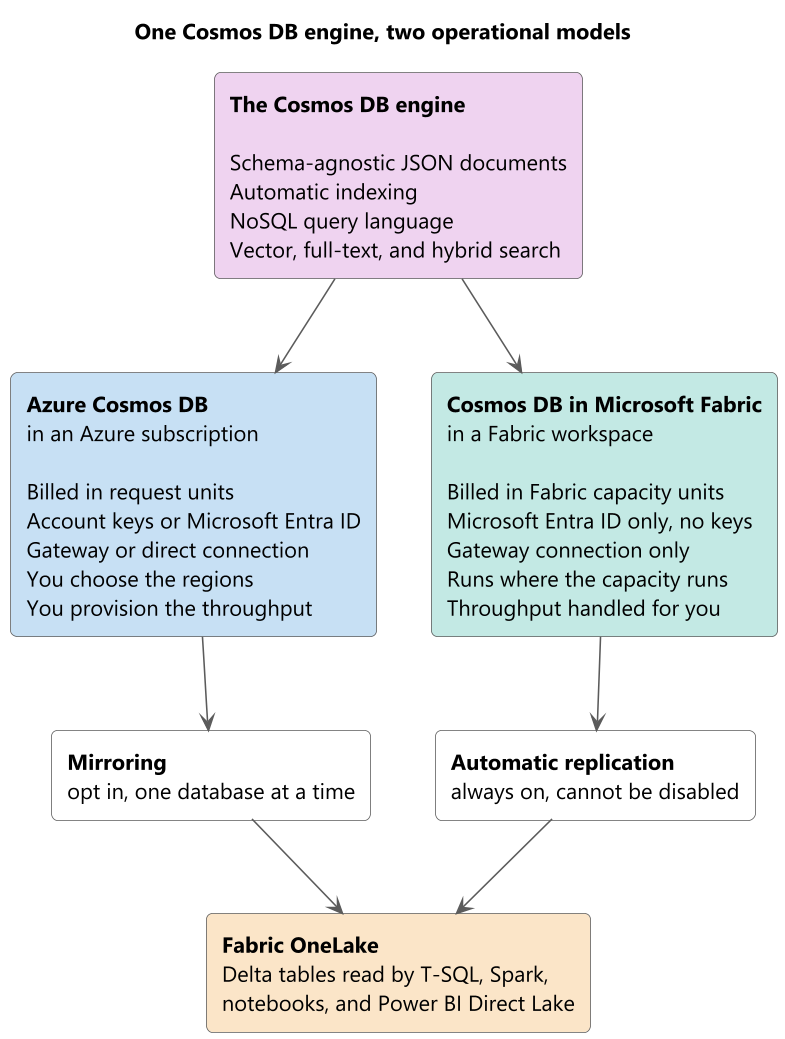
Azure Cosmos DB and Cosmos DB in Microsoft Fabric run the same database engine on the same infrastructure. Both give you a schema-agnostic document store, automatic indexing, the NoSQL query language, and built-in vector, full-text, and hybrid search. A query that works on one works on the other, and the same software development kits (SDKs) work against both.
What differs is the operational model around the engine, and the differences are structural rather than cosmetic.
| Characteristic | Azure Cosmos DB | Cosmos DB in Microsoft Fabric |
|---|---|---|
| Where it lives | An Azure subscription and resource group | A Fabric workspace |
| Billing unit | Request units, billed through Azure | Fabric capacity units, billed through your capacity |
| Licensing | Azure subscription | Power BI Premium, Fabric Capacity, or Trial Capacity |
| Authentication | Account keys or Microsoft Entra ID | Microsoft Entra ID only, with no primary or secondary keys |
| Connection mode | Gateway or direct | Gateway only |
| Regions | You choose the regions and the write topology | The region where the Fabric capacity is configured |
| Analytics copy in OneLake | Opt in, 1 database at a time, through mirroring | Always on, and it can't be disabled |
| Throughput | You provision it, manually or with autoscale | Handled automatically |
The connection-mode row surprises people. The .NET and Java SDKs default to direct mode, so an application that works against an Azure Cosmos DB account fails against Cosmos DB in Fabric until you configure the client for gateway mode explicitly.
Reading the decision from the workload
Two questions settle most cases.
Does the operational database already exist, and does it have constraints Fabric can't express? An account with multiple write regions, a specific consistency level, key-based clients you don't control, or a compliance requirement about which Azure regions hold the data is an Azure Cosmos DB account, and it stays one. Mirroring is how it reaches the analytics platform. This scenario is Contoso's, and it's the common one: the storefront predates the analytics request by years.
Is the application being built inside Fabric, alongside the analytics that consume it? A new application whose operational store, semantic model, notebooks, and reports all belong to one team and one capacity is a candidate for Cosmos DB in Fabric. You give up the knobs and get one governance boundary, one bill, and a replica in OneLake with nothing to configure.
Two smaller signals decide the remainder. If nobody on the team wants to own throughput settings, indexing policies, and regional topology, the autonomous defaults are the point rather than a limitation. And if any client can't be moved off account keys, Cosmos DB in Fabric is out, because it has no keys to give them.
Why mirroring, and not the approach you used before
If you solved this problem on Azure Cosmos DB previously, you probably reached for Azure Synapse Link and the analytical store. Don't reach for it again. Azure Cosmos DB documentation states that Synapse Link is no longer supported for new projects and directs new work to mirroring, which provides the same benefit of avoiding an extract, transform, and load (ETL) pipeline and lands the data in Fabric instead.
It's also worth separating mirroring from the change feed, because both describe data leaving a container as it changes and they aren't the same mechanism. The change feed is a data-plane feature you read from application code to drive your own logic, and it's covered elsewhere in this learning path. Mirroring is a platform service that replicates into OneLake, and it doesn't use the change feed or the analytical store as its capture source. You can run both on the same account without one affecting the other.
What mirroring gives you, concretely
Mirroring replicates inserts, updates, and deletes from an Azure Cosmos DB for NoSQL database into Fabric OneLake in near real time. Three properties matter for the decision:
- Replication consumes no request units, so the analytical copy costs the transactional workload nothing.
- The landing format is Delta, the open format every Fabric engine reads, so Transact-SQL, Spark, Power BI in Direct Lake mode, and data science tooling all reach the same files without another copy.
- The replication compute is free. You pay for OneLake storage against your capacity, for the compute that runs your queries, and for continuous backup on the source account, which mirroring requires.
The next unit turns that requirement into a configuration.